Rage Clicks and Dead Clicks: How to Find Where Your Site Frustrates Visitors (Without Recording Them)
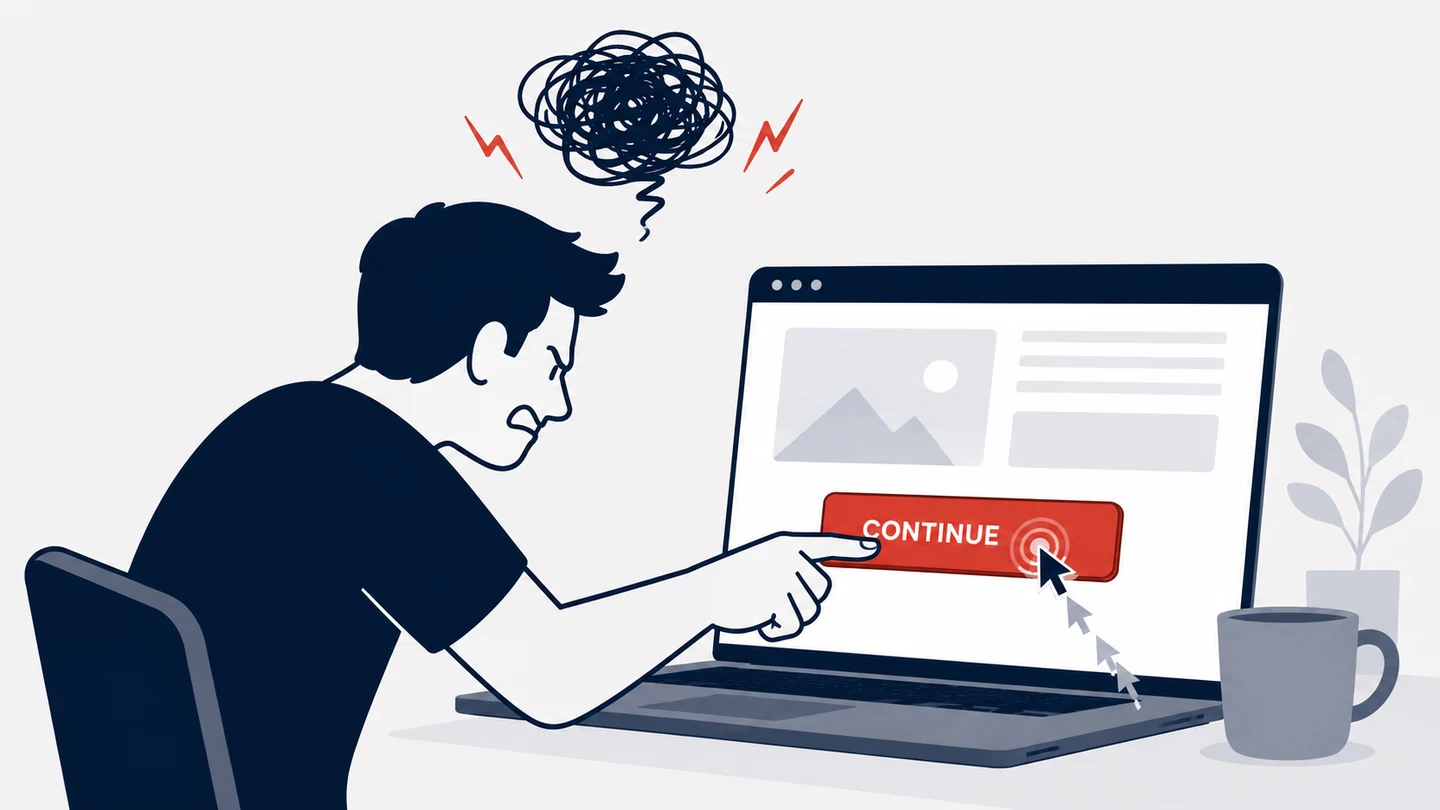
A visitor lands on your checkout page. They click Place order, and nothing happens. So they click it again. And again. Then they leave.
You will never see that in a normal analytics report. The pageview counted. The session looked fine. The bounce rate didn't move. But the sale is gone, and you have no idea why.
Rage clicks and dead clicks are how you catch those moments. This is what they are, what causes them, and how I find them on our own site without recording a single person.
- A rage click is rapid repeated clicking on one spot. A common rule flags it at more than 3 clicks within 750 milliseconds on the same element. A dead click is a click on something that looks clickable but does nothing.
- Both are invisible in a normal report. The pageview counted and the session looked fine, but the visitor got stuck and left. Rage and dead clicks show the exact page and element where your site failed.
- Most tools find these by recording the session. A 2017 Princeton study found session-replay scripts on 482 of the top 50,000 sites, capturing keystrokes and full page contents, and leaking credit card numbers and prescription names to third parties.
- Clickport flags rage and dead clicks as discrete signals: a red R or amber D badge on the exact page and element, plus a Signals filter for the whole list. No screen recording, no keystrokes, no personal data.
- Because it stores nothing on the visitor's device and keeps no personal data, it runs cookieless and needs no consent banner. Session-replay tools, which record the screen, do not get that exemption.
What is a rage click?
A rage click is rapid repeated clicking on the same spot. It's the thing you do when a button looks like it should work and it doesn't, so you click it harder, as if the page can feel your frustration.
There is no single official threshold, but the common rule is simple. The web-performance team at Request Metrics defines a rage click as more than three clicks within 750 milliseconds on the same element. Three quick jabs in the same place, in under a second. That's the signal.
The term was coined in 2015 by a session-replay company, but the behavior is older than the web. People have always tapped the broken vending machine twice. What's new is that you can measure it.
And the clicking isn't the only tell. Researchers at Brigham Young University, in a study published in MIS Quarterly, measured emotion from mouse movement. When users get angry or confused, the cursor stops following a smooth path. The movements turn jagged and sudden. And, counter to what you'd guess, a frustrated person moves the mouse slower, not faster. Rage clicking is the loud, obvious version of that. It's frustration you can count.
What is a dead click?
A dead click is a click on something that looks clickable but does nothing.
A heading styled like a link. A button that was never wired up. An icon that ignores your tap. The visitor saw a thing that said "click me," clicked it, and got silence.
This is a failure of what Don Norman, the designer who literally wrote the book on this, calls perceived affordance. On a screen, Norman writes, "all that the designer has available is control over perceived affordances," and "in design, we care much more about what the user perceives than what is actually true." A dead click is the gap between the two, and it's the visitor who pays for it. The element perceives as clickable. It affords nothing.
Flat design made this worse. When buttons stopped looking like physical buttons, one of the strongest "you can click this" signals went away. Nielsen Norman Group cites an early study where clicks rose by 416% after a site changed flat buttons back to 3-D ones. The same article puts it well: people "treat clicks like currency and they don't spend it frivolously." Spend a click on a dead element and you don't just lose the click. You lose a little trust.
Rage clicks vs dead clicks: what's the difference?
They feel related, and they often happen together, but they aren't the same thing.
Rapid repeated clicking on the same spot, three or more times in under a second. The visitor expected an action and is hammering for it. Usually a slow or broken button, a frozen form, or a control that gave no feedback.
A single click on something that looks clickable but does nothing. The visitor misread a non-interactive element as a button. Usually a styled label, a fake button, or an image or heading that looks tappable.
Here's the simplest way to keep them apart. A dead click is a click that does nothing. A rage click is what a person does next, when the first click did nothing. One is the trap. The other is the reaction to it.
What causes rage clicks and dead clicks?
The causes are boring, which is exactly why they survive. Nobody ships a broken button on purpose. I've shipped a few myself: buttons that worked on my machine and broke on someone else's.
The error-monitoring company Sentry makes the point cleanly: "dead and rage clicks are what happens when the user clicks around your app and it doesn't respond at all," and standard error tracking "normally didn't pick up these problems, because they're not caused by errors or exceptions." No exception is thrown. No log line appears. The page just sits there.
The usual suspects:
- A missing click handler. The button renders, but the JavaScript that should react never attached.
- An element covered by another. An invisible layer sits on top, so your click lands on nothing.
- A slow response with no feedback. The click worked, but the server is thinking, and nothing on screen says so. Jakob Nielsen's response-time limits are blunt here: 0.1 second is the limit for a system to feel instant, and 10 seconds is the limit for keeping someone's attention. A button that returns nothing inside that first tenth of a second feels dead, even when it isn't.
- A fake button. A heading, badge, or image styled to look interactive, with no link behind it.
- A double-click reflex. This one isn't even your bug. Baymard Institute found that more than half of people aged 40 and over still double-click links and form buttons. On a submit button with no guard, that means the same order gets placed and billed twice. The web standards group has an open issue about this exact "double submit problem."
On mobile the cause is often physical. The target is just too small to hit. WCAG sets a minimum target size of 24 by 24 CSS pixels, and that is the floor, not the goal. Miss the target, hit dead space, try again. That's a dead click and a rage click in two taps.
Why these frustration signals matter
Because friction is where the money leaks out, quietly.
Start with the clearest number. Baymard Institute puts the average documented cart abandonment rate at 70.22%, an average across 50 separate studies. In plain English: seven in ten loaded carts never become orders. Some of that is people browsing. A lot of it is friction. Baymard estimates $260 billion in lost orders are recoverable in the US and EU through better checkout flow and design alone, and that the average large site can lift conversion by around 35% through checkout UX, with 32 fixes left on the table.
Speed is part of the same story. Google's "Milliseconds Make Millions" study, run with Deloitte across 37 brands and over 30 million sessions, found that a 0.1 second improvement in mobile speed raised retail conversions by 8.4% and how much people spent by 9.2%. Google has also reported that 53% of mobile visits are abandoned if a page takes more than three seconds to load. In practice a slow page is a dead-click factory: people tap, nothing happens fast enough, they tap again, they go.
None of this shows up as an error. It shows up as a flat conversion rate you can't explain. Fixing it is some of the best-paid work in product. Nielsen Norman Group's review of 72 case studies puts the average gain from a usability redesign at 83%. The hard part was never the fixing. It was knowing where to look. Rage and dead clicks tell you exactly where.
The catch: most tools find them by recording your visitors
So why doesn't everyone already track this? Because of how the popular tools do it. They record the session.
To show you a rage click, a session-replay tool films the visit: every mouse move, every keystroke, every scroll, and the contents of the page. Then it flags the angry clicks inside the recording. You get the insight, but only by capturing everything else along with it.
That's not a small side effect. In 2017, researchers at Princeton ran a study called "No boundaries". They found session-replay scripts running on 482 of the top 50,000 websites, recording "keystrokes, mouse movements, and scrolling behavior, along with the entire contents of the pages you visit." On one retailer's checkout, a full credit card number, expiry, CVV, name, and billing address were sent to the replay provider. On a pharmacy, the name of a prescribed drug leaked. The built-in redaction was supposed to stop this. It didn't. In plain English: the tools that find your broken buttons were filming credit cards to do it.
Regulators have noticed. In February 2026, France's data protection authority opened a public consultation on session-replay tools, noting they record "mouse movements, screen touches, clicks, page scrolling and, in some cases, forms inputs," that they "can potentially be intrusive and infringe on users' privacy," and that operators need consent through a consent management platform. In plain terms: if you film the screen, you owe your visitor a banner and a choice.
Here's the thing nobody says out loud. You don't need the recording to find the rage click. The recording is the cost, not the feature.
How to catch rage and dead clicks without recording anyone
This is the part I built. When I shipped frustration signals in Clickport, the rule I set for myself was simple: get the insight, keep none of the surveillance.
So Clickport watches for the two signals in the visitor's browser and sends only the result. No screen capture. No keystrokes. No mouse film.
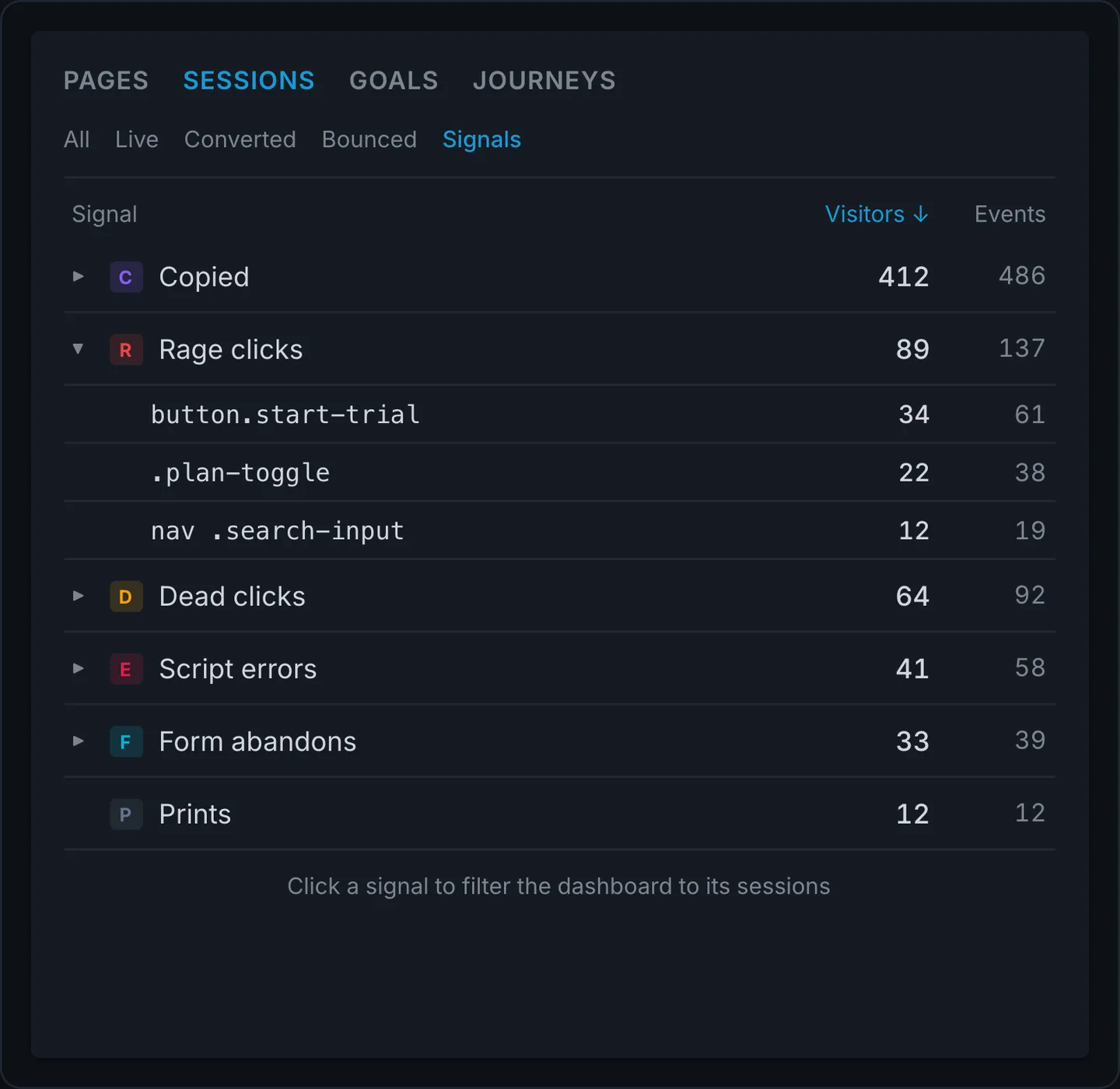
Open the Signals tab and every frustration signal on your site sits grouped and counted: rage clicks, dead clicks, script errors, form abandons. Expand one and you read the exact elements, button.start-trial, 34 visitors, 61 events. That's not a heat map to interpret. It's a work list. Click a signal and the dashboard filters to the sessions where it happened, and inside each session the signal shows as a badge on the page line: a red R for rage, an amber D for dead.
How the detection works, in one breath: a rage click is three or more clicks in about a second, landing in the same small spot. A dead click is a click on something that looks interactive, where nothing on the page responds within about seven tenths of a second. Working links and form fields are never flagged, because they do exactly what a click should do. It all runs in the tracker, which weighs about the same as a single small image, and it's wired into the same session view as your pages, scroll depth, and goals. There is a full write-up in the frustration signals docs.
Try Clickport free
30 days free. No credit card required.
How to find and fix them on your site
I kept the workflow short on purpose. Your time should go into fixing, not hunting.
Open the Signals filter. In the Sessions panel, switch to Signals. You now see only the visits where someone rage-clicked or hit a dead end, newest first.
Read the page and the element. Each badge names the page and the exact element, like button.place-order or div.promo-code. You're not guessing which button. You're reading its name.
Look for the repeat offender. The same element on the same page, again and again, is your fix. One angry visitor is noise. Forty of them on one button is a work ticket.
Fix the obvious thing, then watch the badge fade. Wire up the handler. Disable the button after the first click. Make the fake button a real link, or make it clearly not a button. Then check back and watch the signal drop.
A few fixes cover most cases. If it's a rage click on a real control, it's usually slow or silent: add a loading state so the click feels heard, and guard against double submits. If it's a dead click, the element is lying about what it is: either make it do something or stop styling it like it does. And if it's on mobile, check the target size before anything else.
You don't need a recording to do any of this. You need the page, the element, and the count. That's what a frustration signal is. And if you want the moment too, expand the session: the session timeline pins each rage and dead click at the exact second it happened, so you can see what the visitor was doing right before.
Frustration insight with no personal data
Here's exactly what Clickport keeps when it flags a rage or dead click, and what it never touches.
- The element's identifier, like its tag, id, or class
- The element's visible label, when it has one
- How many clicks were in the burst
- The page it happened on
- No screen recording or video of the visit
- No keystrokes or anything typed into a field
- No mouse-movement trail
- No cookies, no cross-site identity, no personal data
That difference isn't just good manners. It changes the law that applies to you.
A consent banner exists because of one rule. Under Article 5(3) of the ePrivacy Directive, storing or reading information on someone's device needs consent, and the European Data Protection Board's 2024 guidelines confirm the trigger is any storage or access on the device, not just cookies. Clickport stores nothing on the device and keeps no personal data, so it falls outside that trigger. It runs cookieless and consent-free. A tool that films the screen doesn't get that exemption, which is the whole reason the French regulator says session replay needs a banner.
This is the same reason I don't run Google Analytics, and it's the foundation the rest of Clickport's engagement tracking sits on. You can understand behavior without building a file on a person. Rage and dead clicks are proof of it: the single most "session replay" feature there is, delivered with no recording at all.
FAQ
What is the difference between a rage click and a dead click?
A dead click is a click on something that looks clickable but does nothing. A rage click is rapid repeated clicking on the same spot, usually three or more clicks in under a second. The plainest way to tell them apart: a dead click is the trap, and a rage click is what a frustrated person does after they fall into it. They often appear in the same session.
How do you detect rage clicks?
You watch for a burst of clicks close together in time and space. A common rule is more than three clicks within 750 milliseconds on the same element. Clickport detects this in the browser and records only the signal: the page, the element, and the click count. It doesn't record the session to find it.
What causes dead clicks?
A non-functional element that looks interactive. The usual causes are a missing click handler, an element hidden under an invisible layer, a button that was never wired up, or a heading or image styled to look like a link. Slow responses cause them too: if a click returns nothing within about a tenth of a second, it can feel dead even when it worked.
Can you track rage clicks without session recording?
Yes. Recording the session is one way to find rage clicks, not the only way. The clicking pattern can be detected on its own and stored as a single event, with no video, no keystrokes, and no mouse trail. That is how Clickport's frustration signals work, which is why they need no consent banner.
Do rage clicks and dead clicks need a cookie banner?
It depends on how they're collected. If a tool records the screen or stores an identifier on the visitor's device, it generally needs consent under the ePrivacy rules. A tool that stores nothing on the device and keeps no personal data, like Clickport, doesn't trigger that requirement and runs consent-free.
See where your site fights back
Most of your visitors won't tell you when something is broken. They won't email you. They'll click the dead button, jab it a few more times, and leave, and your report will show a visit that looks completely normal.
Rage clicks and dead clicks are how you hear the part they didn't say. No recording, no banner, no file on anyone. Just the page, the element, and the moment it fought back.
Add the tracker and your next frustrated visitor shows up in the Signals tab.
Try Clickport free
30 days free. No credit card required.

Comments
Loading comments...
Leave a comment