Clickport vs Cloudflare Web Analytics in 2026
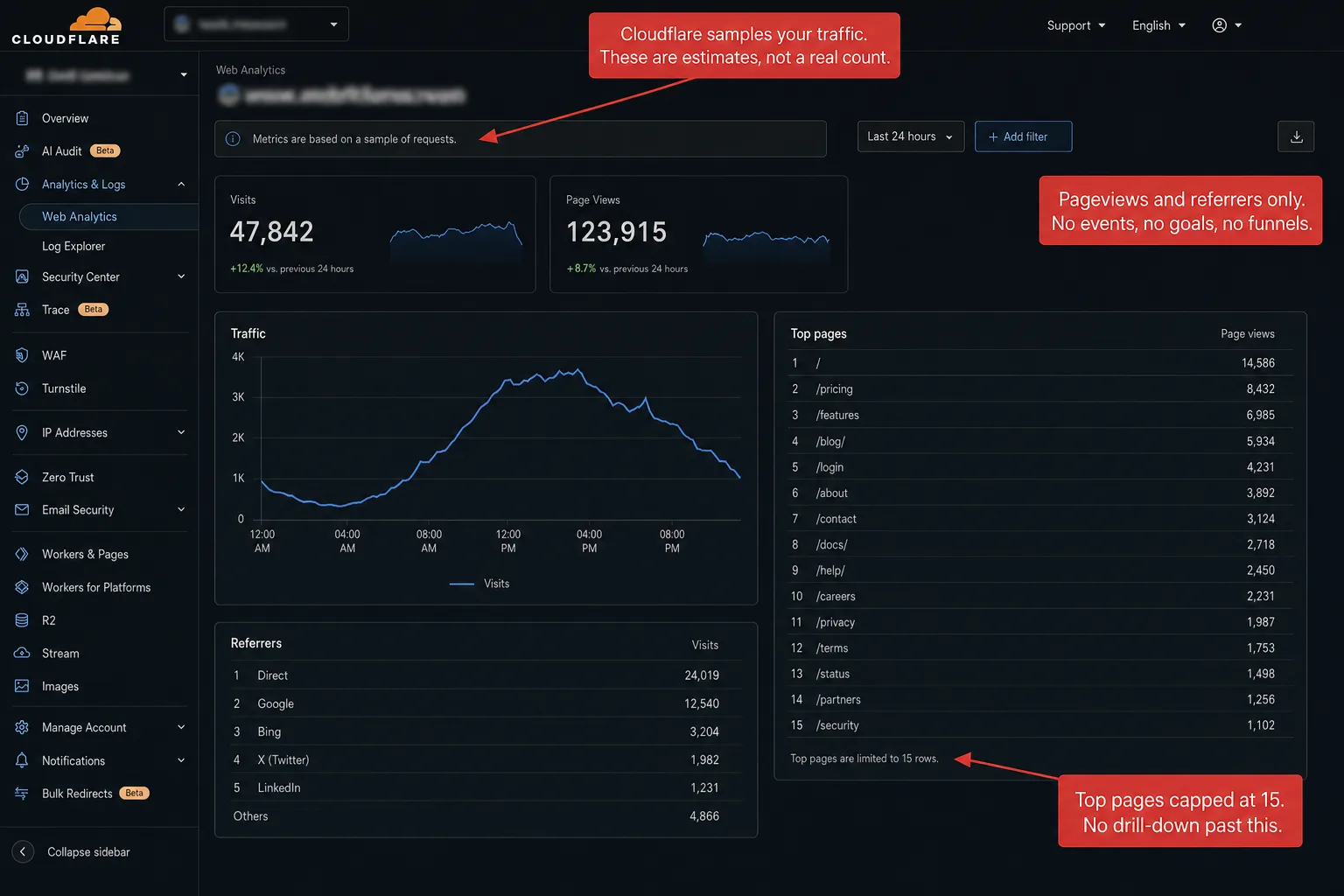
Cloudflare Web Analytics samples your data down to as little as 0.0001%. Which means the chart you're reading might be built from one event in every million.
On top of that it shows the top 15 of everything and nothing else. And it counts the same person as a new visitor every time they re-enter your site from a different source.
It's free. If you're already on Cloudflare and just want a pageview counter on a personal site, that trade-off works. For everyone else, it doesn't.
- Cloudflare Web Analytics is free, cookieless, and auto-injects on Cloudflare-proxied sites. For basic pageview counts on personal projects, nothing beats it at $0.
- Cloudflare has no visitor identifier, so every entry to your site counts as new. One person arriving four times today, from Google, Twitter, email, and direct, shows up as four visitors.
- Cloudflare's dashboard has shown only the top 15 entries per dimension since at least 2022. The community request to lift the cap is still open and unanswered.
- Cloudflare samples your data, from 100% down to 0.0001% depending on the date range. The chart you read may be built from a tiny slice of what happened, and the dashboard says so: 'based on a sample'.
- Cloudflare is a US company under FISA and the CLOUD Act, the same laws that got Google Analytics ruled illegal across the EU. Clickport is hosted in Germany and no other company touches the data.
Let's start with where Cloudflare wins
Every comparison article skips this part. They shouldn't. Cloudflare Web Analytics has real strengths that no paid privacy-analytics tool can match, including Clickport. If you need any of these, Cloudflare is the right tool for you.
If you're running a personal blog on Cloudflare Pages and you want to know whether anyone read your last post, this is the right tool. The rest of this article is for everyone else.
There's a question most site owners never ask after installing it. Does it answer my questions?
For most marketing sites, the answer is no. That's where the trouble starts.
Every chart in the dashboard is an estimate
Cloudflare Web Analytics doesn't store every event. It uses what Cloudflare calls Adaptive Bit Rate sampling, or ABR. It keeps your data at several resolutions and lets the server pick one based on how much data your query touches.
Cloudflare's own engineering blog describes ABR as covering "seven orders of magnitude, from 100% to 0.0001%." That sounds technical. In plain English: 100% means every event, and 0.0001% means one event in a million. So when you load a chart, you may not be looking at your data at all. You're looking at a guess built from a sliver of it.
If you have millions of pageviews and you only care about the top-line trend, sampling at 10% is fine. The trouble shows up on smaller sites.
The long tail disappears. The five-pageview referral that brought your best customer last quarter might be in the data. It might not. The 1% of visits from one Mastodon instance after a good post get rounded away. Which means at a 10% sample, anything that happened fewer than ten times in your raw data is now noise.
Clickport doesn't sample. Every event lands in ClickHouse, and every chart reads the full set. When the dashboard says 47 visits came from r/selfhosted last week, the number is 47. Not "roughly four to five times whatever fraction the system happened to keep."
On a personal site, none of this matters. For anyone making a decision from the data, it's the gap between an answer and a guess that could be off by 30%. In plain English: sampling trades your long tail for server savings. Cloudflare's servers, your tail.
One person, four visits, four "visitors"
Cloudflare counts visits in a way that's easy to miss until it has bent every other number on the page.
Cloudflare calls a "visit" a successful page view where the HTTP referer doesn't match the hostname of the request. Sounds reasonable. It isn't.
Cloudflare has no visitor identifier. No cookie, no localStorage, no fingerprint. Which means it has no way to know the same person came back. Every fresh entry from outside counts as a brand new visit.
Read that twice. One person who comes to your site four times today, through Google then Twitter then a newsletter then direct, is logged as four separate visits. Four visitors, in effect, because the dashboard never dedupes within the day.
11 AM: Twitter link → 1 visitor
2 PM: Newsletter click → 1 visitor
6 PM: Direct → 1 visitor
11 AM: same browser, Twitter → same
2 PM: same browser, Newsletter → same
6 PM: same browser, Direct → same
This isn't a technicality. It bends every metric on the dashboard. Your visit count puffs up whenever one person enters more than once in a day. Your conversion rate sinks, because the denominator is wrong. Your top sources go crooked, because the same person reading your blog three times today lands as three different "visitors" on three different channels.
Then you compare the numbers to GA4, see a gap, and think you have a tracking problem. You don't. Cloudflare is just counting another way.
It's not a bug. It's the documented definition.
Clickport dedupes within a day. Same browser, same day, several entries from different sources: one visitor, several visits. The hash mixes the visitor's IP and user agent with a salt that rotates at midnight. No lasting identifier, no cross-day tracking, no consent banner.
The same person tomorrow is a fresh visitor. Every privacy-first tool draws the line here. The job isn't to follow people across weeks. It's to give you an accurate count of who showed up today.
The bots come through anyway
Cloudflare has an "Exclude bots" toggle in the Web Analytics dashboard. It's on by default. So you'd assume your data is more or less free of bots.
Then you open your top pages and the second-most-visited page on your site is wp-login.php. Or xmlrpc.php. Or some /wp-admin/admin-ajax.php URL you've never linked to anywhere in your life.
This isn't a thought experiment. An independent side-by-side review pointed CF Web Analytics at a real WordPress site and found exactly this. The top operating system was "Unknown." The second-most-visited page was a WordPress login URL. And the visitor count came in 18 times higher than what a dedicated privacy-analytics tool reported on the same site over the same days.
Cloudflare's bot exclusion is mostly user-agent string matching against a list of known bots. Anything that doesn't announce itself as Googlebot or bingbot walks right through. That includes:
- WordPress login bruteforce attempts (extremely common, often the largest single source of "traffic" on small WP sites)
- xmlrpc and admin-ajax probes
- Headless Chrome instances doing scraping
- Datacenter IPs that any sane bot filter would block on sight
- AI training crawlers that ignore robots.txt
- The growing wave of LLM-driven web agents that look like real browsers
Clickport's bot detection runs in layers. User-agent patterns plus an isbot library fallback. IP matching against datacenter ranges. Behavioral signals like no scroll, no mouse, instant exits. Explicit AI bot classification. The unit test file alone has 151 cases for it.
What lands in your dashboard is real sessions, not the background hum of the open internet.
If your CF dashboard shows wp-login.php in the top five, that isn't a quirk of your site. That's what your traffic looks like once you stop matching on user-agent strings alone. The only question is whether you want to see it.
The data lives behind row 15
Cloudflare's dashboard shows the top 15 entries for every dimension. Top 15 pages. Top 15 referrers. Top 15 countries. Top 15 browsers. No pagination, no "show more" link, no export to see what sits in row 16.
The request to lift this cap first landed on the Cloudflare community forum in September 2022. Cloudflare staff have never publicly answered it. Three and a half years on, the thread is still open.
In other words: the cap isn't a bug they're racing to fix. It's the product.
16+. (not shown)
26-50. Next page
51-75. Next page
... all the way down
Export to CSV: full list
For a small site with a handful of traffic sources, 15 rows is plenty. For anything bigger, the cap starts hiding the work:
- A blog with 200 articles sees traffic to its top 15 posts. The other 185 are invisible.
- A site running paid campaigns across 30 UTM tags sees... nothing, because there's no UTM tracking. More on that shortly.
- A site that ranks for 500 keywords on Google gets one row in CF Web Analytics: "Google."
- An e-commerce site with 50 product pages sees the top 15 sellers. The other 35 bring in revenue you can't attribute.
Cloudflare may have lifted the cap quietly. The 2025-2026 changelog says nothing either way, and I couldn't find a 2025-or-later screenshot to confirm. The original community request is still open and unanswered, and every privacy-analytics competitor's vs-CF page still repeats the 15-row claim, which tells me it's current.
Clickport's tables paginate. The Pages panel lists every page that got a visit. The Sources panel lists every referrer. You can sort, filter, search, and export the whole thing to CSV.
It's a dashboard, not a leaderboard.
The tracking you came for is missing
If you came to web analytics from Google Analytics or any other dedicated tool, you carry a picture of what "analytics" means. Visits, sources, pages, sure. But also campaigns, conversions, events, search terms, downloads, outbound clicks, scroll depth, time on page, a live visitor count.
Cloudflare Web Analytics has none of those.
The product was built for a different job. Cloudflare's own framing is that Web Analytics shows "the minimum amount of information needed to understand how their websites perform." That's fair. It's a real-user-monitoring (RUM) tool with a pageview count bolted on. It was never a marketing analytics platform.
The gap bites hardest in four places:
Running paid campaigns. You tag your links with utm_source, utm_medium, utm_campaign. CF Web Analytics throws all of them away. The traffic lands under the referrer's domain, facebook.com, t.co, linkedin.com, with no split by campaign. You're flying without instruments.
Tracking conversions. Newsletter signups, purchases, contact form submissions, downloads. CF has no goals, no events, no conversions. The nearest thing is counting pageviews of a /thank-you URL, if you have one and if nobody bookmarks it.
Watching activity live. Did the post I just published land? Did the launch tweet send anyone? CF has no live view and no real-time counter. You find out in a few hours.
Understanding engagement. Time on page, scroll depth, bounce rate. CF measures none of them. The Core Web Vitals data tells you how fast the page loaded. It tells you nothing about whether anyone read it.
Clickport tracks all of this in the default install. Goals take about a minute each to set up in the dashboard. Custom events are one line of JavaScript: clickport.track('Newsletter Signup', {plan: 'free'}). The realtime view shows the last 30 minutes and refreshes every 30 seconds. Engagement scoring runs the whole time, across every page and every source.
You can put Clickport on a personal site and never open any of it. The day you need it, it's already there.
Cookieless doesn't mean Schrems-free
Let me give Cloudflare credit here. At the data-collection layer, CF Web Analytics is cleaner than GA4. No cookies, no localStorage, no fingerprinting. Cloudflare says visitor IPs are taken at the edge, used to work out the country, then dropped before anything is stored. No advertising integration, no Google Signals equivalent, no stitching identity across sites. Measured against free analytics tools, that's a real step up from GA4.
The legal layer is a different conversation. And that's where the picture turns.
Cloudflare is a US-headquartered company. Like every US company, it falls under FISA Section 702 and the CLOUD Act. Those are the surveillance laws behind the Schrems II ruling that struck down the EU-US Privacy Shield in 2020.
The reasoning that led seven European data protection authorities to rule Google Analytics illegal was never about cookies. It was about whether US surveillance law left EU data subjects too exposed.
Put another way: Cloudflare sits inside the same legal framework that got GA4 banned.
Subject to FISA 702
Subject to CLOUD Act
Relies on Standard Contractual Clauses
No EU-residency option for Web Analytics
2021 CNPD ruling: SCCs insufficient (different product, same company)
Hosted in Germany on Hetzner
EU data residency for all visitor data
Zero sub-processors touch visitor analytics
No US jurisdictional exposure
No Schrems chain to break
One DPA decision has applied Schrems II reasoning to Cloudflare directly. In April 2021, the Portuguese DPA (Deliberação 2021/533) suspended the Portuguese National Statistics Institute's transfers of census data to Cloudflare inside 12 hours. The CNPD ruled that Standard Contractual Clauses weren't enough, because Cloudflare is subject to US surveillance law.
That ruling was about census data, not Web Analytics. No DPA has issued a Cloudflare Web Analytics-specific decision. The reasoning is the same one that struck down GA4 in seven jurisdictions. Pointed at this product, though, it's untested.
Two things follow in practice:
There's no EU-residency option for Web Analytics. Cloudflare offers EU data localization through products like Zaraz and the Data Localization Suite. Web Analytics isn't on the list. The aggregated analytics flow out to Cloudflare's global infrastructure.
Cookieless is necessary, not sufficient. GDPR and ePrivacy compliance was never only about cookies. Processing an IP address, even for a moment, by a processor under US jurisdiction still falls inside the Schrems II reasoning. Cloudflare's line that "your site won't need a cookie banner because of us" holds up at the cookie level. At the legal-basis level, lawyers disagree.
Clickport is hosted in Germany on Hetzner servers in Gunzenhausen. EU-incorporated processor, EU data residency, zero sub-processors that touch visitor analytics data. No US jurisdictional exposure, no Schrems chain to break. When someone hits your site from Berlin, their data stays in the EU the whole way.
If you're a US company serving US customers, none of this touches you. If you're an EU site, or a US site with EU traffic, it's the single biggest difference between the two products.
Features Cloudflare doesn't have
Past the missing basics, Clickport has features Cloudflare has no equivalent for. These aren't a Clickport spin on a thing CF does. They're columns CF doesn't have at all.
AI agent analytics
Cloudflare deserves credit on one front here. Its AI Crawl Control product (it started life as AI Audit) can show you which AI crawlers hit your site, and can even charge them per crawl. But it's an access-control tool, not analytics. It lives outside Web Analytics, and it stops at the crawl.
Clickport treats AI agents as part of your analytics. Which engines read which pages, verified against published IP ranges so impostors don't get counted. Next to that, the human visits those engines referred, and the conversions those visits produced. The crawl, the visit, and the sale in one report.
I wrote up what we saw when we turned this on.
Real-time view
Cloudflare's dashboard won't show you what's happening on your site right now. You can pick a range as short as the last 24 hours, but the data is aggregated and lagged. No live counter, no auto-refresh.
Clickport's realtime view shows the last 30 minutes and refreshes every 30 seconds. You see who's on the site, what page they're on, where they came from, and which country they're in. Publish something, and you watch the wave land as it happens.
Engagement score (0-100)
Cloudflare has no engagement metric of any kind. The Core Web Vitals data tells you the page rendered fast. It tells you nothing about whether anyone read it.
Clickport works out a continuous engagement score from 0 to 100 for every page and every source, blending scroll depth and time on page. The math is simple: average the scroll percentage with the duration in seconds divided by six. It's color-coded, green at 50 and up, amber from 25 to 49, red below 25. At a glance you see which pages and sources pull readers in and which ones lose them.
Copy detection
When someone selects and copies text from your page, that's one of the strongest signals there is that the content has value. They found something worth saving, comparing, or sharing. Clickport logs it on its own: what was copied, from which page, in which session. You can filter sessions by "Signals" to surface your most engaged visitors.
No privacy-first analytics tool tracks this. Not Cloudflare. Not Plausible. Not Fathom.
Frustration signals
Copy detection is one of six signals Clickport tags sessions with. The others: rage clicks (hammering an element that won't respond), dead clicks (clicking something that looks interactive and isn't), form abandonment, script errors, and print tracking.
Filter your sessions by any of these and you have a to-fix list instead of a chart. Cloudflare has no session concept at all, so there's nowhere a signal like this could even live.
Weekday-aware comparisons
Cloudflare has no comparison logic. You pick a date range, and that's the whole story.
Clickport's KPIs compare against the average of the last four matching weekdays. A Monday is held up against past Mondays. A Saturday against past Saturdays. So when the KPI says visitors are up 12%, that 12% means something. It isn't just "today is a weekday and last time you looked it was a weekend."
Smart bounce rate
Cloudflare has no bounce rate. There's no engagement signal to build one from.
Clickport needs four things to be true before it calls a session a bounce. A single pageview. No outbound clicks. Under 25% scroll depth. Less than 15 seconds on the page.
A reader who scrolls your whole article but clicks nothing isn't a bounce. A visitor who lands, reads for a minute, and leaves satisfied isn't a bounce either.
Session drill-down
Cloudflare has no notion of an individual session. The dashboard is aggregate, full stop.
Clickport's Sessions panel lays out a visitor's whole journey on one screen: pages visited, clicks made, forms submitted, goals triggered, what they copied, where they came from. Filter by "Converted," "Bounced," or "Signals" to land on exactly the sessions you care about. Two clicks from the dashboard.
16-channel classification including AI Search
Cloudflare dumps everything into one flat referrer list. chatgpt.com sits next to google.com and t.co with no structure at all.
Clickport sorts traffic into 16 channels, from Direct and Organic Search to Paid Social, Email, Affiliates, and AI Search. The AI Search channel gathers ChatGPT, Perplexity, Gemini, Claude, and Copilot into one bucket.
Which means you can see at a glance how much of your traffic now comes from LLMs, split out from plain organic search.
The feature comparison
Here's what changes if you switch. No spin.
| Dimension | Cloudflare | Clickport |
|---|---|---|
| Price | Free, any traffic | EUR 9-199/mo, 30-day trial |
| Setup | Auto-inject on CF-proxied sites | One script tag, any platform |
| Tracker size | ~10.8 KB gzipped | ~2.7 KB gzipped |
| Cookies / fingerprinting | None | None |
| Data sampling | Adaptive (100% to 0.0001%) | None, 100% of events |
| Visit counting | Each external entry is new | Same browser, same day = 1 visitor |
| Top rows per dimension | 15 | Paginated, full lists |
| Real-time view | Not available | 30-min window, 30s refresh |
| UTM / campaigns | Not tracked | Full UTM + 16-channel classification |
| Conversion goals | Not available | Clicks, forms, scrolls, custom |
| Custom events | Not available | One-line JS API |
| Engagement metrics | None | 0-100 score, scroll, duration, copy |
| Bounce rate | None | 4-criteria definition |
| Session drill-down | Aggregate only | Per-session journey + flagging |
| Bot exclusion | UA-string match | Multi-layer (UA, IP, behavior, AI) |
| Geographic detail | Country | Country, region, city |
| Core Web Vitals | LCP, INP, CLS bundled | Not measured |
| Edge HTTP metrics | Cache hit, status, origin response | Not available |
| Data export | None | PDF, CSV |
| Data retention | 6 months | Unlimited |
| Data residency | Global (US-HQ) | Germany, EU-only |
Cloudflare wins three rows: free pricing, auto-injection on the proxied stack, and the bundled Core Web Vitals data. Real wins, worth keeping if those are the rows that matter most for your site. The rest go the other way.
If your decision rides on price or CWV, stay on Cloudflare. If it rides on anything else in the table, the gap shows up the first time you reach for the column and it isn't there.
Who should stay with Cloudflare
I'd rather lose a prospect to honesty than win one by leaving things out. Cloudflare Web Analytics is the right call in these cases:
Your site is already proxied through Cloudflare and you don't want to add a script tag. The auto-injection really is zero effort. If you run a personal site or a small SaaS on Cloudflare Pages and you just want to know whether anyone visited, this is the least work.
You only care about pageviews and Core Web Vitals. No campaigns, no goals, no events, no behavioral data. Just "did people show up, and did the page load fast." CF answers both, for free.
Free is the only price you'll accept. If €9 a month is outside the budget for the project, nothing in this article changes the math. Free wins.
You run your whole stack on CF Pages or Workers. The integration is tight enough that having analytics in the same dashboard saves real friction. No extra tab, no extra vendor to manage.
If none of those is you, the simplicity is costing you half the picture.
Making the switch
Moving from Cloudflare Web Analytics to Clickport takes about five minutes.
If you have goals to track, signups, purchases, clicks, form submissions, set them up in the dashboard in about a minute each. No developer needed.
You can leave Cloudflare Web Analytics running next to Clickport for as long as you want to compare. Most people who do land on the same result: Clickport shows fewer "visitors," because it dedupes return visits properly, and more pages, because it doesn't stop at row 15. Want the wider field? My GA alternatives comparison covers Plausible, Fathom, Matomo, and 12 more.
See past the top 15
Every Cloudflare Web Analytics chart stops at row 15. Every number is an estimate. The same person entering your site four times today shows up as four visitors. No real-time view, no UTM tracking, no goals, no events, no engagement metric, and bot traffic comes through whether the toggle is checked or not.
If you're already on Cloudflare and you only need pageviews, none of it matters. If you make decisions from your analytics, all of it does.
Clickport shows the whole thing. Real-time, no sampling, paginated lists, EU-hosted. Engagement scores, copy detection, weekday-aware comparisons, and the full behavioral surface Cloudflare's product was never built to give you.
Start your 30-day free trial. No credit card. No cookie banner required.

Comments
Loading comments...
Leave a comment