Shopify Analytics: The Store Owner's Guide to Better Data
If you run a Shopify store, you already have analytics. I want to show you what it's quietly missing. The built-in dashboard ships with every plan and tells you what sold and roughly where it came from. For some stores that's enough.
But look closer, because I've spent a lot of time in these dashboards. Your "Direct" traffic is bigger than it has any right to be. Your EU sessions don't match your order count. You can't see scroll depth or outbound clicks at any plan tier. The built-in dashboard is doing less than you think.
I'll walk through the four structural reasons it under-counts, then show you what the rest of your traffic looks like once you can see it. If you'd rather skip the diagnosis and just install something better, our 60-second Shopify setup guide is here.
Quick disclosure before we start: I run Clickport, a cookieless analytics tool, so the fix I land on at the end is my own product. The diagnosis in between comes from Shopify's own community forums and third-party research, not from me.
- Shopify stores selling to EU customers lose 30-50% of visitor data because cookie consent banners block tracking for visitors who decline.
- A large share of Shopify traffic is misattributed as 'Direct,' including 100% of TikTok and 75% of Facebook Messenger visits. Your best channels look invisible.
- Upgrading Shopify for custom analytics reports costs $3,240/year. A privacy-first analytics tool costs $108-228/year and includes metrics Shopify never provides.
- The typical Shopify analytics stack (GA4 + GTM + Meta Pixel + Hotjar) adds 400-600KB of JavaScript. Every second of delay costs 7% in conversions.
- Cookieless analytics capture every visitor without consent banners, in a 2KB script that is over 65x smaller than GA4 alone.
Your Shopify dashboard is missing 40% of your visitors
Shopify's analytics use cookies. Cookies require consent banners. Consent banners in Europe lose most of your data.
Here's how it plays out. A visitor lands on your store and sees a proper cookie banner with equally visible "Accept" and "Reject" buttons, as EU law now requires. Most of them reject. Only 25.4% of visitors actively accept cookies. That means roughly three in four are gone before they click anything. In France, only 28% always accept. In Germany, fewer than 25%. The customers who care most about privacy are the ones you lose first. I find that backwards.
Every visitor who declines goes invisible to your Shopify analytics. Their session. Their product views. Their add-to-cart. Their purchase. All of it, gone. Shopify's own Customer Privacy settings suppress all non-essential data collection when a visitor declines. So someone refuses cookies, then buys, and that sale never reaches your analytics or your ad platforms.
It compounds from there. On average, 20 out of every 100 Shopify orders never show up in analytics at all. In plain English: one sale in five, just missing.
This isn't a rounding error, and I don't use that phrase lightly. You're making product decisions, ad spend decisions, and inventory decisions on data from less than a quarter of the people who visit. I don't think that's a foundation you can trust. And the missing three quarters aren't random. Privacy-conscious visitors are a specific demographic segment, so your numbers quietly tilt toward the less privacy-aware shoppers. You optimize for the customers you can see.
Not the ones you have.
For a deeper look at the consent problem, see What Cookie-Banner-Free Analytics Actually Means.
The "Direct traffic" black hole
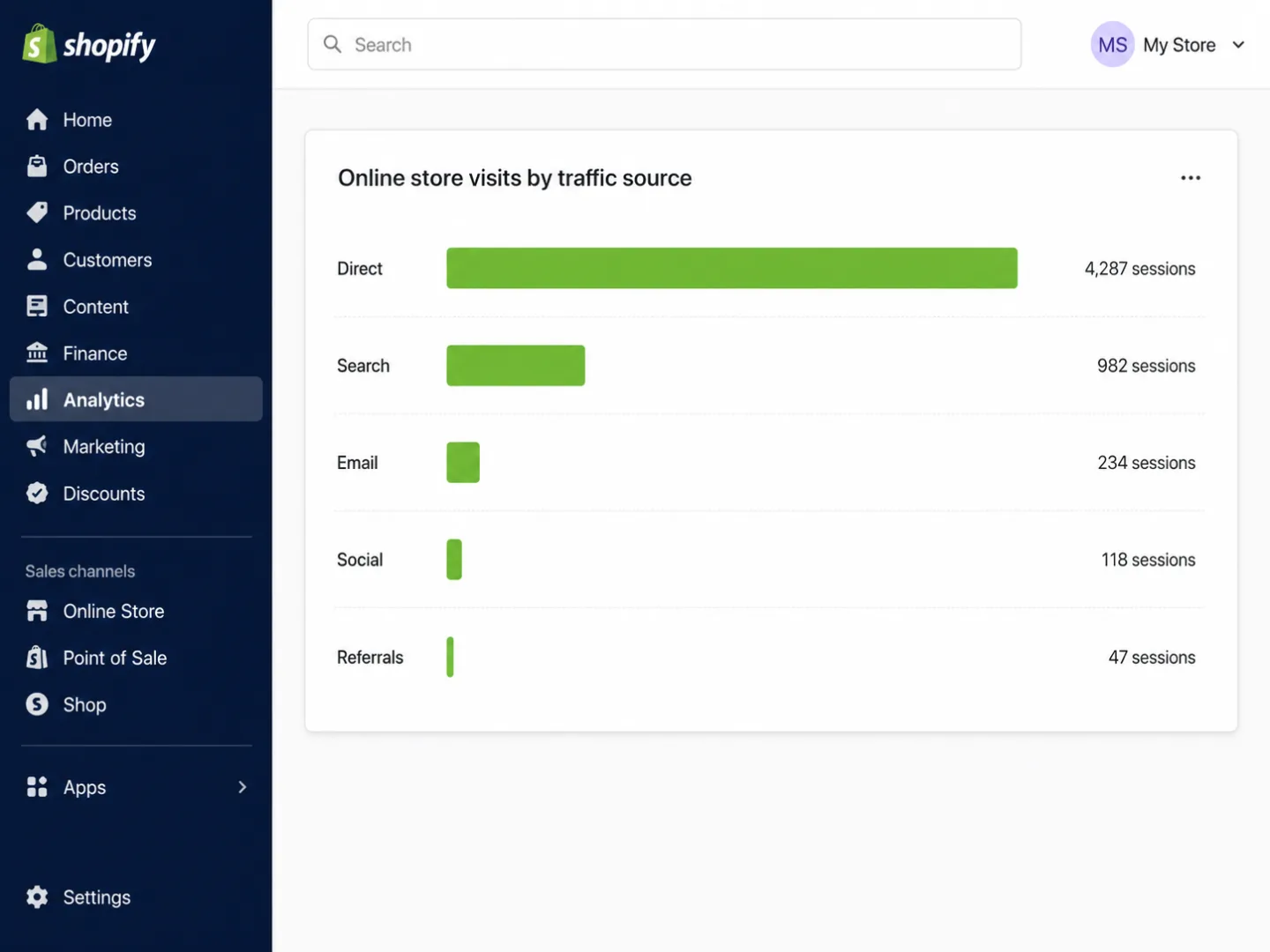
Open your Shopify analytics and look at your traffic sources. "Direct" is probably your biggest channel. It shouldn't be.
A big chunk of what Shopify files under "Direct" came from Instagram, email, messaging apps, or paid ads. That means your biggest channel is mostly a mislabel. People didn't type your URL from memory. SparkToro's controlled research shows just how bad it gets:
The cause is in-app browsers. When someone taps a product link inside Instagram, TikTok, or a messaging app, it opens in that app's own browser instead of Safari or Chrome. The in-app browser strips the HTTP referrer header. So your analytics has nothing to read, and the visit lands in "Direct."
For a Shopify store running social ads, this is a quiet disaster, and I've watched it play out. Mobile traffic from social, which is most social traffic, looks like it barely converts. Desktop direct traffic looks like a money printer. So the store owner cuts the social budget on a signal that was never real.
Here's one documented case I keep coming back to. A merchant spent $5,000 on YouTube ads. Shopify credited YouTube with only $2,000 in orders, so the merchant killed the channel. In plain English: they cut a channel that was paying for itself. Proper tracking later showed YouTube had driven $8,000 in orders through assisted conversions. They cut a channel that was paying for itself. Another clothing brand poured $15,000 into TikTok ads off a strong ROAS in Shopify, when most of those sales had really come from email.
Shopify uses last-click attribution by default. It hands 100% of the credit to the last source before purchase, and nothing to the rest. In plain English: the closer takes everything, the introducer takes nothing. A customer finds you through Instagram, researches on Google, comes back direct, and buys. Only "Direct" gets credit. Shopify's own blog admits that without multi-touch attribution, "brands often overvalue the last touchpoint and ignore earlier interactions."
So the channels that introduce people to your brand get zero. The channels that close the sale take everything. And you defund the very campaigns that feed your future growth.
Why Shopify says your conversion rate is 1.4% when it's actually 2.3%
In my experience, Shopify's conversion rate is wrong, and it's wrong in several directions at once.
Session underreporting. Since December 2024, merchants have reported Shopify undercounting sessions, which pushes the conversion rate up to look better than it's. Five months on, the issue was still open. One merchant with 100 sessions and 5 sales should see a 5% rate. Shopify showed them 0.7%. That means the dashboard was off by roughly seven times.
Accelerated checkout bypass. When a customer pays with Shop Pay, Apple Pay, or Google Pay, they skip the cart. Shopify doesn't record "added to cart," "checkout reached," or "converted session" for those purchases. So your funnel has a hole at the one moment that matters most: the sale itself. And the usual $400+/month rescue pipe of sGTM plus Stape plus Meta CAPI doesn't patch it either, for structural reasons I audit in detail.
Bot inflation. In 2024, 51% of all web traffic was automated. That means, for the first time in a decade, the bots outnumbered the humans. Shopify counts those bot sessions right alongside your real visitors, so your session count goes up and your conversion rate goes down. Merchants have reported waves of Chinese bot traffic flooding their analytics with fake add-to-cart events and wrecking their ad data.
Batch processing delays. Shopify Analytics runs on batch processing and refreshes every 1-3 hours on a normal day. When you need it most, during a flash sale or Black Friday, the delay stretches to 12-24 hours. You're flying blind on the exact days that decide your year.
Missing conversions from accelerated checkout.
Cookie consent hiding real visitors.
All checkouts counted.
Every visitor tracked, consented or not.
Your store's performing better than your dashboard says. You just can't see it yet.
The $3,240/year analytics tax
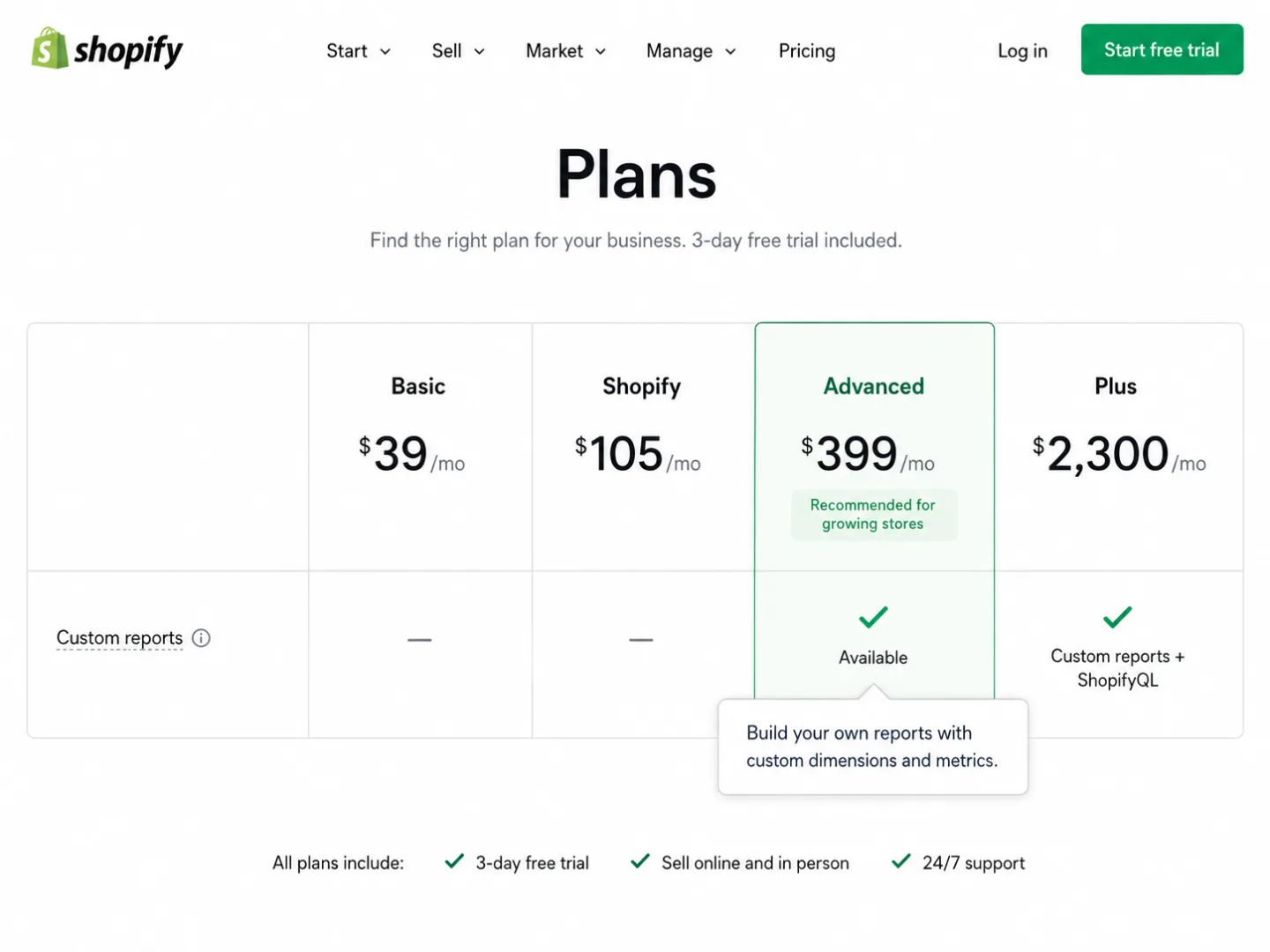
Shopify locks its analytics features behind plan tiers. Here's what you get at each one:
Most Shopify stores run on Basic. To get custom reports that join product performance to campaign data, you have to jump to Advanced at $399/month. On annual billing that's $3,588/year against $348/year for Basic. The gap is $3,240/year. In plain English: three grand a year, and all it buys you is reporting.
Pay that, and Shopify still won't show you bounce rate per page, time on page, scroll depth, outbound clicks, or engagement scoring. Those numbers exist at no Shopify tier. Not Basic, not Advanced, not Plus.
So store owners do the only thing left to them. They stack third-party apps. Littledata found that a typical mid-size store spends $200-500/month on analytics apps alone. In plain English: thousands a year, patching one tool's holes with another:
- Profit analytics (TrueProfit, Lifetimely): $35-200/month
- Heatmaps and session recording (Hotjar, Lucky Orange): $19-89/month
- Attribution (Triple Whale): $129-3,799/month
- Custom reporting (Report Pundit): $9-35/month
- Consent management (Pandectes, Consentmo): $9-29/month
A privacy-first ecommerce analytics tool gives you all of that, the visitor analytics, the engagement metrics, the channel classification, the goal tracking, the CSV and PDF exports, for $9-19/month. Every feature at every tier. No upgrade wall to climb.
902 analytics apps and none of them agree
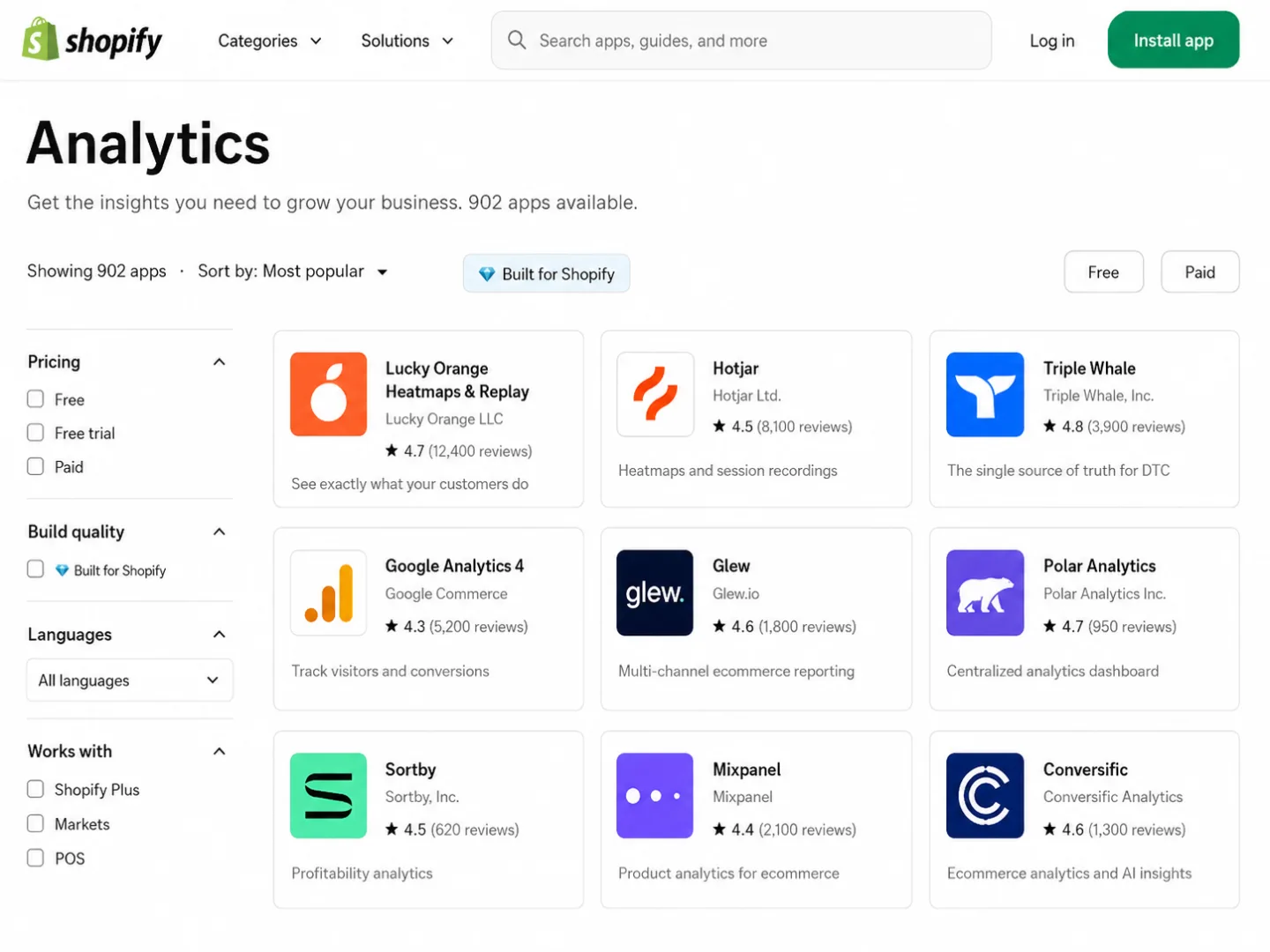
The Shopify App Store lists 902 analytics apps. Nine hundred and two. That means a whole industry grew up to patch Shopify's gaps. A whole industry grew up to patch the holes that Shopify's own analytics left behind.
And each app brings its own version of the truth. Facebook claims 200 conversions. Google claims 150. TikTok claims 80. Shopify shows 250 real orders. Every platform over-claims, because every platform measures with its own window and its own logic, and none of them check with the others. So the numbers can't all be right.
Most Shopify stores running Klaviyo never change the default 5-day attribution window. A subscriber opens a promo email, then buys 3 days later off a Google search. Klaviyo books that sale as email. Shopify books it as Google. Add it all up and your channels claim well past 100% of the revenue you really made. That means somebody's double-counting your sales.
So the store owner sits there, frozen, and I've been that person. Every tool tells a different story, and none of them is independent enough to settle it.
Then comes the speed tax. The average Shopify merchant runs 6 apps, and top stores average 13.56. That means a dozen scripts firing on every page for the busiest stores. Every one of them loads JavaScript and CSS on every page, whether you're using it or not. On bloated stores, 60-80% of the JavaScript that loads on a given page is never used.
One real-world audit of a fashion store found 22 apps pulling in 247 external resources, with apps responsible for 73% of the page weight. Strip them back and the PageSpeed score climbed from 28 to 94. That means one audit nearly tripled the score. Another store still carried script remnants from 23 "uninstalled" apps, adding 3.2 seconds to every load.
And in January 2025, Consentik, a popular Shopify consent app, was breached and leaked admin tokens, Facebook credentials, and analytics data for 4,180+ stores. A tool sold to protect privacy became the way in.
Your tracking scripts are costing you sales
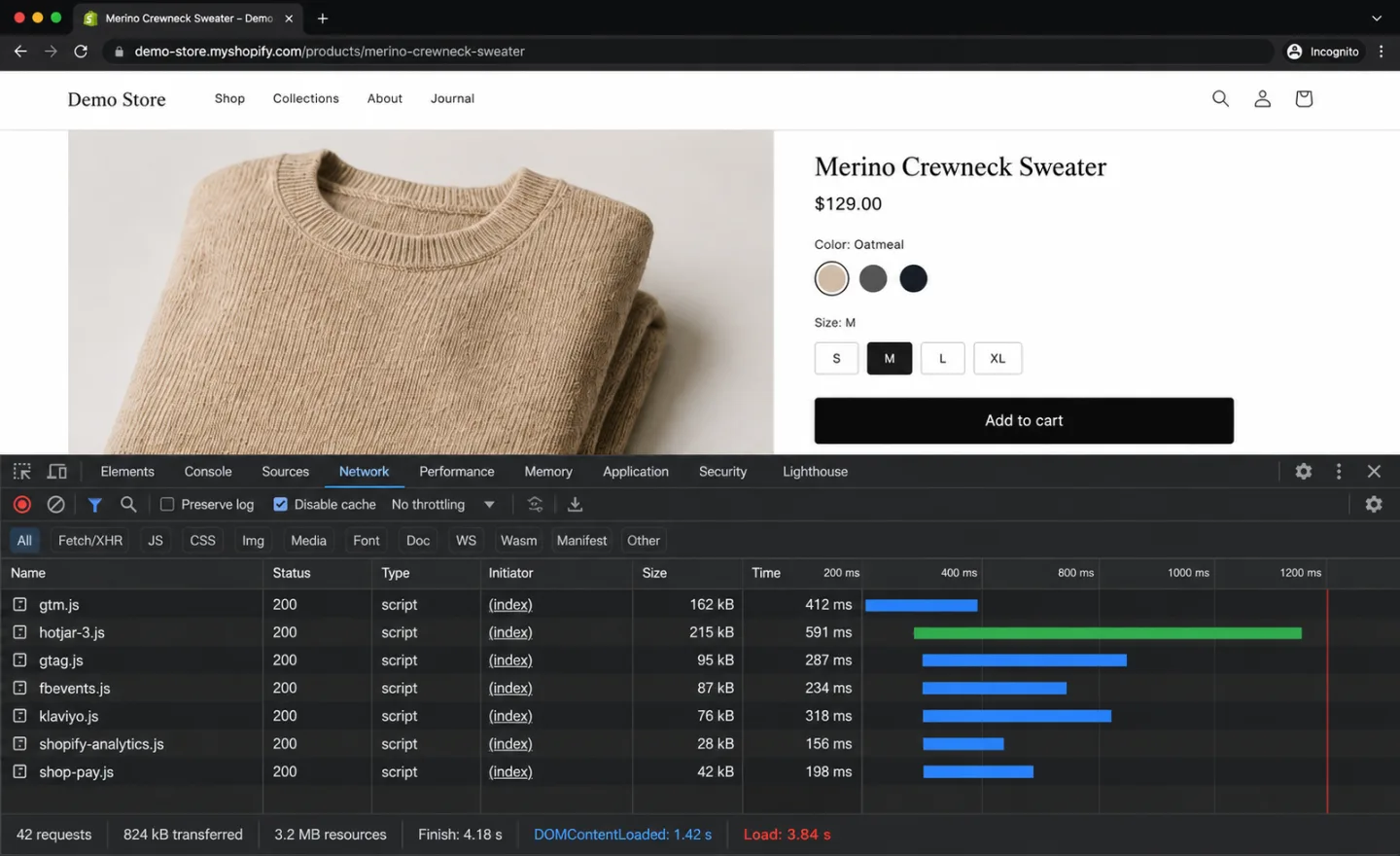
Every analytics script you load slows your store down. Every bit of slowdown costs you sales. I've measured it. The math is simple, and it doesn't bend.
What that weight does to your conversions is well documented:
- A 1-second delay in page load reduces conversions by 7%
- Sites loading in 1 second achieve 3.05% conversion rates vs. 0.67% at 4 seconds
- 53% of mobile visitors abandon a page that takes more than 3 seconds to load
- A 0.1-second improvement in load time increases retail conversions by 8.4%
Only 48% of Shopify stores pass all three Core Web Vitals on mobile. Which means more than half fail. The main reason is JavaScript from apps and tracking scripts. And Google uses Core Web Vitals as a ranking signal. So your heavy analytics scripts cost you conversions and search rankings at the same time.
Put real money on it. A Shopify store doing $1M/year that shaves one second off load time, at a 2% conversion lift, gets back $20,000 a year. That means real money left on the table by a slow analytics stack. This isn't a thought experiment. Walmart measured it: every 1-second improvement gave them 2% more conversions.
A 2KB analytics script adds nothing you could measure. No main thread blocking. No extra requests to third-party servers. No consent platform bolted on top, so no extra JavaScript to go with it. It just counts, and I built it to stay out of the way.
For more on the performance impact of analytics scripts, see Why You Should Stop Using Google Analytics in 2026.
What CNIL's 150 million euro fine means for your Shopify store
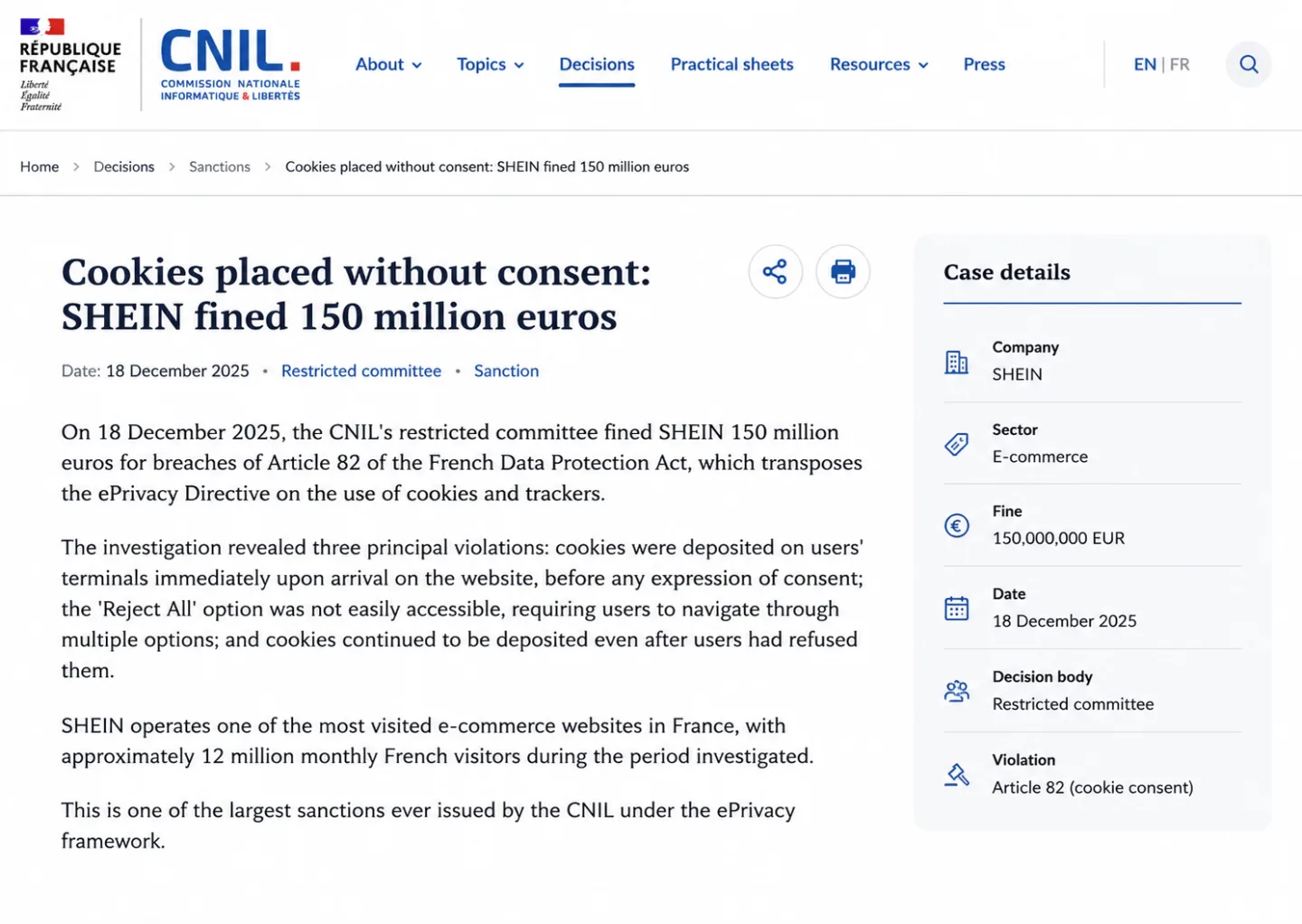
If your Shopify store ships to EU customers, analytics compliance isn't a nice-to-have. And the regulators are speeding up, not slowing down.
In 2025, France's CNIL fined SHEIN 150 million euros over cookie consent, for a setup that touched roughly 12 million French visitors a month. What did SHEIN do wrong? It dropped advertising and analytics cookies the instant the page loaded, before anyone could touch the banner. It buried "Reject All" behind several clicks. And it kept placing cookies even after people clicked "Refuse All."
SHEIN runs on a custom platform, not Shopify. That changes nothing. A Shopify store selling to those same 12 million French shoppers answers to the exact same rules.
CNIL leaves one door open. It carves out a specific exemption for analytics that don't use cookies. Meet CNIL's conditions, no cross-site tracking, no user identification, no cookies, data kept 25 months at most, anonymous aggregate reports only, and you can run analytics with no consent at all. Your visitors never see a banner for it.
Shopify's built-in analytics use cookies, so they don't qualify. GA4 processes the data in the US, so it doesn't qualify either. Eight EU data protection authorities have ruled GA4 illegal under the GDPR.
A cookieless tool that keeps your data in the EU, sets no persistent identifiers, and reports only in aggregate fits inside both CNIL's exemption and GDPR's legitimate interest basis. No consent banner. No lost data. No fine waiting for you.
For the full legal analysis, see Is Google Analytics Legal in 2026? and Privacy-First Analytics: The Complete Guide.
The metrics Shopify will never give you
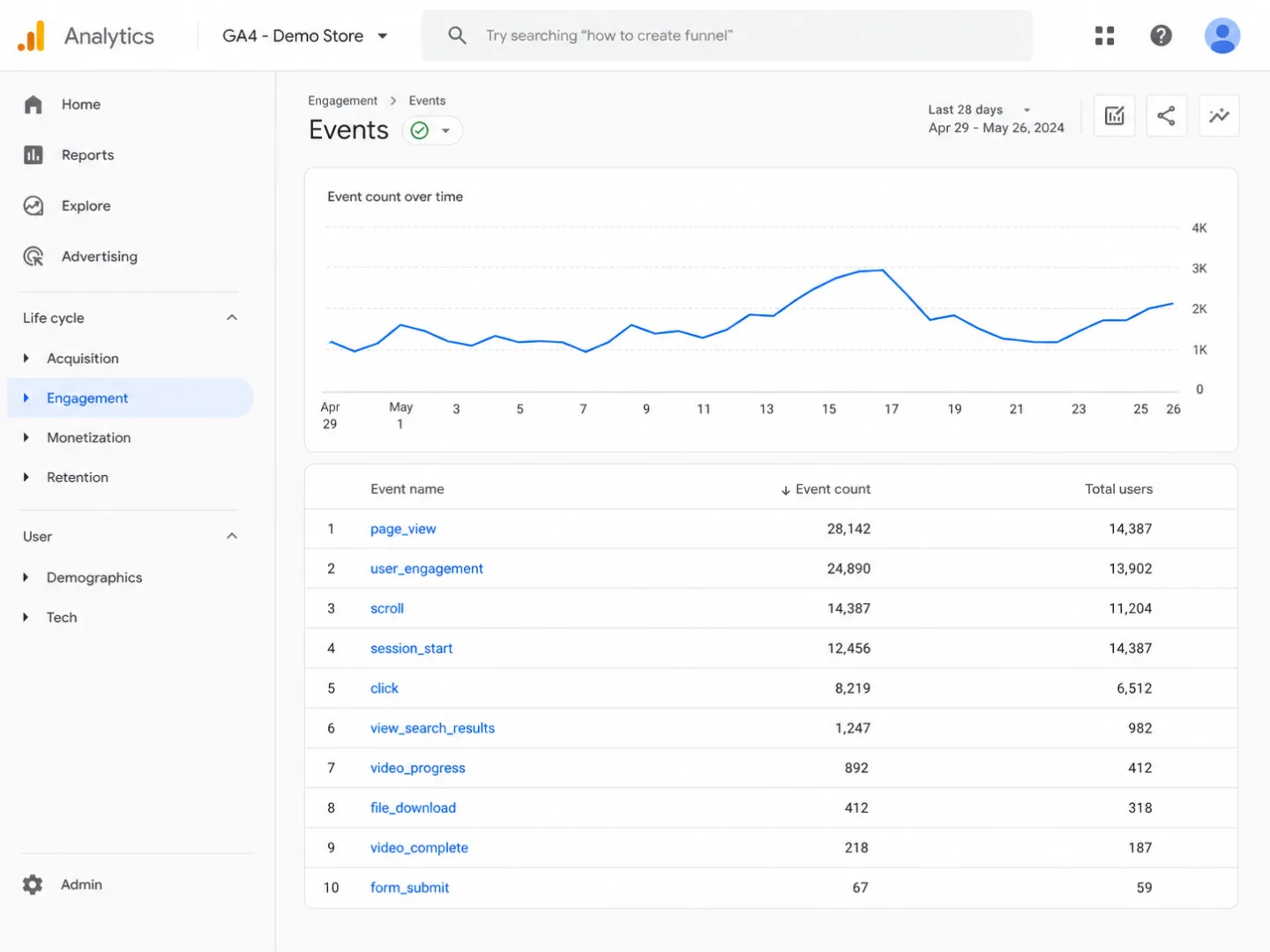
Shopify's analytics are built to count transactions: orders, revenue, average order value. They tell you that someone bought. They can't tell you why they bought, and they won't tell you why everyone else walked.
Here's what's missing at every Shopify tier, Plus included:
Scroll depth. Did people read your product description, or did they leave after the hero image? Shopify can't say. Contentsquare's 2026 benchmark shows engagement down 10% year over year, with less scrolling everywhere. If visitors only get 20% down your product pages, your descriptions might as well not exist. And you'd never know without scroll tracking.
Real time on page. Not session duration. The active reading time that pauses the moment a tab is hidden or the browser loses focus. A controlled study found GA4 undercounts engagement time by about 55%, because it never properly handles tab switching.
Outbound link tracking. Where do people go when they leave you? Which outside links do they click? Link to Amazon, to suppliers, to your social profiles, and Shopify shows you none of it. GA4 only tracks it if you set up a custom event first.
Copy detection. When a visitor copies a product name or a price off your page, they're almost certainly comparison shopping. For an ecommerce store that's a gift of a signal. No built-in analytics tool catches it.
404 detection. Broken product links and deleted pages bleed traffic quietly. Shopify never surfaces a 404 in its analytics. You hear about it when a customer complains, or you never hear about it at all.
Internal search terms. What do people search for on your store? What do they search for and not find? Shopify keeps some of this inside its native search, but it never joins up with your traffic analytics.
Engagement scoring. One score, built from scroll depth and time on page, that tells you at a glance which product pages are working and which are getting skimmed. Color-coded. Sortable. Nothing to set up.
To get any of these in your Shopify store today, you bolt on more apps: Hotjar for heatmaps, Lucky Orange for session recordings, a separate tool for bot detection. More scripts, more cost, a slower store. The cure makes the disease worse.
For a deep dive on engagement metrics, see Beyond Pageviews: The Engagement Metrics That Actually Matter.
What your full traffic actually looks like
Here's what changes the moment you add one analytics script that uses no cookies, asks for no consent, and leans on none of Shopify's built-in reporting.
Every visitor counted. No consent banner to lose them at. No ad blocker gap to fall through. A cookieless script captures 92-95% of your real traffic, against the 18-25% a cookie-dependent tool is left with once consent and ad blockers have taken their cut. In plain English: you go from one visitor in five to nineteen in twenty.
16-channel classification. In place of Shopify's broken "Direct" bucket, every visit is sorted into one of 16 channels: Organic Search, Paid Search, Organic Social, Paid Social, Email, AI Search, Affiliates, and nine more. Click IDs from the ad platforms (gclid, fbclid, ttclid) get spotted on their own, so paid and organic split correctly even when nobody tagged a UTM parameter.
Klaviyo and email recognition. Klaviyo is the email platform most Shopify stores live on. The channel classifier knows Klaviyo, Mailchimp, ActiveCampaign, ConvertKit, Brevo, and 15+ more by sight, so your email traffic lands in the email channel even when no UTM parameter was ever set.
AI Search tracking. Traffic from ChatGPT, Perplexity, Claude, Gemini, and the rest gets its own channel, "AI Search," instead of being tipped into "Referral" or "Direct" the way Shopify and GA4 do it. If an AI is recommending your products to buyers, that's something you want to see, not something you want buried.
Automatic bot filtering. Six checks run the moment data arrives: webdriver flag detection, UA pattern matching against 50+ bot patterns, datacenter IP blocking, spam referrer filtering, header analysis, and zero viewport detection. The bot sessions never make it into your data in the first place. AI crawlers (GPTBot, CCBot, PerplexityBot) are kept on their own so you can see which AI services are reading your product pages.
Custom events with revenue. Track purchases, add-to-cart, and any event you like, with the revenue attached:
clickport.track('Purchase', {
  product: 'Blue Widget',
  variant: 'Large'
}, { amount: 49.99, currency: 'USD' });
No tag manager. Revenue shows up per goal in the dashboard, and you can cross-filter it by source, country, and device.
Cross-filtering across everything. Click "Instagram" in the Sources panel and the whole dashboard answers: the pages Instagram visitors look at, their engagement scores, their conversion rates, the countries they sit in, the devices they hold. Click a single goal and see which channels close it best. This is the independent referee that finally settles the "every platform tells a different story" fight.
Multi-store management. Running more than one Shopify store? Run them all from one dashboard. No per-site fees. Live visitor counts per store in the switcher. One click to jump between them.
You don't have to rip anything out
The thing that stops most people from switching analytics tools is the switch itself. I get it. What happens to my history? How long before the new tool is worth anything? Do I have to quit the old one cold?
No, you don't. You'll run both at once. Leave Shopify's built-in analytics and GA4 exactly where they're and add Clickport beside them. The 2KB script doesn't tread on your existing tracking, and since it's cookieless, it doesn't add a second consent prompt for anyone.
You have useful data on day one. Tracking begins the second the script loads. No waiting period, no training phase, no "data collection" delay. Your first session lands in real time inside 30 seconds. Inside 24 hours you've got the full shape of your traffic sources, engagement, and channels. Inside a week you've got enough to hold up against whatever Shopify and GA4 have been telling you.
And that comparison is usually the moment the penny drops. It's my favorite part. When Clickport shows 40% more visitors than GA4 and names the "Direct" traffic Shopify never could, the gap stops being arguable.
Your Shopify analytics aren't going anywhere. The built-in reports still own order data, inventory, and the financials. They're good at that. That's what they were built for. Clickport takes the visitor side: who arrives, where from, what they do, and which channels earn their engagement. They sit happily together. Most store owners keep Shopify's reports for the money and lean on Clickport as the source of truth for traffic and behavior.
There's no history to lose. Shopify's analytics history stays right where it is, in Shopify. Clickport keeps your data for good, with no 14-month wipe like GA4. From the day you start, your Clickport data piles up next to your other tools. If you ever do drop GA4, you've already banked months of clean, cookieless data to stand on.
When to remove GA4. Most store owners run side by side for 2-4 weeks, see for themselves that the data is richer and truer, then pull GA4. What they get back the same day: one less script on every page, one less consent prompt for EU visitors, one less tool to configure and babysit. Some keep GA4 for its Google Ads bidding integration, and that's a fair reason. Clickport doesn't stand in for your ad platform's conversion pixel. It stands in for the analytics layer, the one that tells you what's really happening on your store.
Frequently asked questions
What is Shopify Analytics?
Shopify Analytics is the reporting dashboard built into every Shopify plan. It tracks orders, sales, customer counts, traffic sources, and basic conversion rates, drawn from data Shopify gathers at checkout and through the storefront tracking script. The reports you get scale with your plan: Basic gives you a small set, Shopify and Advanced unlock more, and the most flexible reporting sits behind Shopify Plus and up. For order and revenue data it's solid, and I'd keep it for that. On traffic, attribution, and engagement it has a hole: it can't see most of the people who land on your store and don't buy, and accelerated checkouts (Shop Pay, Apple Pay, Google Pay) throw off its session and source tracking.
Why is Shopify analytics not accurate?
Three structural reasons. First, cookie consent banners hide 30-50% of EU visitor data from any tracker that needs consent to run. Second, accelerated checkouts (Shop Pay, Apple Pay, Google Pay) finish on Shopify-owned domains, which snaps the source and session chain. Sales from those flows often land in "Direct" even when they came from Instagram, Facebook, or email. Third, the built-in attribution is last-click only, so a customer who found you on Google, then clicked an email link, then bought off a TikTok retargeting ad gets credited entirely to TikTok. The numbers aren't wrong in a technical sense, and I want to be fair here. They're correct inside a narrow measurement model that misses most of the customer's journey. The 27-store audit I ran in April 2026 puts a figure on the gap across real DTC brands.
Set it up in 60 seconds
Add one line to your Shopify theme. Open Online Store > Themes > Edit Code, find theme.liquid, and paste this just before the closing </head> tag:
<script defer src="https://clickport.io/tracker.js"
        data-domain="yourstore.com"></script>
That's the whole job. No Google Tag Manager. No consent platform. No app to install. Nothing to configure.
The script is 2KB. It starts tracking right away. Every visitor counted. Every source named. Engagement metrics, outbound links, form submissions, downloads, 404s, and copy events all captured on their own, with no extra setup from you.
I'll leave you with this: your Shopify store is doing better than your dashboard shows. Your marketing's working harder than your attribution reports admit. Your visitors are more engaged than your metrics let on. You just can't see it yet.
And if your Direct bucket is huge and you can't explain it, email me a screenshot.

Comments
Loading comments...
Leave a comment