Your GA4 Data Disappears After 14 Months. Here's What Google Won't Tell You.
You've heard GA4 has a 14-month data retention limit. Change one setting, the advice goes, and you're fine. You're not.
That setting only touches Explorations. It isn't retroactive. And the official fix for keeping older data is SQL, a Google Cloud account, and a bill bigger than the analytics tools that keep your data forever. Here's the full picture, including the part the one-setting articles skip: the real default isn't 14 months at all.
Disclosure up front: I build Clickport, one of the keep-your-data-forever tools this piece ends at. So I'm not neutral, and every claim below carries a link so you don't have to take my word.
- GA4's data retention limit only affects Explorations (funnels, path analysis, segments). Standard reports keep aggregated data indefinitely. Most articles fail to explain this distinction.
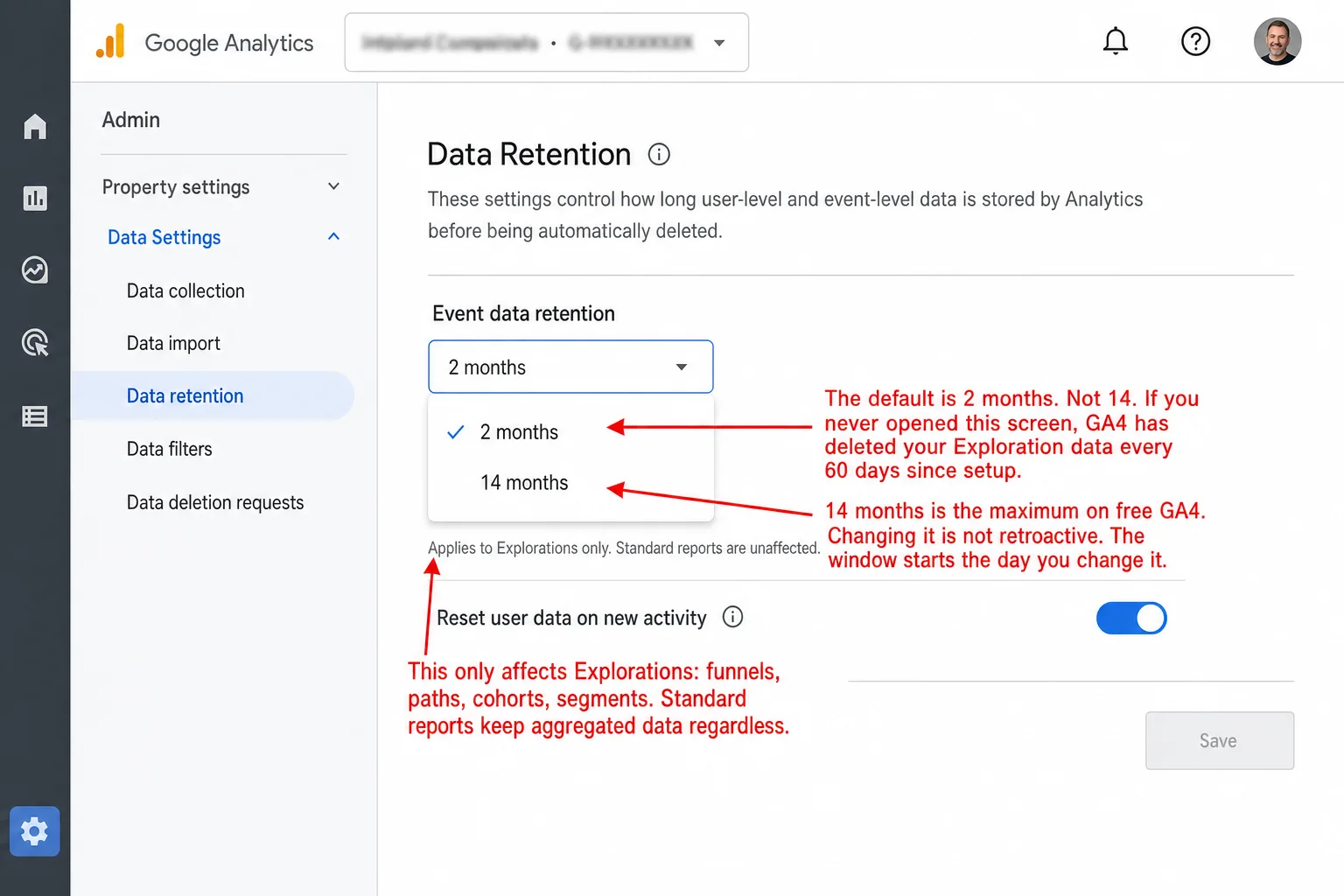
- The default retention is 2 months. If you never changed the setting, you have been losing event-level data every 60 days since setup. Changing it to 14 months is not retroactive.
- Universal Analytics offered unlimited retention for free. GA4 reduced this to 14 months with no public explanation. GA4 360 extends to 50 months starting at $50,000/year.
- BigQuery, the official workaround, requires intermediate SQL, a Google Cloud account, and is not retroactive. Data that already expired is gone permanently.
- Privacy-first analytics tools offer years of retention, or no limit at all, because they don't collect personal data. Clickport keeps your data with no expiry, on every plan, from EUR 9 a month.
What GA4's data retention setting actually controls
The retention limit hits Explorations only. Not your whole account. Not your standard reports. Just the Explore section: funnels, path analysis, segment comparisons, cohort analysis, and free-form custom reports.
Standard reports (the left-nav Reports section: Acquisition, Engagement, Monetization, Tech) run on pre-aggregated daily tables with every user identifier stripped out. Those tables aren't subject to the retention limit. They persist for as long as your property exists. Last year's traffic overview is still right there.
Google's own help page muddies this. It says "data retention controls how long user-level and event-level data is stored by Analytics." Sounds like everything. It isn't. It's the raw, unaggregated event rows behind Explorations. And that's the part that matters, because Explorations is where the real work happens: custom funnels, user journeys, segment comparisons, the detailed breakdowns standard reports can't touch.
User IDs and client IDs
Advertising IDs (AAID, IDFA)
Custom Explorations data
Funnel and path analysis data
Segment comparisons
Cohort analysis
Pre-aggregated daily summaries
Overall traffic trends
Conversion totals
GA4 Data API responses
Looker Studio via native connector
BigQuery exports (if enabled)
There's another catch most articles skip. Age, gender, and interest data is always capped at 2 months, whatever your retention setting says. Google Signals data tops out at 26 months even on GA4 360. In other words, these limits are hard-coded. No setting touches them.
Now the part I find genuinely rude. The default retention is 2 months. Not 14. Two. Set up GA4, never open Admin > Data Settings > Data Retention, and you've been losing every scrap of Exploration data every 60 days since day one. That means no notification, no warning during setup, no prompt to change it.
As Julius Fedorovicius, founder of Analytics Mania, puts it: the 2-month default is one of the most common GA4 configuration mistakes, and "this change does not apply to historic data. Your 14 months start when you change that setting." In other words: the clock only ever runs forward.
The timeline: how your data disappeared
The retention limit existed from GA4's launch in October 2020. But it didn't become a crisis until Google forced everyone onto GA4 by shutting down Universal Analytics.
Universal Analytics had an option called "Do not automatically expire." You picked it once and your data stayed forever. For free. GA4 took that option away. Google has never publicly explained why. It's one of many reasons people are walking away from GA4, and retention is far from the worst of them. GA4 also drops data it never shows you, reports metrics that mislead, and fills your reports with unexplained "(not set)" rows.
The silent failure: GA4 doesn't tell you data is missing
This is the silent part, and I'll show it to you. Open an Exploration, pick a date range that reaches back past your retention window, and GA4 hands you a report. No error. No warning banner. No asterisk. It shows you the data it still has and quietly leaves out the rest.
Say you compare holiday 2025 to holiday 2024 in a custom Exploration. You get a report. The numbers look normal. But if the November and December 2024 rows have already been purged, half your comparison is missing and nothing on the screen tells you. Seresa.io documented this exact thing with WooCommerce stores. Teams walked into meetings with "38% year-over-year revenue growth" built on data that was partially deleted, incomparable across UA and GA4, or silently incomplete. They had no idea.
On Google's own support forums, people have set retention to 14 months and still see only 2 months in Explorations. Google's documentation says raising the retention period applies to data already collected, so whatever is still in your account gets the longer window. The catch is the word "still." In practice, anything already purged under the 2-month default is gone for good. Wait a few months to change the setting and you never get that data back.
One commenter on Analytics Mania said it plainly: "I set the data retention settings for both event and user data to 14 months as soon as I installed GA4. Two years later and still only 90 days' data is available in the Explorations." He did everything right and still lost most of it.
Retention is one of four things that quietly shrink your GA4 numbers. The GA4 Data Loss Estimator folds it into the "internal limits" line, next to thresholding, cardinality, and "(not set)," and puts a percentage on the total gap.
Why 14 months breaks real analysis
Fourteen months sounds like plenty for a year-over-year comparison. It isn't. The math is tight, and I'll walk you through where it breaks.
in Explorations before the prior year's data expires.
Seasonal businesses get one shot at comparing this year to last year in Explorations. An online store looking at Black Friday 2025 in January 2026 still has the data. By October 2026, that Black Friday 2025 data starts expiring. In other words, the second comparison never happens.
B2B companies with long sales cycles never had a chance with 14-month retention. The B2B Stack documented that one enterprise buying cycle can throw off 60-100 website sessions spread across months or years. Which means by the time the deal closes, the first touchpoints are already deleted. You see the bottom of the funnel and none of the top.
Lifetime value stops working past the retention window. GA4 has a metric called User Lifetime, but it only counts the date range you select, not the real lifetime. A subscription business wants to know if a customer it won in January is still active in March of the following year. The Exploration data that answers that is gone.
SEO measurement runs on 6-12 month cycles. You rework your site, target a keyword cluster, and then you wait. With 14-month retention in Explorations, you get barely one cycle before the "before" data expires. In practice, on the default 2-month setting, you can't do real SEO analysis in Explorations at all.
Investor reporting needs multi-year growth lines. A startup that wants to show a 3-year growth curve can't build it from GA4 Explorations. Standard reports do survive the retention window, but they only hold aggregates. They miss the cohorts, segments, and funnel steps that make a growth number believable.
The BigQuery "solution" and what it actually costs
Google's official answer for keeping data past 14 months is BigQuery export. Every article on GA4 retention names it. Almost none tell you what it takes to use. I will.
BigQuery export ships your raw GA4 event data to Google's data warehouse. Each day it writes a new table with the day before's events. It's free for every GA4 property. Sounds simple. It isn't.
The schema is deeply nested. You don't get clean, flat tables. event_params, user_properties, and items arrive as nested RECORD arrays. Want one page URL? You write an UNNEST subquery. The value sits in one of four columns: string_value, int_value, float_value, double_value, and you have to know which one holds the parameter you're after. Every "simple" metric turns into SQL that would slow down a mid-level analyst.
SELECT
  (SELECT value.string_value
   FROM UNNEST(event_params)
   WHERE key = 'page_location') AS page_url,
  COUNT(*) AS pageviews
FROM `project.analytics_123456.events_*`
WHERE event_name = 'page_view'
GROUP BY page_url;
There is no session table. GA4 exports events and nothing else. Bounce rate, session duration, channel attribution: none of them exist until you rebuild sessions by hand from user_pseudo_id, ga_session_id, and window functions. That's multi-step SQL with incremental builds. Things a session-based tool gives you on the first screen.
It is not retroactive. This is the part that catches people. BigQuery export starts the day you turn it on. Anything that already aged out of GA4's window is gone, and there is no backfill. Find BigQuery in 2026 with a property that's been running since 2023 on the 2-month default, and those 2+ years of event data are not coming back.
The free tier has a trap. Use BigQuery's free sandbox with no billing account, and every table defaults to a 60-day expiration. So the workaround for losing data after 14 months can drop it after 60 days instead. Add a billing account later and it doesn't fix the tables you already have. You go set each one's expiry by hand.
The real cost is not money. It's skill. BigQuery's free tier covers most small and mid-size sites. For a property under 1 million pageviews a month, storage and query costs round to nothing. What you pay in is SQL, Google Cloud setup, and a pipeline someone has to keep running.
Pick the analysis you need and see where it still works once your retention window passes:
Jack Novorr, Head of Data at Cypress North, put it plainly: "GA4 only retains data within Explore reports for 14 months before it disappears forever." Even paying your way up to GA4 360, he says, "costs upwards of $50,000 per year and still limits you to just 50 months of data retention." So you pay enterprise money and you're still on a clock.
For most small and mid-size businesses, BigQuery isn't a real answer. It wants a Google Cloud account, SQL skills, and someone to babysit the pipeline. The marketing team that needs last year's funnel is not the team writing UNNEST queries against nested RECORD arrays.
The five other workarounds (and why they fall short)
BigQuery isn't the only road. The trouble, as I see it: not one of the others fully fixes the problem.
| Workaround | Cost | Skill level | Data preserved | Main gotcha |
|---|---|---|---|---|
| BigQuery export | Free-$100+/mo | Advanced | Everything (raw events) | Not retroactive. SQL required. |
| Looker Studio exports | Free | Beginner | Aggregated only | Can't re-slice later. 5M cell limit. |
| Third-party tools (OWOX, etc.) | $600-800/yr | Intermediate | Aggregated | Paying for what BigQuery does cheaper. |
| Manual CSV exports | Free | Beginner | Minimal (5,000 row cap) | Nobody does this consistently. |
| GA4 API scheduled pulls | Free | Advanced | Aggregated | Requires dev work. Quota limits. Sampling. |
| Second analytics tool | $9-69/mo | Beginner | Everything (going forward) | Won't recover past GA4 data. |
The pattern I keep running into is hard to miss. The workarounds that keep your raw data need a technical person. The ones a beginner can set up only keep aggregated snapshots. One option keeps everything and stays beginner-simple: run a separate analytics tool next to GA4.
GA4 360: pay $50,000+/year for 50 months
GA4 360 is Google's enterprise tier. It stretches event-level retention to 26, 38, or 50 months, whichever you pick. It starts at $50,000 a year for 25 million events a month and climbs from there with your volume. In plain English: bigger setups pay a lot more.
Even at the 50-month ceiling, demographics data still caps at 2 months and Google Signals at 26 months. In other words, some of your data types stay hard-capped no matter how much you spend.
For comparison, the analytics tools that give you unlimited retention on every plan start at $6-19 a month. The zeros are not a typo.
The GDPR defense doesn't hold up
Google calls the retention limit a privacy feature. The argument goes like this: GDPR's storage limitation principle, Article 5(1)(e), says you can't keep personal data longer than you need to.
That's true on paper and misleading in practice. The storage limitation only applies to data "kept in a form which permits identification of data subjects." Anonymize or aggregate the data for real and it drops out of GDPR's scope entirely. Even for personal data, Article 5(1)(e) lets you keep it past the usual necessity period for statistical purposes, as long as you follow the safeguards in Article 89(1). In plain English: the law doesn't hand you a 14-month number.
The privacy-first tools prove the point. Clickport and the rest of the cookieless category never collect personal data and never build a persistent identifier. With no personal data in the set, the storage limitation principle has nothing to bite on, so retention can run for years, or without any limit at all.
Now look at the timing. GA4 cut retention from unlimited under UA to 14 months. The fix it points you to is BigQuery, Google's paid data warehouse. The tier that buys back 50 months is GA4 360 at $50,000 a year. Whether the GDPR framing is real privacy or handy cover for selling you the extension is a question analysts have raised in the open, and I'm not the first to ask it.
What every other analytics tool offers
Unlimited retention isn't a premium add-on. For most analytics tools outside Google, it's just how they work out of the box.
| Tool | Retention | Starting price | Cookies |
|---|---|---|---|
| GA4 Free | 14 months (Explorations only) | Free | Yes |
| GA4 360 | 50 months max | $50,000+/yr | Yes |
| Typical privacy-first tool | Years to unlimited | $6-19/mo | No |
| Clickport | Unlimited | EUR 9/mo | No |
I can offer unlimited retention because of how Clickport is built, not out of kindness. Tools like it don't collect personal data. No cookies, no user IDs, no device fingerprints. With nothing in the set that can point back to a person, GDPR's storage limitation has nothing to act on. The data is aggregated the moment it lands, so there's nothing to age out and delete.
GA4 collects personal data by design: client IDs, cookies, advertising identifiers. That's what creates the GDPR obligation to limit retention in the first place. Then GA4 turns around and charges you up to $150,000 a year to push that limit out. In other words, tools that never collect personal data sidestep the whole thing.
How to stop losing data today
If you're on GA4 and you want to hold onto your history, do these three things. I've ordered them most urgent first.
Step 3 is the one I'd pick, but I'm biased; see the disclosure up top. If your team has no SQL and no appetite for a Google Cloud project, a tool like Clickport gives you unlimited retention, no cookies, no consent banner, and a dashboard you read without writing a single query. Your data is yours. It doesn't expire on you, and it doesn't quietly disappear after 14 months.
Start your free 30-day trial. No credit card required.
Frequently asked questions
Why do I only see 2 months of data in GA4 Explorations?
Because 2 months is the default, and you never changed it. GA4 has been deleting your Exploration data every 60 days the whole time. Fix it in Admin > Data Settings > Data Retention. The change isn't retroactive, so you'll have to wait for new data to build up.
Does GA4 data retention affect standard reports?
No. Standard reports (Acquisition, Engagement, Monetization, Tech) run on pre-aggregated tables that the retention limit never touches. They stick around for as long as your property does. Only Explorations get cut.
Is changing GA4 data retention to 14 months retroactive?
No. Whatever was already deleted under the 2-month default is gone for good. The 14-month window starts the day you flip the setting. So you won't have a full 14 months of data until 14 months after you make the change.
Does GA4 data retention affect BigQuery exports?
No. Once your data lands in BigQuery, it lives outside GA4's retention system. But BigQuery export isn't retroactive either. It only catches data from the day you switch it on.
What is the maximum data retention period in GA4?
14 months on free properties. GA4 360, the enterprise tier, buys you 26, 38, or 50 months for $50,000-$150,000+ a year. None of these limits touch standard reports, on any tier.
How long does GA4 keep age, gender, and interest data?
2 months, full stop. Your retention setting doesn't change it, and neither does paying for GA4 360. It's hard-coded.
Can I keep GA4 data forever?
Not inside GA4. The most it holds is 14 months on free or 50 months on 360. To keep raw event data for good, you export to BigQuery and take on the SQL. Or you run an analytics tool that gives you unlimited retention by default and skip all of it.

Comments
Loading comments...
Leave a comment