(Not Set) in GA4: What It Means and How to Fix It
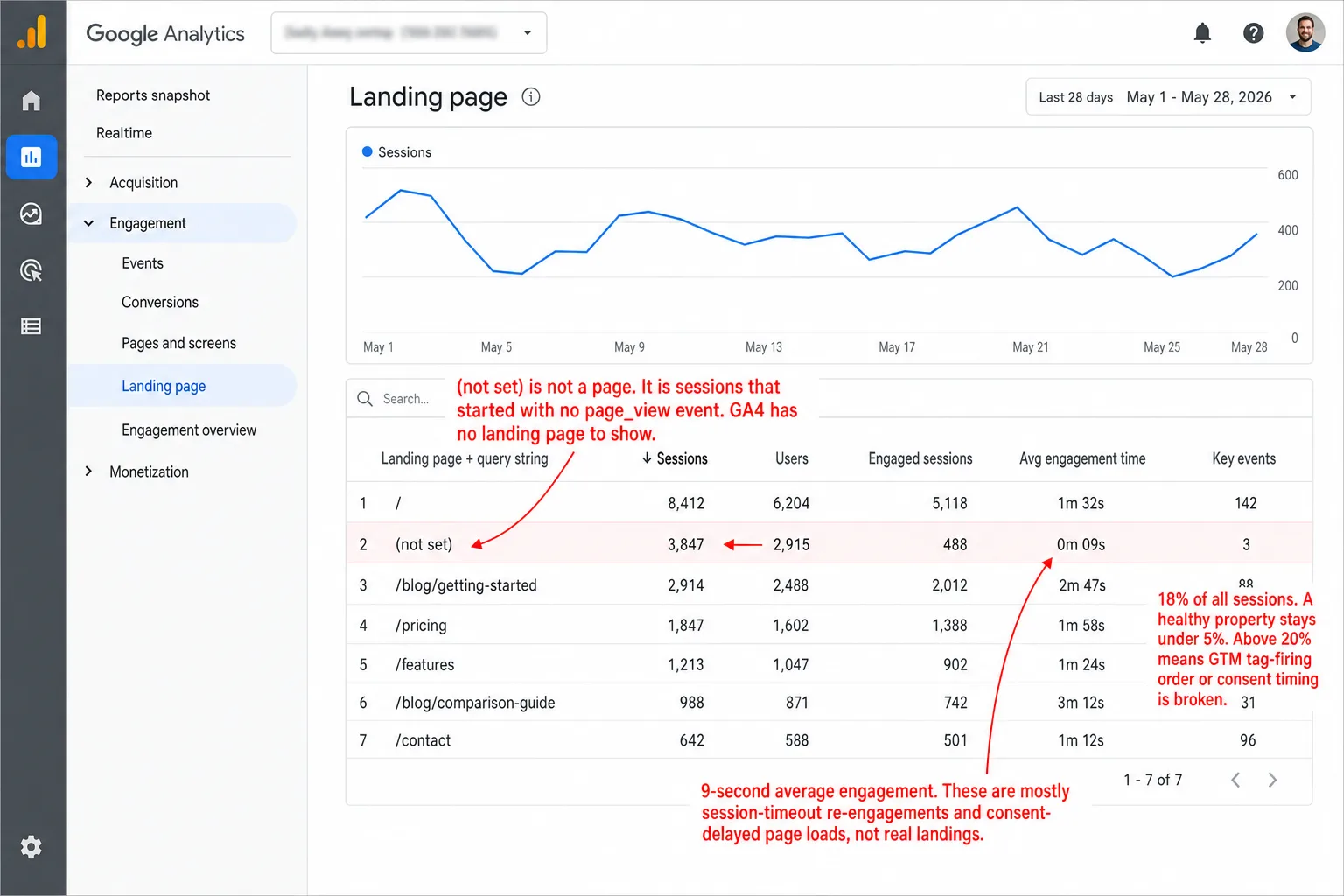
Open any GA4 property and you'll find (not set) sitting in your reports. Every property has it. The question that matters isn't how to make it disappear. It's which half of it you can fix.
Some (not set) is a configuration issue. You move a tag, you fix it, it takes 10 minutes. The rest is architectural. It's data that was never collected, and no setting in the world brings back data GA4 never received. So the trap is treating all of it the same. You spend a week chasing tags that were never the problem. Here's how I tell the two apart.
Quick disclosure before we start: I run Clickport, a cookieless analytics tool, so I'm selling the medicine I'll be prescribing near the end. The GA4 fixes below stand on their own, though. I'd do them even if you never look at my product.
- (not set) means GA4 got an event but no value for that dimension. The data never arrived. It's a gap, not an error message.
- Landing page goes (not set) when a session starts without a page_view. Top causes: session timeouts, consent delays, and GTM tag order. A healthy property stays under 5%.
- Source/medium goes (not set) when the referrer never arrives. Consent denials, links shared in apps like WhatsApp and Slack (69% of all sharing), and in-app browsers are the big three.
- No fix is retroactive. Once GA4 logs a session without the data, that gap is permanent. The one exception: Google's February 2024 Signals removal, which unhid historical rows.
- Cookieless analytics reads the referrer directly and needs no consent banner, so the biggest EU driver of (not set) disappears. Dark social still hides sources from every tool.
What (not set) means (and what it doesn't)
(not set) is the label GA4 puts in a cell when it got no value for that dimension. It isn't an error. Nothing broke while GA4 crunched the numbers. The value was just never sent in the first place.
That's the whole story. And almost everyone I talk to misses it. GA4 has five different labels for data it can't show you, and people treat all five as one thing. They aren't the same thing.
In practice, one distinction decides what you do next. (not set) means the data is genuinely gone. (other) means GA4 collected the data fine but is hiding it because the table ran out of room. Unassigned means the data is there and GA4 just can't sort it into a channel. Three different problems. Three different responses. Filtering the (not set) rows out of your report doesn't fix any of them. It only hides the symptom.
Why landing page shows (not set)
GA4 fills the landing page dimension from the page_location parameter on the first page_view event of a session. So if a session has zero page_view events, there's nothing to fill it with. Landing page becomes (not set). Not "unknown." Not "the page they were on." Missing.
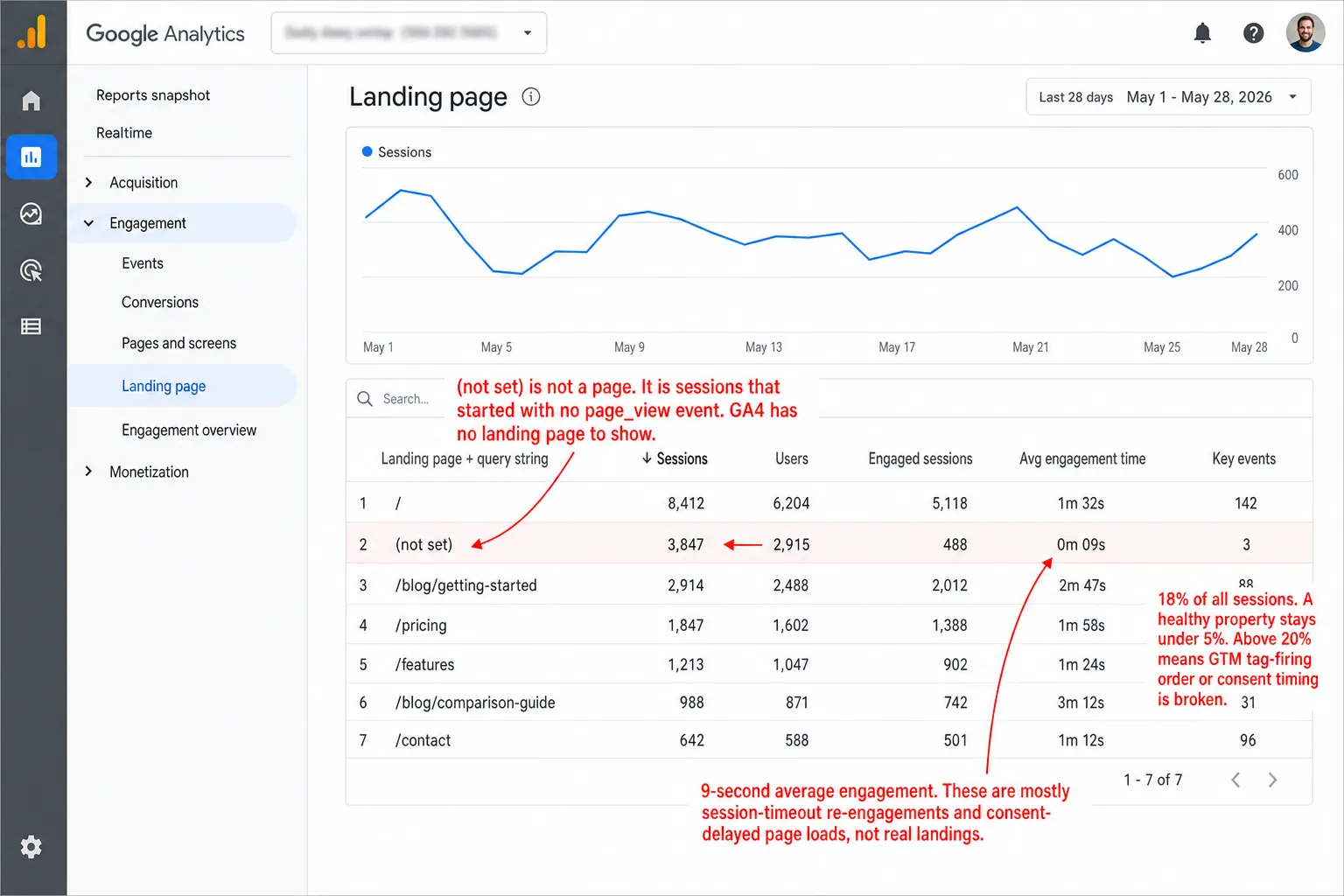
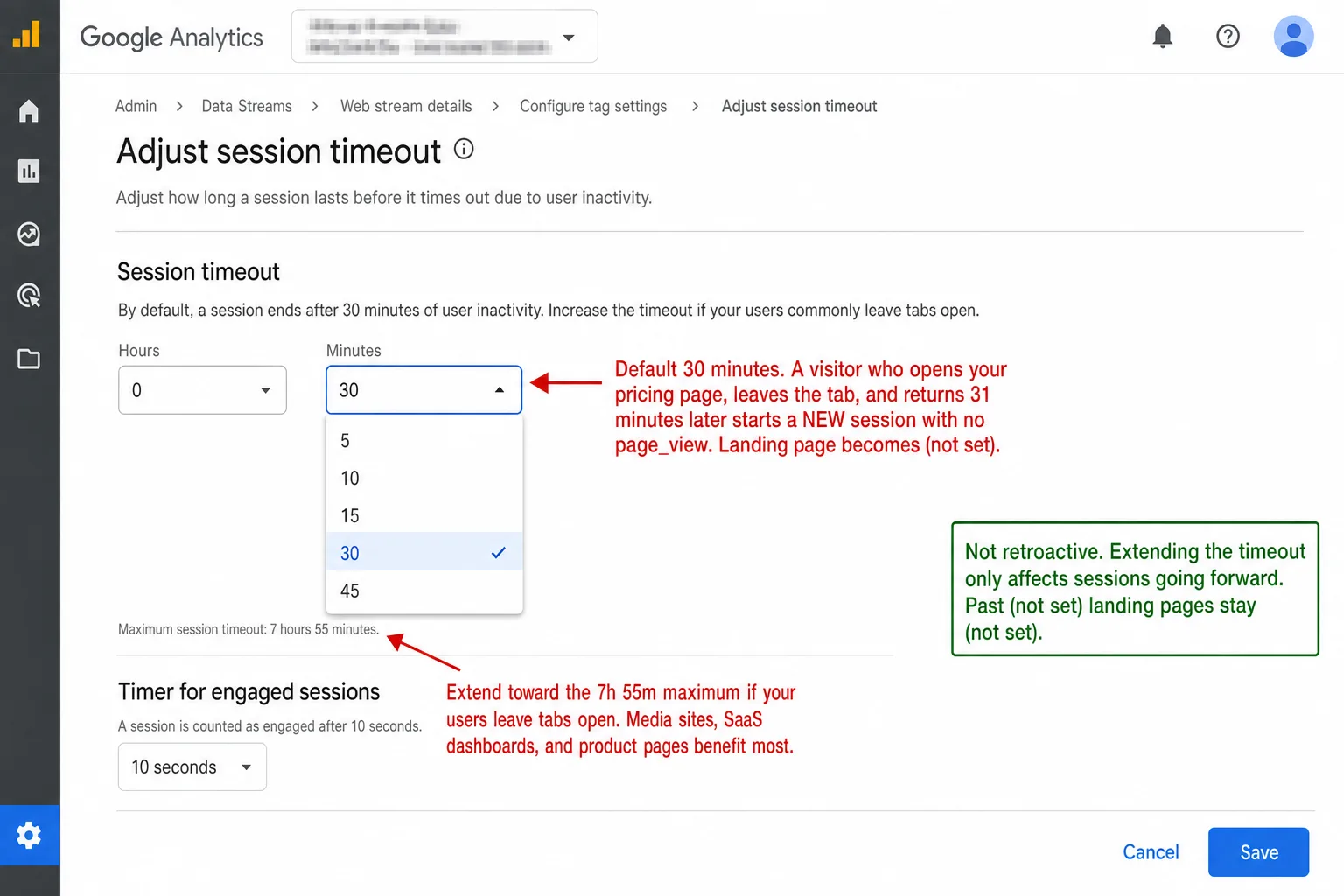
Session timeout re-engagement. A visitor opens your pricing page at 2:00 PM. They leave the tab open and go to lunch. At 2:31 PM they come back and scroll. GA4's default 30-minute timeout has run out, so it starts a fresh session. In other words: same person, same tab, brand new visit. The scroll fires a user_engagement event. No page_view fires, because the visitor never went to a new page. The new session has engagement data and no landing page. This hits media sites, SaaS dashboards, and ecommerce product pages hardest. Anywhere people leave tabs open.
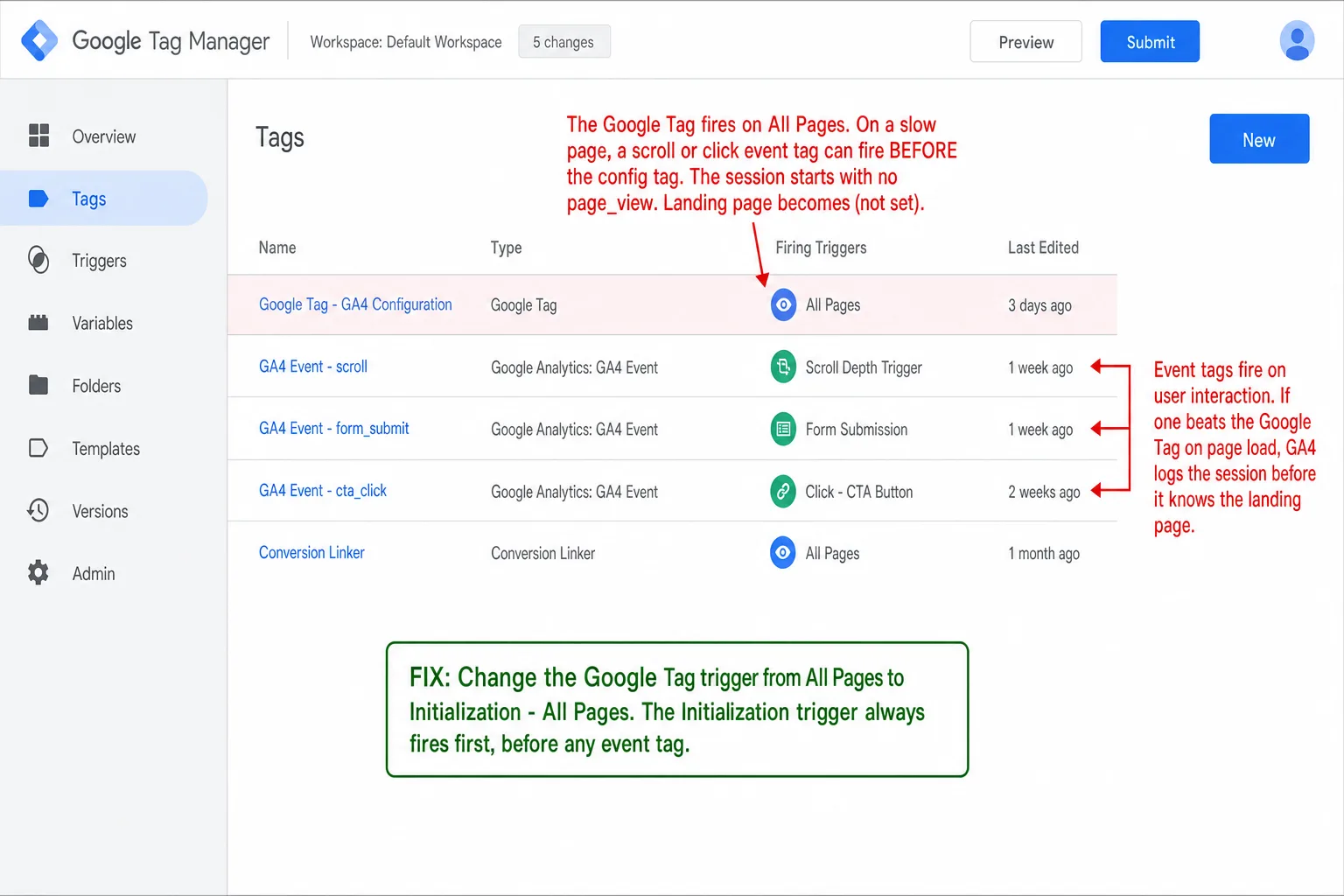
GTM tag firing order. Tags fire in an order. If your Google Tag fires on "All Pages" instead of the "Initialization" trigger, a custom event tag can sneak in first. The session starts before page_view is sent. The fix is one click: move the Google Tag to the Initialization trigger in GTM.
Consent timing. A visitor scrolls or clicks before they accept the cookie banner. If GA4 runs in Advanced Consent Mode, that scroll triggers a user_engagement event and a session starts. The page_view waits. It may not fire until the visitor grants consent on a later page. Landing page: (not set).
What good looks like. On a well-configured property, (not set) landing pages stay under 5% of sessions. Above 20%, something is broken. In plain English: single digits are healthy, a fifth of your sessions is not. Odds are you'll find the culprit in your GTM tag firing order or your consent setup. Data Bloo's GA4 audit tool flags anything over 2% of page views.
Why source/medium shows (not set)
To figure out source/medium, GA4 has to read either the document.referrer or the UTM parameters at the start of a session, then tie that to the session with cookies. It's a chain. Break any link in it and source/medium goes to (not set).
Consent mode strips session identifiers. In Advanced Consent Mode, when a visitor denies cookies, GA4 sends "cookieless pings" that drop the user_pseudo_id and the session_id. Each page load is now an orphan event with no session around it. GA4 has nothing to tie it to a source. Google can model some of this data back, but as I read the thresholds, the bar is high: at least 1,000 daily consenting users for 7 of the past 28 days and 1,000 daily denied events for at least 7 days. Translation: sites under 2,000 daily visitors almost never qualify.
Dark social strips referrer headers. 69% of all sharing happens in channels that pass no referrer data at all: WhatsApp, Slack, email clients, Facebook Messenger, SMS. Put another way: nearly seven shared links in ten arrive with no source attached. A link someone sends you on WhatsApp opens in your browser with nothing for GA4 to read. GA4 logs it as direct, or as (not set). The Groupon experiment showed how big this gets. Groupon de-indexed from Google for 6 hours, and 60% of their "direct" traffic vanished. Which means it had been organic search the whole time.
In-app browsers corrupt attribution. Tap a link inside the Facebook, Instagram, or TikTok app and it opens in an embedded WebView. That WebView often strips the referrer header on the way through. One fashion brand could see only 10% of its mobile ad traffic in Google Analytics. In other words: the in-app browser hid the other 90%.
![A screenshot of the Chrome DevTools Network panel with the document request selected and the Headers tab open, on a page opened from an in-app browser. The Request Headers list shows Sec-Fetch-Site: none, a User-Agent containing FBAN/FBIOS (Facebook in-app browser), and a Referer header marked [MISSING] in red. The Remote Address is 192.0.2.44. An annotation reads 'No Referer header. GA4 has nothing to attribute this visit to. Source/medium becomes (not set) or direct.' A second annotation reads 'FBAN/FBIOS = Facebook in-app browser. Its embedded WebView strips the Referer before the click reaches your site.' A third annotation reads 'Sec-Fetch-Site: none looks like a direct visit. It is actually a dark-social click that lost its referrer in transit.'](/blog-assets/not-set-in-ga4-missing-referer.webp)
The benchmarks. On a properly tagged site with mostly non-EU traffic, source/medium (not set) stays in the low single digits. Move to EU markets with a compliant consent banner and tagging stops being the problem. etracker's consent benchmarks put the average visit-data loss at 60% when consent is required. Which means every one of those lost visits had a source GA4 never saw. You can't fix that with a setting. It's baked into how the tracking works.
The fixes (and what they can't fix)
Every fix below shares one trait. It only touches future data. This is the part I need you to hold onto. Once GA4 has logged a session with no attribution data, that gap is there for good. You can't go back.
The configuration fixes are real, and they're worth doing. Move the Google Tag to the Initialization trigger. Register your custom dimensions today. Link all your Google Ads accounts. And if your users leave tabs open, push your session timeout up from the default 30 minutes toward the 7 hours 55 minutes maximum. That means fewer phantom sessions from parked tabs.
None of them touch the deeper causes, though. Consent-denied visitors. Dark social. In-app browsers. Ad blockers. These aren't settings you forgot to flip. They're what you get when your analytics runs on cookies and client-side JavaScript. The gaps come with the design.
What (not set) costs you
(not set) isn't a cosmetic annoyance. It quietly bends every decision you make off your analytics.
On a typical ecommerce site, 30-40% of conversion data lands in catch-all buckets like Direct and Unassigned. That means up to four sales in ten with no traceable source. The purchases happened. The revenue is real. GA4 just can't tell you which campaign, ad, or referrer brought the buyer in.
That feeds straight into automated bidding. Google Ads Smart Bidding optimizes against the conversions GA4 reports. So when 30% of conversions are invisible, Smart Bidding reads your campaigns as worse than they are. Which means it pulls budget from ads that were quietly earning you money. It chases channels that are easy to track, not the ones that earn the most.
In the EU it gets worse. The consent gap from earlier means GA4 is blind to the source of most of your European visitors. Google's behavioral modeling is meant to patch the hole, but it needs volume thresholds that most small and medium sites never hit. So here's what you see: your EU traffic appears to convert at half the rate of your US traffic. It doesn't. You just can't see the conversions it makes.
Want the number for your own site? Drop your region and industry into the GA4 Data Loss Estimator. It folds (not set) into the "internal limits" and "consent rejection" drivers and shows you how much of your traffic is unmeasured versus how much is merely unattributed.
Analytics without (not set)
I built Clickport to read the referrer straight from the browser at page load. No cookies. No session rebuilt after the fact. Nothing waiting on consent. A visitor arrives from Google and document.referrer says google.com. A visitor arrives from an email link and the referrer is the email client's domain, or empty. Either way there's nothing to reconstruct, nothing to model, and nothing for a consent rejection to take away.
Unknown source → (not set).
No page_view → (not set) landing page.
Unknown country → (not set).
Consent denied → Invisible or modeled.
500+ unique values → (other).
Unknown source → Raw hostname shown.
Every request → Landing page always captured.
Unknown country → Excluded (no false labels).
No consent needed → Every visitor counted.
No cardinality bucketing → No (other) row.
Every dimension carries a real value you can read. Placeholder labels are gone. So is the data that GA4 tucks behind its processing thresholds. And so is the 24 to 48 hour wait for reports to fill in.
I won't oversell it. The referrer isn't always there to read. Dark social strips referrer headers no matter which analytics tool you run, and Clickport is no exception. But the consent gap, which is the single biggest driver of (not set) in EU markets, is simply gone. No cookies means no consent banner. No consent banner means no 40-60% data loss. Which means every visitor gets counted, attributed to whatever referrer the browser hands over, and lands in your dashboard within 30 seconds.
Start your free 30-day trial. No credit card. One script tag. No (not set).
And if you're still staring at a (not set) row you can't explain, email me a screenshot.
Frequently asked questions
What does (not set) mean in GA4?
(not set) means GA4 got an event or a session but has no value for one of its dimensions. It isn't an error message. It means the information never arrived: no landing page URL, no referrer, no campaign parameter. Each dimension goes (not set) for its own reasons, and each one needs its own fix.
Can (not set) be completely eliminated from GA4?
No. Analytics Mania says it plainly: "In some situations, it is possible to fix and remove not set. In other situations, it is possible to reduce how often it appears. And in the rest, it is just something we will need to accept." I'd put names on those situations: session timeouts, consent denial, dark social, ad blockers. They all create (not set) that no setting can undo.
Is (not set) the same as direct traffic?
No. Direct traffic shows up as (direct) / (none) in source/medium. GA4 means that on purpose: someone typed your URL, used a bookmark, or came from a source GA4 couldn't name. (not set) is different. GA4 never got to try, because the attribution data wasn't there at all. Direct is a fallback answer. (not set) is no answer at all.
What is the difference between (not set) and Unassigned?
(not set) means the data is missing. Unassigned means the data is right there, source and medium can both be filled in, but it doesn't match any of GA4's 18 default channel rules. The usual culprit is an off-script utm_medium value: "newsletter" instead of "email," "partner" instead of "referral." Fix it by using medium values that GA4's channel rules already know.
Does BigQuery fix the (not set) problem?
Partly. BigQuery gets the same raw event stream as GA4, only without the data thresholding, the sampling, or the row limits. So it can pull back gclid-based paid search attribution that GA4 mislabels, and it can surface custom dimension values you've never registered. What it can't do is recover data nobody collected. If consent blocked the event, the tracker never fired, or the page had no title tag, BigQuery is just as blind as GA4.

Comments
Loading comments...
Leave a comment