How Bot Detection Actually Works in Web Analytics (2026)
Your traffic doubled overnight. Nothing else changed: no campaign, no press, no new enquiries. Every analytics tool will show you the spike. Very few will tell you what it was.
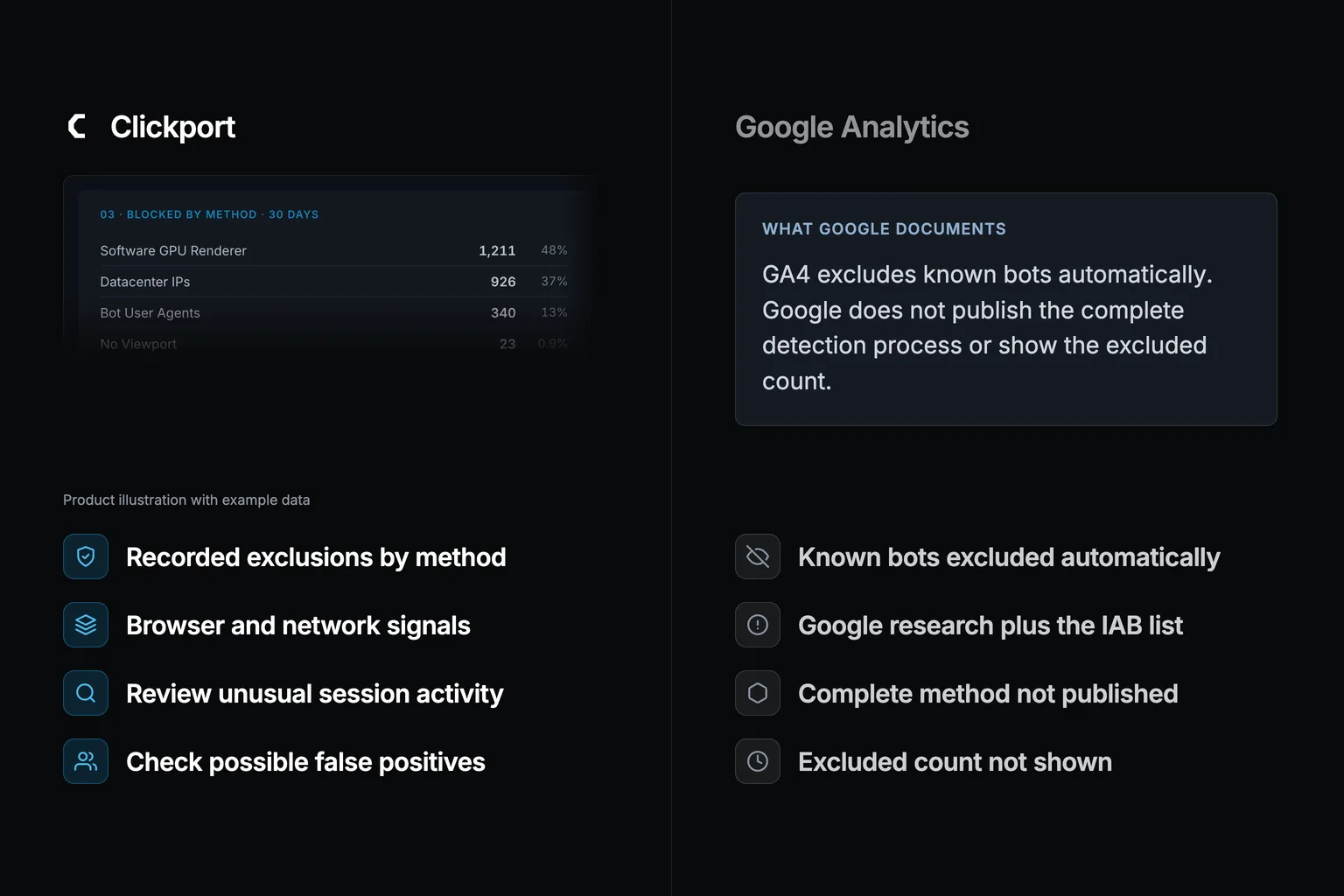
That's the job of bot detection. It decides which visits count as people before they reach your reports. GA4 filters known bots automatically, but Google does not show how much it excludes. That is a reporting limit, not proof that its filter uses only one signal.
This article explains how detection works, signal by signal, with Clickport's own checks as the worked example. For a practical starting point, use my five checks for real traffic and bots.
Quick disclosure before we start. I run Clickport, and clean data is a thing I built and sell. Read the vendor comparison with that in mind. Where a competitor does something better, I say so, and every number below is from a linked source.
- GA4 automatically excludes known bots using Google research and the IAB/ABC list. Google does not show the excluded count or publish a universal detection rate.
- 51% of all web traffic in 2024 was automated, with bad bots alone at 37%. AI scraper traffic grew 300% year-over-year. Only 2.8% of websites are fully protected.
- Clickport runs 11 detection checks across 7 filtering layers at ingestion time, from tracker-side hard stops to fingerprint velocity analysis. Blocked events never reach the database.
- No other analytics tool shows what it blocks. Clickport's Bot Center displays blocked counts by detection method, top sources, AI bot breakdown by intent, and blocklist update status.
- Behavioral scoring using Welford's online variance algorithm detects bots that pass all other checks by analyzing mouse velocity, scroll patterns, and timing distributions in O(1) memory.
What is bot detection in web analytics?
Bot detection in web analytics is the work of catching non-human traffic before it dirties your data. It decides whether you can trust a single number you read. Bots inflate session counts, and they'll wreck the metrics you trust most. They spike bounce rates, skew engagement, and distort every decision you make from those numbers. Good detection mixes behavioral analysis, device fingerprinting, IP reputation, and JavaScript environment checks to split machines from people before either one reaches a report. In my build, no single signal is enough.
Common signals analytics tools use to identify bots:
- Zero-engagement sessions. Sessions with 0-second engagement time, single-page visits, no scroll, no clicks. You'll spot them once you look. Bots rarely trigger interaction events. That's your first tell.
- Unusual traffic patterns. Sudden high-volume spikes (especially direct), abrupt drops in organic, traffic that doesn't match your usual rhythm.
- Geographic anomalies. Surges from countries that don't match your audience. That's a tell you can't ignore.
- Datacenter IP origin. Traffic from AWS, Google Cloud, Azure, OVH, Hetzner ranges. Real visitors browse from residential ISPs. That means traffic from the 3,434 datacenter ranges is suspect by default.
- Source/medium check. Known AI crawlers and spam referrers, plus traffic from sources that don't match your marketing footprint.
Common bot detection methods:
- Behavioral monitoring. Mouse velocity, scroll patterns, click timing, dwell distributions. Bots show inhuman precision or impossible speed. Humans are messier than you'd think.
- Device fingerprinting. Browser settings, plugin sets, screen resolution, WebGL renderer. Headless browsers leak signals real Chrome doesn't. That's the gap you exploit.
- IP reputation and threat intelligence. Match against known datacenter, VPN, and botnet IP databases.
- JavaScript and cookie challenges. Many bots can't execute JS or accept cookies, so tools that require both filter a chunk by default.
- Rate limiting. Request volume per second beyond what a human produces. That means more than 60 requests a minute from one IP is a machine.
These methods can overlap. A request can match several rules, while the report records only the first match. That tells you which rule acted first. It does not tell you how another analytics tool would have classified the same request.
What large network reports tell you
The Imperva 2025 Bad Bot Report reported 51% automated traffic in its 2024 dataset, including 37% bad bots. That describes traffic measured across its network. It does not mean half of the visitors in your analytics are bots.
This isn't some fringe corner of the web, whatever you've been told. Imperva blocked 13 trillion bad bot requests in 2024. Akamai reported AI scraper traffic tripling in a single year, a 300% jump. That means the AI-scraping wave is only getting bigger. Cloudflare's 2025 data shows non-AI bots driving 50% of all HTML page requests, 7% more than humans manage. That means machines already win the page-request race.
Cloudflare CEO Matthew Prince spoke at SXSW in March 2026. He put it bluntly: "We suspect that, in 2027, the amount of bot traffic online will exceed the amount of human traffic."
AI is what poured fuel on the fire. DoubleVerify found general invalid traffic jumping 86% year over year in the second half of 2024. AI scrapers like GPTBot, ClaudeBot, and AppleBot were behind 16% of known-bot impressions. The scale is hard to picture until you look at one site's logs. Barracuda's research found one web application took 9.7 million AI scraper requests in 30 days. Another took more than 500,000 in a single day.
So here's the catch. If your analytics tool can't tell a bot from a real visitor, every number in your dashboard is a guess. Your traffic is inflated. Your engagement rates are watered down. Your A/B tests are contaminated. And your marketing budget gets spent against numbers that are part fiction.
What GA4 actually does about bots
Google documents automatic exclusion of known bots using its own research and the IAB/ABC list. It does not publish the complete detection process. I cannot infer that it ignores IP addresses or browser signals from that documentation.
The practical limitation is visibility. You cannot disable the automatic exclusion or see its excluded count. A normal-looking browser name does not prove that a visit passed the filter.
What you can compare
GA4: known-bot exclusion runs automatically. The excluded count is unavailable.
Clickport: Bot Center shows recorded exclusions and the methods that triggered them. These are detector decisions, not a count of every bot.
My separate March experiment with 1,000 Puppeteer sessions reported that GA4 counted all 1,000 and Clickport blocked 800. Those results describe the five setups in that experiment. They do not establish a detection rate for your website.
Correction, 9 September 2026: I removed a GA4 miss-rate claim derived from Clickport's April detector counts. That study did not compare the same requests in GA4. Read the method and correction.
Then comes the part that makes it permanent. GA4 can't go back and pull bot traffic out of reports it has already processed. Google's data deletion feature works on parameter values, not on what kind of traffic something was. So you can't scrub it. Once bot sessions land in your GA4 property, they live there forever. That means your history stays inflated, permanently.
Why every other analytics tool is a black box too
The privacy-focused tools handle bots better than GA4, and I'll give them that. Most of them are built by people who care about this. But they all share one habit: they tell you nothing about what they block.
Plausible uses UA pattern matching, roughly 32,000 datacenter IP ranges, and referrer spam filtering. They have blocked around 2 billion bots across all subscribers since February 2023. That's a lot of bots stopped, and you never get to see one of them. That's a lot of bots stopped. None of it shows up in the dashboard. No blocked counts, no breakdown by method, no way to see what got filtered.
Fathom is blunt about it: "We're not going to detail what we've changed in our bot detection algorithm." They treat the method as a trade secret, so you can't audit it. You see clean numbers and you're asked to trust that they're clean.
Matomo goes furthest of the older tools, with a TrackingSpamPrevention plugin that covers cloud provider IPs and headless browser detection. The catch is that these are opt-in plugins, off until you find them and turn them on. And the third-party BotTracker plugin logs bot visits, which isn't the same as a real detection dashboard.
Umami, the open-source favorite, runs on one npm library (isbot) for user-agent matching. You get what that library gives you. No IP detection. No behavioral analysis. No referrer spam filtering. When Umami spots a bot, it answers {"beep": "boop"} and gets on with its day. That's the whole reply.
| Feature | GA4 | Plausible | Fathom | Matomo | Clickport |
|---|---|---|---|---|---|
| Shows blocked counts | No | No | No | Plugin | Yes |
| Breakdown by method | No | No | No | No | Yes |
| AI bot categorization | No | No | No | No | Yes |
| Manual session flagging | No | No | No | No | Yes |
| Blocklist update status | No | No | No | No | Yes |
In my experience, the whole industry treats bot detection as a checkbox. "Bot filtering: enabled." That's as far as it goes. No method shared, no blocked traffic shown, no detection rates put on the record. You're asked to hand a black box the accuracy of every number you make decisions on. I won't do that.
If you've ever stared at your analytics and thought these numbers don't feel right, this is most likely why. I've had that feeling about my own. We took the other road, and I'm proud of it: we show you exactly what we block and why.
The 7 layers a bot must survive
Clickport applies detection rules before it stores accepted analytics events. A rule can reject an event, and Bot Center records the exclusion. Some bots can pass the checks. A blocked event is a detector decision, not proof of perfect classification.
Filtering before storage keeps rejected events out of the standard reports. It cannot prove that every remaining event came from a person. I still check unusual traffic and review possible false positives.
We also built a safety net for the in-between cases. Bots we are sure about get blocked at ingestion. Suspicious sessions that get past the checks can be flagged by hand in the Sessions panel. That removes them from every dashboard query without touching the underlying data.
The pipeline is built around one idea from the bot detection research world: cost asymmetry. No single layer has to be unbeatable. It only has to make getting past it more expensive. A bot can spoof a user-agent for free. It can pay a little to rent residential proxies. It can patch navigator.webdriver cheaply. Doing all of that at once, every time, across thousands of requests, while also faking the timing of a real human, gets expensive fast. That's the point. You don't need a perfect wall. You need to make cheating cost more than it's worth.
11 detection checks, explained
Layer 3 runs 11 checks in priority order. It stops at the first match: the moment one check confirms a bot, the rest are skipped. Every blocked event keeps a record of the method that caught it and the exact detail, which bot name, which IP range, which behavioral signal.
Environment signals (checks 1-4)
These read signals the tracker's JavaScript picks up while running in the visitor's browser.
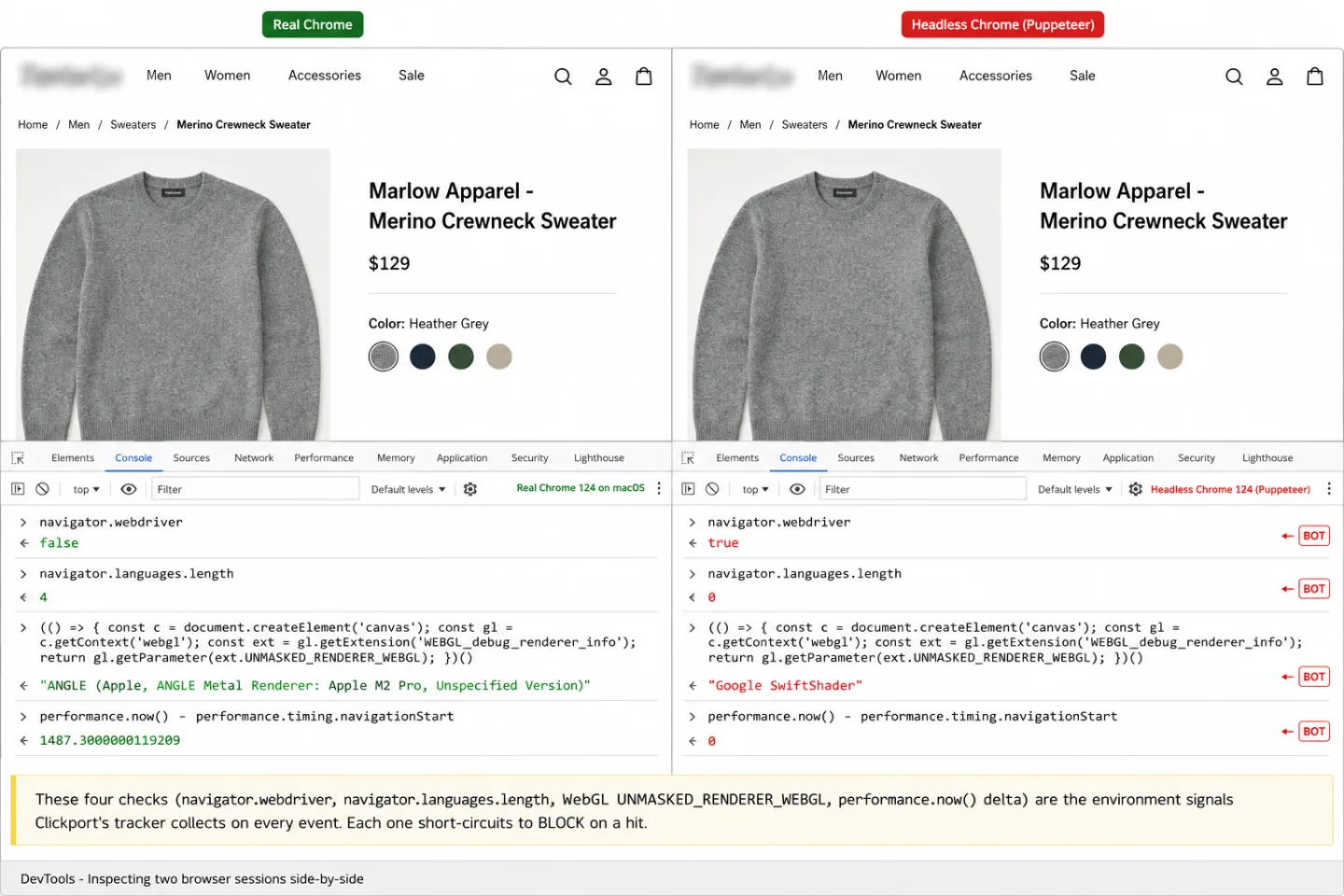
Check 1: Webdriver flag. The W3C WebDriver specification tells browsers to set navigator.webdriver = true when an automation tool controls them. Selenium, Playwright, and Puppeteer are examples. Real browsers return false. The tracker reads this at startup and sends it with every event.
Check 2: Language count. The tracker reads navigator.languages.length. Real browsers always report at least one language. A count of zero means the browser was never set up properly, and that only happens in automation.
Check 3: Software GPU. The tracker reads the WebGL renderer string via UNMASKED_RENDERER_WEBGL. Real browsers name a real GPU, like "ANGLE (NVIDIA GeForce RTX 3080)". Headless Chrome and CI machines fall back to software renderers: SwiftShader or llvmpipe. Those are well-documented headless tells.
Check 4: Instant execution. The tracker times the gap between when the script starts and when it sends its first event, using performance.now(). A gap of zero milliseconds means the script ran the instant it loaded, which no real page does. Only automation that skips realistic page loading behaves that way.
Network signals (checks 5-8)
These read server-side data that comes with the HTTP request.
Check 5: Empty user-agent. A missing or empty User-Agent header. Real browsers always send one, so an empty one is a tell.
Check 6: User-agent pattern matching. A regex that matches over 100 known bot patterns across 8 categories. They are AI bots (54 patterns), search engines (15), SEO tools (10), and social crawlers (9). The rest are monitoring services (10), feed readers (5), HTTP libraries and headless browsers (11), and vulnerability scanners (6). These are Clickport's own patterns. Google names the IAB list as an input but does not disclose the complete GA4 implementation.
Check 7: Datacenter IP blocking. The client IP is checked against 3,434 datacenter IP ranges, which is where most bots live. The ranges come from the ipcat project, plus 5 ranges we hardcode (Apple, Tencent Cloud, Huawei Cloud, Google Crawlers). The lookup is fast. It uses binary search over sorted ranges, so it takes 12 comparisons in the worst case instead of 4,000.
Here's the part that trips up most naive blocking. Block every datacenter IP and you also block real people on corporate VPNs and commercial VPN services. Providers like NordVPN and ExpressVPN run their exit nodes on cloud infrastructure. That's a real risk. A developer working through their company's AWS-hosted VPN is a person, not a bot.
So I keep a VPN whitelist: 10,700+ CIDR ranges from the X4BNet VPN list. That means a privacy-conscious human on a VPN still counts. If an IP shows up on both the datacenter blocklist and the VPN whitelist, we treat it as a real visitor. That solves the false positive that makes blunt IP blocking untrustworthy.
Check 8: Spam referrer filtering. The referrer hostname is checked against 2,342 known spam domains, so ghost-spam referrers domains from the Matomo referrer-spam-list. Referrer spam is an old trick. Bots send fake requests with a spoofed Referer header that points at a spam site. The aim is a backlink, or a curious webmaster who clicks through.
Behavioral signals (checks 9-11)
These catch the bots that sail past every environment and network check.
Check 9: No viewport. A screen width of zero on an event that isn't a pageleave. That means a browser with no screen, which is no human. Real browsers always report a viewport size.
Check 10: ARM64 Linux. User-agents that carry Linux aarch64 or Linux arm64. That means a server architecture wearing a browser's clothes. That's server and container hardware (AWS Graviton, Docker on ARM). Nobody browses the web from an ARM64 Linux server.
Check 11: Impossible interaction patterns. You'll catch this one too. It fires on a pageleave with three conditions. Scroll depth is 90% or higher, engagement time is between 0 and 5 seconds, and there was no mouse or keyboard event. Scrolling through 90% of a page in under 5 seconds while touching nothing is something no human can do.
All three blocklists, the datacenter IPs, the VPN ranges, and the spam referrers, refresh on their own every week. A status file logs the count and the last-update time for each one. If a fetch fails, the system keeps using the older cached list instead of running with no protection at all.
Behavioral scoring: catching bots that pass every other check
The 11 checks catch most bot traffic. But what about a bot running a real Chromium browser on a residential proxy with a spoofed user-agent? It passes every environment check, because it's a real browser. It passes the datacenter IP check, because it sits on a residential IP. It passes the spam referrer check, because it carries no referrer. On paper it looks human.
This is where behavioral scoring earns its keep. The tracker watches mouse movement, scroll behavior, and timing, then works out a behavior score from 0 to 100 using Welford's online variance algorithm.
The algorithm is lovely in how little it needs. It tracks running mean and variance in a single pass with O(1) memory: no arrays, no history kept around. Each new data point updates three values (count, mean, M2). The coefficient of variation can be calculated from those three at any moment.
What the score measures
Mouse velocity CV (35 points possible). The tracker samples mousemove events and works out the distance and time between them. After 5 or more samples, it figures the coefficient of variation. Real people have very uneven mouse speed (CV > 0.3) because they pause, speed up, overshoot, and correct. Bots glide at a constant speed or in mechanical lines (CV < 0.1).
Scroll velocity CV (25 points possible). The same idea, pointed at scroll events. After 3 or more samples, it measures the variance. Real people scroll in ragged bursts, stopping to read. Bots scroll at one even speed.
Timing bucket distribution (25 points possible). That means timing alone can flag a quarter of the bot score. After 10 or more mouse events, the tracker drops the gaps between them into three buckets: under 20ms, 20-100ms, and over 100ms. Real people spread across all three, with no single bucket over 50%. Bots pile into one bucket, because their timing is too regular to be human.
Presence bonus (15 points). Any mouse movement at all earns 15 points. Plenty of bots never move the mouse once.
Irregular scroll patterns
Spread timing distribution
Natural pauses and corrections
Partial mouse/scroll data
Short session duration
May be mobile or keyboard user
Constant-speed scrolling
Mechanical timing patterns
Zero interaction events
Right now the behavior score is collected and shown in the Bot Center's traffic quality section. We don't yet use it to block on its own, and the reason is honesty: behavioral scoring carries more false-positive risk than the hard signals. A keyboard-only user who never touches the mouse would score low, even though they're perfectly human. Blocking that person would be worse than letting a bot through. So we are building toward a composite score. It weighs the behavioral data alongside the other 11 checks, and it doesn't treat behavior as a yes-or-no switch.
56 AI bots, three intent categories
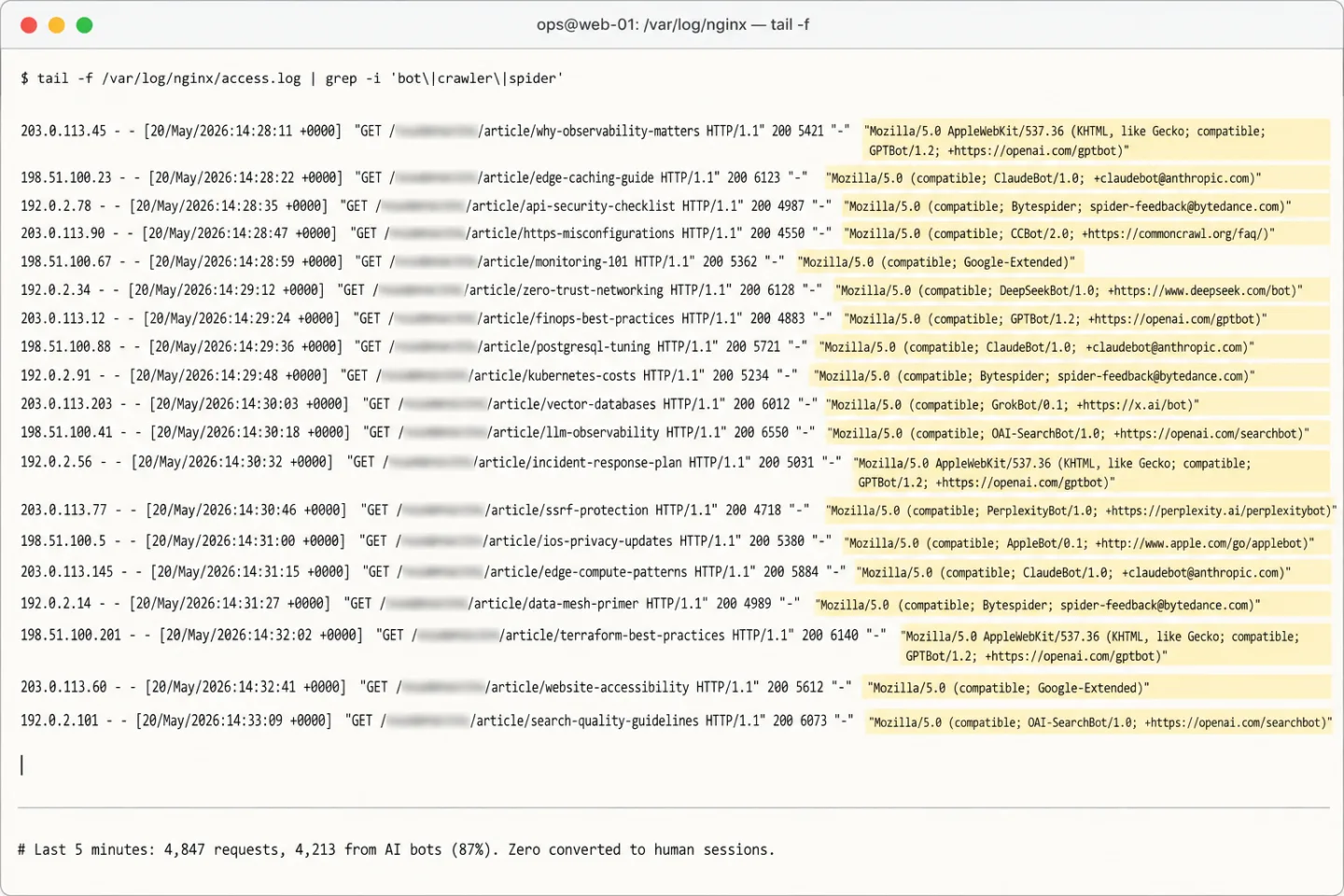
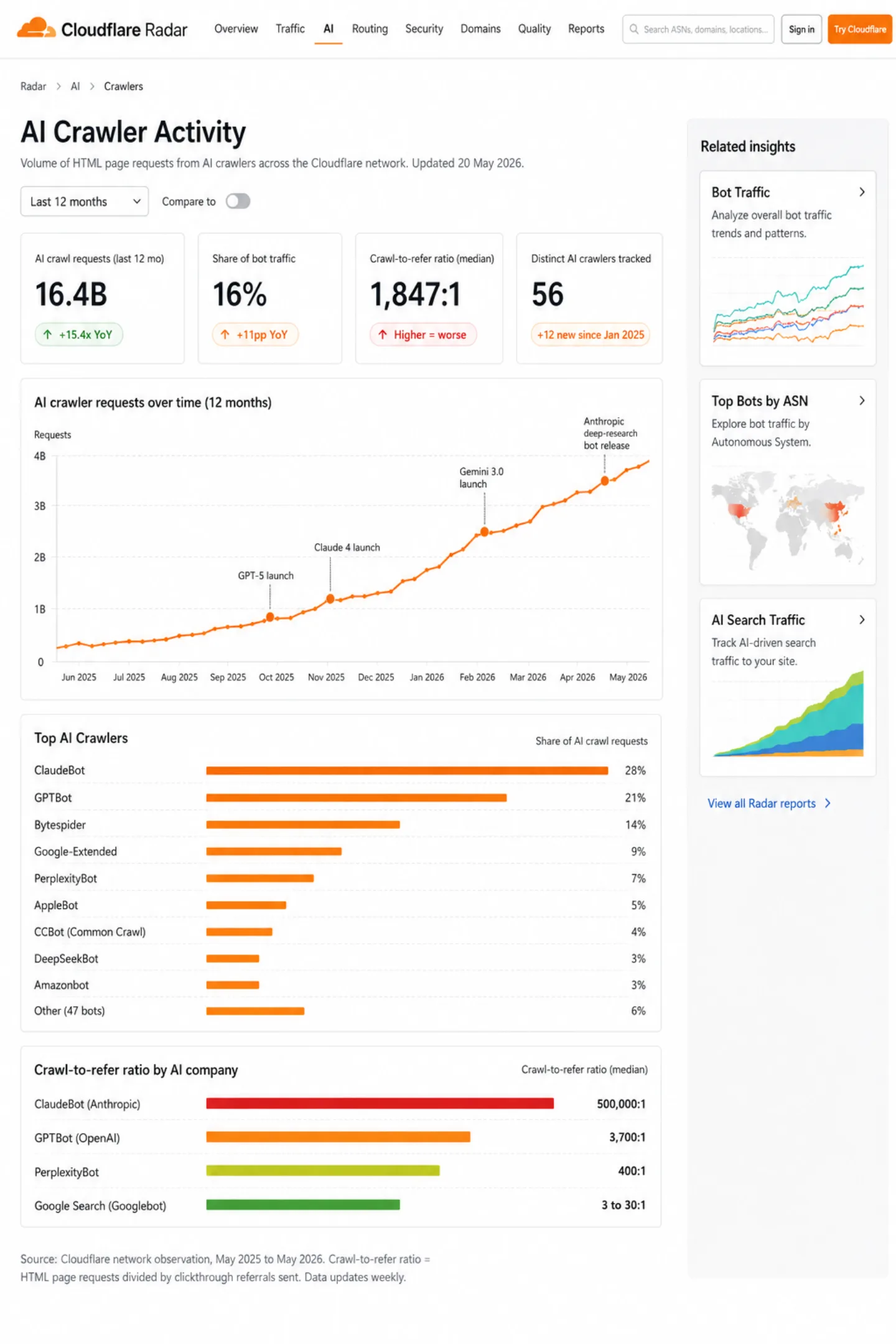
AI crawlers are the fastest-growing slice of bot traffic. Cloudflare observed AI "user action" crawling shooting up more than 15x year over year in 2025. But not every AI bot wants the same thing, and lumping them together is a mistake.
We track 56 AI bots across three intent groups: 15 live retrieval, 14 search indexing, and 24 model training. Three old legacy entries stay in the list for reference. The split matters, because what you'll do about each one is different.
Live Retrieval (15 bots)
These bots fetch a page in the middle of a live AI conversation. Someone asks ChatGPT to "look up the pricing on this website," and ChatGPT-User goes and reads your page. That's real human intent. A person wants your content right now.
Examples: ChatGPT-User (OpenAI), Claude-User (Anthropic), Perplexity-User, meta-externalfetcher (Meta), Google-Agent, kagi-fetcher.
Search Indexing (14 bots)
These crawl your site to build an AI-powered search index. Think of them as Googlebot for the AI era. Getting indexed by them means your content can turn up inside AI-generated answers.
Examples: OAI-SearchBot, Claude-SearchBot, PerplexityBot, Amazonbot, meta-webindexer, PhindBot, DuckAssistBot.
Model Training (24 bots)
These scrape your content in bulk to train large language models. They give your site nothing back. No referral traffic, no user intent, just server load and bandwidth on your bill.
Examples: GPTBot (OpenAI), ClaudeBot (Anthropic), Bytespider (ByteDance), Google-Extended, CCBot (Common Crawl), DeepSeekBot, GrokBot (xAI).
The crawl-to-refer ratio tells the whole story. Google Search crawls 3 to 30 pages for every visit it sends back. That's a fair trade. ClaudeBot crawls 500,000 pages for every visit. That isn't a partnership. That's your bandwidth being mined.
The Bot Center splits AI bot traffic by intent group. You can see which AI companies read your content, how often, and whether any of them send a visitor back. You'll also track AI search referral traffic on its own in your sources panel, to measure what it is really worth to you.
The Bot Center: seeing what others hide
Most analytics tools treat bot filtering as plumbing in the wall. It happens out of sight. You never see it, you never question it, and you never find out whether it's working.
We built the Bot Center to put bot detection in plain view.
You'll see blocked events by detection method. That shows how many were caught by UA pattern matching, by datacenter IP blocking, and by browser and behavior checks. It shows the top blocked sources, the specific bots and networks that hit your site hardest. It shows AI crawlers by intent group, with the top crawlers by name. It shows zero-engagement sessions by device. And the Protection panel tells you when the blocklists were last refreshed, so you know your protection is current.
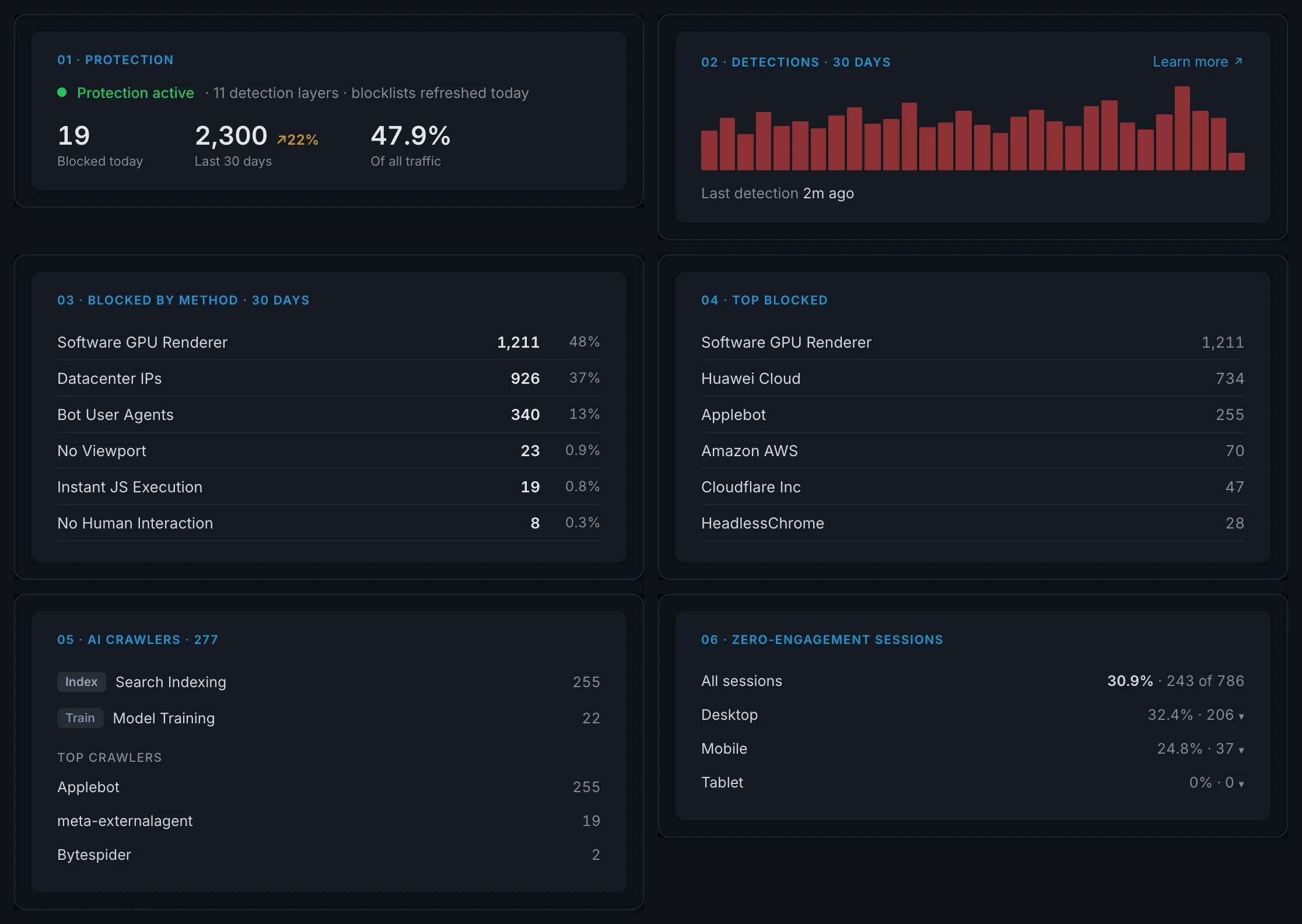
The Sessions panel gives you a second layer of control by hand. You can open any session, read its engagement metrics (duration, scroll depth, pages viewed, interaction count), and flag a suspicious one as a bot yourself. Flagged sessions drop out of every dashboard query but stay in the database, so you can always check your own work.
That's the hybrid: automatic blocking at ingestion for the bots we are sure about, manual control at the session level for the ones we aren't. Your data is clean by default, and you hold the tools to make it cleaner.
Rahul Gupta, Senior Principal Software Engineer at Barracuda, put it plainly: "Their presence can distort website analytics leading to misleading insights and impaired decision-making." The only question left is whether your tool lets you see that distortion or buries it behind a checkbox.
What we are building next
Bot detection is an arms race. The bots keep getting smarter, so the detection has to keep moving too. Here's what is coming to our pipeline.
Tier 1 (next releases)
Deferred pageview confirmation. A 2.5-second tracker beacon that waits for any mouse, scroll, touch, or keyboard event before it confirms the visit. No event, no confirmation, and the session gets flagged. This catches the bot that fires one pageview and vanishes without touching anything.
Session timeout sweep. When a session falls out of the cache with exactly one event, no pageleave, and zero engagement, we flag it as suspicious. A lot of bots hit one page and never come back.
Client Hints header validation. Modern Chromium browsers send sec-ch-ua and sec-ch-ua-mobile headers on their own. A request that claims to be Chrome 124 in its User-Agent but forgets to bring those headers is suspicious on its face. This catches bots built on HTTP libraries with a spoofed user-agent and no real browser engine underneath.
requestAnimationFrame timing probe. A 5-frame rAF probe that spots headless Chrome by its odd frame timing. Real browsers lock to the display's refresh rate (about 16.67ms at 60Hz) with a little natural jitter. Headless Chrome either fires too fast or lands on intervals too neat to be real.
IP subnet clustering. Count unique IPs per /24 subnet per site. Say 30 or more unique IPs from one /24 subnet hit a site inside 60 minutes. That's a residential proxy pool, not 30 separate people who happen to live on the same street.
Tier 2 (planned)
Composite bot scoring. Swap the yes-or-no call on soft signals for a weighted point system. Hard signals (webdriver, datacenter IP) stay instant blocks. Soft signals (a low behavior score, odd timing, unusual geography) add points. A session piles up points across several weak tells until it crosses a line. This catches the bot that's a little off in many ways instead of badly wrong in one.
Geographic anomaly scoring. Catch language and timezone mismatches and tight geographic clustering, weighed together with engagement. Take a visitor who claims to be in Germany, with a Chinese language preference, zero scroll depth, and a 2-second session. Together, those signals are far more suspicious than any one of them alone.
Tier 3 (research)
TLS fingerprinting (JA4). A Python requests library, a Go net/http client, and a real Chrome browser each leave a different TLS fingerprint. That holds even when the User-Agent header is spoofed. TLS fingerprinting catches the gap between what a bot says it is and what its network stack shows. This one needs changes at the reverse proxy, not in application code.
Session timeout sweep
Client Hints validation
rAF timing probe
IP subnet clustering
Geographic anomaly scoring
Canvas hash clustering
MaxMind Anonymous IP DB
IPQualityScore API lookups
I'll be straight about what we can't catch today. Picture a bot on a residential proxy that runs fully instrumented headless Chrome and fakes realistic behavior. It will get past most client-side analytics tools, ours included. No analytics-grade detection catches everything, and anyone who tells you otherwise is selling. The goal is to catch the 95% that's catchable and hand you the tools to spot the rest.
The math behind dirty data
Bot traffic does more than pad your visitor count. It bleeds into every metric in your dashboard at once.
Take a site with 10,000 real monthly visitors and a 3.5% conversion rate. That's 350 conversions a month. Now add 30% bot traffic. I think that's a careful estimate. CHEQ found that 17.9% of all observed traffic is fake, and DataDome reports that only 2.8% of websites are fully protected.
Now your dashboard reads 13,000 visitors and the same 350 conversions. That means your conversion rate just fell for no real reason. Your conversion rate shows 2.7%, not 3.5%. You just handed 23% of your apparent conversion rate to visitors who don't exist. Run paid ads off that and you're chasing a 2.7% target when reality already sits at 3.5%. Meta Ads bot traffic is the most expensive version of this. You pay for every bot click, and then the same click lowers the conversion rate in your reports.
Some channels get hit harder than others. CHEQ found that 22.1% of "direct" traffic is fake, the worst invalid rate of any channel. That means one in five Direct visits is a machine. A sudden Direct spike is usually the first hint a site owner gets that something is poisoning their data. Bot sessions average 0.5 seconds of engagement against 43 seconds for a human. That means a bot is off your page before a person finishes the headline. They drag your average engagement down, push your bounce rate up, and muddy the signal in every number you'll steer by.
A/B testing is hit hardest of all. Peakhour documented that 40% of their customers' test traffic came from bots, which bends the results. That means two in five test visits weren't people. When bots land on Variant A and Variant B at different rates, they create a sample ratio mismatch. That can flip statistical significance, and you ship the worse version believing it won.
The money side is brutal, and I don't think most owners see it. Juniper Research projects digital ad fraud reaching $172 billion a year by 2028. Forrester found that 21 cents of every media dollar is wasted on poor data quality. For an enterprise, that works out to $16.5 million a year.
Clean data isn't a nice extra. It's the line between optimizing for what's real and optimizing for what's made up.
Start with clean data
Every number in your dashboard hangs on one question, and I keep coming back to it: was this visitor real?
If your tool can't answer that with confidence, and can't show you the evidence, every decision you make from that data carries a risk you can't measure. That's not a place I'd build from.
Clickport runs 11 detection checks across 7 filtering layers. Blocked events never reach your database. The Bot Center shows you exactly what was caught, how, and what's still trying to get in. You can open any session and flag anything that smells wrong. It's yours to check. And we'll tell you what we can't catch yet, with a public roadmap of what's coming.
We do all of it without tracking cookies and without a lasting visitor profile. The tracker does read technical browser signals to detect bots, and consent rules for browser storage and device signals differ by country. Bot detection should protect your data quality without selling out the people who came to read your site. I believe that.
And if you flip on bot filtering and the blocked count shocks you, email me a screenshot.
If that sounds like the kind of analytics you want, do try it. Start your free 30-day trial. You'll see your real traffic in 60 seconds, no credit card required.
FAQ
What are the main methods of bot detection?
Five categories cover almost everything you'll meet in practice. Behavioral monitoring (mouse velocity, scroll patterns, click timing). Device fingerprinting (browser settings, plugin sets, WebGL renderer, screen resolution). IP reputation and threat intelligence (matching against datacenter, VPN, and botnet IP databases). JavaScript and cookie challenges (many bots can't run JS or take cookies). Rate limiting (more requests per second than a person could send). The good systems use all five and weigh the results together, because no single signal catches every bot. I've learned that the hard way.
How do I know if my analytics data includes bot traffic?
If you run GA4 with nothing else on top, your data almost certainly carries bot traffic. I'd bet on it, and you'd probably lose. The Imperva 2025 Bad Bot Report found that 51% of all web traffic is automated. The signs you'll notice are spikes from datacenter locations (Ashburn, Virginia turns up a lot) and sessions with zero engagement time. Bounce rates that look too high and traffic from places unrelated to your audience are two more.
Does GA4 automatically filter bots?
Yes. Google documents automatic known-bot exclusion. It does not publish a complete rule list or a detection percentage. A Clickport detection-method count cannot tell you which of those requests GA4 would exclude.
How do I enable bot filtering in GA4?
Known-bot exclusion already runs automatically. Google says you cannot disable it or see the excluded count. Internal-traffic filters handle your own visits. The unwanted-referrals setting changes attribution; it does not remove bot events.
Can bots execute JavaScript?
Yes. Modern headless browsers (Puppeteer, Playwright, Selenium) run JavaScript in full, analytics scripts like GA4's gtag.js included. The old comfort that JavaScript-based tracking filters bots on its own stopped being true a long time ago. Clickport's tracker reads environment signals (WebGL renderer, language count, execution timing) that separate real browsers from automated ones. That catches headless browsers that run the JavaScript but can't fake a full browser environment.
What percentage of web traffic is bots in 2026?
The most recent broad study says 51% of all web traffic is automated, with bad bots alone at 37% (Imperva 2025). So your data is probably affected. AI scraper traffic tripled in a year, up 300% (Akamai 2025). The DataDome 2025 report found only 2.8% of websites are fully protected from bot traffic, down from 8.4% in 2024. Cloudflare's CEO expects bot traffic to pass human traffic by 2027.
How does bot detection work without cookies or fingerprinting?
Clickport's bot detection works on signals that don't name a person. They are IP range matching against known datacenter providers, user-agent pattern matching, JavaScript environment checks (WebGL renderer, execution timing), and behavioral analysis in aggregate. The behavior score is variance math on mouse and scroll velocity, not tracking of any one user. IP addresses are used for detection at ingestion time and then never written to the analytics database. No cookies get set. No one is followed from site to site.
Can I retroactively remove bot traffic from my analytics?
In GA4, not really. Its data deletion feature works on parameter values, not on what kind of traffic something was. Once bot traffic is processed, it stains your historical reports for good. In Clickport, bot traffic is blocked at ingestion and never reaches the database, so there's nothing left to remove. You can flag the sessions that get past the checks as bots by hand in the Sessions panel. That removes them from every dashboard query.
What about bots on residential proxies?
Residential proxy networks (like Bright Data or Oxylabs) route bot traffic through real consumer IP addresses, which slides right past datacenter IP detection. This is the hardest category there's. We use three things against it. Behavioral scoring works because residential proxy bots still tend to move in non-human ways. Fingerprint velocity analysis spots clusters of identical browser fingerprints spread across many IPs. The third is the planned IP subnet clustering feature. No client-side analytics tool catches every residential proxy bot, and I would rather say that out loud than pretend otherwise.
How often are the blocklists updated?
Clickport's three external blocklists (datacenter IPs, VPN whitelist, spam referrers) refresh weekly through an automated script. Cloud providers like AWS, Google Cloud, and Azure add new IP ranges all the time. A weekly update is what it takes to keep up. The blocklist status, the count and last-update time for each list, is right there in the Bot Center.

Comments
Loading comments...
Leave a comment