Is My Website Traffic Real or Bots? 5 Checks (2026)
Your traffic went up last week. Your enquiries didn't. Now you want to know who all those visitors are.
Some of them are probably not people. A bot is software that visits websites automatically. But a traffic total can't tell you which visits are bots. You have to look at the visits behind it: their timing, their source, what they do, and what they bring.
This guide gives you five checks that work in any analytics tool. It also shows what our April 2026 study measured. I built Clickport to filter detected bots automatically and to show you why each visit was excluded.
- Check five things together: timing, source, visitor actions, repeated requests, and the business result.
- GA4 excludes known bots automatically. Google does not show how much it removed or publish its full method.
- April 2026 study: the median site had a recorded block share of 20%. The range was 2.45% to 82.22%.
- In the same study, 43.3% of recorded blocks first matched user-agent rules; 56.7% first matched other rules.
- Clickport filters detected bots automatically and shows the reason for each exclusion in Bot Center.
How do you check for bot traffic?
Use these five checks to find the part of your traffic that needs a closer look.
- Find when it changed. Compare the last seven complete days with the seven before them. Check whether the increase starts after a campaign, website change, or new link.
- Find the source and page. Look for the traffic source and landing page behind the increase. A landing page is the first page of a visit.
- Check what visitors do. Compare the pages they open, their recorded time on the page, and useful actions. Little activity is a reason to investigate, not proof of a bot.
- Look for repeated requests. If the pattern still looks strange, ask your host to check repeated page requests at those times. A request is a call to your server for a page or file.
- Check the business result. Compare tracked enquiries with the messages you receive, or purchases with completed orders. A recorded form submission is not necessarily a useful lead.
For example, more homepage visits with no extra enquiries can mean poor traffic, a weak offer, broken measurement, or automation. The next check depends on what else changed.
Google's Direct traffic guide explains why a missing source can have ordinary causes. Shared links, redirects, and missing campaign information can all complicate attribution. The ChatGPT Direct guide covers one specific case.
What should you check first?
Choose the problem you see. This guide suggests a next step. It doesn't scan your website or calculate a bot percentage.
Your next check
Start with the affected source and page
Compare the unusual visits with an earlier period. A single traffic metric cannot establish whether they are bots.
Next: check the timing, recorded actions, and results outside your analytics.
Keep a note of what you find. If the increase follows a campaign and produces useful enquiries, investigate that explanation first. If requests repeat without a clear purpose, inspect them more closely.
Does GA4 already filter bot traffic?
Yes. GA4 automatically excludes traffic it identifies as known bots and spiders. You do not need to turn on a bot-filtering checkbox.
Google describes a combination of its own research and the IAB/ABC bot list. Its documentation also says you cannot see how much known bot traffic it excludes.
In practice, you see the filtered totals without a report of the excluded visits. Google does not publish its complete detection method or a guaranteed detection rate. The remaining visits are not a verified human audience.
Use the Traffic acquisition report to compare sources and engagement. Then inspect the affected pages. If activity is missing across the site, verify event collection before blaming bots.
A high bounce rate is not a bot test. Google's engagement definition depends on time, key events, or multiple page views. A person who reads briefly and leaves can count as a bounce.
There is also a difference between hiding rows in a report and stopping future collection. Keep those changes separate when you assess whether a fix works.
What did our earlier bot study measure?
In April 2026, I studied the requests Clickport blocked and the tracking events it accepted across the sites we measure. The study period was March 24 to April 23, 2026.
Two findings stood out. The results varied widely from site to site. And no single detection rule did most of the work.
How did the results differ between sites?
The median recorded block share was 20%. That means about one blocked request for every four accepted tracking events at the middle of the site results.
I calculated each site's share as blocked tracking requests divided by blocked tracking requests plus accepted tracking events. The ratio compares tracking records. It doesn't measure the percentage of visitors who were bots.
Clickport study: March 24 to April 23, 2026
Recorded block share by site
- Median site
- 20%
- Lowest recorded share
- 2.45%
- Highest recorded share
- 82.22%
Calculation: blocked tracking requests ÷ (blocked tracking requests + accepted tracking events), expressed as a percentage.
The middle half of site results ranged from 13.5% to 50.3%. Each site contributes one result, so a site with more tracking records doesn't dominate the median.
A range that wide means a general bot percentage tells you little about your own website. Your own detection report tells you more.
What do the large networks measure?
Security networks count requests at the network level, before any analytics tool sees them. Their figures are higher.
Imperva's 2025 Bad Bot Report says automated traffic was 51% of all web traffic in 2024. It was the first time in a decade that automated traffic passed human traffic. Imperva counts 37% of all traffic as malicious bots.
Akamai reported in June 2024 that bots make up 42% of web traffic, and that 65% of those bots are malicious.
These figures count requests to servers. Many of those requests never run an analytics tag. So they don't tell you the bot share in your reports. They tell you that automated traffic is normal, and that it is large.
Which detection rules recorded the blocks?
User-agent rules accounted for 43.3% of recorded blocks. Other rules accounted for 56.7%. That means more than half of the blocks needed a browser, network, or activity check first. A list of bot names alone didn't record them.
A user agent is the browser or bot name sent with a request. Each blocked request appears under the first rule it matched.
Clickport study: March 24 to April 23, 2026
Share of recorded blocks by first matching rule
- User-agent patterns43.3%
- Software GPU renderer36.0%
- Datacenter IP18.9%
- Fingerprint rate rule1.3%
- Other signals0.5%
The other checks used browser, network, and activity signals. For example, the GPU rule checked how the browser draws graphics. The fingerprint rate rule checked repeated browser characteristics across requests.
The datacenter category may include real visitors using Apple's iCloud Private Relay. I disabled the fingerprint rate rule on April 11 after false detections. Its earlier results remain in this historical chart.
The 56.7% figure measures Clickport's rule allocation. This study didn't compare the same requests in GA4, so it can't establish a GA4 miss rate.
Read the study method and corrections
What we counted. The site calculation compares requests rejected by the detector with accepted tracking event rows. Accepted events are not verified human visits. One visit can generate several events, and other collection rules can exclude records from both sides.
Which sites we included. The site-level results require more than 100 accepted events per site. The detection-method chart includes all sites in its date range. These two calculations therefore use different groups of records.
Dates and rounding. The accepted-event query looks back 30 days from the query time. The blocked-request query uses calendar dates from 30 days earlier. Their boundaries differ slightly. Site percentages were saved to two decimal places. The median and middle-half range above are calculated from those archived percentages.
Rule changes. Detection rules changed during the study period. The counters do not record the rule version or preserve each request for a later accuracy review. The results describe the detector at that time.
Corrections to the original article. The 20% result is a recorded block share, not a visitor-level bot rate. The method split cannot establish the earlier claim that GA4 missed 57% of bots. The old estimator also used Direct traffic and device mix, which cannot establish a reliable bot percentage. The practical checks below replace it.
Are AI crawlers the same as AI visitors?
No. A crawler request and a person arriving from an AI answer are different events. Keep them separate when you compare reports.
A crawler can fetch your page without running the JavaScript that sends analytics events. That request can appear in your server logs without becoming a GA4 pageview.
A browser-based bot can run the tag. Server integrations can also send events. Google's pageview guide and Measurement Protocol documentation describe those collection paths.
In Clickport, normal visitor tracking uses the tracker. Seeing server-side AI requests requires an additional AI Agents connector. It starts collecting after installation and needs access to your hosting setup.
This explains why two reports can disagree without either counting the same thing twice. Your host counts requests; your analytics records the events it receives and accepts.
How big is AI crawler traffic?
Cloudflare Radar found that AI bots made an average of 4.2% of HTML requests in 2025. That is about one request in 24.
The mix changes fast. Cloudflare compared May 2024 with May 2025. GPTBot's share of AI crawler traffic rose from 5% to 30%, and its requests grew 305%. Meta-ExternalAgent was a new entry at 19%. Bytespider fell from 42% to 7%.
A Fastly analysis has a heading that says it well: "Robots.txt: A Suggestion, Not a Shield." Fastly found that three companies sent 95% of the AI crawler traffic to high-authority websites: Meta with 52%, Google with 23%, and OpenAI with 20%.
Most of these requests never appear in your analytics, because the crawler doesn't run the tag. You find them in your server logs.
What does a real bot campaign look like?
Three documented cases show the range.
Read the Docs, May 2024. One AI crawler downloaded 73 TB of zipped HTML files in a month, and almost 10 TB on a single day. The bandwidth bill was over $5,000.
Perplexity, August 2025. Cloudflare reported that Perplexity used undeclared crawlers when a website blocked its declared crawler. They used a generic browser name that imitates Chrome on macOS, and they ignored robots.txt files.
A review platform, March 2026. DataDome blocked a scraping attack that used 855,000 IP addresses over 13 days. The total was 80 million blocked requests, with a peak of 1.35 million every two hours.
The pattern is the same in all three. The bot doesn't announce itself, and it changes its address. A list of names or a list of IP addresses alone doesn't stop it.
How do you stop unwanted bot traffic?
Match the action to the problem you confirm.
| Your problem | The relevant action |
|---|---|
| Unreliable analytics | Review detection evidence and correct the collection or reporting rules. |
| Spam enquiries | Improve validation and abuse protection on the form or signup process. |
| Server load or scraping | Ask your host about request limits and firewall controls for the confirmed pattern. |
| Useful search crawlers | Verify their identity before applying rules that could block them. |
Clickport filters analytics events. It does not act as a firewall for your website or stop a crawler downloading a page.
A crawler name is not enough to identify it. Google explains how to verify requests from its crawlers. Your host can help with that check.
A robots.txt file tells cooperative crawlers which pages they may fetch. It is not an access barrier. Google's robots.txt guide explains its limits.
After a change, check both the unwanted activity and your normal visitor path. A lower traffic total is useful only if the change preserves the visits you want.
Which detection layers exist?
No single check finds every bot. Detection works in layers.
- Names. A list of user-agent strings finds bots that identify themselves. The open-source isbot library works this way. A bot that copies a browser name passes.
- Networks. IP lists find traffic from known abuse sources and datacenters. FireHOL collects public lists. A bot on a home connection passes.
- Browser signals. Checks of how the browser behaves find automation tools.
- Activity. Timing and repetition show patterns that people don't produce.
Cloudflare documents four detection engines of its own: heuristics, JavaScript detections, machine learning, and anomaly detection. Our study above shows the same idea at a small scale. 56.7% of recorded blocks first matched a rule that wasn't a name.
How does Clickport filter bot traffic?
Clickport filters detected bot traffic from your analytics automatically. The filtering starts when you install the tracker. Bot Center shows which detection methods acted and the reason behind each exclusion.
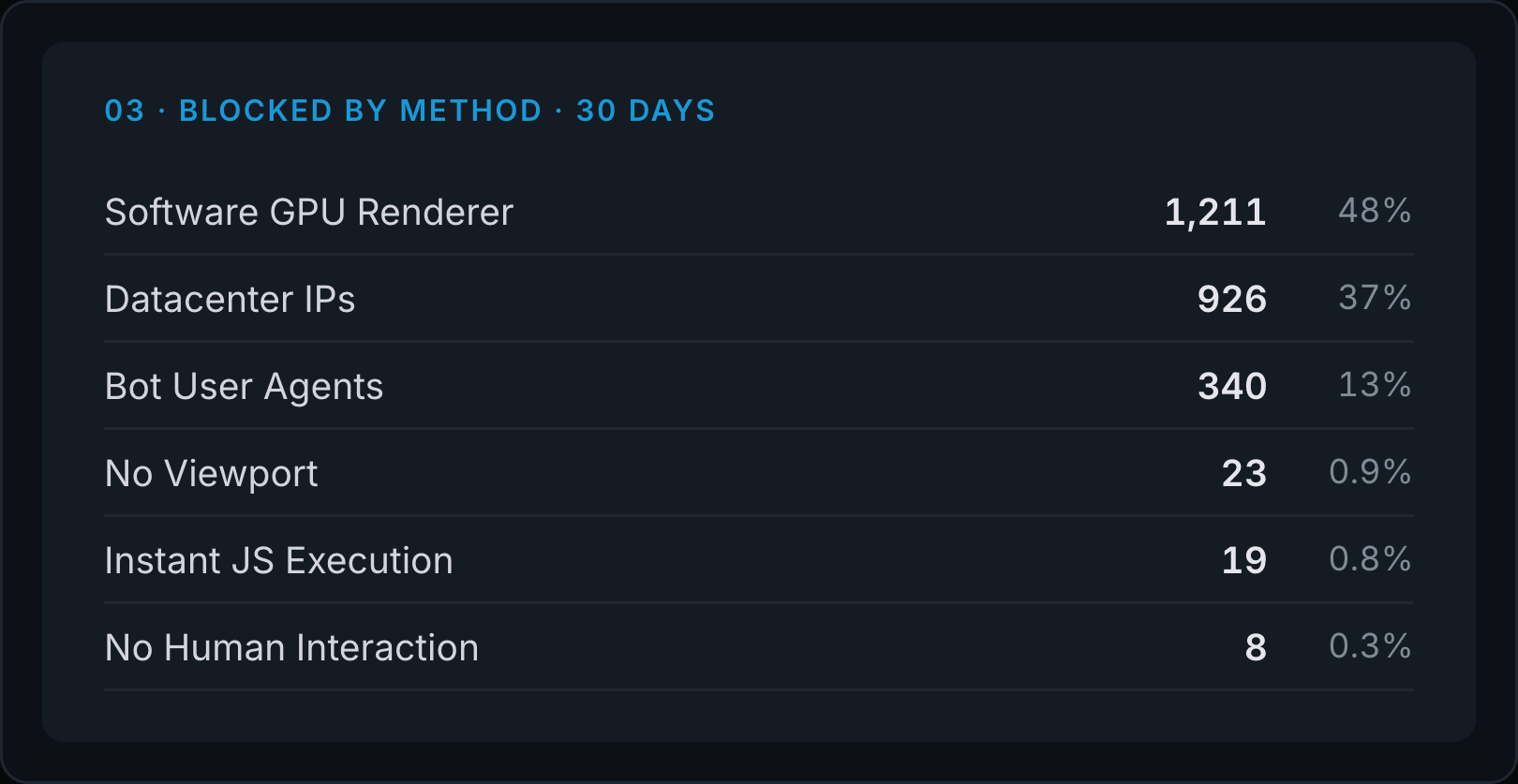
I built Bot Center because a filter you can't inspect asks you to trust a number. Here you can review what the filter catches, then open individual sessions for traffic that still looks unusual. A session is a visit.
- Open Settings, then Bot Center. Review Blocked by method and Top blocked. These are site-wide reports with their own date range.
- Return to the dashboard and open Sources. Choose its Sources tab, then click an unusual source to filter the dashboard.
- Open Sessions and expand a visit. Check its pages, time, scroll depth, and recorded actions.
- Select a goal for a useful result. Measure visits that reach an enquiry confirmation page, then compare them with the enquiries you receive.
A goal is an action you choose to measure. Configure it for a completed enquiry, a signup, or another useful result.
This connects traffic quality to a business decision. You can inspect the source behind weak results before you change the page or spend more on that traffic.
Clickport has limits too. It filters analytics events. It isn't a firewall, and it can't stop a crawler from downloading a page. No detector is perfect, so treat each result as evidence to review.
Start your free Clickport trial and check the traffic behind your next website decision. All features are included for 30 days, with no credit card required. The setup guide takes you through installing the tracker and verifying your first visit.
How do manual exclusions and zero-engagement sessions work?
Zero engagement means little recorded activity. Inspect the sessions and verify your installation before deciding to exclude them.
The session menu includes Flag as bot. It excludes the recorded session and its events from normal metrics while keeping the records for review.
Use Undo while it appears to cancel the action. After the action completes, the interface has no unflag option. Delete permanently removes the session and its events after the Undo window closes. The Sessions guide explains these actions.
Frequently asked questions
Can a traffic checker tell whether my visitors are real?
A public estimate of a website's audience cannot inspect your individual visits. Use your own analytics and, when needed, your host's request records. The checker on this page suggests a next step; it does not scan your website.
Is 100% bounce rate proof of bot traffic?
No. A short human visit can meet GA4's bounce definition. Check the source, page, tracking, and repeated activity before deciding that a group of visits is automated.
Does Direct traffic mean bots?
No. Direct means the analytics tool lacks a clear referral source. People can arrive through typed addresses, shared links, documents, or links with missing source information.
Can Clickport block bots from reaching my website?
Clickport excludes detected bot events from its normal analytics. It does not replace your hosting provider's request controls or a firewall.
Can every bot be detected?
No. Bots can imitate browser activity, and legitimate visits can trigger suspicious signals. Treat detection results as evidence to review, not a guarantee of perfect classification.
Check the visits before you trust the total
A traffic total is the easiest number to read and the hardest to trust. The five checks above work in any tool, and they cost you nothing.
In our study, the recorded block share ran from 2.45% to 82.22% from site to site. So don't borrow someone else's bot percentage. Look at your own visits.
I built Clickport to make that look short: the filter runs automatically, Bot Center shows its reasons, and Sessions shows the visits behind a source.
Start your 30-day free Clickport trial. All features are included, and no credit card is required. The switching guide takes you through the move from Google Analytics.

Comments
Loading comments...
Leave a comment