Sudden Spike in Direct Traffic: Is It Bots? (2026 Study)
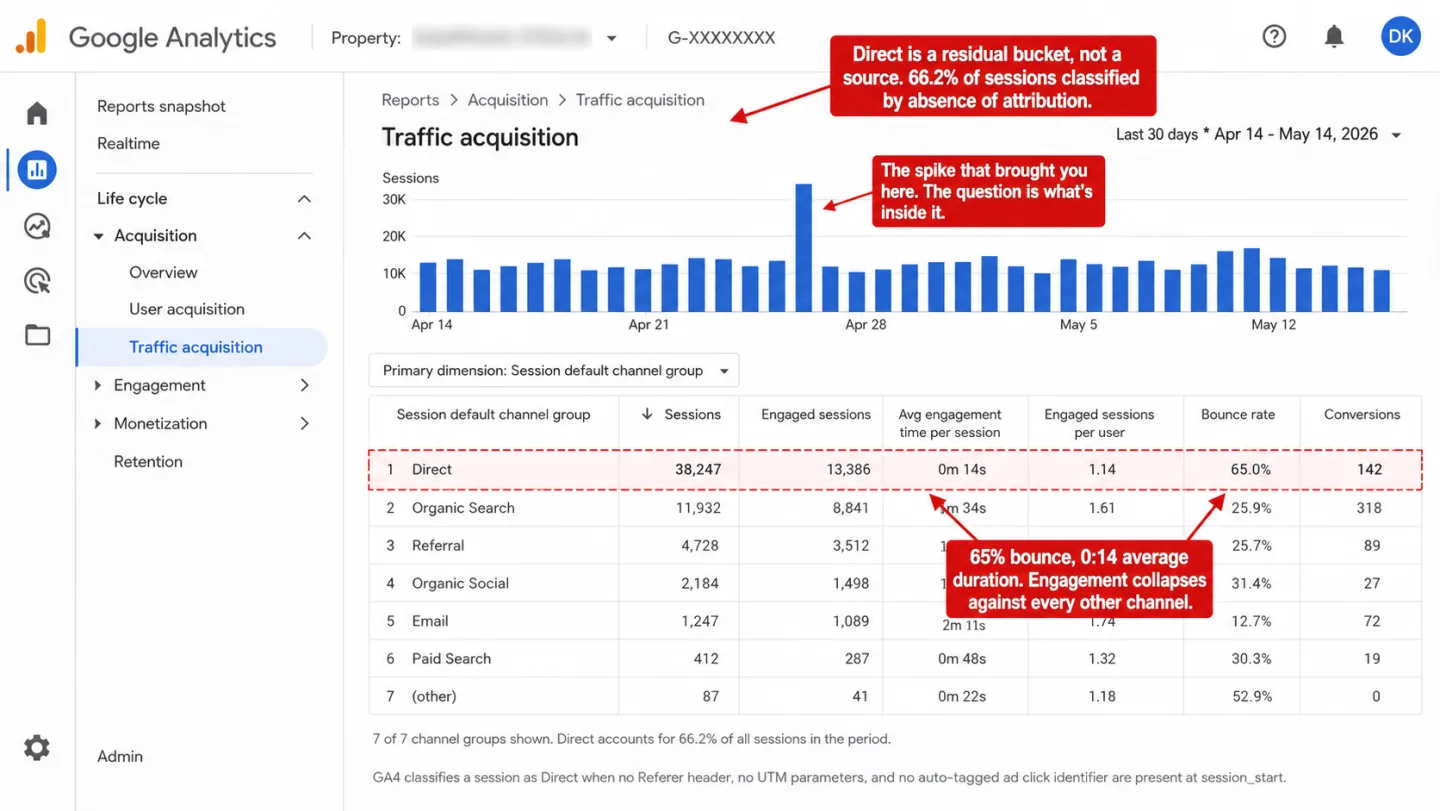
On the biggest site we monitor, 76% of sessions show as Direct. Not Organic, not Paid, not Social. Direct. I think Direct is the most misread number in web analytics, and I'll show you why. And that is what is left after our ingestion-layer bot filtering rejects every automated request it catches. Anything that slips through lands in Direct too. So every spike you go to investigate in that channel is already sitting on top of a pool you can't see into.
Direct isn't where your loyal visitors live. It is where your analytics tool puts the traffic it gave up on.
- Across the sites we monitor, 66.2% of sessions classify as Direct. On the largest, it is 76.3%. Direct isn't a traffic source. It is the bucket analytics uses for sessions it can't classify.
- Clickport runs eight ingestion-layer checks that reject bots before they become sessions. GA4 doesn't. It filters one user-agent list and counts everything else, including headless Chrome on residential IPs, as human.
- SparkToro's 2023 study found 100% of visits from TikTok, Slack, Discord, WhatsApp, and Mastodon lose their referrer. All of it lands in Direct. Most of it is real humans, not bots.
- A bot spike looks different from a dark-social spike. Bots bounce near 100%, cluster in one country, and concentrate on the homepage. Dark social shows normal engagement on deep content pages. The triage takes 15 minutes.
The data: what "Direct" looks like across our network
Across the sites we monitor, 66.2% of all sessions in the last 30 days classify as Direct. On the single largest site it's 76.3%. That means the busiest channel on your biggest pages is mostly traffic nobody could label. Put another way: two out of every three sessions, and on one site three out of four, arrive with no source attached. Direct isn't a traffic source. It is the bucket your analytics tool reaches for when it can't tie a session to anything else.
In that same 30 days, our ingestion layer caught and rejected every automated request it could before any of it became a session. None of it ever reached a dashboard. Here is what we blocked, broken down by the method that caught it, as a share of total blocks.
Every one of these requests would have landed in Direct if it had slipped through. None of them sent a Referer header. None carried UTM parameters. That is how bots get into analytics tools. Quietly, with no attribution attached, into the one bucket where attribution was never going to exist anyway.
The same shape shows up in the direct sessions that do survive. On the largest site we monitor, 65% of Direct sessions bounced, 60% had zero duration, and 70% never scrolled past the first screen. Read that in plain English: most of this channel does nothing. It is a thick layer of dead weight sitting inside a channel most analysts read as loyal visitors typing the URL from memory. They aren't typing anything.
These numbers aren't freakish. I'd bet your own dashboard is showing you something close to this right now, and you can't see it by looking. A sudden spike in direct traffic is almost never a sudden spike in direct traffic. It is a spike in things that couldn't be classified, dropped on top of a pool of other things that couldn't be classified, handed to you as one number.
Three things hiding in your Direct bucket
Direct traffic isn't a source. It is the absence of one. GA4 calls a session Direct when three things go missing at once: no Referer header, no UTM parameters, and no auto-tagged ad click identifier (gclid, dclid, msclkid). With all three gone, GA4 sets source = (direct), medium = (none), and drops the session into the Direct channel, as documented in Google's Default Channel Group reference.
Three very different crowds meet those conditions. They land in the same bucket. You see them as one thing. And the pool is deep before any spike arrives: across the sites we measure, the median site runs 29% Direct on an ordinary day.
You can't fix "direct traffic" as one problem, because it isn't one problem. A bot spike and a dark-social spike call for opposite responses. Bots need tighter filtering. Dark social needs an engagement number you can trust. Referrer loss needs an audit of your URL plumbing. Treat all three as one number and you spend a week blaming the wrong thing.
So before you can diagnose which one you're staring at, you need to know what each one looks like on the inside.
How bots end up classified as Direct
Bots end up in Direct because they don't send a Referer header. That header is optional. RFC 7231 specifies that a client sends it only when the request was triggered by a prior resource. A bot calling your page directly has no prior resource. No Referer. No attribution.
The tools bots run on behave this way out of the box. curl doesn't send Referer by default. Neither does wget. Python's requests library, Node's axios, Playwright, Puppeteer, and Selenium all launch with no Referer unless the script sets one on purpose. Commercial scraping services (Bright Data, Oxylabs, ScraperAPI, Apify) document Referer as a header you should add by hand to look more natural, which is another way of saying their default is nothing. A bot that doesn't bother to spoof a referrer looks exactly like a person who typed your URL.
It gets worse when the bot runs a full browser. Headless Chrome and Playwright execute JavaScript, which means they fire your analytics tracker. The pageview leaves the browser with document.referrer set to an empty string, reaches your analytics endpoint, and gets filed as Direct. Which means a scraper that fakes 10 seconds of dwell time produces a Direct session that looks roughly like a human who bounced. Run that at volume and you've got your spike.
![A screenshot of Chrome DevTools with the Network panel and Headers tab open for a single article-page request, with four red editorial annotations. The Request Headers section is expanded and red-dashed-bordered, showing Sec-Ch-Ua, Sec-Ch-Ua-Mobile, Sec-Ch-Ua-Platform 'Linux', Sec-Fetch-Site: none, and a User-Agent spoofed as Mozilla/5.0 Linux HeadlessChrome/145.0.0.0 Safari/537.36. A conspicuous gap below the headers shows [MISSING] Referer (no Referer header sent). The General section shows Remote Address 185.220.101.42:443 and Referrer Policy strict-origin-when-cross-origin. The request list on the left shows article-page highlighted in pale red, with gtm.js and g/collect requests visible below. Annotations read 'Looks like real Chrome. The HeadlessChrome substring is the only tell GA4's IAB list can catch,' 'No Referer header. document.referrer arrives empty. The session lands as Direct,' 'Sec-Fetch-Site: none means the request wasn't initiated by a prior page. Bot signature, classified as Direct.' A footnote notes GA4's IAB filter catches the HeadlessChrome substring while real-world bots replace it, and that Remote Address 185.220.101.42 is in a known datacenter range not seen by GA4.](/blog-assets/direct-traffic-spike-bots-devtools-bot-headers.webp)
Residential proxies are the one change that broke old bot detection. IP blocklists only catch traffic from known datacenter ASNs. Residential proxy networks build their exit nodes out of bundled SDKs and free VPN apps, then rent them out at premium rates for one reason: the IPs carry no bad reputation. Academic work on these networks keeps reaching the same conclusion. Which means detection now needs behavioral signals, not IP reputation, because the exit nodes look like ordinary home broadband.
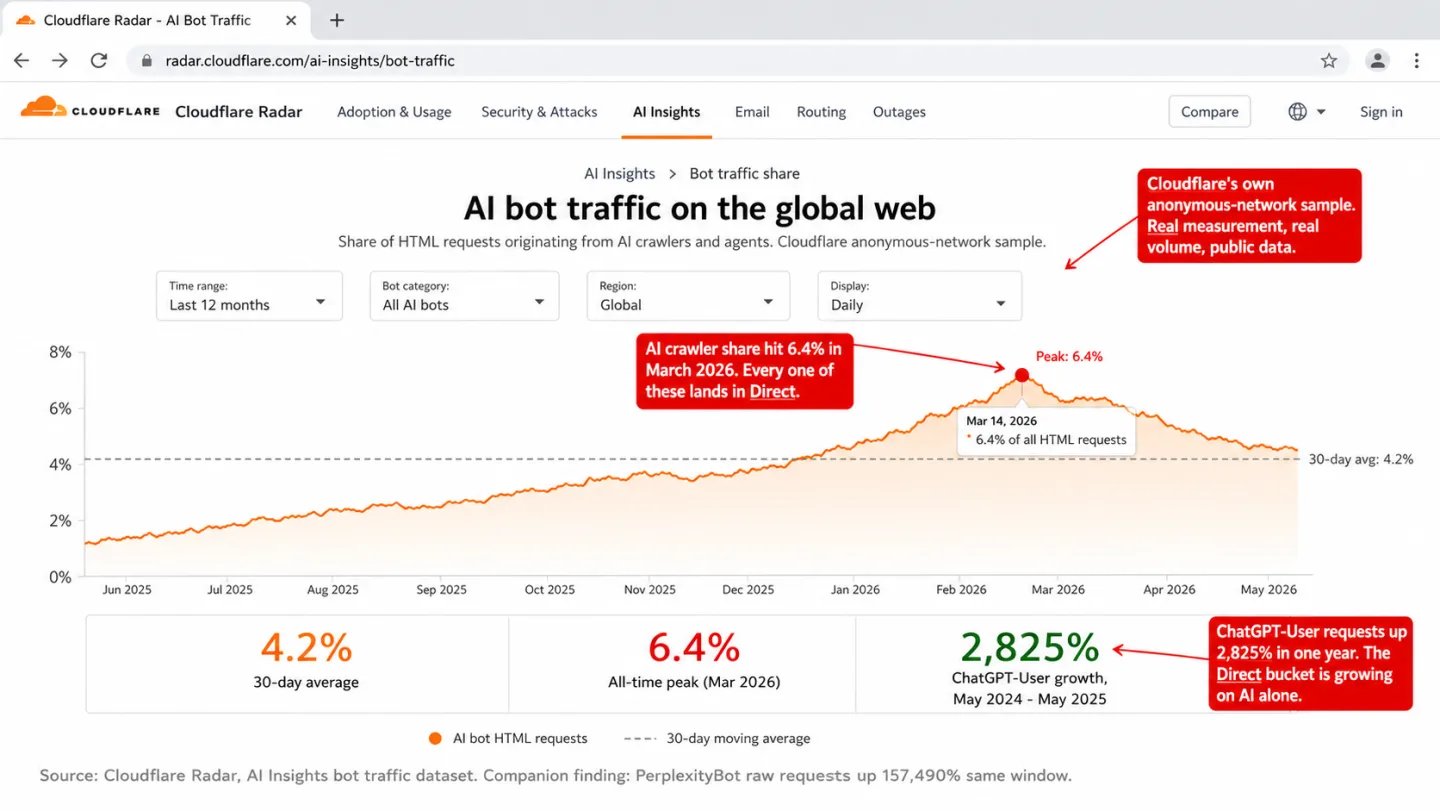
AI crawlers deserve their own line. Cloudflare tracked ChatGPT-User requests up 2,825% from May 2024 to May 2025, and PerplexityBot raw requests up 157,490% over the same window. Those aren't typos. Barracuda documented one web application taking 9.7 million AI scraper requests in 30 days. That means a single app absorbed 9.7 million scraper hits in a month, and you'd never see it in GA4. Many of those crawlers run JavaScript now, so they fire your tracker and land in Direct.
Cloudflare CEO Matthew Prince said it plainly at SXSW in March 2026: "Before the generative AI era, the internet was only about 20% bot traffic... in 2027, the amount of bot traffic online will exceed the amount of human traffic." If he's right, and I think he is, your Direct bucket grows right along with it. "Is my direct spike bots" stops being a niche question and becomes everyone's.
Why GA4's filter catches almost none of them
GA4 filters bot traffic with one mechanism and one only: the International Spiders and Bots List maintained by the Interactive Advertising Bureau. Google's own documentation says it plainly: "known bot and spider traffic is identified using a combination of Google research and the International Spiders and Bots List." The filter is automatic. You can't configure it. You can't see what it threw out.
And it only catches bots that own up to being bots. A crawler whose user-agent says Googlebot/2.1 gets filtered. A scraper whose user-agent says Mozilla/5.0 (Windows NT 10.0; Win64; x64) AppleWebKit/537.36 (KHTML, like Gecko) Chrome/145.0.0.0 Safari/537.36 walks straight in. No behavioral analysis. No IP reputation check. No JavaScript environment fingerprinting. Just a name-check against a list.
This isn't me guessing at a gap. I've watched an independent controlled test from May 2025 do exactly this, with three different bot setups pointed at a GA4 property. GA4 recorded 22 pageviews from a script using the user-agent PostmanRuntime/7.43.4. It recorded 40 pageviews from Puppeteer wearing a spoofed browser user-agent. It recorded 17 pageviews from traffic on datacenter IPs. Every one of them survived GA4's 48-hour processing window and showed up in standard reports as a real session. In plain English: every fake setup they tried counted as a person.
Our own 30-day numbers say the same thing at scale. 34.2% of the bot requests we blocked tripped the headless Chrome signal: a swiftshader or llvmpipe WebGL renderer, which a real consumer GPU never returns. Another 28.6% came from known datacenter IP ranges. GA4's IAB list catches neither category. Run the math on the same traffic and, in plain English, roughly two-thirds of what we blocked would sail through GA4's filter as real sessions, most of them into Direct. We cover GA4's bot detection limits in detail in a separate controlled test.
☑ Bingbot (self-identifies)
☑ GPTBot (self-identifies)
☑ ClaudeBot (self-identifies)
☑ AhrefsBot (self-identifies)
☑ Well-behaved crawlers
☐ Playwright, Puppeteer, Selenium
☐ Residential proxy bots
☐ PostmanRuntime hits
☐ Datacenter IP traffic
☐ Click fraud bots
That gap matters for the exact question you came here to answer. If GA4 shows you a direct spike and you suspect bots, GA4 can't help you confirm it. It doesn't tell you what it filtered out. It doesn't show per-session engagement fingerprints. It doesn't expose IP or browser-environment signals. You're left diagnosing the spike with information GA4 never bothered to collect.
Simo Ahava, who writes the most widely read GA4 implementation guide on the internet, was already making this point in 2019, when he wrote that Google Analytics bot filtering "is far from comprehensive enough to tackle all instances of bot traffic that might enter the site." The list of things it misses has only grown since.
Dark social moves real humans into Direct too
Not every direct spike is bots. Sometimes it's the exact opposite: real humans on real browsers whose referrer vanishes between the share and the click. I've chased plenty of these thinking they were bots. The industry calls this dark social, a term Alexis Madrigal coined in a 2012 Atlantic piece after Chartbeat flagged how much Atlantic traffic was arriving with no referrer at all.
The cleanest modern measurement came from SparkToro in April 2023. Rand Fishkin and his collaborators sent 16 unique tracking URLs through 11 social networks with a panel of roughly 100 testers, then checked GA4's attribution against the channels they knew they had sent through. No one has published better numbers on this.
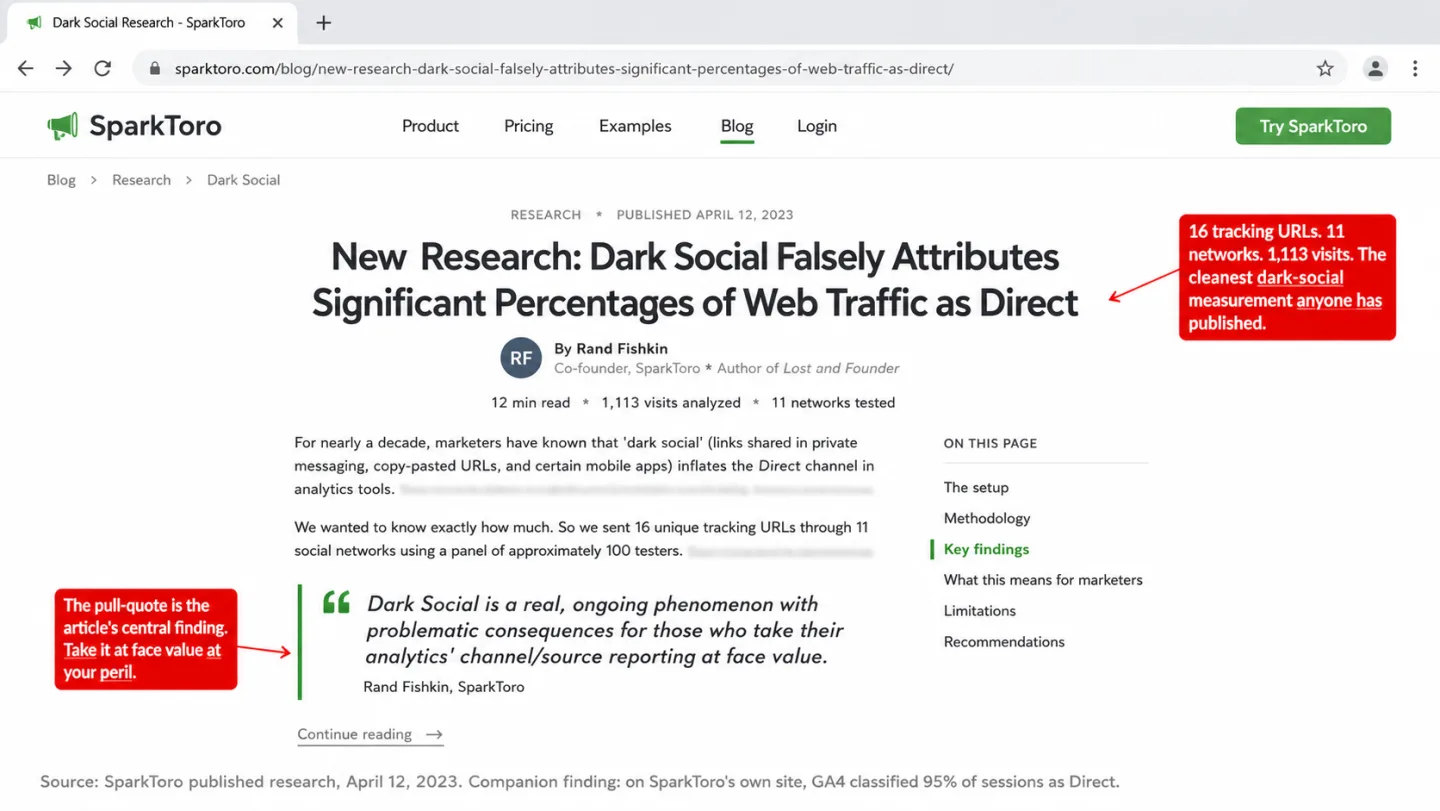
Fishkin summed it up in the line that matters: "Dark Social is a real, ongoing phenomenon with problematic consequences for those who take their analytics' channel/source reporting at face value." On SparkToro's own site, GA4 was calling 95% of sessions Direct when the real attribution, measured through tracking URLs, was nothing close to that. In other words, almost the entire channel was mislabeled.
The mechanism is the same every time. Someone taps a link inside an in-app browser (LinkedIn, Instagram, TikTok, WhatsApp, Slack, Discord) or pastes a copied URL into a fresh tab. The starting point isn't a web page. There is no Referer to send. Your site gets an HTTP request with no referrer header, sees no UTM in the URL, and files the session under Direct.
Apple's platform behavior piles on. Instagram, Facebook, and LinkedIn all open external links inside their own WKWebView-based in-app browser, which doesn't share session state with Safari. There is no prior web page for the browser to treat as a referring document, so the Referer header never gets set and document.referrer arrives empty at your tracker. A mobile user tapping a link in a LinkedIn post goes through a sequence that looks nothing like a desktop click-and-browse, and by the time the tracker fires, the attribution chain is already gone.
So a dark-social spike on a Monday morning is often just a LinkedIn post that caught fire over the weekend. The engagement looks right. You'll see real people scroll, click internal links, sometimes convert. Read the channel attribution alone and you'll see a bot-style spike. Read the engagement and you'll see the opposite of a bot. That difference is the very first thing I check when I start diagnosing.
Browsers quietly stopped sharing the full referrer
Browsers made a default change a few years back that quietly affects every site on the web. It is worth knowing the exact years. Chrome 85 (August 2020) and Firefox 87 (March 2021) both flipped their default Referrer-Policy from no-referrer-when-downgrade to strict-origin-when-cross-origin. Safari had been stripping referrers to classified trackers since ITP 2.0 in 2018 and now downgrades all third-party referrers to origin by default.
Here is what that does in practice. A user clicks from https://example.com/article/some-path to your site, and document.referrer reads https://example.com/. The path is gone. The query string is gone. Domain-level attribution still works, which is why this change didn't wipe out analytics altogether. But put any redirect in the chain and the referrer collapses further. Click through a t.co or bit.ly link and your analytics sees t.co/ or bit.ly/, never the source that made the click. Click through an ad platform's redirect and you see the ad platform, not the campaign.
Privacy browsers go further still. Brave strips referrers to origin on every cross-site navigation by default, and the Brave team announced 101 million monthly active users as of September 2025. Firefox 93+ in Strict mode overrides whatever permissive policy a site tries to set. DuckDuckGo's browser trims third-party referrers to the hostname. Add it all up and a real, measurable slice of human traffic now arrives with no referrer and no UTM, for reasons that have nothing to do with bots or dark social. The HTTP Archive's Web Almanac 2024 Privacy chapter found 33.87% of desktop pages now set some explicit Referrer-Policy, with strict-origin-when-cross-origin the most common one. In practice, a third of the web now trims part of the referrer before it reaches you.
This is the third thing hiding in Direct, and it is slow drift rather than a spike. Every year a bigger share of sessions show up with stripped or origin-only referrers. Compare your direct share today against your direct share three years ago on the same traffic mix and you'll probably find it climbed on its own, with nothing changing about your campaigns at all.
Diagnosing a spike in 15 minutes
When the spike hits, here's the order I use, and it saves me time every time: rule out a real cause first, rule out broken tracking second, then go looking for bots. Skip the first two and you'll burn an afternoon chasing bots that were never there. A Direct spike is one symptom of the bigger question is my traffic real or bots, and the steps below overlap a lot with the general checklist for spotting bot contamination at a glance.
1. Did anything happen? A press mention, a newsletter send, a LinkedIn post that took off, a shoutout on a podcast, a launch (app clicks from Product Hunt often arrive as Direct). You've probably done one of these without logging it. Check your own calendar for the spike date. Check when your content went live. If the spike lines up with something you did, it is almost certainly dark social, not bots. Real surges tend to move other channels too. A spike that lifts only Direct while everything else stays flat is more suspicious than one where Organic Search, Referral, and Social all tick up together.
2. Did your site change? A deploy on the spike date, a CMS migration, a GTM container publish, a new redirect rule, a cookie banner update. Any of these can break referrer handling for a slice of your users. GA4 Admin > Property Change History and your GTM version log will tell you what shipped and when. HTTPS-to-HTTP hops are the classic offender, and a recent CMP reload bug on consent banner platforms has been quietly inflating Direct for European sites.
3. What does engagement look like? This is the single fastest signal. Filter the direct channel to the spike period and read the engagement metrics. A case study from Capacity Interactive caught a Chicago client where Ashburn, Virginia showed up as the number two traffic source, engaging at 1.5% against a 57% site average. That is a textbook datacenter IP pattern. That means if your spike runs sub-5% engagement or sub-5-second average sessions, it's bots. If engagement looks normal, it's real humans, and you should stop hunting bots.
The country check earns a note of its own. On the largest site we monitor, 48.6% of all Direct sessions come from China, and that share lines up roughly with what survives our bot filtering. In plain English, almost half of Direct on that site is one country's scraping infrastructure. A spike landing in a country outside your target market, flat across all 24 hours, is scraping infrastructure. A spike concentrated in a country where your audience lives, rising and falling with the local day, is humans.
The hour-of-day check is the one most analysts never run. Integral Ad Science's research on bot traffic timing shows human traffic dropping off sharply from 10pm to 3am local time while bot traffic holds steady around the clock. A five-minute glance at a chart is often enough to settle the question on its own. I built the Clickport hourly view to make exactly this jump out at you.
Landing-page distribution is the fourth check you don't get to skip. A real dark-social spike hits the thing that was shared, which is almost always a deep URL: one blog post, one product page, one pricing page. A bot spike hits the homepage, walks through URLs in sequence, or asks for pages that don't exist. Paul Conroy's 2021 diagnostic piece said it best: "Direct is Analytics' catch-all way of saying 'I've no idea.'"
Is your direct-traffic spike bots? Run the numbers
The signals stack. Any one of them on its own can be noise, and a real spike almost never trips just one. Plug your numbers in below and see which way the evidence leans. I tuned it on the same signals I lean on myself.
Three tiers come out, each pointing at a different next step. A score above 70 means the spike almost certainly includes bots and you need tighter filtering. A score between 40 and 70 means the signals are mixed, so pull a sample of individual sessions and decide from there. A score below 40 means the evidence points at real dark social or referrer loss, and you're most likely chasing a ghost.
One caveat on the thresholds: they're tuned for a typical content site. A SaaS dashboard with a natural login-and-stay pattern drags your bounce rate down. A high-bounce blog full of casual readers pushes it up. So I treat the score as a triage, not a verdict. If it lands on 65, open ten random sessions from the spike and you'll know inside a minute.
What to do once you know
Three different problems. Three different fixes. Here's how I keep them straight, because I've mixed them up myself.
When it is bots. The fix is filtering at ingestion, not cleaning up after the fact in the dashboard. GA4 hands you two levers worth using: the unwanted-referral list and IP-range exclusions. Both help with specific known sources. Neither touches a behavioral bot. If bots are a real chunk of your traffic, the honest next step is a tool that does behavioral and environment-level detection at ingest. Clickport runs eight detection checks before a request ever becomes a session, with the full bot-detection framework documented here. The Bot Center shows you exactly what got blocked, by method and by source. That is the transparency GA4 simply doesn't give you.
Past the automatic filtering, two moves pay off more the longer you run them: engagement-gated reporting and manual session flagging. Engagement-gated reporting means your headline metric stops being pageviews and becomes sessions with real interaction: scroll depth above zero, time on page over a threshold, at least one click. That is the heart of Clickport's engagement-first dashboard, and it makes bot contamination obvious on contact instead of hiding it inside the averages. Manual flagging mops up the rest. Spot a fishy session in the sessions panel, click once, and it disappears from every dashboard for good.
When it is dark social. This fix isn't technical, it is procedural. I tag every link I share with UTM parameters before it goes out, and I'd tell you to do the same. The convention for social links is ?utm_source={platform}&utm_medium=social&utm_campaign={slug}. UTMs survive in-app browsers because they ride in the URL itself, not in an HTTP header that gets stripped. Tag them and your Slack, WhatsApp, TikTok, and Discord traffic all land in a Social channel with the right source attached. The spike turns readable.
For content already loose in the world, your only real move is to change the lens you measure with. Pull the engagement metrics for the direct channel and hold them up against your site-wide baseline. If they match or beat it, you're looking at real humans with missing attribution. The number is real. The label is wrong. Often that is all you need to act.
When those visits end in a signup or an enquiry, you can also ask people how they found you and compare the answers with the Direct label.
When it is referrer loss. This one you almost always did to yourself, and I include my own past self in that. A Referrer-Policy: no-referrer header you set site-wide. A rel="noreferrer" your CMS staples onto every external link. A CMP that reloads the page after consent and drops the UTM parameters off the URL. A URL shortener in your email template that crushes the chain. Audit the obvious surfaces first: cookie banner config, email template link handling, social sharing buttons, anything that rewrites outgoing links. The common culprits are documented well by OneFurther, and the fix is usually one line of config.
If you want to see your analytics with the bot layer stripped out entirely, the 30-day free Clickport trial sets you up in about two minutes, no credit card. The onboarding puts the Bot Center in front of you on day one, so you see the raw numbers before anything smooths them into a dashboard.
Frequently asked questions
What is "(direct) / (none)" in GA4?
It is the label GA4 slaps on a session with no referrer, no UTM parameters, and no auto-tagged ad identifier at the moment the session_start event fires. Google's own documentation blames missing UTM tags, URL shorteners, offline documents, direct URL entry, and ad-blocker interference. Bots aren't on that list, but they throw the same signature and drop into the same bucket.
Does GA4 automatically filter bot traffic?
Partly. GA4 applies the IAB/ABC International Spiders and Bots List automatically, and you can't switch it off or see what it caught. The list only filters bots that identify themselves by user-agent. Spoofed browsers, headless Chrome, Puppeteer, and Playwright all walk through. An independent May 2025 test confirmed GA4 logs bot traffic from PostmanRuntime scripts, Puppeteer with spoofed UAs, and datacenter IPs as ordinary sessions.
Why is direct traffic from China or Singapore spiking?
A large AI-scraping wave that started in October 2025 runs mostly on Alibaba (AS45102) and Baidu (AS55967) infrastructure. The scrapers wear real browser user-agents, run JavaScript, and send no Referer. That combination drops them straight into Direct. On our network, China is 46.8% of all Direct sessions on the largest site we monitor. Which means nearly half of one site's Direct is a single country's scrapers.
Is a high direct-traffic share always bad?
No. A well-known site with returning visitors will always run a high Direct share. The benchmark most practitioners quote is 15-25% for ecommerce and 20-35% for content, but those are averages across many audiences and won't map onto yours one-to-one. In practice, anything past those bands with weak engagement is worth a look. What matters is whether engagement inside the Direct channel matches your site-wide baseline. If it does, Direct is healthy. If it collapses, Direct is contaminated.
How do I tell dark social from bots in ten seconds?
Engagement. Real humans scroll, stay, and sometimes convert. Bots do none of it. Filter your Direct spike to the period in question and read average session duration, bounce rate, and scroll depth. Match your site baseline and it is dark social. Collapse against it and it is bots.
Does iCloud Private Relay cause direct traffic spikes?
Not through the referrer. Private Relay works at the IP layer and leaves the Referer header alone. It hides the user's IP and can cause geolocation misattribution, but the session's referrer still comes through. Safari's ITP does strip referrers to origin on third-party navigations, and that is a far bigger driver of Direct growth than Private Relay ever is.
What does Clickport do that GA4 doesn't?
Eight detection checks at ingestion, a Bot Center that shows what got blocked by method and source, per-session engagement signals (scroll, duration, behavior score), manual session flagging that pulls bots out of every panel after the fact, and a channel classifier that separates AI Search from Direct so AI referral traffic stands as its own category. GA4 gives you one user-agent list and no visibility at all.
I've come to read direct traffic as a confession, not a number. It is your analytics tool owning up to the fact that it has no idea where the traffic came from. Stop reading it as a source and start reading it as a residual, and the diagnosis speeds up while the dashboard finally tells you something useful. Everything you measure on top of a dirty Direct pool inherits its noise. That is the whole reason the question "is this spike bots" is worth fifteen minutes of your day.
Clickport is built for teams that want to see what is in the bucket, not blend it into an average. Start with the free 30-day trial, no credit card. EUR 9 a month covers 10k monthly pageviews, and you'll watch your Bot Center fill up within a day of installing the tracker.

Comments
Loading comments...
Leave a comment