GA4 Bot Traffic Test: 1,000 Sessions in March 2026
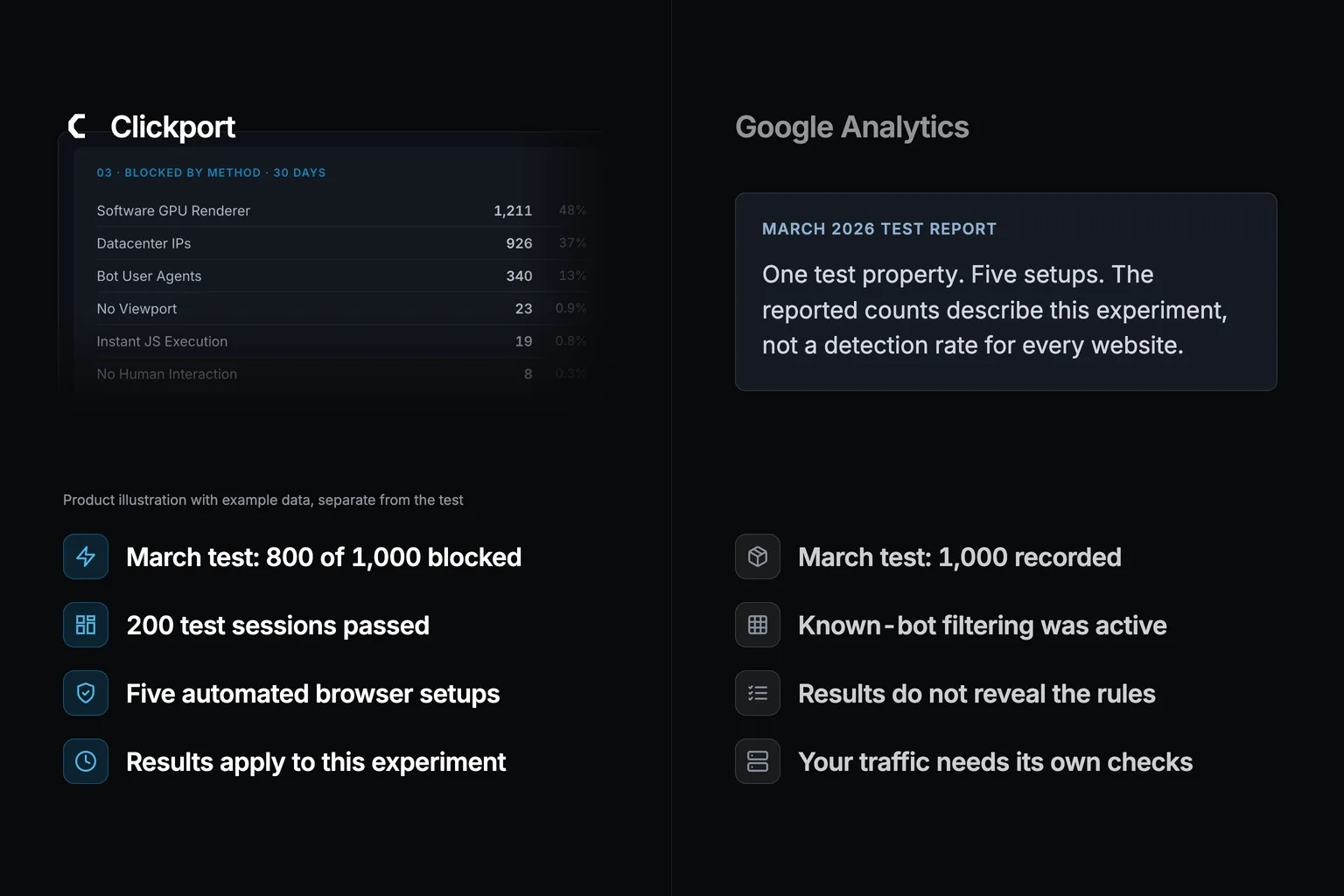
In a March 3-7, 2026 test, I sent 1,000 automated sessions to one site running GA4 and Clickport. I reported that GA4 counted all 1,000 and Clickport blocked 800.
This article preserves that historical report. It covers five browser setups, not the detection rate on your website. The original raw exports and test runner are not available in the archive, so I cannot independently recheck those counts today.
- This March experiment reported 1,000 automated sessions counted by GA4 across five setups. GA4 also has automatic known-bot exclusion. The experiment does not establish a universal miss rate.
- More than half of all web traffic is now bots, with bad bots alone at 37% (Imperva 2025). AI tools have made cheap, simple bots easy to build, so their share keeps climbing.
- Clickport's layered detection (webdriver signals, UA patterns, datacenter IPs, spam referrers, viewport checks) caught 800 of the 1,000 test bots before they reached the database.
- The 200 that got through were stealth bots on residential proxies in this experiment. This shows a limit of the tested setup, not a fixed limit for every analytics tool.
- You can't undo it in GA4. Its data deletion only strips parameter text, and there are no property-level bot filters. Once a bot is counted, it's counted for good.
51% of web traffic is now bots
Before the results, look at the scale of the problem. It's bigger than most people think.
Start with the Imperva 2025 Bad Bot Report, the most comprehensive annual study on bot traffic. Bad bots alone account for 37% of all internet traffic, up from 32% in 2023. Good bots take another ~14%. Human traffic? Just 49%.
In plain English: less than half the web is people.
The other studies land in the same place. Akamai's research puts total bot traffic at 42%, with 65% of those malicious. Cloudflare's 2025 Year in Review found non-AI bots alone generated 50% of requests to HTML pages, 7% more than human traffic. Which means the bots are already on top, and that's before you count the AI ones.
AI is what changed the math. DoubleVerify reported an 86% year-over-year jump in invalid traffic in the second half of 2024, with AI scrapers like GPTBot, ClaudeBot, and AppleBot accounting for 16% of it. Akamai saw a 300% surge in AI bot activity year over year. Triple the bots, one year apart.
Cloudflare CEO Matthew Prince said it plainly at SXSW on March 14, 2026: bot traffic will exceed human traffic by 2027. Put another way: within two years, the average visit to the average site won't be a person.
And the bots keep getting better at hiding. Barracuda's threat research classified 49% of detected bots as "advanced," built to mimic human browsing. Imperva found simple bots grew from just under 40% to 45% of all bad bot traffic, because AI tools make a convincing bot trivially easy to build.
The cost of faking a human went down. The volume went up.
So here's the question that matters. If your analytics can't tell a bot from a person, which numbers on your dashboard can you trust?
Your traffic is inflated. Your engagement rates are watered down. Your A/B tests are polluted. Your marketing decisions rest on fiction. The dashboard looks confident, and it's wrong.
My test: 1,000 bot sessions, 5 scenarios
The setup was simple. A fresh Astro site on Vercel with five pages: a homepage, three content pages, and a contact page. Both GA4 (via gtag.js) and Clickport's tracking script were installed. I turned off Vercel's own bot protection so both tools saw the raw traffic.
The bots ran on Puppeteer on Node.js 20. Each scenario faked a different level of sophistication. And every bot session behaved like a person: 50% scrolled the page, 30% clicked an internal link and moved to a second page, and all of them paused between 2 and 8 seconds between actions. In plain terms, these weren't crude one-shot pings. They looked like real visits.
The tests ran over five days, March 3 through March 7, 2026. Then I waited 72 hours before reading GA4's processed reports, since GA4 takes up to 48 hours to process.
Five rounds. 200 bot sessions each. 1,000 in total. Each round was harder to catch than the last.
Round 1: Known bot User-Agent strings
The easiest test first, the kind of bot your dashboard should catch in its sleep. I told Puppeteer to rotate through five non-browser User-Agent strings: PostmanRuntime/7.43.4, python-requests/2.31.0, curl/8.4.0, Go-http-client/2.0, and Wget/1.21.4. These are HTTP-tool labels. No real browser ever sends them. In other words: the loudest, most obvious bots on the internet.
All 200 sessions came from a residential IP address. The bots loaded pages, scrolled, and clicked links. The one odd thing was the UA string. Which means the only tell here was a name the bot could have changed in one line of code.
const browser = await puppeteer.launch({ headless: 'new' });
const page = await browser.newPage();

const botAgents = [
  'PostmanRuntime/7.43.4',
  'python-requests/2.31.0',
  'curl/8.4.0',
  'Go-http-client/2.0',
  'Wget/1.21.4'
];

await page.setUserAgent(botAgents[Math.floor(Math.random() * botAgents.length)]);
await page.goto('https://bot-test-site.vercel.app/');
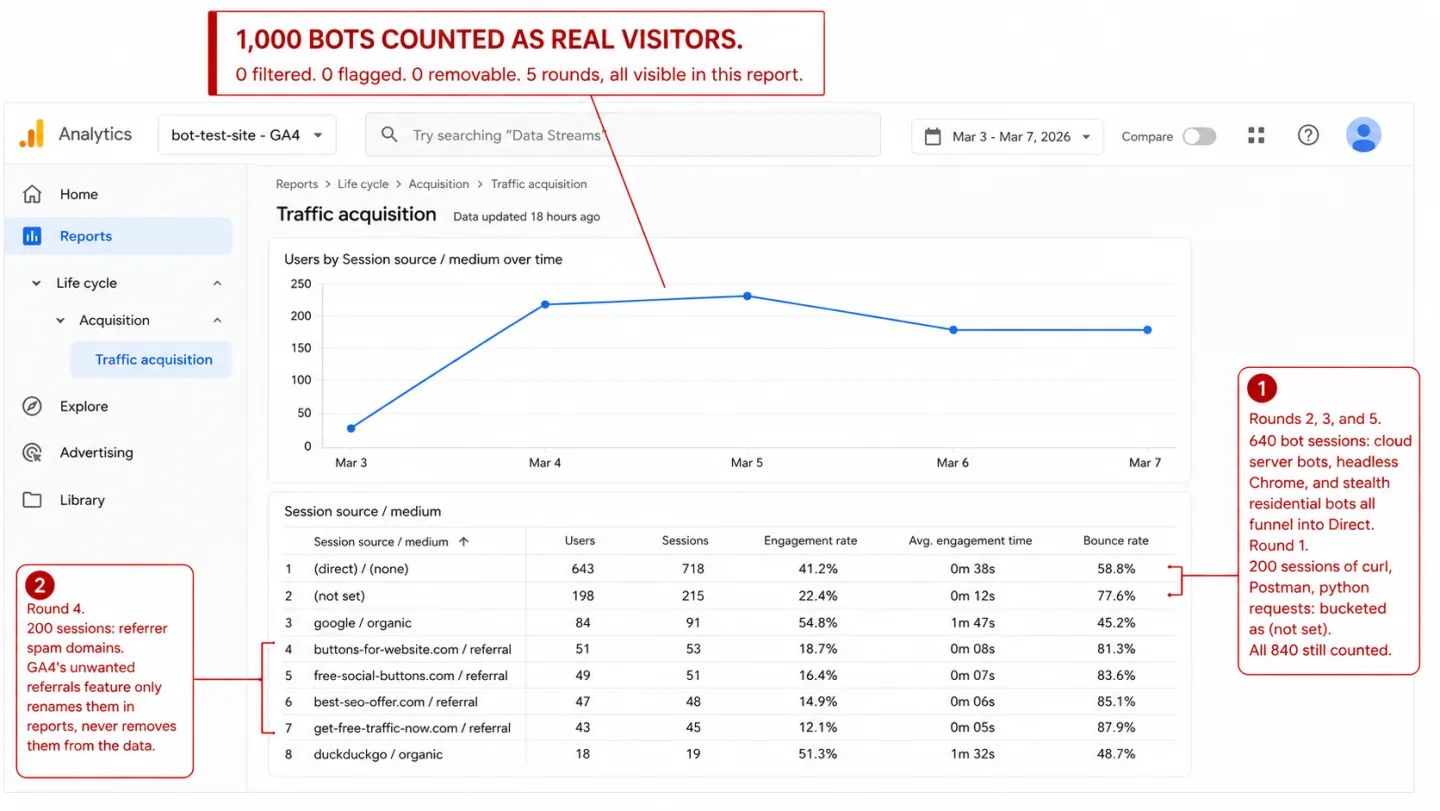
GA4 result: 200 sessions counted as real visitors.
In plain English: the crudest bots on the web, the ones sending curl and python-requests as their name, sailed straight in. Every single one showed up in GA4's Real-time report during the test. Three days later they were still sitting in the processed Traffic Acquisition report. GA4's "known bot" filter did nothing.
Clickport result: 0 sessions counted.
All 200 were blocked at the door by User-Agent pattern matching. Clickport runs a compiled regex of 80+ bot signatures against every incoming request. "PostmanRuntime," "python-requests," "curl," "Go-http-client," and "Wget" are all on the list.
This is the simplest bot there's to catch. A non-browser User-Agent string is a burglar wearing a name tag that says "burglar." GA4 missed all of them.
Round 2: Default headless Chrome
For Round 2, I left Puppeteer at its defaults. No stealth plugins. No UA spoofing. Default headless Chrome leaves two tells: the User-Agent string contains "HeadlessChrome," and navigator.webdriver is set to true. Two signals that scream automation.
I ran 200 sessions from a residential IP. Same behavior as before: page loads, scrolling, clicking, random delays. In other words: a bot with nothing suspicious in its address or its clicks, only its headless engine.
GA4 result: 200 sessions counted as real visitors.
The 200 default headless-browser sessions appeared in this test property. This observation does not reveal which browser signals Google checks internally.
Clickport result: 0 sessions counted.
On your site, GA4 would show 200 extra visitors. Clickport shows none. Clickport caught these bots at two levels. First, the tracker checks navigator.webdriver the moment it loads. If it's true, the tracker quietly stops. No events, no requests. As far as the database is concerned, the session never happened.
Second, even if someone bypassed that client check, the server still spots "HeadlessChrome" in the User-Agent and blocks it.
Two checks, one job. The client-side check stops bot events from ever being sent. The server-side check sweeps up anything that slips past it.
Puppeteer, Playwright, and Selenium can automate a browser that executes analytics JavaScript. In this round, the automated sessions appeared in the GA4 test property.
Update (March 2026): Chrome's newer --headless=new mode, now the default in Puppeteer and Playwright, no longer puts "HeadlessChrome" in the User-Agent string. It runs the full browser engine and is architecturally identical to a normal Chrome window. So Round 2 was generous to GA4. Today's default headless browsers hide better than the ones I used, and GA4 missed even my loud, easy ones.
Round 3: Stealth bots from cloud servers
This is where it gets interesting. For Round 3, I used puppeteer-extra-plugin-stealth, a plugin that patches 16 known automation fingerprints. It flips navigator.webdriver to false, hands over a real Chrome User-Agent string, tidies up the plugin arrays, and fills in the window dimensions that headless mode forgets. In short, it scrubs off the obvious bot signals.
I ran these 200 sessions from three cloud providers: AWS, Google Cloud, and DigitalOcean. On fingerprint alone, these bots looked exactly like the real Chrome browsers in your reports. One thing gave them away: the traffic came from cloud datacenter IPs. That means the only remaining tell was where the request came from, not what it looked like.
const puppeteer = require('puppeteer-extra');
const StealthPlugin = require('puppeteer-extra-plugin-stealth');
puppeteer.use(StealthPlugin());

const browser = await puppeteer.launch({ headless: 'new' });
const page = await browser.newPage();
// navigator.webdriver is now false
// UA string is a real Chrome 121 UA
// All 23 stealth patches applied
await page.goto('https://bot-test-site.vercel.app/');
GA4 result: 200 sessions counted as real visitors.
The 200 cloud-hosted sessions appeared in this test property. That result does not establish that GA4 ignores datacenter IP addresses in every situation.
Clickport result: 0 sessions counted.
All 200 were blocked by datacenter IP detection. Clickport keeps an IP range database from ipcat covering AWS, Google Cloud, Azure, DigitalOcean, Hetzner, OVH, and dozens of other cloud providers. On every event, the client IP is turned into a 32-bit number and checked against a sorted list of datacenter ranges with binary search. If the IP lands inside a known datacenter range, the event is blocked.
One detail matters a lot here: VPN users on datacenter IPs don't get blocked. Before the datacenter check, Clickport tests the IP against a VPN IP whitelist. If it matches a known VPN provider, the datacenter check is skipped. That keeps real visitors on NordVPN, ExpressVPN, or any other consumer VPN out of the bot bucket, even though those services run on datacenter IPs.
This round matters because most bot traffic comes from cloud infrastructure. Running a botnet from residential IPs is expensive. Running one from AWS spot instances costs pennies. So that's where the bots live, and datacenter IP blocking catches the bulk of real-world bot attacks.
Round 4: Referrer spam
Referrer spam is one of the oldest tricks there is. A bot visits your site with a fake referrer URL, hoping you spot the domain in your reports and click it. The spam domains are usually SEO link farms, malware sites, or phishing pages. They want your curiosity, not your content.
For Round 4, I set Puppeteer to send referrer headers from known spam domains. I pulled 20 of them from Matomo's referrer spam list, a community-maintained blocklist with thousands of entries. Domains like best-seo-offer.com, buttons-for-website.com, free-social-buttons.com, and get-free-traffic-now.com.
Each session loaded a page with the spam domain set as the document.referrer. Some used the stealth plugin. Some didn't. The referrer was the one constant.
GA4 result: 200 sessions counted as real visitors.
The reported result was 200 sessions under Referral in this test property. GA4's unwanted-referrals setting tells Analytics to ignore matching referrers for attribution. It does not remove the event.
Clickport result: 0 sessions counted.
All 200 were blocked by the spam referrer layer. That means every single referrer-spam bot was stopped before it reached a report. Clickport checks every event's referrer against Matomo's spam list, and it checks it properly. For a URL like https://tracking.best-seo-offer.com/campaign?id=123, the system pulls out the hostname, then walks up the domain: first tracking.best-seo-offer.com, then best-seo-offer.com. Match at any level, and the event is blocked. Subdomains don't get a free pass.
If you've ever opened GA4's Traffic Acquisition report and seen traffic from domains you've never heard of, you've met this problem already. GA4 has no way to filter them out, and no way to scrub them from your data after the fact.
Round 5: Stealth bots from residential IPs
This was the hardest test. I wanted to see what happens when a bot does everything right.
I used puppeteer-extra-plugin-stealth with all 16 evasion modules on: navigator.webdriver patched to false, real Chrome 121 User-Agent strings, realistic viewport dimensions, and proper language headers. Then I routed every session through a residential proxy service, so the source IPs were real consumer ISP addresses, not datacenter ranges.
For any practical purpose, these bots were a real person using Chrome. The UA was real. The IP was residential. The webdriver flag was patched. The viewport was non-zero. The referrer was clean.
Every tell I'd relied on was gone.
GA4 result: 200 sessions counted as real visitors.
Same as every other round.
Clickport result: 200 sessions counted as real visitors.
Both tools failed. And I think it's important to say that out loud.
In this fifth setup, both tools accepted the automated sessions. The test used a residential IP, a patched webdriver flag, a normal viewport, and a clean referrer. It does not establish a detection limit for every tool.
These test sessions passed the checks in that setup. Accepted does not mean verified human.
The only defenses against this kind of bot sit at a different layer: infrastructure tools like Cloudflare Bot Management, server-side behavior analysis across many sessions, or CAPTCHAs. None of that's the job of an analytics tool.
So when an analytics vendor claims 100% bot detection, I think they're either not testing hard enough or not telling you the truth. I'd rather show you what I can't catch than let you assume I catch everything.
Final scorecard: GA4 0% vs Clickport 80%
Here are the complete results across all five rounds.
GA4's "known bot" filter caught zero of my 1,000 test sessions. Not one. Across five setups, from the loudest bot to the sneakiest, GA4 logged every automated session as a real human visitor. Put another way: the filter you assume is protecting your data caught nothing you'd worry about.
Clickport blocked 800 of 1,000. That's 80%. In plain English: four out of five fakes never reached the database.
The 200 that got through were stealth bots on residential proxies in these five setups. This experiment does not measure how common that setup is on other websites.
Why GA4's bot filtering fails
Google documents automatic known-bot exclusion using Google research and the IAB/ABC list. It does not disclose the complete process. The results above cannot establish that GA4 uses only browser names or ignores every other signal.
A bot that runs browser JavaScript can send analytics events. A crawler that only fetches an HTML page does not automatically create a GA4 session. Those are different types of activity.
The five setups in this March experiment produced the results reported above. They do not give a detection percentage for all bots or your website.
What the comparison can show
The reported test counts describe the automated sessions used here. They do not identify the full detection process inside GA4.
Clickport's detection-method totals show which rule recorded an exclusion first. They cannot measure how many of those requests another tool would count.
Correction, 9 September 2026: I removed a GA4 miss-rate claim added from a separate April study. That study contained Clickport detector counts, not results from the same requests in GA4. This correction does not turn the March experiment into a current benchmark. Read the method and correction.
To investigate your own traffic, use the five checks for real traffic and bots. No percentage from this experiment can replace that check.
How Clickport's 6-layer bot detection works
Since I'm being open about the results, here's exactly how each layer works. No "proprietary algorithms." No vague "machine learning." Just six plain checks, run in order, where the first match blocks the event. The full 11-check framework goes deeper on each layer if you want the source-code-level detail.
Layer 1: Webdriver signal. The tracker checks navigator.webdriver in the browser. If it's true (and Selenium, Playwright, and default Puppeteer all set it), the tracker quietly exits and sends nothing. No events reach the server. As a backup, the server also looks for webdriver signals in event payloads, in case a different client sends them.
Layer 2: Empty User-Agent. Every real browser sends a User-Agent header. If it's missing or blank, the request is blocked. That catches raw HTTP clients, misconfigured scrapers, and some headless setups.
Layer 3: User-Agent pattern matching. A compiled regex of 80+ patterns covering search engine bots (Googlebot, Bingbot, Baidu), AI crawlers (GPTBot, ClaudeBot, Bytespider, PerplexityBot), SEO tools (Ahrefs, Semrush, Screaming Frog), social media bots (FacebookBot, Twitterbot, LinkedInBot), monitoring services (UptimeRobot, Pingdom, GTmetrix), HTTP libraries (curl, wget, python-requests, axios), headless browsers (HeadlessChrome, PhantomJS), and vulnerability scanners (Nmap, Nikto, WPScan).
Layer 4: Datacenter IP blocking. The client IP is checked against a sorted array of known datacenter ranges from ipcat, using binary search for O(log n) speed. Before that check runs, the IP is tested against a VPN whitelist. A VPN match skips the datacenter check, so real users on VPN services that share datacenter IP space don't get flagged.
Layer 5: Spam referrer blocking. The event's referrer is checked against Matomo's referrer spam list. The system pulls the hostname and walks up the domain to catch subdomains. If URL parsing fails, it falls back to substring matching.
Layer 6: Zero viewport. If the event's screen_width is 0, the request is blocked. Real browsers always report a non-zero screen width. Pageleave events are exempt, since some browsers legitimately report zero dimensions during page unload.
All three blocklists (datacenter IPs, VPN whitelist, spam referrers) are cached locally and refreshed from their GitHub sources every 7 days. If a refresh fails, the system keeps using the most recent cached version.
Every blocked event is logged with the layer that caught it and the exact detail that triggered it: the matched UA pattern, the datacenter provider, the spam domain. All of it shows up in Clickport's Bot Management panel, so you can see how many bots hit your site, which layer caught them, and which bots or providers are behind it. Clickport also breaks out AI crawler traffic on its own: GPTBot, ClaudeBot, PerplexityBot, Bytespider, and the rest, so you can watch how often AI services are scraping your content.
What bot traffic does to your business decisions
Bad analytics data doesn't just look wrong. It leads you to wrong decisions. Here's what it costs you.
Inflated traffic hides real problems. If bots add 20-30% phantom visitors to your numbers, you'll think your latest blog post did well when it didn't. You'll think your SEO is climbing when it's flat. In plain English: the bots make a flat month look like a good one. A Google Analytics Community thread with 300+ reports tells that exact story: owners seeing sudden spikes from Lanzhou, China and Singapore that turned out to be pure bot traffic, with GA4 counting every session as real.
Wasted ad spend. Bot traffic usually lands in "Direct" (see why a sudden direct-traffic spike is often bots), which dilutes your channel numbers. Your real cost-per-acquisition looks better than it is, because bots pad the denominator. SpiderAF's 2025 report put global ad fraud losses at $37.7 billion in 2024. In plain English: you optimize spend against numbers the bots wrote.
Broken A/B tests. Bots don't convert. If 15% of your test traffic is bots, they drag down conversion rates in both variants. Which means you need a bigger sample and a longer test to reach significance, and even then the result is noisy.
False engagement data. Bots that scroll and click, like the ones in Rounds 2 through 5, generate engagement events. Your average engagement time drifts up or down with the bot's behavior. Your scroll-depth numbers stop meaning anything. Your event counts swell.
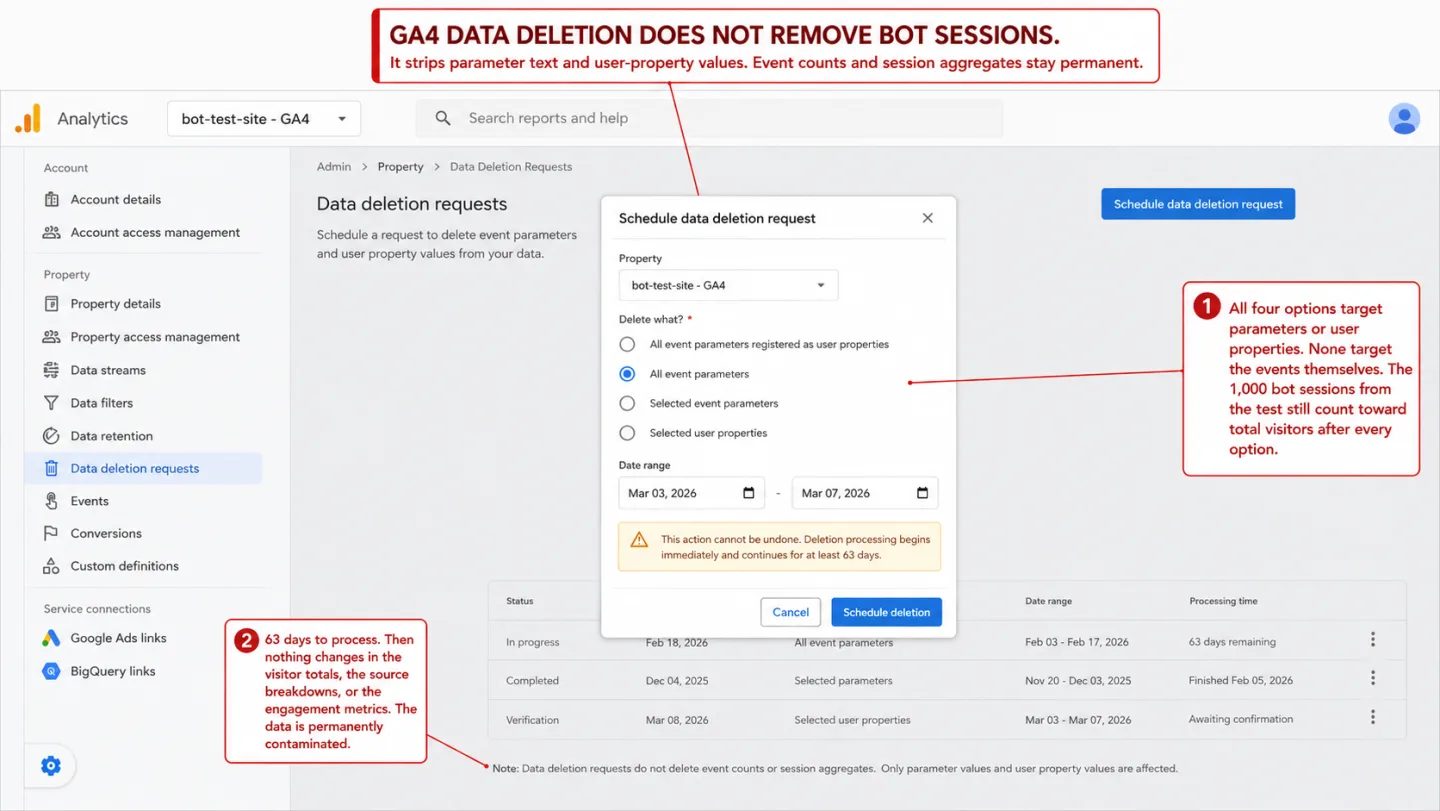
You can't fix GA4 after the fact. This is the one most people miss. GA4 does have a data deletion feature, but it only strips parameter text from events. The events themselves, and their counts, stay in your reports for good. There's no "remove these bot sessions" button. There are no property-level bot filters. Your only workaround is segments in Explorations that exclude suspect regions or low-engagement traffic.
And those segments only touch Explorations. Not your standard reports. Not your dashboards. Not anything reading from the GA4 API. Put another way: once the bots are counted, they're counted forever. That same permanence is what makes bot form spam so expensive: once a fake form_submit is counted as a conversion, no GA4 setting takes it back, and it keeps training your ad bidding. I walk through that case in bot form fills counting as conversions.
This isn't a thought experiment. The China/Singapore bot flood in late 2025 hit thousands of GA4 properties. Some sites saw their traffic double overnight. One Portuguese site reported a 15,000% jump in three days. GA4 counted every bit of it, and the owners had no way to scrub it from their history.
Google's Analytics team admitted the problem and said a "long-term spam detection fix" was in the works. As of March 2026, it still hasn't shipped.
What I learned
Three things to take from this test.
First, the five tested setups produced unwanted sessions in this property. GA4 also automatically excludes known bots. This experiment cannot describe its complete filter or predict the bot share on another website. I discuss the wider reporting questions in Is GA4 accurate?.
Second, blocking before storage matters. Clickport runs every event through six layers before it ever enters the database. Catch a bot, and the event is blocked and logged in a separate stats table. What's left is verified, non-bot traffic. There's no "maybe I'll clean it up later." GA4 works the other way around: the bot traffic goes into the database first, and the filter runs after. Miss something, and your data is contaminated for good.
Third, some test bots passed Clickport too. The 200 sessions in Round 5 passed both tools. That is a limit of this experiment, not an 80/20 rule for all traffic. For accepted sessions that look suspicious, you can review and flag them in Clickport.
If you're tired of staring at GA4 numbers and wondering how many of those visitors are real, try Clickport free for 30 days. Install the tracker, leave GA4 running next to it, and compare the two yourself. You'll see the difference in your data within the first day.

Comments
Loading comments...
Leave a comment