Why I Chose to Build Clickport Instead of Using Matomo
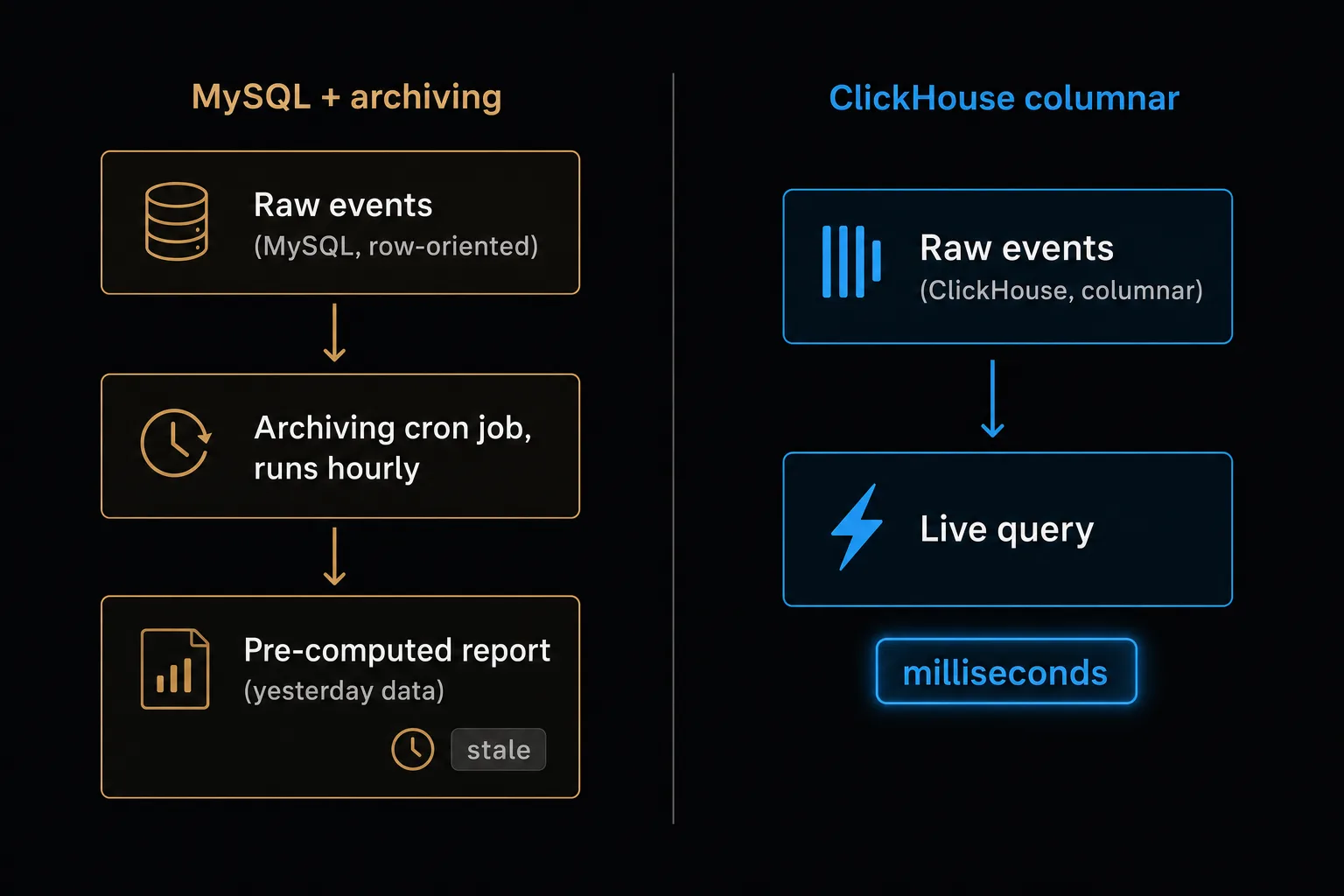
Matomo is the most respected open-source analytics project in the world. I spent weeks evaluating it, and I almost used it. Then I read the fine print. It's built on MySQL, it preprocesses every report with a cron job, and it takes 12 configuration steps to run without a consent banner. Twelve steps, and miss one and the banner comes back. That's when I decided to build something different.
- Matomo is the most respected open-source analytics project (17 years, 21,000+ GitHub stars, endorsed by CNIL). It's a strong choice for teams with dev resources.
- Self-hosted Matomo requires MySQL archiving cron jobs, PHP maintenance, and a 12-step GDPR configuration. The WordPress plugin creates 217 database tables.
- Matomo Cloud starts at €22/month billed annually (50K hits). Clickport starts at €9/month (10K pageviews). Self-hosted Matomo is free but costs $50-200/month in infrastructure.
- Matomo still uses cookies by default and requires configuration to run cookieless. Cookieless mode disables returning visitor tracking.
- If you need full data ownership on your own servers and have the dev team to maintain it, Matomo is a solid choice. If you want managed, cookieless analytics out of the box, Clickport is simpler.
Matomo deserves more credit than it gets
Before I get into the problems, let me be clear about one thing. Matomo isn't Google Analytics. It isn't a data-harvesting business dressed up as a free tool. It's an independent, largely bootstrapped company with around 50 people that has built open-source analytics for 17 years. The founder, Matthieu Aubry, started it as a student project and has kept it his own for nearly two decades.
That matters. Most SaaS tools take venture money, then pivot, get bought, or quietly die. Matomo has stayed open and stayed alive since before the iPhone existed.
So let me give it the credit it has earned.
Self-hosted data sovereignty. You can run Matomo entirely on your own servers. Your data never touches anyone else's machines. For government agencies, universities, and regulated industries, that's not a nice-to-have. It's the whole point. The European Commission runs Matomo across EU institutions for exactly this reason.
The CNIL exemption. France's data authority names Matomo by name as one of the few tools that can run without a consent banner when you set it up right. The same exemption applies in Spain, Italy, and the Netherlands. No startup gets to claim that.
Feature depth. Heatmaps, session recordings, A/B testing, funnel analysis, ecommerce tracking, form analytics, a built-in tag manager, media analytics, roll-up reporting. No other open tool comes close. If you need all of that in one self-hosted platform, Matomo is the only serious pick.
Unsampled data. GA4 samples your reports above 10 million events, meaning it guesses past a certain size. Matomo gives you 100% of your data at any volume. What you see is what happened.
I won't pretend these don't matter. They do. If you need self-hosted data on your own servers, enterprise features, and the CNIL's blessing on paper, Matomo might be exactly right for you. This isn't an argument that Matomo is bad. It's the story of why its design creates problems for a different kind of user. And those problems start with the database.
The database that wasn't built for this
Matomo stores all its analytics data in MySQL. MySQL is a row-oriented database. It was built for shopping carts, user accounts, and content management systems. It reads and writes one row at a time, fast. That's what it's good at.
Analytics asks the opposite. Ask "how many visitors came from Google this month" and the database has to scan millions of rows but read only three columns: source, timestamp, visitor ID. A row-oriented database like MySQL loads the whole row into memory just to pull those three.
A columnar database like ClickHouse keeps each column on its own and reads only the ones it needs. That cuts the work by 10 to 100 times.
This isn't theory. It's the reason Matomo needs a whole preprocessing layer that most people never hear about until it breaks.
Reads: every column of every row
├─ visitor_id, ip, url, title, referrer,
│ browser, os, screen, country, city,
│ language, device, timestamp, duration,
│ actions, revenue, custom_vars...
└─ × 500,000 rows
Result: slow. needs preprocessing.
Reads: only the columns it needs
├─ source
├─ timestamp
└─ visitor_id
(skips 20+ other columns entirely)
Result: milliseconds. no preprocessing.
Because MySQL has to scan everything, Matomo can't read raw data fast enough to power a live dashboard. So it runs a separate archiving cron job that crunches every report ahead of time, on a schedule. Raw data lands in MySQL. The cron job reads it, does the math, and writes the finished numbers to archive tables. Open a report and you're reading yesterday's math, not live data.
On small sites this is fine. Archiving finishes in minutes and you never notice it running.
On medium and large sites it turns into the single biggest chore you own. Matomo's own docs say archiving often takes more than two hours on busy sites. Every segment archives on its own. Add one custom report and it re-archives the previous 6 months of data.
And when archiving falls behind or fails, your dashboard quietly shows stale numbers with no warning.
The failure stories are hard to read. One person ran a 48-core server with 128 GB of RAM. That means hardware most companies will never need, for a website counter. Archiving spiked their load average from 0.15 to 5.4 with MySQL queries running past 13 hours. They wrote: "We have to check the server every day and kill the database process manually, because it never ends."
INFO 02:00:01 Starting Matomo reports archiving...
INFO 02:00:09 Archiving day, week, month, year for each site and segment
WARNING load average climbing: 0.15 before the run, now 5.40
WARNING MySQL archiving query still running after 13 hours
FATAL PHP Fatal error: Allowed memory size of 268435456 bytes exhausted (256 MB)
Archive run aborted. The next hourly run is already queued.
Memory leaks in the archiver are a known issue since 2012. That means the bug is old enough to be in high school. The same bug keeps coming back: issues #5794, #6846, #16285, #18460, and #22875 across the years. After the jump to version 5.2.0, setups with 700+ sites ran out of memory at 256 MB. The same leak has been on the books for over a decade and it still isn't fixed.
Even Matomo's own family knows it. Piwik PRO, the enterprise fork that split off in 2016, moved to ClickHouse for exactly these MySQL limits. The Matomo community has asked for ClickHouse support since 2021. The team's answer: it would mean "rewriting major portions of the codebase." The issue is still open, with nothing on the roadmap.
This is the one call that shaped everything else about Clickport. I picked ClickHouse on day one. No archiving step. No cron jobs. No preprocessing delay. Queries hit raw event data and come back in milliseconds, even across months of it. There's no yesterday's math to wait on.
What self-hosting actually costs
Matomo's loudest marketing line is "free and open-source." And it's true. The core platform really is free to self-host. But "free" and "costs nothing" are two different things.
Matomo recommends this spec for medium traffic
$269 + $239 + $199 per year
Matomo estimates "a few hours per week" × $50/hr
Let me walk through the line items.
Server costs scale fast. Matomo recommends 2 CPU and 2 GB of RAM as the floor. Above 10 million pageviews, they tell you to split the app and database onto separate servers, 8 CPU and 16 GB of RAM each.
Storage grows at roughly 1 GB for every 5 million pageviews. One person running 350 websites watched their database climb from 2 GB to 60 GB in three months. Another hit 207 GB in a single archive table. The data piles up whether you watch it or not.
Premium plugins add up. The features that set Matomo apart from simpler tools are nearly all paid add-ons. Heatmaps: $269/yr. Funnels: $239/yr. A/B testing: $269/yr. Form analytics: $199/yr. Custom reports: $269/yr. Want the lot? The Premium Bundle is $1,979/year for up to 4 users, $3,959 for 5 to 15 users, $5,939 for unlimited. The "free" tool has a price list.
Maintenance is the hidden killer. Matomo's own FAQ pegs upkeep at "a few hours per week". Security patches, PHP updates, MySQL tuning, watching the archive cron, backups, and fixing what breaks.
Do it yourself and those are hours you're not spending on your business. Pay someone at $50 to $75 an hour and it means $6,000 to $15,000 a year. For a "free" tool, that stings.
The cloud pricing gotcha. Matomo Cloud counts "hits", not pageviews. Events, downloads, outbound clicks, and content interactions all eat into your limit. A site with 200K pageviews easily throws off 400K to 600K hits. In plain English: your bill is priced on a number two to three times bigger than the one you think in. Go over and additional hits cost extra on top of your plan, and that adds up fast.
Privacy that requires a 12-step configuration
Matomo's other big marketing line is "privacy-friendly." That's true too. The catch is the gap between privacy-friendly and private by default. Matomo is the first. Out of the box it isn't the second.
Fresh out of the box, Matomo sets first-party cookies (_pk_id, _pk_ses, _pk_ref) and collects IP addresses, browser fingerprints, referrer URLs, and page titles. In that default state, you need a consent banner in most of the EU.
To get to "no consent banner required" you follow a specific setup. Matomo lists 12 steps. Turn off all cookies. Anonymize IP addresses by 2 or more bytes. Anonymize referrer data. Strip personal data from URLs, page titles, and custom variables. Mask data in heatmaps and recordings. Drop ecommerce order IDs. Switch off the User ID features. Lock data to analytics-only use. Limit to single-site tracking. Add an opt-out. Update your privacy policy.
Skip any single one of those and you're back to needing a banner. In other words: there's no "GDPR mode" toggle that does it for you.
And even careful admins fall into traps hidden inside those 12 steps.
UTM parameters cancel the CNIL exemption. CNIL confirmed through direct correspondence that tracking UTM campaign parameters knocks you out of the consent exemption. Campaign tracking is one of the main reasons people run Matomo. So you pick one: track your campaigns, or skip the banner. You can't have both.
The opt-out iframe sets cookies anyway. A German state data protection authority found that even with disableCookies switched on, Matomo's opt-out mechanism set a MATOMO_SESSID cookie for CSRF protection. They ruled that cookieless mode was therefore non-compliant and were "forced to remove Matomo entirely." The cookieless setting set a cookie.
Cookieless mode degrades accuracy. With no cookies, Matomo falls back to config_id, a daily-rotating hash of IP and browser details. The hash changes every day. So a visitor who comes back tomorrow looks like a brand-new person. Unique visitor counts, returning visitor numbers, and multi-session conversion attribution all stop being reliable.
The exemption stops at the border. The CNIL exemption only covers France, Spain, Italy, and the Netherlands. In Germany, Austria, Finland, Ireland, Latvia, Lithuania, and the UK, analytics cookies need consent no matter how you configure them.
Clickport has no privacy configuration because there's nothing to configure. No cookies means no consent banner. No IP storage means no anonymization step. It's designed for compliance, not configured into it.
217 tables in your WordPress database
Matomo offers a WordPress plugin with 100,000+ active installs. It works by stuffing the entire Matomo analytics engine inside your WordPress install. That's an odd thing to do, and it creates problems all its own.
(a default WordPress install has 12)
<10,000 annual visitors
(users report crashes at 1 GB)
recommended by Matomo's own docs
(every pageview bootstraps full WP stack twice)
(toggle in Settings > Advanced to preserve)
The plugin creates 217 database tables, all prefixed wp_matomo_. A default WordPress install has 12. Which means the analytics plugin outweighs WordPress itself, eighteen to one. One person with fewer than 10,000 visitors a year found it eating 599 MB. They wrote: "It's really not helpful that with such a waste of space there's no information on how to get this into usable shape."
wp_matomo_archive_blob_2025_02
wp_matomo_archive_numeric_2025_01
wp_matomo_archive_numeric_2025_02
wp_matomo_log_visit
wp_matomo_log_link_visit_action
wp_matomo_log_action
wp_matomo_option
wp_matomo_segment
wp_matomo_site
... 207 more
Every tracking request boots the whole WordPress framework, every active plugin, theme function, and database connection. So each pageview loads WordPress twice. That roughly doubles your server load and adds 300 to 500ms to your time-to-first-byte. Your readers wait longer so the plugin can phone itself.
Version 5.2.0 threw fatal errors on the admin backend. People had to delete files by hand over FTP to recover. WordPress auto-updates can set off failures like this while the site owner is asleep. Others have reported running out of memory at 1 GB just from switching the plugin on.
There are also known conflicts with popular plugins (BackWPup, Google Listings and Ads, PublishPress Blocks, WooCommerce extensions) because PHP library versions collide.
Matomo's own docs tell you to cap the WordPress plugin at 50,000 pageviews a month. Past that, they point you at their separate self-hosted or cloud product. The plugin has a ceiling, and it's low.
Clickport's WordPress side is one script tag, or a light connector plugin if you prefer. It adds zero tables to your database, uses zero PHP memory, and conflicts with zero plugins, because the heavy lifting happens on Clickport's servers, not inside your WordPress install.
The 70-report question
Matomo has 12 main navigation sections holding over 70 separate reports. The Custom Reports plugin piles on 163 metrics and 94 dimensions. There are 110+ segment dimensions to filter by. That's a lot of screens.
If you're a data analyst, all of that's a feature. But most site owners aren't data analysts. They want answers to a handful of questions: where is my traffic coming from, which pages are popular, are visitors converting, is traffic going up or down?
Reviewers say so out loud. Capterra reviewers keep calling the interface "cluttered and overwhelming". TrustRadius notes "the complex interface might require additional learning for non-technical users."
One reviewer said it plainly: "If you're looking to leave Google Analytics to escape the complex menus, you're unlikely to find relief with Matomo." You left one maze for another.
Then there's the hide-and-seek problem. A GitHub issue records that key features sit behind hover-only icons. Per-row actions only show up when your mouse is over the row. Custom report dropdowns are "not obviously there." On a phone, where there's no hover, they're basically out of reach. The Matomo team closed the issue as "not planned."
Comparison reviews say Matomo takes "hours to master". I built Clickport to be understood in minutes.
The trade-offs
Matomo can do things Clickport can't. I'd rather tell you straight what you give up if you switch.
No heatmaps or session recordings. Matomo sells these as a premium plugin ($269/year). Clickport doesn't record mouse movements or screen video. You can still drill into a single session to see pages visited, time on page, engagement scores, and conversion events. But if you want visual replay, run a dedicated tool like Microsoft Clarity (free) next to Clickport, or stay with Matomo.
No A/B testing. Matomo has a $269/year A/B testing plugin. Clickport doesn't run experiments. If you test often, you probably want a dedicated testing platform anyway.
No self-hosting option. Matomo can live on your own servers. Clickport lives on Hetzner servers in Germany. You get EU data residency and full GDPR compliance, but the data sits on our machines, not yours.
No historical data import. Matomo has a GA importer. Clickport starts fresh the day you paste the script. Your old Matomo data stays right where it is, on your existing install.
No tag manager. Matomo has a built-in tag manager. Clickport is one script tag, with optional configuration attributes and a JavaScript API for custom events.
Here's what Clickport does differently:
- Engagement scores (0-100) for every page and traffic source, combining scroll depth and time on page. Not just "engaged or not."
- Copy detection that captures when visitors select and copy text from your pages.
- Weekday-aware comparisons that compare Monday to previous Mondays instead of to Sunday.
- Redesigned bounce rate that needs all four signs of a real bounce (single page, no clicks, under 25% scroll, under 15 seconds), not one arbitrary cutoff.
- Session drill-down showing a visitor's whole journey on one screen.
- Real-time data with a 30-second refresh. No archiving delay.
- A tracker around 2 KB, versus Matomo's ~22.8 KB. More than ten times lighter on the page.
- No cookies, no consent banner by default. None of the 12-step setup.
When Matomo is the right choice
I've spent most of this article explaining why I built something different. But Matomo is the right call for plenty of people, and I'd rather you pick the right tool than the one I happen to sell.
Choose Matomo if your analytics data has to physically stay on machines you control. Government agencies, hospitals, universities with strict data governance, companies where a compliance team mandates self-hosting. For that spot, no cloud tool works, Clickport included.
Choose Matomo if you really use heatmaps, session recordings, A/B testing, and funnel analysis, and you want all of it in one open-source platform behind one login. No lightweight tool matches that spread.
Choose Matomo if you have a DevOps team that already runs PHP, MySQL, and cron jobs. The upkeep is real, but if you already have the skills in the building, it's manageable.
Choose Matomo if you operate mostly in France and the CNIL naming Matomo by name matters for your compliance paperwork. No other tool can put that on the page.
Choose Clickport if you want analytics that work the moment you install them. No server to provision. No database to tune. No cron job to babysit. No privacy setup to get right. No premium plugins to buy. One script tag, real-time data, and a single dashboard that answers your questions in seconds, not minutes. Still weighing everything? Our GA alternatives comparison covers Plausible, Fathom, Simple Analytics, and others alongside both Clickport and Matomo.
The best analytics tool is the one you'll open every day and understand. For some people that's Matomo. For a lot of people, I think it's Clickport. Start a free 30-day trial and see for yourself.

Comments
Loading comments...
Leave a comment