Best Google Analytics Alternatives in 2026: 15 Compared
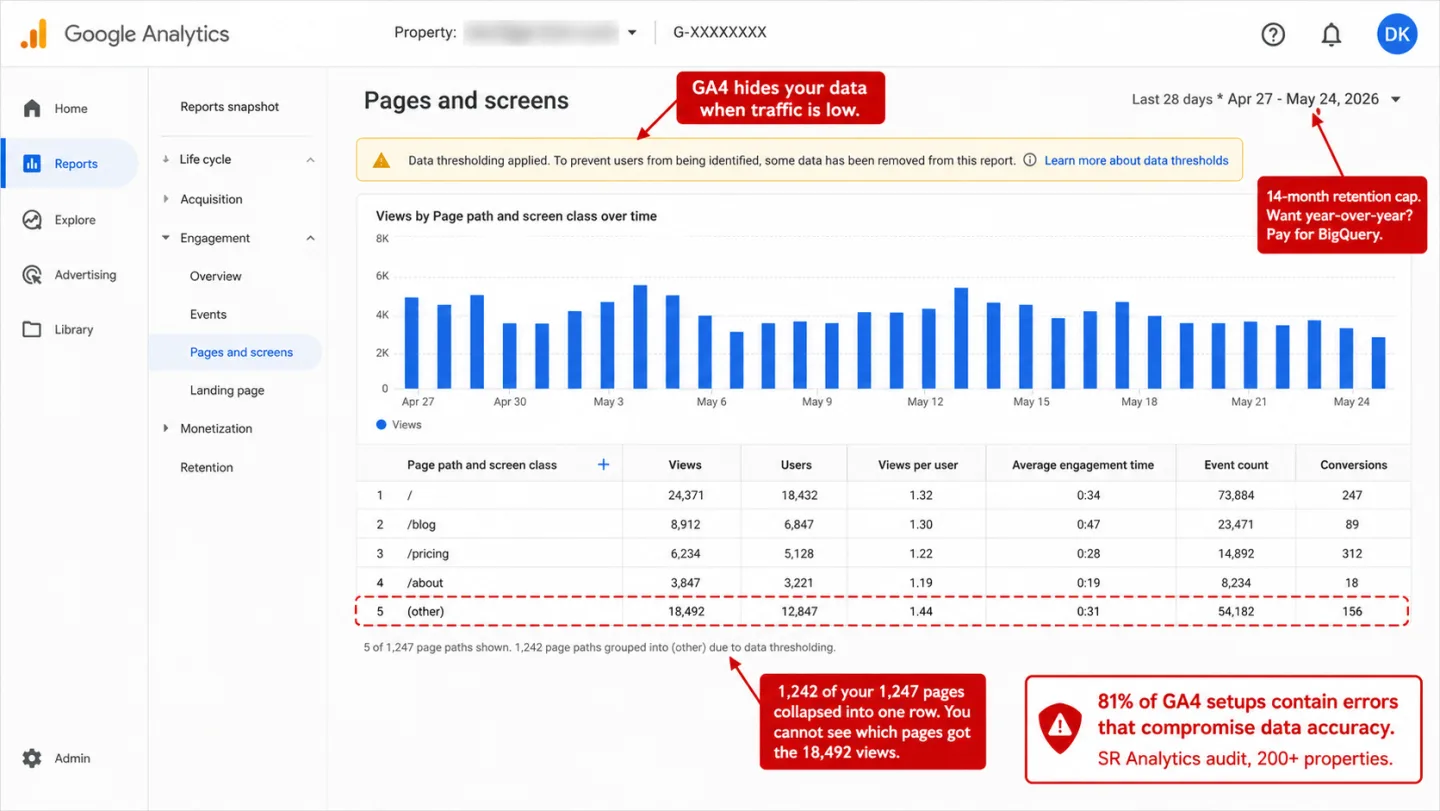
"Free" is the first reason most people stay on Google Analytics. It's also the most expensive word on the pricing page. You don't pay Google in dollars. You pay in consent banners to run it legally, in hours lost to an interface nobody asked for, in a setup that breaks without telling you, and in the quarter to a third of your visitors it never counts. I've watched teams leave for one of those reasons and stay gone for all four.
So here's the honest version. I put 15+ analytics tools side by side on what they actually cost at real traffic, what each one tracks, and where each one falls short, plus the handful of cases where GA4 is still the right call. New to the category? Our guide to privacy-friendly analytics covers what cookieless tracking is and why it skips the consent banner. If you already know you want out, keep reading for the picks.
- Google Analytics costs $5,000-$20,000/year when you include consent management, training, implementation, and data quality debugging. 81% of GA4 setups contain implementation errors that compromise data accuracy.
- Cookieless analytics tools see 30-50% more visitors than GA4 in Europe because they don't need cookie consent banners. When more than half of EU visitors reject cookies, you're making business decisions based on incomplete data.
- If you run Google Ads and rely on conversion import, keep GA4. No alternative replicates that integration. But you can run a privacy-first tool alongside GA4 as your primary dashboard for understanding real site performance.
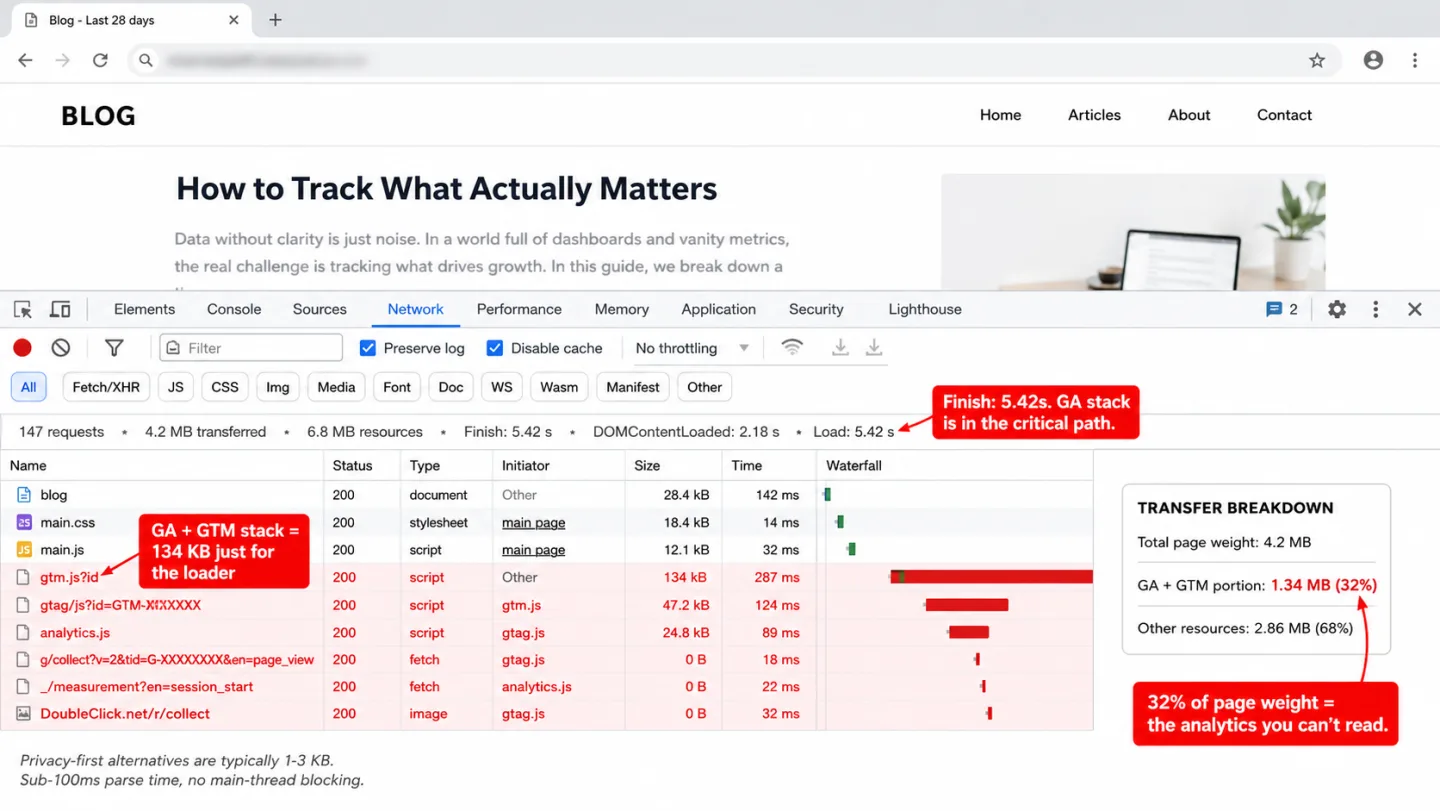
- Script sizes range from under 1 KB (Plausible) to 96 KB (Amplitude). GA4 loads ~134 KB (compressed) and blocks the main thread on 70% of pages where it's installed. Every millisecond costs conversions.
- No analytics tool tracks AI search traffic properly by default. AI search referrals grew 527% year over year. 70% of AI traffic lands as Direct. Only tools with dedicated AI channel classification can separate it.
Why people are leaving Google Analytics
GA4 isn't the upgrade Google promised, and I'd argue it never became one. The forced migration from Universal Analytics broke workflows, deleted historical data access, and swapped a familiar interface for something that 75% of SEOs reported being unhappy with. That means three of four professionals are unhappy with the tool. Three years on, searches for "GA4 for dummies" have risen 90% globally. That means the confusion keeps growing, not fading. People aren't asking for a beginner's guide to a tool they love. In plain English: the frustration is near-universal, not a you problem.
You've probably opened GA4, stared at it, and closed it without finding what you came for. That isn't you. You're not imagining it, and I'd never tell you that you were. The frustration is specific, and it's well documented:
- The interface is genuinely harder. Finding "how many people visited my site this week" takes 3 clicks in most alternatives. In GA4 it takes navigating to Reports, picking the right Exploration, configuring dimensions, and hoping you haven't hit a data threshold that hides your data.
- Data retention is capped at 14 months. Universal Analytics stored your data indefinitely, and you didn't think about it. GA4 free caps at 14 months for event-level data. That means year two of your own history is simply gone. Want year-over-year comparisons? You'll need BigQuery, and I've watched teams learn that the hard way.
- 81% of implementations contain errors. SR Analytics audited 200+ GA4 setups and found four out of five had implementation errors compromising data accuracy. In practice, 200+ real audits point one direction. No error message, no warning. Just wrong numbers in every report. That means most GA4 setups are quietly reporting figures you can't trust.
- Consent mode kills your EU data. When more than half of EU visitors reject cookies, GA4 loses the majority of your European traffic. Google's behavioral modeling promises to fill the gap, but it requires 1,000+ daily events from both consenting and denying users for 7 consecutive days. Most small sites never hit that.
- Google uses your data for AI training. In July 2023, Google updated its privacy policy to permit using data collected through its services to train AI models. Your visitors' behavior helps improve Gemini. You weren't asked.
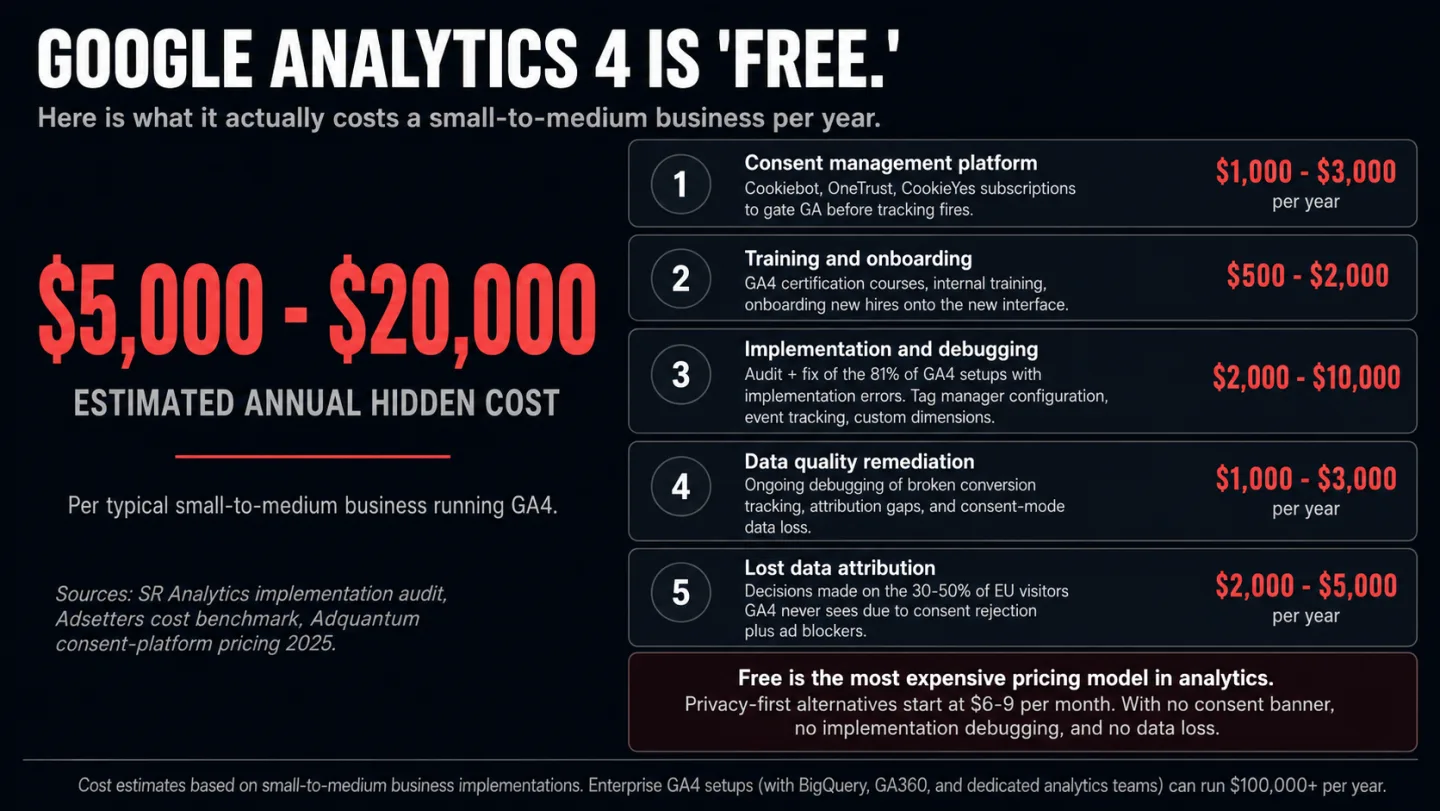
Then there is the legal risk, and it's real. Seven EU data protection authorities have ruled Google Analytics non-compliant with GDPR. The Norwegian DPA noted that "Google Analytics 4 won't necessarily correct those problems we've so far identified." The Danish DPA told organizations they must either remediate with supplementary measures or stop using the tool entirely. The Italian Garante put it flatly: "a website using Google Analytics without the safeguards provided by the EU Regulation violates data protection law."
None of this means GA4 is always the wrong choice. It means "free" has a price, and you should know it before you decide. The GA4 Data Loss Estimator puts a concrete percentage on the accuracy cost for your industry and region. Worth a look before you weigh a switch.
If those costs sound familiar and you want to see what simple web analytics looks like in practice, Clickport's 30-day free trial takes two minutes and needs no credit card.
How to choose the right alternative
Skip the feature lists for a minute. Three questions decide most of this.
1. Do you run Google Ads? If conversion import from GA4 into Google Ads runs your business, you probably need to keep GA4 in some form. No alternative replicates that integration. You can still run a privacy-first tool next to it as your main dashboard.
2. Where are your visitors? If most are in the EU, you're facing cookie consent data loss as your biggest problem. Cookieless tools see 30-50% more visitors, which means up to half again as many people, because there's no consent barrier in the way. That means you're deciding on a third to half more data than GA4 shows you. If your visitors are mostly in the US, consent matters less. The US asks people to opt out, not opt in.
3. What do you look at? If the answer is "pageviews, top pages, referrers, and maybe a conversion goal," you don't need GA4's complexity. If you need funnels, cohort analysis, and custom event parameters, you need a heavier tool.
Most businesses need far less than they think. The industry has a complexity habit, and GA4 carries hundreds of features because Google has an enterprise tier to justify. Most website owners check traffic, sources, and top pages. That's the whole list.
Answer six questions and get a pick built for your case:
How they compare: the numbers
Numbers don't lie, but pricing pages do, and I've read enough of them to know. Here's what each tool costs at real traffic levels, matched to Clickport's five tiers. All prices are monthly billing. Most tools knock 15-33% off if you pay yearly. That means annual billing shaves up to a third off every number below.
| Tool | 10K | 100K | 1M | 5M | 10M |
|---|---|---|---|---|---|
| GA4 | Free* | Free* | Free* | Free* | Free* |
| Clickport | €9 | €19 | €69 | €129 | €199 |
| Plausible | $9 | $19 | $69 | $129 | $169 |
| Fathom | n/a | $15 | $60 | $140 | $200 |
| Pirsch | $6 | $12 | $54 | $99 | $159 |
| Simple Analytics | n/a | $19 | $59 | Custom | Custom |
| Matomo Cloud | n/a | €38 | €172 | €822 | €1,600 |
| Umami Cloud | Free | Free | $20 | $140 | $200 |
| Rybbit | n/a | $13 | $69 | $149 | $249 |
| PostHog | Free | Free | Free | $153 | $324 |
| Tool | Sites included | Data retention | Cookies | EU hosted |
|---|---|---|---|---|
| GA4 | Unlimited | 14 months | Yes | No |
| Clickport | Unlimited | Forever | No | Yes |
| Plausible | 1-10 | 3-5 years | No | Yes |
| Fathom | 50 | Forever | No | Yes (isolation) |
| Pirsch | 50 | Forever | No | Yes |
| Simple Analytics | 10-100 | Unlimited | No | Yes |
| Matomo Cloud | 5-30 | 24 months | Default yes | Yes |
| Umami Cloud | 3-20 | 6 months - 7 years | No | Yes (option) |
| Rybbit | 5 | 2-5 years | No | Yes |
| PostHog | Unlimited | 1 year | Optional | Yes (option) |
Now let's go category by category, starting with the tools most readers came here for.
Privacy-first analytics tools
These tools all start from the same idea. No cookies. No consent banner. Lightweight scripts, EU hosting, and a dashboard you can read without a training course. They measure your website traffic, not what each visitor does across the rest of the internet.
Clickport Analytics
Full disclosure: this is my product. I built Clickport because the privacy-first tools I tried were too thin. They counted pageviews and referrers, then went quiet about what people did once they landed on the page.
Teams with several sites can evaluate analytics for a larger team before choosing a plan.
What it does well: Engagement tracking that other privacy tools skip: scroll depth, engaged time, click tracking, form submissions, copy detection (unique to Clickport), outbound links, file downloads, and 404 detection. All on by default, nothing to wire up. Session drill-down lets you follow one visitor's path. 16-channel traffic classification with a dedicated AI Search channel that picks out ChatGPT, Perplexity, Claude, and 10 other AI platforms on its own. Goal tracking with revenue attribution. Weekday-aware comparison baselines using 4-period averaging. 3-page PDF reports and CSV export. Bot detection that caught 800 out of 1,000 test bots while GA4 caught zero, none, not one. EU-hosted on Hetzner in Germany.
Pricing: Starts at €9/month for 10K pageviews (€7/month on annual). €19/month for 100K. €69/month for 1M. Unlimited sites and unlimited data retention on every plan. No per-site fees, no overage charges. 30-day free trial, no credit card.
Limitation: No open source build. No self-hosting. It's newer, with a smaller user base than Plausible or Fathom. No Google Ads integration, though none of the privacy-first tools have that. No funnel visualization yet.
Best for: Content sites, affiliate marketers, and agencies who want engagement data and session-level detail without the weight of GA4.
Plausible Analytics
It's the best-known privacy-first option, by a wide margin, and I won't pretend otherwise. Open source (AGPL-3.0) with 24,000+ GitHub stars. Built and hosted in the EU, from Estonia, on servers in Germany.
What it does well: The dashboard loads in under a second and puts everything on one page. Goals, custom events, UTM campaigns, top pages, referrers, countries, devices. The ~1 KB script is the lightest on the market. No cookies, no consent banner. Set up right, it meets CNIL's consent exemption criteria in France.
Pricing: Starts at $9/month for 10K pageviews (Starter). That means you're in for under ten dollars to begin. Growth starts at $14/month (10K pageviews, 3 sites, 3-year retention). Business starts at $19/month (10K pageviews, 10 sites, 5-year retention). Every tier scales with pageviews. Annual billing available.
Limitation: No session-level drill-down. You get the aggregate, not one visitor's journey. AI sources show up as referrers, but they aren't split into their own AI Search channel. The self-hosted Community Edition leaves out funnels, ecommerce revenue tracking, and SSO. Sites are capped at 1-10 by plan. Data retention runs 3-5 years by plan, then it stops.
Best for: Small-to-medium businesses, bloggers, and privacy-conscious site owners who want clean, simple, accurate numbers.
Fathom Analytics
The premium pick. Closed source, cloud only. A Canadian company with EU data isolation on Hetzner. Customers include GitHub, IBM, and Laravel.
What it does well: Forever data retention on every plan. Custom domain tracking built to slip past ad blockers, though some, like uBlock Origin, have learned to block custom domains too. 50 sites on every plan. The dashboard is fast and polished. A strong 25% lifetime affiliate program that has paid out more than $100K. That means the tool has real traction, not just a landing page.
Pricing: $15/month for 100K pageviews. It climbs in a straight line from there: $25 (200K), $45 (500K), $60 (1M), $140 (5M). No 10K tier. That means you won't find a cheap entry point if your traffic is small.
Limitation: The main product is closed source and cloud only. Fathom Lite, an older open-source version, still sits on GitHub, but it's unsupported and stripped down. No session drill-down. No engagement metrics past the basics. On a small site, the premium price is a harder sell.
Best for: Agencies running many sites, businesses that need forever data retention, and teams that pay for premium support and uptime guarantees.
Simple Analytics
The strictest option on privacy. Dutch company, EU servers. It counts unique visitors from referrer signals alone, with no IP hashing, no fingerprinting, and no cookies. No tool on this list collects less.
What it does well: Plain by design and private by design. Custom domain tracking to get past ad blockers. A tweet viewer for Twitter engagement. 14-day free trial, no credit card.
Pricing: $19/month ($9 annual) for 100K datapoints. $59/month ($49 annual) for 1M. 50% off for nonprofits.
Limitation: Unique-visitor tracking is referrer-based only, so it's rough. No session data. No engagement metrics. At the same traffic level it's the priciest of the simple tools. The feature set is narrow next to Clickport or Plausible.
Best for: Privacy purists and teams in heavily regulated industries who want the smallest possible data footprint.
Pirsch Analytics
German company, German servers on Hetzner. The budget pick, and deeper than the price suggests. An open-source core analytics library under a proprietary dashboard.
What it does well: It's the cheapest paid entry on the list at $6/month, and I've recommended it to budget-conscious friends. Funnels and A/B testing come in on the $12/month Plus plan. White-labeling for agencies. Google Analytics data import. SEPA Direct Debit for European payment. 500+ paying customers, climbing steadily.
Pricing: $6/month (Standard, 10K views, 50 sites). $12/month (Plus, 100K views, unlimited sites, funnels, A/B testing, white-labeling). Enterprise available.
Limitation: Smaller community and slower shipping than Plausible, since it's essentially a one-person shop. Little brand recognition. 500+ paying customers.
Best for: Budget-minded businesses and agencies who want funnels and white-labeling for a fraction of Plausible's or Fathom's price.
GoatCounter
The hobbyist's choice. Built and mostly maintained by one developer, Martin Tournoij. Free for reasonable public use, small-to-medium business sites included. Open source (EUPL license). Written in Go and easy to self-host as a single binary.
Pricing: Free for personal and non-commercial use. Commercial use starts at $5/month (100K pageviews). Funded by donations through GitHub Sponsors. That means it's the cheapest way onto this list if you qualify.
Limitation: Basic event tracking only, just click events, no properties or revenue. No funnels, no goals. The leanest feature set here. No engagement metrics. A small one-person project, so its long-term future isn't guaranteed.
Best for: Personal websites, open-source projects, and developers who want the bare minimum for free.
Cabin
Carbon-conscious analytics. It reports CO2 emissions per page. You'll pay one flat rate, whatever your traffic, and I like the honesty of that. Runs on 100% renewable energy. A ~1.2 KB script.
Pricing: Free (1 site, 30-day retention). $19/month (unlimited sites, unlimited retention, unlimited pageviews).
Limitation: The feature set is thin. No funnels, no sessions, no detailed engagement. A one-person operation since January 2025. Small user base.
Best for: Climate-minded organizations and B-corps that want carbon-aware analytics and a price that never moves with traffic.
Open-source and self-hosted options
Self-hosting means you own the data, all of it, with nobody else in the loop. I'll be honest that it's not for everyone. It also means you run the servers, apply the security updates, scale the database, and debug the infrastructure when it breaks. So "free" self-hosted analytics still costs $50-200/month in server resources once you have real traffic. In plain English: self-hosted isn't free, it's a different bill.
Matomo
The oldest and most complete open-source alternative. Founded in 2007, on 1.4 million+ websites, used by the European Commission and NASA. The only one here that comes close to GA4's depth.
What it does well: The full kit: heatmaps, session recording, A/B testing, form analytics, custom dimensions, roll-up reporting, tag manager, Google Analytics data import. One catch worth flagging: heatmaps, session recording, A/B testing, and form analytics are paid add-ons, not part of the free self-hosted build. Set up right, it meets CNIL's consent exemption. The WordPress plugin has 100,000+ active installs.
Pricing (Cloud): EUR22/month (50K hits) climbing to EUR14,850/month (100M hits). Self-hosted is free, core features only.
Limitation: It uses cookies by default. There's a cookieless mode, but it drops returning-visitor tracking. Getting it GDPR-compliant means 12+ settings you have to get right. Self-hosted Matomo wants real DevOps skill and slows down at high traffic unless you tune MySQL. The interface looks dated next to newer tools. Cloud pricing climbs fast.
Best for: Organizations that need GA4-level features and full data ownership, especially government, healthcare, and enterprises with strict data sovereignty rules.
Umami
It's the developer favorite, and I've watched it earn that. Clean, modern, open source (MIT license). 35,000+ GitHub stars. Built with Next.js and React. Easy to self-host with Docker on a $5/month VPS. That means a hobbyist can run it for the price of a coffee.
What it does well: The cleanest interface of any self-hosted option. Cookieless. A ~2 KB script. Still shipping, since v3 added funnels, journeys, retention, and cohorts. Free cloud tier (100K events/month).
Pricing: Cloud: a free Hobby plan (100K events/month, 3 sites, 6-month retention). Paid plans from $20/month for 1M events. That means you'll start free and only pay once you scale. Self-hosted is free with nothing held back.
Limitation: The self-hosted build leaves out a few cloud-only features: session replays, Web Vitals, email reports. Revenue looks modest next to the GitHub star count, which tells you most people self-host instead of paying.
Best for: Developers who want a modern, self-hosted dashboard with a clean UI and nothing to worry about on the tracking side.
Rybbit
The newcomer. Open source (AGPL-3.0). 11,000+ GitHub stars in under a year, which is faster than any analytics project in GitHub history. It sits between simple privacy analytics and full product analytics.
What it does well: Funnels, user journeys as Sankey diagrams, retention analysis, user profiles, Web Vitals monitoring (cloud only), session replays (Pro plan, cloud only). 7-day free trial.
Pricing: $13/month (Standard, 100K views). $26/month (Pro, 100K views with session replays). That means you'll pay double the moment you want replays. Scales with pageviews. Self-hosted is free, minus session replays, Web Vitals, and email reports.
Limitation: It's brand new, launched January 2025, with barely a year behind it. The ~9 KB tracker is heavier than most privacy-first rivals. The privacy community has questioned its IP-based hashing. Whether it lasts is still an open question.
Best for: Developers who want Plausible-level simplicity with PostHog-level features, and none of the PostHog complexity.
The Italian Data Protection Authority put it plainly: "A website using Google Analytics without the safeguards provided by the EU Regulation violates data protection law." Self-hosted and EU-hosted tools step around that entirely, because the data never touches US infrastructure in the first place.
Product and behavioral analytics (different category)
These tools answer a different question. They track what users do inside your product, not who visited your website. If someone calls Mixpanel or Amplitude a "Google Analytics alternative," they're comparing a scalpel to a hammer. Both are tools. They aren't for the same job.
PostHog
Open-source product analytics platform. Session replay, feature flags, A/B testing, surveys, error tracking, data warehouse. Used by 65% of every Y Combinator batch, which is two out of every three startups in the program. Tens of millions in ARR.
Pricing: Web analytics: first 1M events/month free. Session replay: first 5K recordings free. Usage-based after that.
When to use it instead of GA4: When you're a product team that needs analytics, experimentation, and session replay in one place. If you're a YC startup or have raised under $5M, you get $50K in free credits.
When not to use it: When you just want to know how many people visited your website and where they came from. PostHog is powerful, and it's a lot.
Mixpanel and Amplitude
Enterprise product analytics. Funnels, retention, cohorts, behavioral segmentation. The entry prices look gentle (Mixpanel: 1M events free, Amplitude: 50,000 MTUs free), but the enterprise tiers are custom-quoted and can run to tens of thousands a year.
When to use them: When you're a product team at a SaaS company with a data analyst on staff, and you need behavioral cohort analysis and retention curves.
When not to use them: As a stand-in for website analytics. They don't track page speed, script weight, referrer data, or geographic breakdowns the way web analytics tools do.
Enterprise alternatives
Adobe Analytics
The most powerful analytics platform there is. Unsampled data at any scale, AI-driven predictive analytics, cross-channel journey analysis. Pricing starts near $50,000/year and can reach $300,000+ with the full Adobe Experience Cloud stack.
When to use it: When you have a dedicated analytics team, a six-figure budget, and you need to join up web, mobile, email, CRM, and advertising in one view.
When not to use it: For anything that looks like a small or medium business. This isn't built for you, and the price says so.
Piwik PRO
Enterprise-grade analytics with consent management, tag management, and a customer data platform built in. 98% attribution accuracy. Starts at EUR35/month (Business plan). Made for regulated industries: healthcare, finance, government.
When to use it: When you need analytics, consent management, and tag management in one compliant bundle, and your industry comes with hard compliance rules like HIPAA or SOC 2.
When you should keep Google Analytics
I could fill a whole article telling you to leave GA4. I already did. But staying is the right call more often than the privacy crowd admits, and I'd rather tell you straight. Here's when it is.
You run Google Ads and lean on conversion import. GA4's link to Google Ads for conversion tracking, remarketing audiences, and attribution is the one thing no alternative replicates. You won't find it anywhere else on this list. If that drives a real chunk of your revenue, you'll want to keep GA4 for it and run a privacy-first tool next to it as your main dashboard.
You need BigQuery for deep analysis. If your data team builds custom models on raw event data, you'll find GA4's BigQuery export hard to give up. Tools like PostHog offer data warehouse connections, but you won't beat how mature and battle-tested the GA4-to-BigQuery pipeline is.
You have no budget and a hobby site. GA4 is free. Privacy-first alternatives start at $6-9/month. That means for a hobby site, the math can still land on free. For a personal blog pulling 100 visitors a month, it isn't always worth it, and I'd rather say so than sell you something. GoatCounter's free for personal use if you want an alternative that costs nothing.
Your team already knows GA4, and switching would cost more than staying. Retraining is a real expense. I won't pretend it isn't. That means the switching cost is real money, not just effort. If your organization has poured time into GA4 training, Looker Studio dashboards, and custom Explorations, count that cost before you decide.
The AI search traffic gap
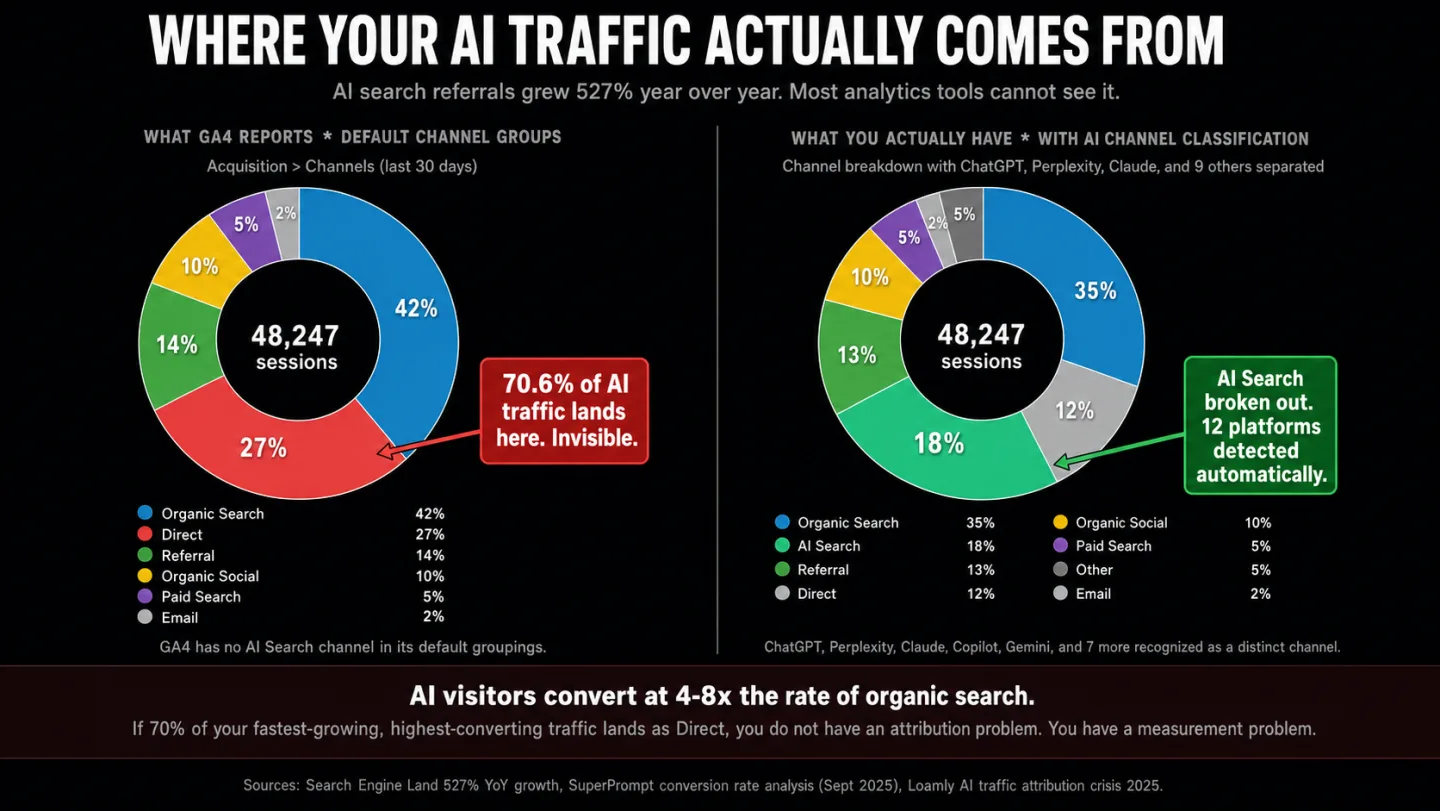
There's one gap most comparisons leave out, and it's getting bigger by the month: AI search traffic tracking.
AI search referrals grew 527% year over year, so they more than sextupled in twelve months. That means the channel roughly sextupled in a single year. AI visitors convert at 4-8x the rate of organic search, so one of them is worth several visitors from Google. In plain English: one AI visitor is worth several from search. But 70.6% of AI traffic lands as "Direct" in your reports, because AI platforms strip the referrer header before the visit reaches you. That means seven in ten of those visits are misfiled the moment they arrive. Your fastest-growing, highest-converting source is sitting there unnamed. That means the channel most worth watching is the one GA4 hides in Direct.
GA4 has no AI Search channel in its default groupings. Plausible shows the referrer domain but doesn't split it into its own channel. Fathom and Simple Analytics file it under generic referral traffic. Most tools drop ChatGPT and Perplexity visits into "Referral" or "Direct" and leave them there.
Clickport sorts every visit into 16 channels, one of them a dedicated AI Search channel that recognizes 12 AI platforms on its own. That means 12 AI sources get named instead of dumped into Direct. I built it because I kept seeing more and more visits from ChatGPT and Perplexity in my own data, and no tool was naming them for what they were. I'd been staring at a Direct bucket that wasn't Direct.
The gap will close as other tools add AI classification. But right now, if AI traffic matters to you, most alternatives can't see it at all, and I think that's the gap that'll decide the next round of switches.
How to actually switch
Most comparisons stop at the recommendation and leave you to figure out the move on your own. I've done this switch enough times to make it boring, and here's the process:
If you want the long version, with feature mapping and platform-by-platform instructions, I wrote a full migration guide.
Frequently asked questions
Is GA4 replacing Google Analytics? GA4 isn't a separate product that replaced Google Analytics. It's Google Analytics, the current version of it. Universal Analytics, the version before it, was retired for free properties on July 1, 2024 and stopped collecting data for good. So when someone says "Google Analytics" today, they mean GA4 unless they spell out Universal Analytics. That forced migration is why so many sites are rethinking the platform now. The interface got harder, the data model changed, and the old Universal Analytics history was either exported or gone. If you're weighing GA4 against alternatives because the migration left you fed up, you're in good company. That's the most common road to this article.
What is the best free alternative to Google Analytics? Umami self-hosted is free with nothing held back. GoatCounter is free for personal and non-commercial use. PostHog gives you 1M events/month for nothing. If you want zero setup, both Plausible and Clickport run 30-day free trials.
Is Plausible or Fathom better? It depends on what you care about. Plausible is open source, cheaper, and lighter, a ~1 KB script against Fathom's ~2 KB. Fathom keeps your data forever, includes 50 sites on every plan, and uses custom domain tracking to get past ad blockers. If budget leads, pick Plausible. If retention and ad blocker bypass lead, pick Fathom.
Do I need a cookie banner if I switch to a privacy-first alternative? Not for the analytics. Cookieless tools like Plausible, Fathom, Simple Analytics, and Clickport store nothing on the visitor's device. No cookies, no localStorage, no fingerprinting. If analytics was the only reason your cookie banner existed, you can remove it entirely.
Can I use Google Analytics and a privacy-first tool at the same time? Yes, and plenty of businesses do. Use the privacy-first tool as your main dashboard, where the data is more complete and the interface is simpler, and keep GA4 for the one job it does best: Google Ads conversion import and BigQuery export.
Will switching analytics tools affect my SEO? No. Google has said outright that using or not using Google Analytics changes nothing about your search rankings. Your analytics tool is invisible to search engines.
How accurate are cookieless analytics compared to GA4? Cookieless tools usually report higher visitor counts than GA4, because they don't lose data to consent rejection or ad blockers. They report lower "returning visitor" accuracy, because without a persistent cookie they can't reliably tell it's the same person twice. For total traffic, sources, top pages, and engagement, cookieless tools are the more accurate read for any site with EU visitors.
What about Cloudflare Web Analytics and Vercel Analytics? Both are free and privacy-friendly. Cloudflare Web Analytics runs server-side, with no JavaScript, but it's light on features, with no events and no goals. Vercel Analytics is tied to the Vercel hosting platform. Both are fine for keeping an eye on basic traffic. Neither goes as deep as a dedicated analytics tool.
Is Google Analytics actually illegal in Europe? Seven EU DPAs have ruled GA non-compliant. The EU-US Data Privacy Framework (July 2023) patched the data transfer issue for now, but it faces ongoing legal challenges that may invalidate it, the case often called "Schrems III." And even if the framework holds, GA4 still needs cookie consent under EU ePrivacy rules. The legal risk is real, and it hasn't gone away.
Analytics should tell you what is happening on your site. It shouldn't need a certification to read, it shouldn't hide half your visitors behind a consent banner, and it shouldn't take 48 hours to show you yesterday.
Every tool here exists because GA4 left a gap. Some fill it with simplicity. Some fill it with privacy. Some fill it with depth. The right one comes down to what you need, not to which company wrote the loudest comparison article.
If you want to see what your data looks like when nothing is hidden, start a free 30-day trial of Clickport. No credit card. One script tag. Two minutes.

Comments
Loading comments...
Leave a comment