Track 404 Pages in GA4: Why 39% Get Missed Silently
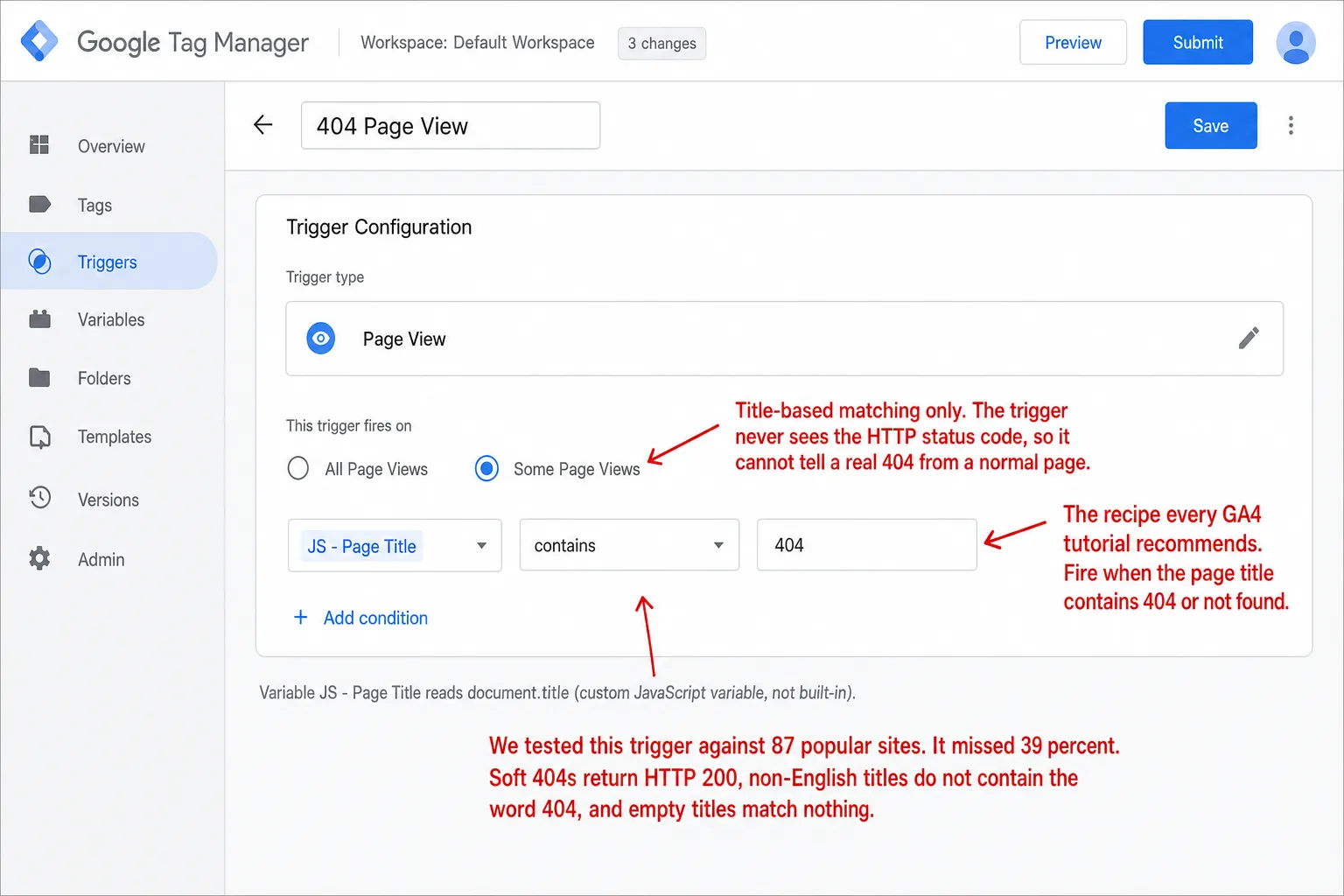
Every GA4 tutorial recommends the same fix: a Tag Manager trigger that fires on pages whose title contains "404" or "not found." It sounds airtight. It isn't. I ran that exact recipe against 87 popular websites, and it would have caught 53. The other 34 slip through silently, including major news outlets, government sites, and ecommerce platforms. Put another way: 4 in 10 sites are invisible to it. That's before you get to soft 404s and single-page apps. This is one of the most-asked GA4 problems for a reason.
Quick disclosure before the data: I run Clickport, an analytics tool that ships 404 detection built in. I'm selling the medicine I'm about to prescribe. The test results below stand on their own either way, and I'll show you exactly how they were produced.
- GA4 doesn't detect 404s on its own. Enhanced Measurement auto-tracks ten interactions (scrolls, clicks, forms, video, downloads), but a 404 is a server response code. GA4's JavaScript never sees it.
- The standard fix is a Tag Manager trigger that fires when the page title contains '404' or 'not found.' We tested it against 87 popular sites in May 2026. It missed 34 of them, roughly 4 in 10.
- Soft 404s break every title-based recipe. About 1 in 15 sites returned HTTP 200 for a missing page, so the error looks like a normal pageview to any client-side tool.
- Non-English 404 pages fail silently. At least 11 of the 87 sites returned localized titles like 'Seite nicht gefunden,' and the English-only trigger never fires on them. A multi-language regex recovers most.
- Clickport flags 404s automatically at the tracker layer, with a one-line override for soft 404s and single-page apps. Click a broken URL, open the session, and the page right before the 404 is usually the one that linked to it.
Why GA4 doesn't auto-detect 404s
GA4 ships with a feature called Enhanced Measurement. It auto-tracks ten interactions out of the box. None of them are 404s. The reason is structural, not a bug. A 404 is an HTTP response code. JavaScript runs after the response. By the time GA4's tracker loads, the status code is already gone. There's nothing left to read.
That's the full list. Scroll, click, search, video, file, form. Every one of them is a DOM interaction that gtag can catch by attaching an event listener. None of them need the HTTP response code. That's why 404 detection isn't there. My read: this isn't an oversight. It's a category of work Google chose not to do.
I went looking for an official Google statement explaining the gap. There isn't one. The GA4 release notes don't mention 404s. Search Central points you to the Page Indexing Report in Search Console. That's fine for SEO triage, but it only covers what Googlebot crawled. The 404s your real users hit from email links, app redirects, and stale bookmarks stay invisible to Search Console. You're on your own.
The standard GTM setup (and how it actually works)
Every popular GA4 tutorial lands on the same recipe: a Google Tag Manager trigger that fires when the document title contains "404" or "not found." The shape is identical across Analytics Mania, MeasureSchool, and Bounteous. Here's the full process.
You start in GTM. You create a JavaScript Variable that reads document.title. It's not a built-in variable, which trips a lot of people up. Then a Page View trigger that fires on "Some Page Views," with the condition {{JS - Page Title}} contains 404. Then a GA4 Event tag with your Measurement ID, event name page_not_found, and parameters for page_location and page_referrer so you can later trace which links sent users to the broken URL. You preview in debug mode, hit a real 404 URL on your site, confirm the tag fires, and publish the container.
The official GA4 docs don't walk you through any of this. The closest Google-blessed alternative is firing a gtag('event', 'exception', { description: '...', fatal: false }) from a <script> tag injected into your 404 template. But the docs describe exception as a crashes-and-errors event, not a page-level signal. The community settled on the GTM page-title approach because it doesn't need developer access and works with whatever 404 template your CMS already ships.
That's the theory. In practice the trigger fires on the wrong pages, misses the right ones, doesn't catch soft 404s, breaks on single-page apps, and quietly fails on any site whose 404 page isn't in English. It also takes up to 48 hours for GA4 to surface the data after you publish the trigger. In practice you publish, wait 2 days, and hope. The test-and-verify loop is slow and demoralizing.
The bigger problem sits underneath all of that. The recipe assumes every 404 page on every website behaves the way the tutorial says it should. I checked whether that holds.
We tested it on 87 popular websites. 39% slipped through.
I wrote a small Node script that hits a guaranteed-nonexistent URL on a curated list of well-known sites. The list spans SaaS (Stripe, Notion, Slack, Vercel), ecommerce (Shopify, Etsy, Patagonia, Nike), news (NYT, Guardian, Reuters), government (NASA, CDC, IRS), WordPress publishers, software foundations, privacy-focused tools, and a deliberate slice of European-language sites (German, French, Spanish, Italian, Norwegian, Finnish). I probed 91 sites. 87 returned a successful HTTP response.
For each one I followed redirects, captured the final HTTP status, captured the server-rendered <title>, and scanned the response body for "not found" phrases in eight languages. The findings aren't subtle.
34 of 87 sites had a 404 page whose server-rendered <title> did not contain "404" or "not found." In plain English: on 34 of the 87, there's nothing to match. The standard GTM trigger only fires when the title matches one of those strings. On those 34 sites it does nothing, and tells you nothing. This isn't a parade of obscure indie blogs. It's Slack ("There's been a glitch…"), Intercom (kept its homepage title), Netlify (kept its homepage title), Etsy ("Etsy - Your place to buy and sell..."), Reuters ("We can't find that page"), and The Atlantic ("The Atlantic"). Six sites returned an empty <title> for the bad URL, which is worse still: there's nothing to match against at all.
Put another way: set up the most-recommended 404 tracking method on a site that pulls traffic from brands like these, and you'd undercount your broken-link hits by roughly 4 in 10. You wouldn't know it. The dashboard would just look low. If a quietly low dashboard sounds familiar, it isn't just 404s: the GA4 Data Loss Estimator shows how much of your overall traffic GA4 misses to ad blockers, consent, and its own limits.
The data isn't surprising once you see it. It's just not what the tutorials say. The tutorials assume every 404 page sets a title with the literal string "404" in it. The web doesn't do that.
The soft 404 problem
The deeper failure isn't title formatting. It's the status code. A soft 404 is a page that tells the user "this content doesn't exist" while the server returns HTTP 200. Google's official definition says exactly that: "a URL that returns a page telling the user that the page does not exist and also a 200 (success) status code."
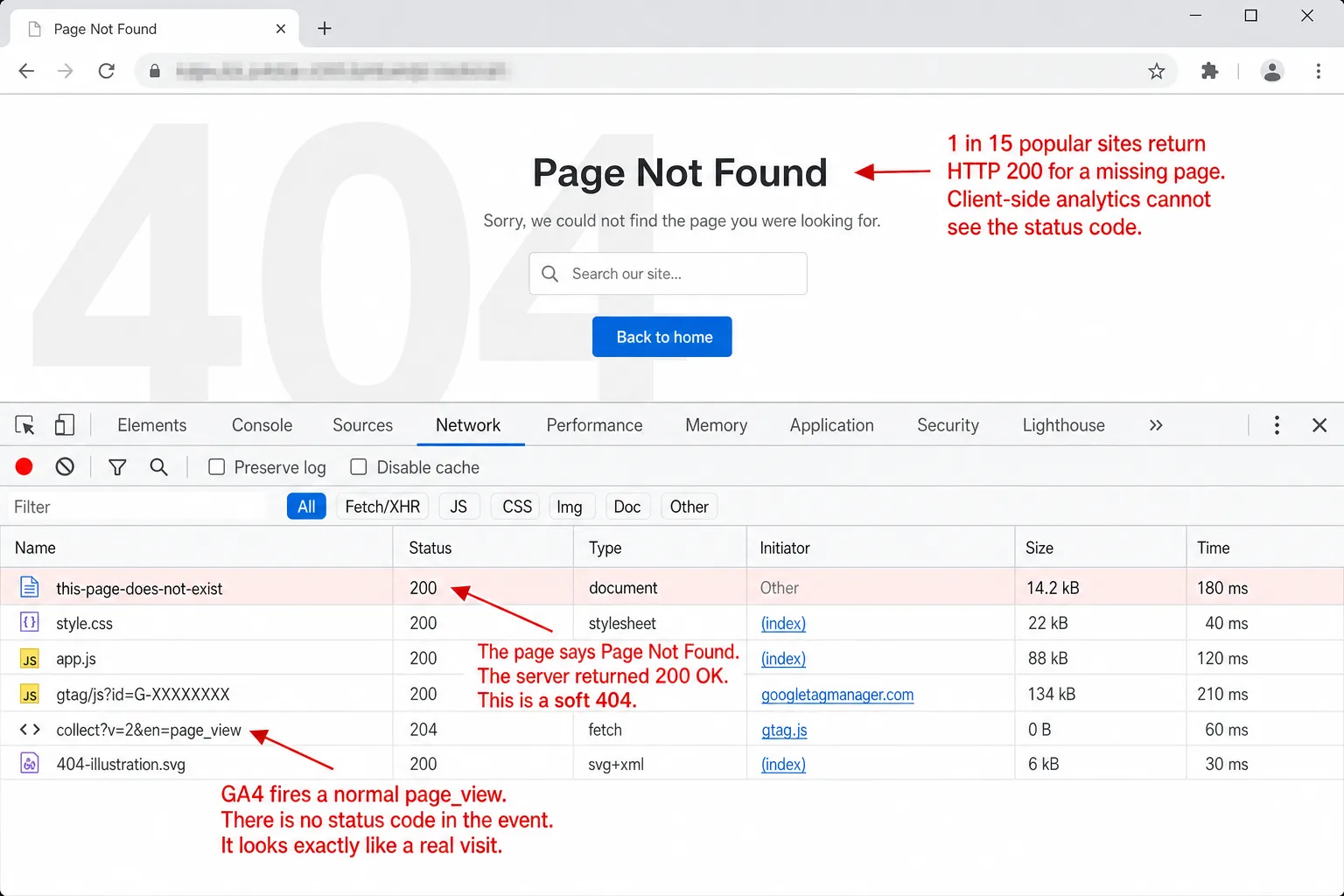
In the 87-site audit, 6.9% of sites returned HTTP 200 for a clearly nonexistent URL. That includes segment.com (rendered Twilio's "Page not found" page), vercel.com (redirected to login), patagonia.com (a checkout-queue holding page), startpage.com (an explicit "Page Not Found" template, served with status 200), hackernoon.com (kept the homepage shell), and sueddeutsche.de (kept the homepage's title). Six sites in 87. Which means roughly 1 in 15 popular websites serves soft 404s by default.
Here's why that breaks tracking. Client-side analytics tools, GA4 included, and Plausible and Fathom included, never see HTTP response codes. The browser receives the response, JavaScript runs, the analytics tag fires. By that point the status code is gone. The only signal left is the page title or the body content. And on a soft 404 the CMS sometimes hides even those, on purpose, to keep the user calm.
There's a real SEO cost on top of the analytics gap. Google's Gary Illyes has confirmed that soft 404s still eat crawl budget even when they return 200 OK: "crawlers use the status codes to interpret whether a fetch was successful, even if the contents of the page is basically just an error message." So every soft 404 burns one of the slots Googlebot would have spent on a real page. Which means broken pages tax your good ones. Glenn Gabe at GSQi has documented cases where redirected URLs were treated as soft 404s, and the sites lost rankings and traffic because the link equity the redirect should have passed never got passed.
There's a GTM dataLayer workaround. You add a dataLayer.push({event:'page_not_found'}) directly inside your 404 template, and it can catch soft 404s if you also instrument the soft-404 path yourself. But that's circular. If your server already knows the page is a soft 404, the right fix is to return a real 404 status code, not to keep returning 200 and patch around it in analytics.
Single-page apps make it worse
The page-title trigger assumes the browser does a full page load when the visitor hits a bad URL. Single-page apps don't work that way. They intercept the route with history.pushState, render a 404 component on the client, and never reload. Three things go wrong at once.
First, the server returns HTTP 200 by default for every SPA route, valid or not, because the server's only job is to hand over the SPA shell. So every SPA 404 is a soft 404 unless the framework opts out. Second, GA4's "Page changes based on browser history events" toggle, part of Enhanced Measurement, fires page_view on every pushState, including the move into the 404 component. Which means the 404 lands in GA4 as a pageview you can't tell apart from a real one. Third, the page title at the moment GA4 reads it depends on whether the framework's router updated document.title before the tag re-fires. Most routers don't, by default.
The fix is different for every framework, and tutorials almost never cover it.
| Framework | Failure mode |
|---|---|
| React Router v6 | Catch-all route renders a 404 component with no document.title update. The page-title trigger sees the previous page's title. |
| Next.js App Router | not-found.tsx is a Server Component by default, so client-side gtag calls require a 'use client' wrapper. Streamed responses return 200, not 404. |
| Vue + Vue Router | Catch-all :pathMatch(.*)* fires history events but the title trigger needs a router.afterEach hook to update title before the GA4 event. |
| Angular Router | If send_page_view: false isn't set on the gtag config, every NavigationEnd handler fires a duplicate page_view. The wildcard 404 route inherits this, so 404s land as a doubled event. |
| SvelteKit 2 | SvelteKit 2's shallow-routing change broke GA4's automatic pageview detection on client navigations (issue #11499, opened then closed in early 2024 with a recommended workaround). 404s still require separate onMount instrumentation inside +error.svelte. |
SvelteKit is the messiest story of the bunch. GA4's auto-firing on pushState got broken by v2's shallow-routing patch. The documented workarounds lean on the reactive $page store, which can double-fire on some transitions. And the 404 case in +error.svelte needs its own onMount block, because no framework-level hook intercepts errors. If you run a SvelteKit site and you've wondered why your 404 numbers are always zero, that's the reason. See also our docs on SPA tracking for the broader pattern.
The redirect-to-error-page anti-pattern, observed live
I want to walk through this one because it came out of real customer data that we almost didn't see ourselves. We recently fixed a query bug in our own dashboard that had been hiding real-visitor 404s from a panel. When the data came back, one customer site, a high-traffic B2B media platform, stood out at once.
Over 36 days that site racked up 2,385 events flagged as 404s, spread across 1,068 distinct broken URLs. That means about 66 broken-page hits a day. Real backlinks pointing to dead pages, internal links to retired products, typo paths, the long tail of a content-heavy publisher that's been running for two decades. That's the shape you'd expect.
What you wouldn't expect: 1,041 of those hits, 43.6% of the total, collapsed onto just two pathnames. In plain English: nearly half the evidence dead-ends at 2 URLs. Both were variants of a single /PageNotFoundError/ URL that the site's CMS redirects every dead link to with a server-side 301. Look at this site's dashboard and those 1,041 hits show up as one row. The URL the visitor tried to reach is gone. So is the referrer that sent them, swallowed by the redirect chain.
I think this pattern is far more common than people realize. Plenty of CMSes ship with "redirect 404s to a friendly error page" as a default, some with a help-desk article telling admins it's a best practice. From a UX angle it's defensible. From an analytics angle it's a blackout. You know somebody hit something broken. You have no idea what.
The fix on the site side is to render the error template at the requested URL instead of redirecting. That keeps both the failed URL and the referrer. If you can't change the redirect, the next-best signal is the on-site session right before the 404 fired. That's what the session drill-down is for, and I'll get to it in a moment.
Non-English titles silently break the trigger
The standard GTM trigger condition is Page Title contains 404 or Page Title contains not found. Both strings are English. Send a visitor to a German error page that says "Seite nicht gefunden," and the trigger doesn't fire. You're invisible to your own tracking in that locale.
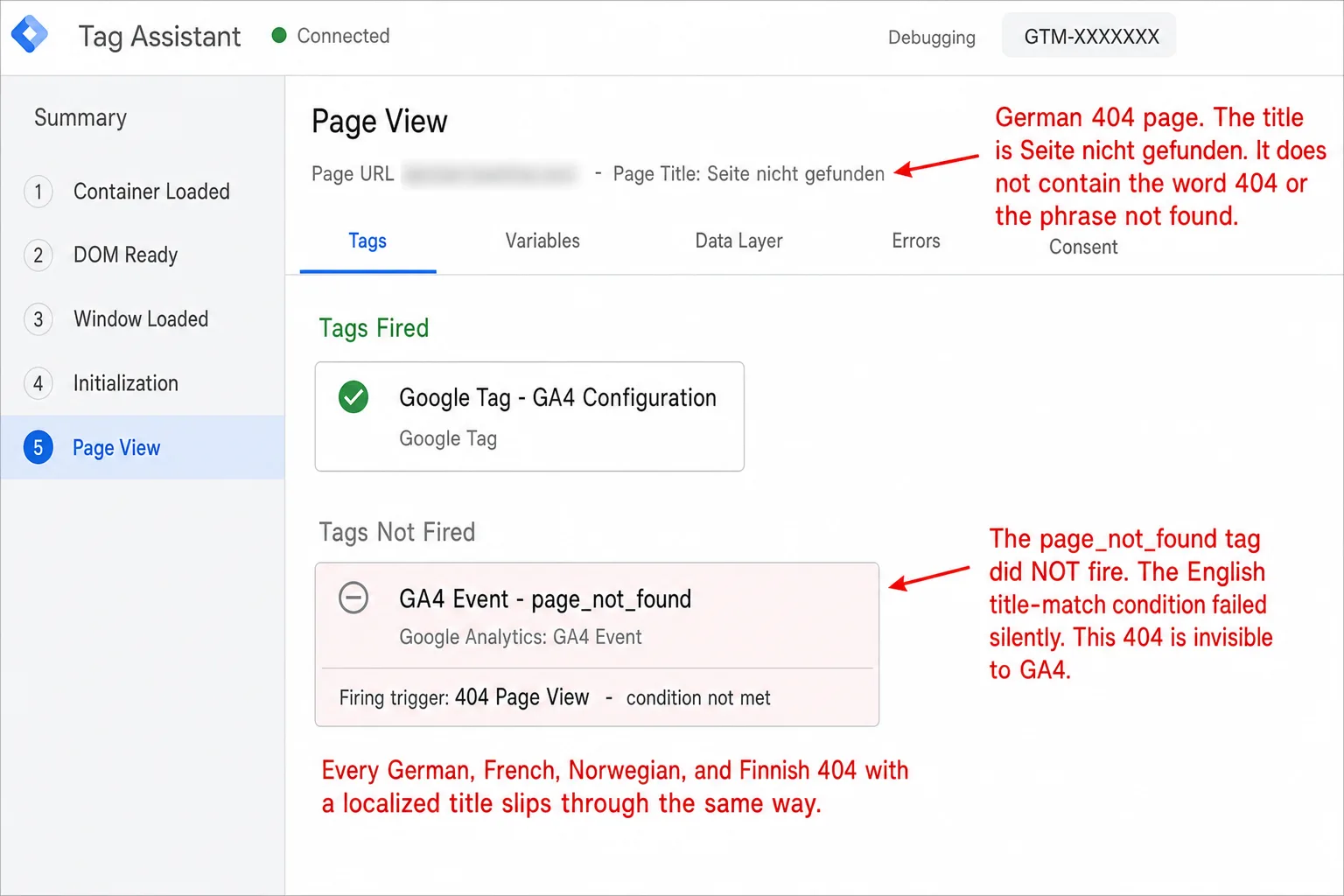
The audit picked this up cleanly. At least 11 sites in the 87 returned a localized 404 title. Some had "404" or a bit of English next to the localized string, so they'd still match. Others didn't. Here's the split.
repubblica.it: "La Repubblica | 404"
abc.es: "Página no encontrada (error 404) - ABC"
aftenposten.no: "Fant ikke siden"
nrk.no: "NRK beklager! Vi kan ikke finne siden..."
hs.fi: "Sivua ei löydy | HS.fi"
rtl.de: "Seite nicht gefunden | RTL.de"
Three sites caught their localized 404 only because a copywriter happened to put "404" or "Fehler 404" in the title. Five sites are flat-out invisible to the standard trigger. That means every 404 in those 5 languages goes uncounted. If you serve traffic in any of those languages and you set GA4 up from an English-language tutorial, you're undercounting in those markets.
The fix is mechanical. Replace the GTM contains condition with a regex that matches every locale you ship in. A reasonable starting set:
/(404|not found|nicht gefunden|introuvable|non trouv|no encontrad|non trovat|ikke funnet|hittades inte|löytynyt|nenalezeno|页面未找到|存在しません)/i
Paste your 404 page's title here to see what the standard recipe does and what a multi-language fallback recovers:
For sites with empty titles or homepage-equivalent titles, no regex helps. Those sites need server-side instrumentation: a dataLayer push from inside the 404 template, or an explicit flag set by the page when it renders. That's most of the case for building auto-detection into the tracker itself, instead of bolting it on with GTM.
What auto-detection at the tracker layer looks like
Clickport's tracker checks the page title against a regex (/404|not found/i) on every pageview. If it matches, the event gets flagged with is_404 = 1 and shows up in the Pages panel under the "404" sub-tab. In practice you land where the GTM recipe ends: no GTM, no publish-and-wait cycle, no dataLayer push, no JavaScript variable to declare. But it carries the same blind spots: soft 404s with sanitized titles, non-English titles, and SPAs with a stale document.title.
The override closes those. In your 404 template, set:
<script>
  window.cpConfig = window.cpConfig || {};
  window.cpConfig.is_404 = true;
</script>
before the tracker loads. Now 404 detection doesn't lean on the title at all. Soft 404s, non-English titles, SPA error components: all flagged correctly, because the page told the tracker straight out. One line per template. One time. Documented in script configuration.
I won't pretend that's a perfect setup. If the soft 404 is something you don't control, like a SaaS app embedded on your site, the override doesn't reach it. If your SPA framework renders a 404 component without your template, the override doesn't load. So here's the honest framing. Auto-detection plus a one-line override catches the union of "the title looks like a 404" and "you know where to put the override," which on most sites is the overwhelming majority of broken-URL hits. Soft 404s on third-party content stay a structural blind spot for any client-side analytics tool.
What you don't have to do: maintain a GTM container, declare a JavaScript variable, register a custom dimension, wait 48 hours for the event to show up, or migrate your custom report from UA Custom Reports to GA4 Explorations when Google retires the old surface, which Google did, in July 2023. The detection lives in the tracker. The dashboard reads it.
If that sounds simpler, that's the whole point. Start a free 30-day trial and see your real 404 traffic in about the time it took to read this paragraph.
From detection to fix: the session drill-down
Knowing that /products/discontinued-item/ got 47 hits last month is half a finding. In practice the count is the easy half. The other half is which page on your site links to that broken URL, so you can fix the source of the problem. Without that, every 404 in your report is a triage task you trace by hand, clicking around your own site.
Clickport's Pages panel wires the 404 sub-tab into the dashboard's cross-filter. Click any broken-URL row and the whole dashboard filters to sessions that hit that pathname. Open the Sessions tab in the same view and you see the sessions that landed on the 404, newest first. Each session opens into its full page sequence: every page the visitor saw in order, plus the source channel, the device, the country, the entry point, and engagement before the broken hit. The page right before the 404 is nearly always the one that linked to the dead URL, even when the dashboard doesn't spell that out. Most of the time you fix it in three clicks: dashboard, session, page editor.
For external broken links, the session shows the referrer's domain and channel. If a popular outside article points to a URL on your site that died, that's a case for a 301 redirect, not a fix-the-link-on-our-end change. Same drill-down, different conclusion.
This workflow is the real reason 404 tracking matters. The number is interesting. The trace is what gets the link fixed. GA4's Exploration view, set up correctly, can build something close, but you'd need a custom Exploration with the right dimensions and a manual filter, redone every time you want to investigate. In practice the cross-filter turns that into a 30-second click on every row.
How other tools handle it (they mostly don't)
I read the docs of seven privacy-friendly analytics tools to see how each one handles 404 tracking. None auto-detect. All of them want some form of manual instrumentation on the 404 template. The setup runs from "drop in a one-line script call" (Plausible, Fathom, Pirsch) to "improvise a custom event because there's no documented pattern" (Simple Analytics, Umami, PostHog).
Plausible's docs recommend plausible('404') on DOMContentLoaded plus a goal definition. Fathom's docs suggest setting the event name to 404: [pathname], which bakes the URL into the event identifier. Matomo's FAQ shows _paq.push(['setDocumentTitle', '404/URL = ' + encodeURIComponent(document.location.pathname + document.location.search) + ' /From = ' + encodeURIComponent(document.referrer)]), the same template-injection pattern with referrer encoding bolted on. Pirsch's docs call pirschNotFound() and say it plainly: "there is no way for the script to figure out if the content was found or not." That one sentence is the cleanest summary of why client-side 404 detection is hard.
The differences are surface-level. Every one of them needs you to know this is a category of work in the first place, find the right docs, edit the right template, deploy, then check whether the events show up. None ship detection in the tracker. I picked a different default, because I think 404 visibility is the kind of thing your analytics tool should handle without asking you to remember it. (How these tools compare more broadly: our GA alternatives breakdown.)
FAQ
Why doesn't GA4 track 404s automatically?
A 404 is an HTTP response code. JavaScript runs after the response. By the time the GA4 tracker fires, the status code is already out of reach. Enhanced Measurement only auto-tracks DOM interactions (scroll, click, form, video, file download, search), because those are the things JavaScript can see at runtime. Adding 404 detection would need either a server-side hook Google chose not to ship, or a client-side regex on document.title, which is the brittle thing the rest of this article picks apart.
How do I track 404s in GA4 without GTM?
Two options. The first is a custom event in GA4's Admin panel: Admin > Events > Create event, name it page_not_found, condition event_name = page_view AND page_title contains 404. That's a remapping rule, not new instrumentation. It only works on data you already collected with a matching title. The second is to inject a gtag('event', 'page_not_found', {page_location: window.location.href, page_referrer: document.referrer}) call straight into your 404 template. That needs developer access but doesn't lean on the title. Both options miss soft 404s and SPAs.
Does GA4 detect soft 404s?
No. Soft 404s return HTTP 200, so to any client-side tool they look like a normal pageview. Google Search Console reports soft 404s as a separate Coverage error, but Search Console only sees pages Googlebot crawled. The soft 404s real users hit from email links, app redirects, and bookmarks are invisible to both GA4 and Search Console. The structural fix is server-side: configure your CMS to return a real 404 status code for missing content.
How do I track 404s in a Next.js or React app?
In Next.js App Router, mark your not-found.tsx (or a child of it) as 'use client', then use useEffect plus usePathname to fire window.gtag('event', 'page_not_found', { page_path: path }). In React Router v6, fire the event from inside the catch-all route component's useEffect. Both lean on the framework rendering the 404 component in the first place, which it doesn't always do for streamed responses or for routes that fall through to a generic catch-all without a status code change. See SPA tracking docs for the broader pattern.
Why does my 404 trigger fire on every page?
The usual cause is the Page Title contains 404 condition matching real pages whose title happens to hold the string "404." Think of a blog post titled "What HTTP 404 means" or a product titled "Model 404 Audio Interface." If your trigger uses contains, switch to matches RegEx ^.*( 404 |Page Not Found| not found).*$ with explicit word boundaries. Or use the dataLayer approach, where the 404 template pushes the event itself and there's no title matching at all.
Why are my 404 numbers different from Search Console's?
Search Console counts URLs Googlebot tried to crawl that came back 404 (or that Google tagged as soft 404s). GA4 counts pageviews from real users who hit your 404 template. The two datasets overlap, but they don't match. Googlebot's crawl includes URLs nobody has visited yet. User traffic includes app links, email clicks, and bookmarks Googlebot may never crawl. Use Search Console to find broken URLs you forgot to redirect. Use a real-time analytics view to find URLs bleeding traffic right now.
What's the simplest setup that actually works?
If you control the 404 template, add a one-line config flag in it (window.cpConfig.is_404 = true for Clickport, dataLayer.push({event:'page_not_found'}) for GTM) so detection doesn't lean on the title. If you can't edit the template, fall back to the regex-on-title approach with a multi-language pattern, and accept that soft 404s and SPAs will quietly undercount. No setup catches everything client-side. Some of the failure modes are structural, and no amount of clever JavaScript gets around that.
Stop maintaining a 404 tracking pipeline
You shouldn't have to declare a JavaScript variable, write a regex, register a custom dimension, and wait 48 hours to learn which links on your site are broken. A web analytics tool built in 2026 should already know what a 404 is.
Clickport detects 404s automatically from the page title, with a one-line config flag for soft 404s and SPAs. Click any broken-URL row and the rest of the dashboard cross-filters: Sources, Sessions, Countries, Devices. The session drill-down shows the full page sequence, so the page right before the 404 is the one that linked to it. Three clicks, not a triage project.
Start a free 30-day trial. No credit card. See your real 404 traffic in 60 seconds.
And if you're wrestling with a 404 setup that won't behave, email me what you're seeing.

Comments
Loading comments...
Leave a comment