How to Track Outbound Links in GA4 (And the Easier Way)
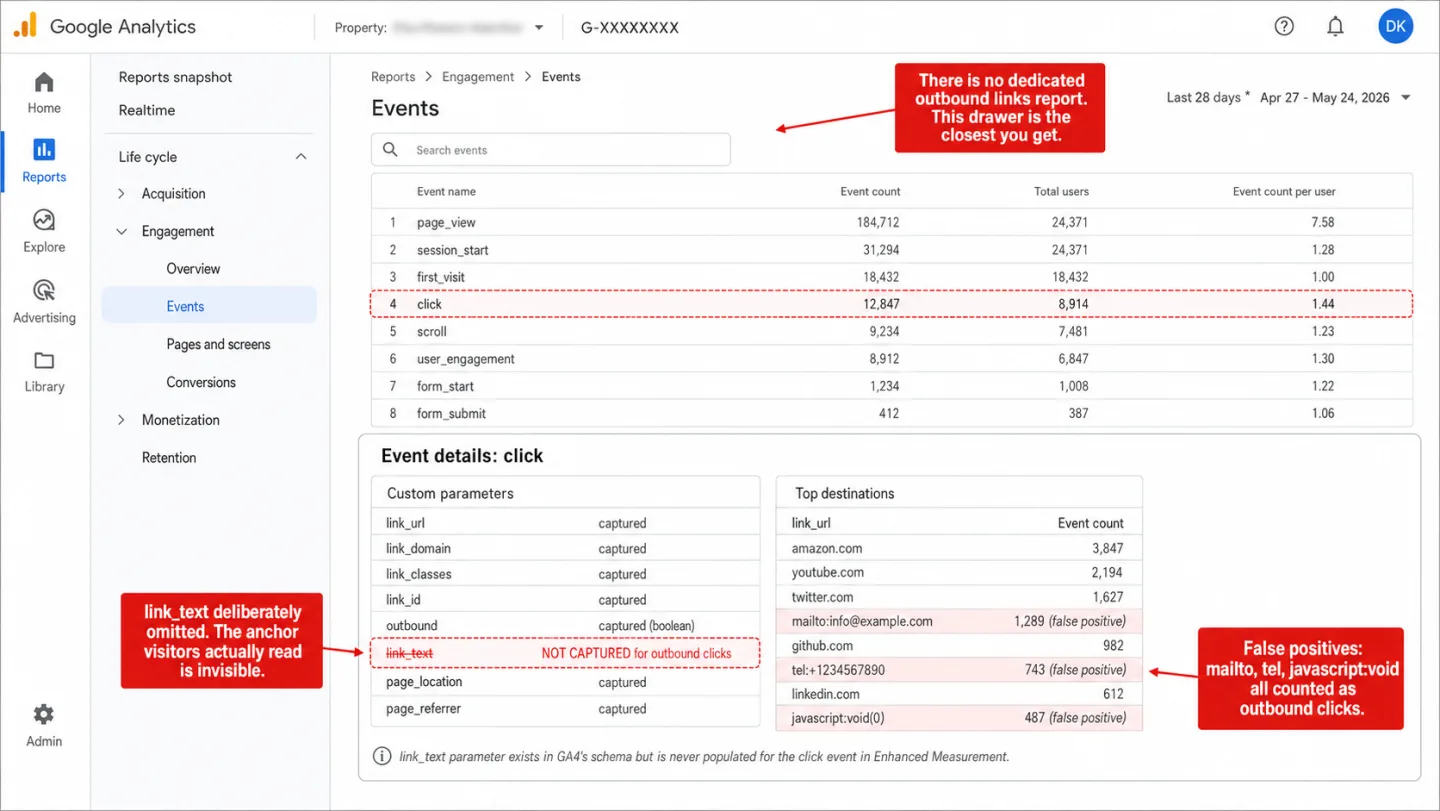
GA4 tracks outbound link clicks on its own. Enhanced Measurement does it automatically, no code required. But it strips out the one thing you came for: the words people clicked. You see where they went, not what they read. This guide covers the quick method, the GTM method for full control, and a one-line alternative that skips both. (Considering a full switch? See our GA alternatives breakdown.)
Quick disclosure first: I run Clickport, a cookieless analytics tool that keeps the link text GA4 drops, so I'm not neutral. The GA4 methods below still work, and I've written them out in full. Use whichever gets you the data.
- GA4's Enhanced Measurement tracks outbound clicks automatically but does not capture the link text. You see where visitors went, not what they clicked on.
- There is no dedicated outbound links report in GA4. You must build a custom Exploration or register link_url as a custom dimension first. Data only appears from the moment you register it.
- Enhanced Measurement counts mailto: and tel: links as outbound clicks. Sites with contact pages see inflated counts that drown out real external link data.
- The GTM method gives you link text and filtering control but requires 5 setup steps and adds 100ms+ to page load time.
- Cookieless analytics tools like Clickport track outbound clicks with full link text, zero configuration, and no consent requirements.
What GA4 tracks by default
Every time someone clicks an <a> link that points to a different domain, Enhanced Measurement fires a click event with outbound: true. It does this on its own. It's on by default and has been since GA4 launched.
The event hands you five parameters: link_url (the full destination URL), link_domain, link_classes, link_id, and the outbound flag. Sounds like the whole picture. Then you notice the hole.
GA4 doesn't capture link_text for outbound clicks. The anchor text, the words a person read before clicking, is gone. You didn't misconfigure anything. GA4 captures link_text for file download events and chooses to drop it for outbound ones. The slot for it sits right there in the schema. Enhanced Measurement just leaves it empty.
So GA4 tells you 47 people clicked a link to amazon.com. That means 47 clicks and not one word of anchor text. It won't tell you whether they clicked "Buy on Amazon," "Check the reviews," or "See pricing." For an affiliate site or a content publisher, that's the difference between a useful number and a number you can't do anything with.
Where to find outbound click data in GA4
GA4 has no dedicated outbound links report. The data is sitting in there somewhere. Digging it out is your job, and I'll show you all three ways to do it.
Method 1: Exploration report. Go to Explore > Blank exploration. Import dimensions: Event name, Link URL (or Link domain). Import metrics: Event count, Total users. Add a filter: Event name = "click" AND Outbound = "true." This is the recommended approach and the only way to see link-level detail without setting up anything extra first.
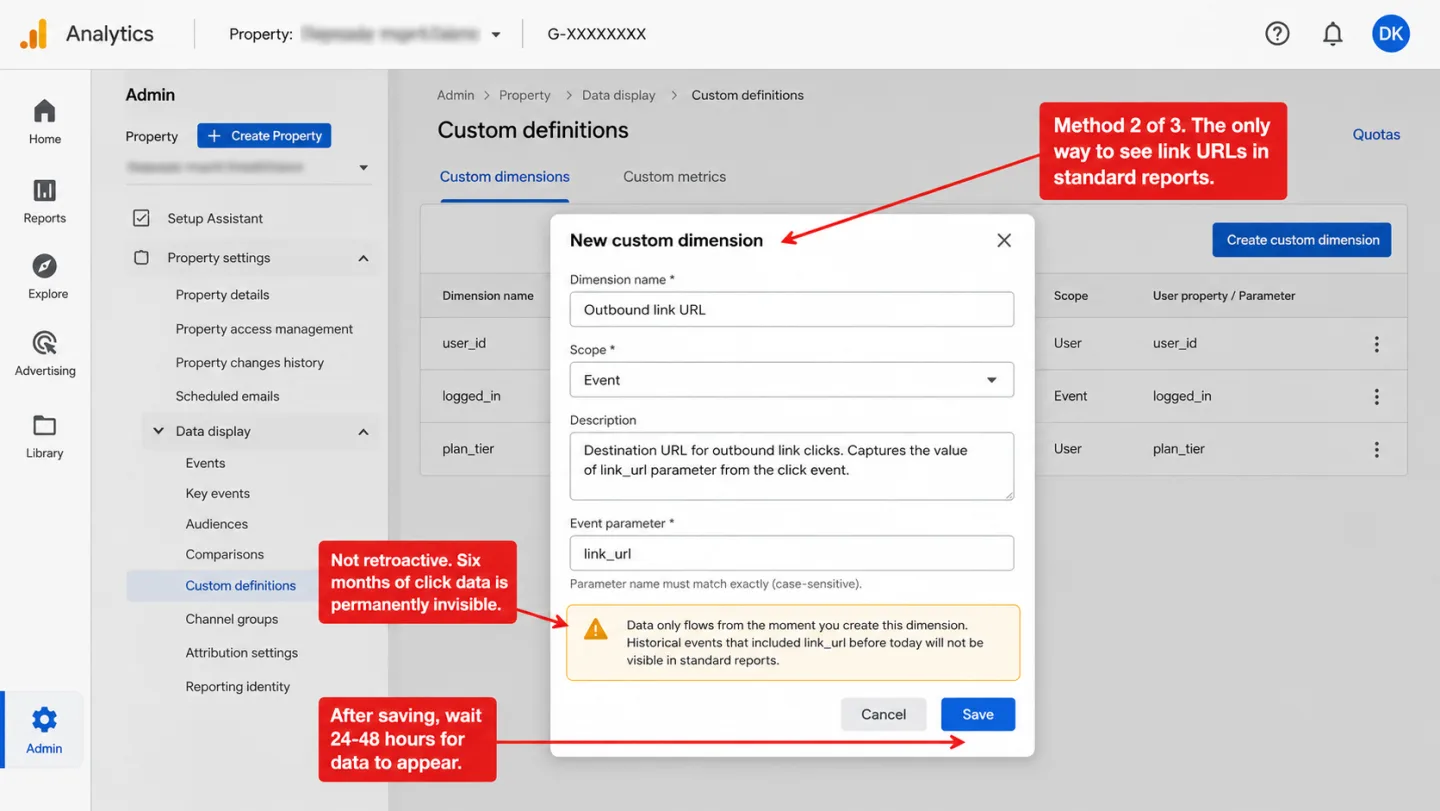
Method 2: Custom dimension. Go to Admin > Custom definitions > Create custom dimension. Set the scope to "Event," the event parameter to link_url. Once you save it, you'll see link URLs in standard reports. Here's the catch. The data only starts flowing the moment you create the dimension. It doesn't look backward. Run GA4 for six months without this dimension, and those six months of outbound click URLs simply aren't there in standard reports. They were collected. You just can't see them.
Method 3: Standard Events report. Go to Reports > Engagement > Events, filter for the click event. You get the total number of outbound clicks and nothing else. No URL breakdown. For URLs you're back to Method 1 or 2.
Three methods, not one of them obvious, every one needing setup GA4 never nudges you to do. Google's own tutorial for measuring outbound clicks is thin, and I read it twice to be sure. It skips Explorations and custom dimensions altogether.
The false positives problem
Enhanced Measurement calls any click an outbound click if the link's domain isn't your domain. That rule catches a lot more than real outbound links.
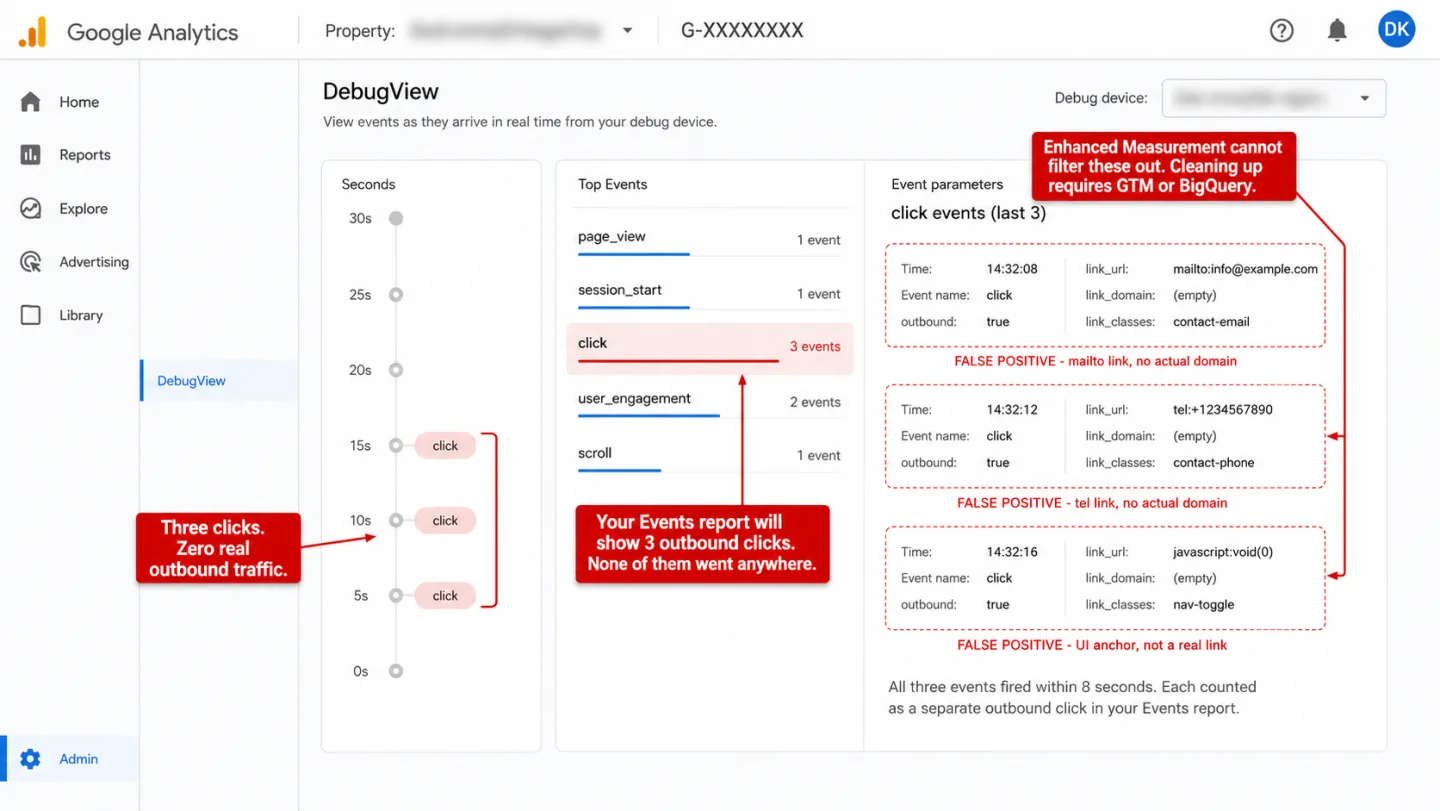
mailto: links (mailto:info@example.com) have no matching domain, so GA4 counts them. tel: links (tel:+1234567890) get treated the same way. Put an email address and a phone number on your contact page, and every click on them lands in your outbound report next to the real external links.
javascript:void(0) anchors are everywhere too. JavaScript frameworks and WordPress themes use them for menus, toggles, and other on-page controls, and they fire the event as well. People report these showing up as the top "outbound clicks" in their Explorations, shoving the real data below the fold.
Cross-domain links break the other way. Any domain you add to GA4's cross-domain measurement gets pulled out of outbound tracking. Added your payment gateway or a partner portal to keep one session intact across domains? Clicks to those sites now vanish from your outbound data without a word. You set that up for session stitching. GA4 quietly used it to delete clicks too.
I want to be precise here: your outbound numbers are wrong in two directions at once. Padded by the false positives. Short by the cross-domain exclusions. To clean it up you have to reach for GTM or BigQuery. Enhanced Measurement gives you no filter at all.
The GTM method for full control
Want the link text back and the noise gone? Google Tag Manager is the answer GA4 points you to. It'll take you five steps.
Step 1: In GTM, go to Variables > Configure Built-In Variables. Enable Click URL, Click Text, Click Classes, and Click ID.
Step 2: Create a new trigger. Type: Click, Just Links. Fire on: Some Link Clicks. Condition: Click URL doesn't contain your domain AND Click URL doesn't match mailto:|tel:|javascript:.
Step 3: Create a GA4 Event tag. Event name: outbound_click. Add parameters: link_url = {{Click URL}}, link_text = {{Click Text}}, link_domain = extract via regex or lookup table.
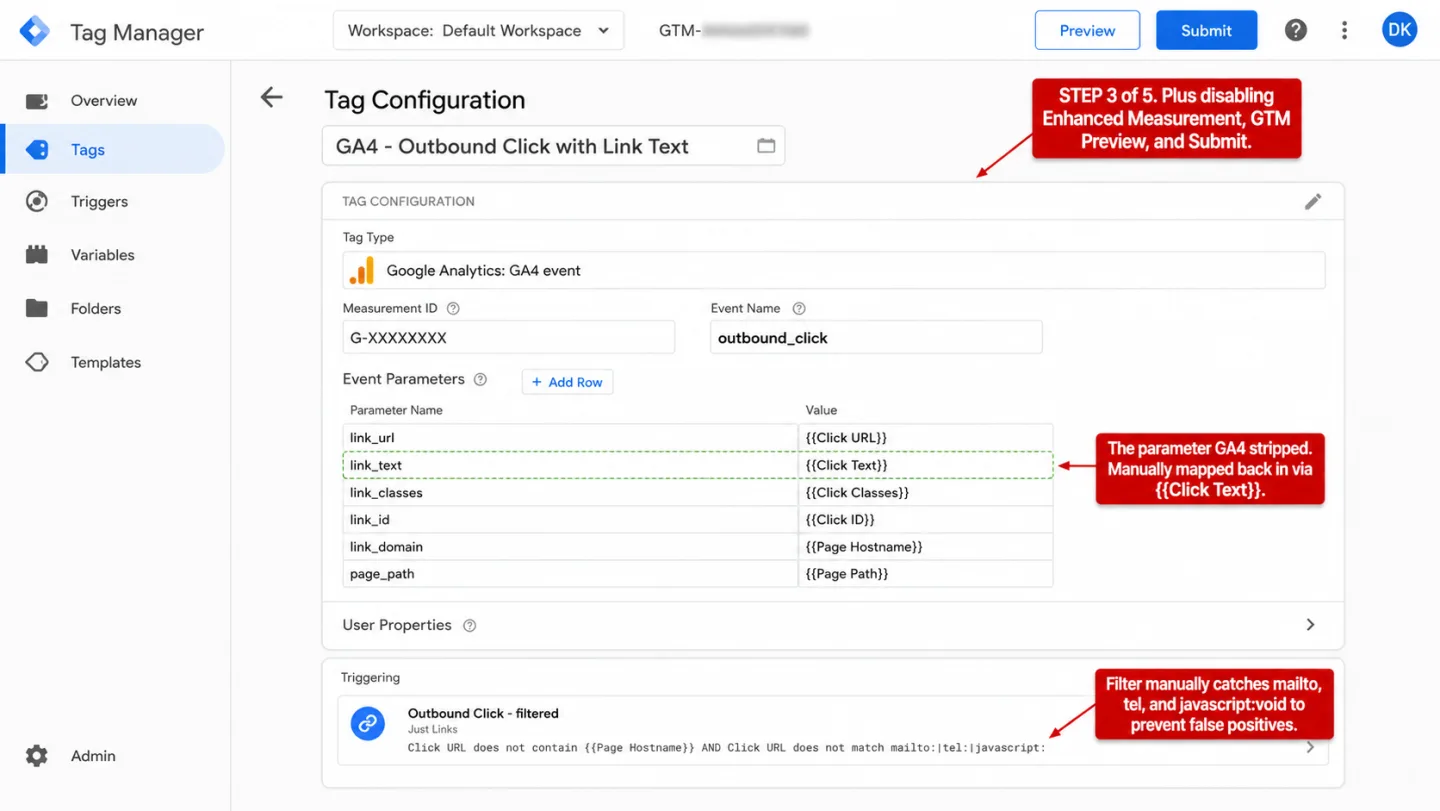
Step 4: Disable the Enhanced Measurement outbound click toggle (Admin > Data Streams > Enhanced Measurement gear icon > toggle off "Outbound clicks"). If you skip this, you get duplicate events: one from Enhanced Measurement and one from your GTM tag.
Step 5: Use GTM Preview mode to test. Verify events appear in GA4 DebugView. Publish the container.
Now you have link text, filtered data, and custom parameters. You also have a bill. Five manual steps, another tool to keep alive, and a speed cost that lands on real people. An empty GTM container adds roughly 100ms to page load. Load it up with 8 tracking tags on a Fast 3G connection and that 100ms turns into 3 full seconds. Which means real seconds, on every page, for every visitor.
What both methods still miss
Even with a flawless GTM setup, GA4 outbound tracking has holes you can't patch. They're built into how it works. I'll list the ones that bite hardest.
JavaScript-triggered navigation. A button that calls window.open(), or a React component that uses navigate() to send someone to an external URL, never clicks an <a> element. GA4 and GTM only listen for native clicks on anchor tags. Open a link in code and GA4 never sees it.
Same-domain redirects. This one bites affiliate sites hard. They send people through internal paths like /go/amazon or /out/partner. The href points at your own domain, so GA4 treats it as an internal click and fires nothing outbound. The visitor lands on Amazon. GA4 wrote it down as a click that stayed home.
Links inside iframes. A cross-origin iframe can't be touched from the parent page. Embed a widget, a form, or a partner's content in one, and every click inside it's off-limits to GA4 and GTM.
Consent-denied visitors. With a consent banner up, an Orbit Media study found GA4 caught only 55.6% of traffic next to a cookieless tool. Put another way: nearly half the visitors were simply gone. In Basic Consent Mode, GA4 collects nothing from anyone who declines. Their outbound clicks never make it into a single report.
Ad-blocked visitors. About 32% of internet users run an ad blocker. Which means roughly one in three. uBlock Origin blocks GA4 and GTM out of the box. Point this at a developer audience and the number climbs to 72% (Censuswide/Ghostery, 2024). Translation: close to three in four. They all click your outbound links. GA4 is none the wiser.
Both holes scale with your audience. The GA4 Data Loss Estimator puts a combined percentage on them for your region and industry.
Outbound link tracking without the complexity
I built Clickport to track outbound clicks on its own. Nothing to configure, no GTM, no custom dimension to register.
The tracker puts one click listener on the document in the capture phase. Click any <a> that points to another domain, and it grabs the full URL, the anchor text (the link_text GA4 throws away), and the page you clicked from. It ships the data as a fire-and-forget beacon, fetch with keepalive: true, so the request finishes even as the browser is already loading the next page.
Register link_url as custom dimension.
Build Exploration report manually.
Filter out mailto: / tel: / javascript:.
Cross-reference with page_location.
Wait 24-48 hours for data.
Link text: not available.
Done.
Link text: captured automatically.
The dashboard lists outbound links by unique visitors, each with its full URL, anchor text, and click count. Click any row to cross-filter the whole dashboard. You see which pages send the most clicks out, which traffic sources bring the people who click, and which sessions that exact click sat inside.
No cookies, which means no consent banner and no half your EU visitors going missing. The script loads from Clickport's own domain, not Google's, so it slips past the blocklists that go straight for google-analytics.com and googletagmanager.com.
The link text was always the point.
You get it back.
And if your outbound report still looks off, email me what you're seeing.
Start your free 30-day trial. No credit card. One script tag. Data in 30 seconds.
Frequently asked questions
If your visitors leave to order food, book an appointment or buy tickets, see how to track conversions when customers buy or book elsewhere. The five business examples explain which website actions to measure and which outcomes need the provider's records.
Does GA4 automatically track outbound links?
Yes, as long as Enhanced Measurement is on, and it's on by default. GA4 fires a click event with outbound: true when someone clicks a link to an external domain. The catch is where it goes. There's no dedicated report for it. To see individual URLs you'll have to build an Exploration or register link_url as a custom dimension first.
Why is my outbound click data not showing in GA4?
When people email me about this one, it usually comes down to one thing: you never registered link_url as a custom dimension (Admin > Custom Definitions). Without it, standard reports give you total click counts and no URL breakdown. The other suspects: Enhanced Measurement's outbound toggle got switched off (check the gear icon in Data Streams settings), cross-domain measurement is quietly excluding the links, or GA4's 24-48 hour processing delay just has not run yet.
Does GA4 track link text for outbound clicks?
No. Enhanced Measurement captures link_text for file download events but not for outbound clicks. The parameter is right there in GA4's data model. It just never gets filled in for this event type. Your only way around it's to rebuild outbound tracking in GTM, where you can map the Click Text variable to a custom parameter yourself.
How do I track affiliate link clicks in GA4?
It depends on how your links are built. If they point straight at the external domain (like amazon.com), Enhanced Measurement catches them on its own, minus the link text. If they run through a same-domain redirect like /go/amazon, GA4 sees an internal click and nothing more. To track those you'd need a GTM trigger that matches your redirect path pattern, or an analytics tool that spots same-domain affiliate redirects on its own.
What counts as an outbound click in GA4?
Any click on an <a> element whose domain isn't the current page's domain. That covers real external links, but it also sweeps in mailto: links, tel: links, and javascript:void(0) anchors. Domains you set up for cross-domain measurement are left out. The rule is about the domain, not about what the person meant to do, and that's why false positives keep turning up.

Comments
Loading comments...
Leave a comment