How to Track Form Submissions Without Google Analytics
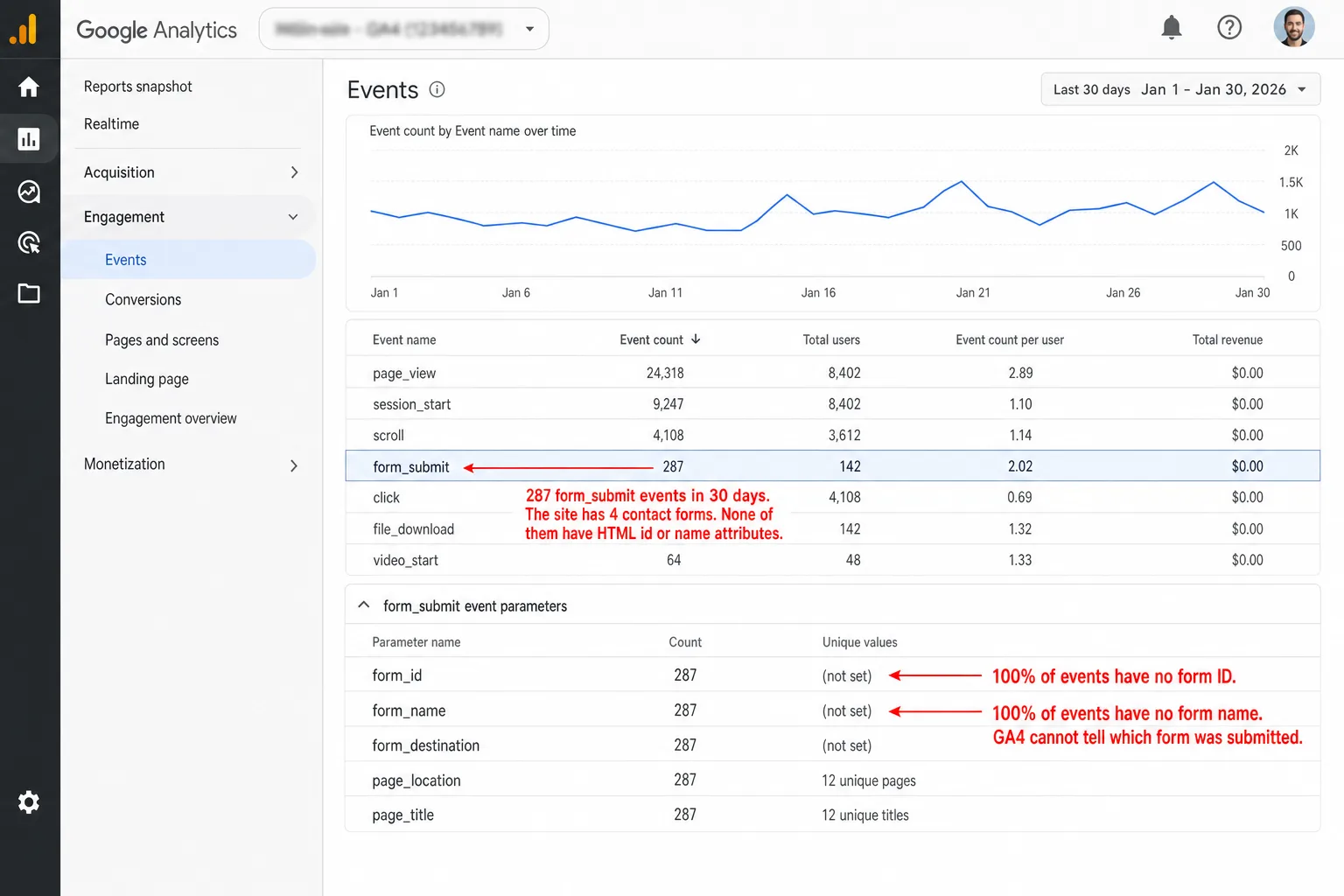
You've been told GA4 tracks your forms automatically. It doesn't. Its Enhanced Measurement catches zero submissions from Contact Form 7, WPForms, and most AJAX-based plugins. Cookie consent hides whatever it does catch. So the real question isn't whether GA4 is tracking your forms. It's how many submissions you've never seen. Here's how to track every one without Google Analytics.
Quick disclosure before we start: I run Clickport, a cookieless analytics tool that does form tracking automatically, so I have skin in this game. The comparison below includes tools that compete with mine, and where one of them beats us, I say so.
- GA4's Enhanced Measurement form tracking misses most modern forms (AJAX, WordPress plugins, SPAs) and inflates counts with phantom submissions from the Meta Pixel.
- Cookie consent banners hide 50-70% of EU form submissions from GA4 before the data is even collected.
- Cookieless analytics tools track every submission without consent banners by using server-side session hashing instead of browser cookies.
- Dropping GA4 doesn't mean losing ad attribution. Every major ad platform (Meta, Google Ads, TikTok, LinkedIn) has independent server-side conversion APIs.
- In a controlled 50-submission test, GA4 Enhanced Measurement caught 0 Contact Form 7 submissions, GTM with a custom listener caught 19, and a cookieless tool caught all 50.
Why form submissions are your most important metric
Pageviews tell you people showed up. Form submissions tell you they took action. That's the line between traffic and business results.
Every lead form, newsletter signup, contact form, and checkout is a form submission. And the rates swing wildly depending on what you ask people to do.
Small changes here have big effects. Expedia once discovered that one confusing "Company" field on their checkout form was costing them $12 million a year. People typed their bank name instead of skipping the optional field, address verification failed, and the sale died. They deleted the field. In plain English: deleting one field earned $12 million a year.
That's not a story about a giant company with a giant analytics team. It's a story about reading form data. And yet companies spend just $1 on conversion optimization for every $92 they spend buying traffic (Econsultancy). Put another way: almost all the money goes to getting people to the form, and almost none to learning why they don't finish it.
The traffic is flowing in.
Most businesses just aren't watching where it leaks out.
You can't optimize what you don't track.
What's wrong with GA4 form tracking
GA4 has a feature called Enhanced Measurement, and inside it sits "Form interactions" tracking. That's the thing people mean when they say GA4 tracks forms on its own. It fires two events: form_start when someone clicks into a field, and form_submit when a form is sent.
On paper it sounds fine. In practice it's the least accurate Enhanced Measurement feature, and most analytics people tell you to turn it off.
Five reasons why.
AJAX forms are invisible. GA4 waits for the browser's native submit event on a <form>. But most sites built with React, Vue, Angular, or a WordPress form plugin send forms through JavaScript (fetch() or XMLHttpRequest) and never fire that native event. The page doesn't reload. So GA4 never sees the submission. If your form shows a "thank you" message on the same page instead of redirecting, GA4 is almost certainly missing it.
It can't tell your forms apart. The form_id and form_name parameters are read from the HTML id and name attributes on the <form>. Most forms don't have those attributes. So GA4 logs generic form_submit events with blank identifiers. You see "42 form submissions" and have no idea whether they came from your contact form, your newsletter signup, or your search bar.
Search bars count as form submissions. If your search bar is wrapped in a <form> element (most are), every search query triggers a form_submit event. GA4 has no way to distinguish a search from a real form submission.
Meta Pixel creates phantom submissions. This is a widely documented issue. The Facebook/Meta Pixel creates invisible <form> elements in the DOM, submits tracking data through them, then deletes them. GA4 sees these as real form submissions. One reported case: a site with 22 actual visitors showed 42 form_submit events, almost all from Meta Pixel activity. Which means the phantom forms outnumbered the people.
![A screenshot of Chrome DevTools Elements panel with the Meta Pixel-injected hidden form selected in the DOM tree. The element is <form id='fb_xd_fragment'> with display:none, visibility:hidden, position:absolute styling. The Console drawer below shows '[gtag.js] form_submit event fired. form_id=(not set) form_name=(not set)'. An annotation reads 'Meta Pixel injects this hidden form into every page. GA4 Enhanced Measurement sees it as a real form_submit event.' A second annotation reads 'Site had 22 actual visitors. GA4 logged 42 form_submit events. Most are these phantom submissions.' A third annotation reads 'gtag.js listens for any submit event. It cannot distinguish Meta Pixel injections from real forms.'](/blog-assets/track-form-submissions-without-google-analytics-meta-pixel.webp)
Failed submissions count as conversions. GA4 fires form_submit when the browser's submit event fires, not when the submission succeeds. If someone clicks Submit but validation fails, with a required field blank or a bad email, GA4 still logs a conversion. I wish I were joking.
So the data isn't just thin. It points you the wrong way.
And the fix everyone recommends only digs you in deeper.
The GTM rabbit hole
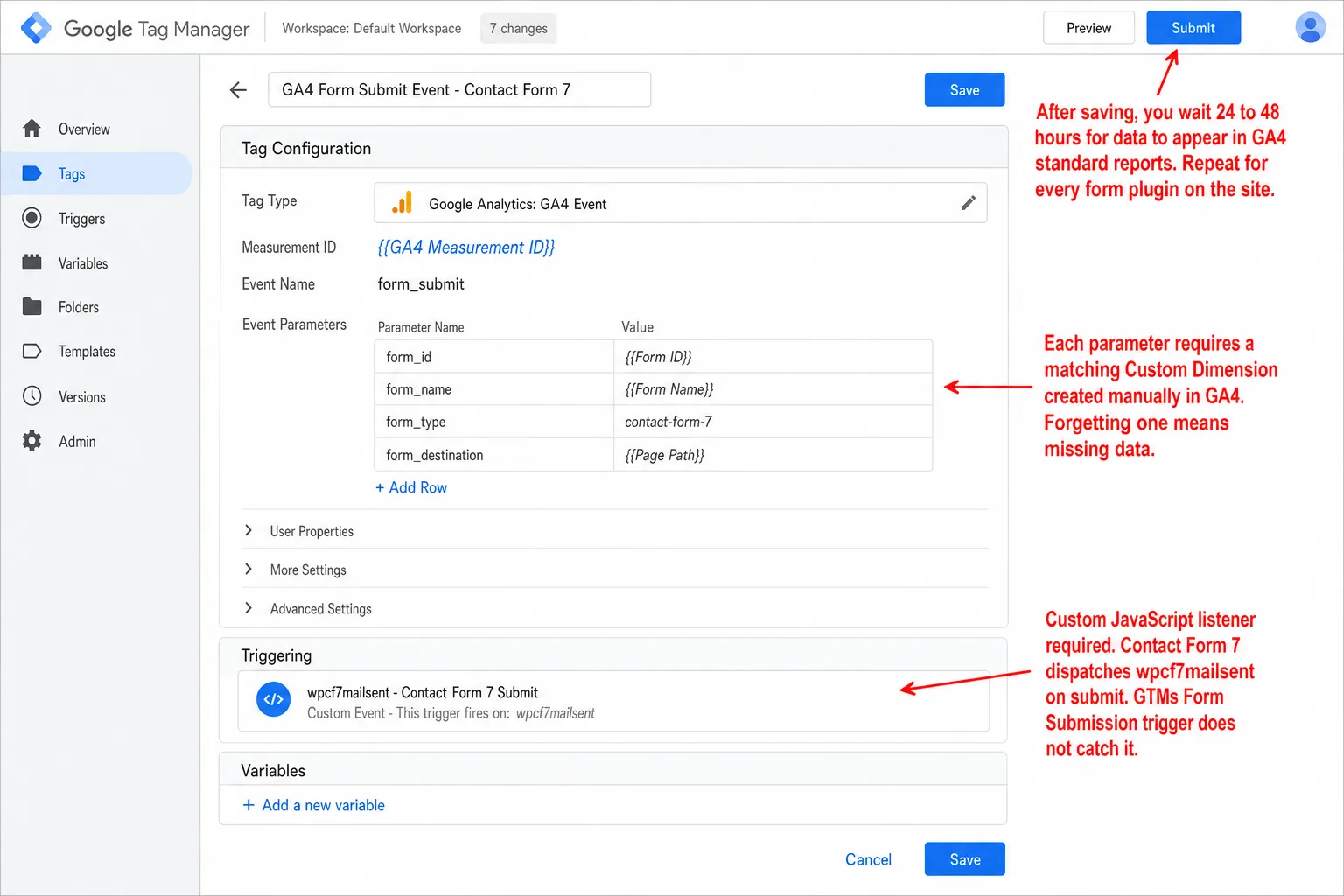
When GA4's automatic tracking fails, which is most of the time, the standard advice is one line: set it up properly with Google Tag Manager.
GTM is powerful. It also takes months to learn and asks for a level of technical know-how most site owners and marketers don't have. Here's what it takes to track a single form.
And that's the happy path.
The real path is usually worse.
Contact Form 7, the most popular WordPress form plugin with 5+ million installs, uses AJAX and fires custom DOM events GTM doesn't recognize. To catch them you write a custom JavaScript event listener for the wpcf7mailsent event and push the data to the dataLayer yourself. If you don't write code, that sentence reads like a foreign language.
HubSpot embedded forms don't work with GTM's standard form triggers because they load inside iframes. Popup forms are worse still.
Elementor forms break GTM's Form Submission trigger the moment you turn on reCAPTCHA v3. The only event GTM sees is a generic gtm.click.
If you run a small business, freelance, blog, or just don't have an analytics team on staff, this is too much. GA4 and GTM ask for a notable level of technical know-how, and the cost of getting it working can run past the worth of the data itself.
The consent problem: losing half your form data
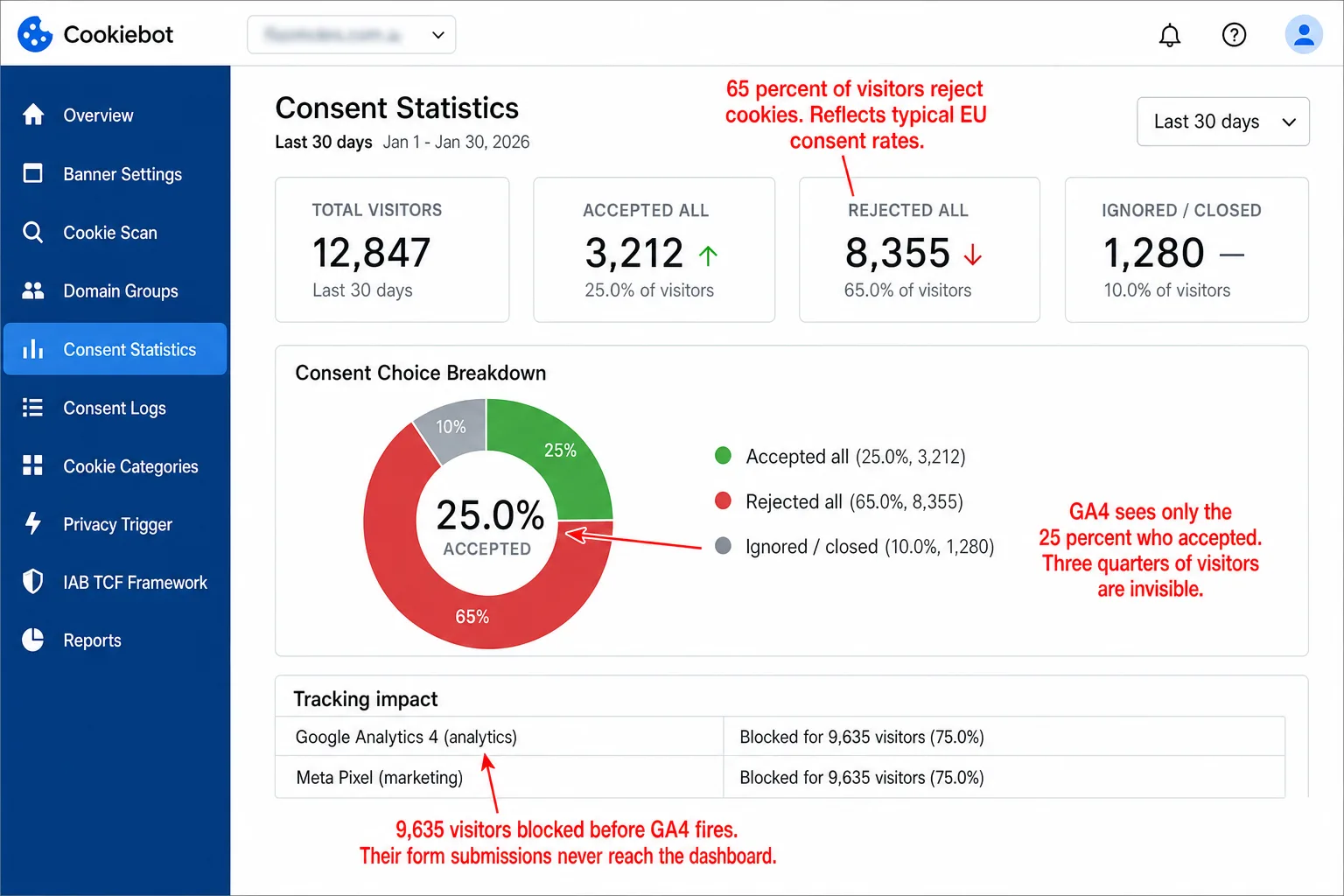
Say you get GTM working perfectly. There's still a bigger problem waiting, and it doesn't care how good your GTM is. GA4 runs on cookies. Cookies need a consent banner under GDPR. And the consent banner is quietly eating your form data.
The UK's Information Commissioner's Office enforces privacy law for a living. When they put a proper, GDPR-compliant consent banner on their own site, their tracked traffic dropped by 90.8%. Translation: nearly everyone said no and disappeared from the data. The regulator measured the cost of its own rules on itself.
It holds across Europe. Research keeps showing that when people get a fair choice, with Accept and Reject weighted the same, only about 25% accept analytics cookies. That means one in four. The rest reject, close the banner, or walk past it. On top of that, over 40% of internet users worldwide run an ad blocker that stops Google Analytics cold.
For form tracking, the math is simple: most of your conversions are gone before GA4 ever looks.
Google's answer is Consent Mode with behavioral modeling, which "recovers" some of the gap. But the modeling only switches on after you hit 1,000 consenting users a day for 7 days straight. Most sites never get there. And when it does run, the numbers it gives back are modeled, which is a polite word for estimated. You end up making decisions on Google's best guess instead of what happened.
For a closer look at how privacy law shapes analytics data, see our GDPR compliance overview and our complete privacy-friendly analytics guide.
How cookieless analytics solve the form tracking problem
Cookieless analytics tools track every visitor, including the 70% who reject the cookie banner. The trick is how they tell one session from another.
They don't drop a cookie on the visitor's device. Instead they build a short-lived identifier on the server. The formula looks roughly like this:
HMAC-SHA256(daily_salt, ip_address + user_agent + date)
The daily salt is a random value that rotates every 24 hours and gets deleted the moment it rotates. In practice, the identifier dies every midnight. The raw IP address is never stored. The hash runs one way, so you can't turn it back into the IP and user agent it came from. The tool can spot the same visitor inside a single day. It has no way to link Tuesday's visitor to Wednesday's. That's the trade you make on purpose: you give up multi-day tracking, so there's no "returning visitors" number, and in return you see every visitor and you're GDPR-compliant with no consent banner.
The law is moving the same way. France's data protection authority, the CNIL, has said plainly that cookieless analytics tools meeting certain criteria can run without consent. The upcoming EU Digital Omnibus Package, proposed in November 2025, carves out consent-free audience measurement when the data is aggregated and can't identify a person. Regulators are starting to accept that not every analytics tool needs a banner.
Consent is only half of it. A growing number of cookieless tools also do automatic form detection. You don't wire up a trigger per form. The tool listens for submit events at the DOM level and catches every submission on the site with nothing to configure. Setup is the same across the bunch: drop in one script tag and the data starts flowing. (Weighing your options? See our GA alternatives ranked for 2026.)
Several tools handle form tracking well. Plausible tracks submissions on its own once you flip the setting in your site config, though it groups every form under a single goal, so you filter by page to tell them apart. Matomo goes further with a paid Form Analytics add-on that tracks field-level interactions, time per field, and where people drop off. Fathom and Simple Analytics track forms too, but you add a snippet of custom event code per form.
So they split on two things: how much you have to wire up by hand, and how much detail you get back. I'll line them up in the evaluation section below.
GA4 vs. cookieless: a head-to-head test
Accuracy claims are cheap. So I ran a test you can check.
On a WordPress test site running Contact Form 7, I submitted the same form 50 times over two days. The site had GA4 (with Enhanced Measurement enabled), Google Tag Manager (with a custom CF7 listener), and a cookieless analytics tool all running simultaneously. The site used a standard GDPR-compliant consent banner with equally weighted Accept/Reject buttons. About 60% of test sessions rejected cookies, reflecting typical EU consent rates.
GA4 Enhanced Measurement recorded zero. I ran the numbers twice to be sure. None. Contact Form 7 uses AJAX, so the native submit event never fires for it to hear. GTM with a properly built wpcf7mailsent listener did catch submissions, but only from the ~40% of sessions that accepted cookies. In plain English: 19 of the 50. The cookieless tool doesn't ask for consent, so it saw all 50.
Contact Form 7 isn't a special case, and I picked it deliberately: it's the most popular form plugin there is. Any AJAX form on a site with a consent banner lands in the same place. The two problems stack: GA4 can't see the form in the first place, and even after GTM fixes that, the banner hides most of the people who used it.
Form tracking for WordPress sites
WordPress runs over 40% of all websites, and its form plugins are a minefield for tracking. Which means the most common setup on the web is also the hardest to measure. Each one handles submissions its own way, and most of them break GA4's automatic tracking outright.
* Gravity Forms may trigger GA4's form_submit in some configurations, but the official GA4 addon ($259/yr) is recommended for reliable tracking.
** HubSpot forms rendered via their JS SDK work with DOM-level trackers. Old-style iframe embeds require HubSpot's callback API.
The pattern repeats. GA4's Enhanced Measurement misses most WordPress form plugins because they submit through AJAX. GTM can be made to work, but every plugin needs its own approach. Contact Form 7 needs a custom JavaScript listener. WPForms needs MonsterInsights or ExactMetrics, both paid. Gravity Forms hides its tracking behind a paid Elite license. Elementor breaks with reCAPTCHA v3. HubSpot embeds don't fire GTM triggers at all because they sit inside iframes.
A cookieless tool with automatic form detection catches the submit event at the DOM level. It doesn't care which plugin drew the form or how that plugin sends it. No per-plugin setup, no paid addons, no JavaScript surgery.
What about ad platform attribution?
The biggest objection I hear to dropping GA4 is always the same: "My ad platforms need GA4 for conversion tracking." They don't. Every major ad platform now has its own server-side conversion API that runs with no help from Google Analytics at all.
- Meta Conversions API (CAPI): Your server sends form conversions straight to Meta's Graph API. GA4 never touches it. Meta even ships a no-code CAPI Gateway if you want it simpler.
- Google Ads Enhanced Conversions: Uses the Google Ads conversion tag, a small snippet separate from GA4, plus a server-side API for hashed user data. The Google Ads API docs show it working with no GA4.
- TikTok Events API: A standalone server-to-server integration with its own pixel ID and access tokens.
- LinkedIn Conversions API: Direct REST endpoints behind OAuth. It leans on no analytics tool at all.
The wiring is simple. When a form converts, your server grabs the click IDs from the URL (gclid for Google, fbclid for Meta, ttclid for TikTok), then sends the conversion plus hashed user data to each platform's API. Tools like Stape and Converly can do this forwarding for you on WordPress.
So here's the flip. GA4 was never the pipe to your ad platforms. It was a middleman sitting in the way. Sending conversions server-side is more reliable than routing them through a browser script that consent banners and ad blockers keep knocking out.
How to evaluate form tracking tools
Shopping for a Google Analytics alternative to track forms? These are the things worth weighing.
Automatic detection. Does the tool track submissions out of the box, or do you wire up a trigger per form? Automatic detection means a form you add tomorrow is tracked the moment it goes live, with nothing to touch in your analytics.
Form identification. Can it tell you which form someone submitted? "47 form submissions" with no idea which form they came from is close to useless.
AJAX/SPA support. Does it handle modern JavaScript forms that never reload the page? This is where GA4's Enhanced Measurement drops out on its own.
No cookies, no consent banner. Does the tool need a cookie banner? If it does, you lose 50-70% of your EU form data before any of it is collected.
Real-time data. Can you watch submissions land as they happen? GA4's standard reports run 24-48 hours behind.
Source attribution. Can you see which source, campaign, or referrer drove each submission? Without it you can't tell which marketing earned its keep.
Goal and conversion rate tracking. Can you mark a specific form as a goal and have the rate worked out for you?
I checked each cell in the table below against current docs as best I could. If you catch something wrong, I'd genuinely like to hear it.
fathom.trackEvent() code per form. Plausible groups all submissions under one goal; filter by page URL to distinguish forms. If you need field-level data (time per field, drop-off points), Matomo's premium plugin is the strongest option.All four are solid, privacy-focused alternatives to Google Analytics. For forms in particular, three things separate them: automatic detection, so you don't miss a form you forgot to set up; form identification, so you know which form each submission came from; and field-level analytics, where Matomo's premium plugin stands alone.
Getting started
Pick whichever tool you like. The point is to start tracking your forms with numbers you can trust. Any of the ones above beats GA4 behind a consent banner.
If you want to try Clickport, it's one script tag on your site:
<script defer data-domain="yoursite.com"
  src="https://clickport.io/tracker.js"></script>
From that moment, every form submission is tracked. The tracker listens for submit events on all <form> elements, reads the form's ID or name, and sends a lightweight event to your dashboard. You make goals for specific forms ("Form submission where page URL contains /contact"), wire up custom events when you need something fancier, and read conversion rates split by source, country, or device. No cookie banner, no Tag Manager, no waiting two days for the numbers.
Your forms are where visitors become business.
The least they deserve is a count you can believe.
And if your form numbers still look wrong after all this, email me what you're seeing.
Start your free 30-day trial. Add the script, submit a test form, and watch it land in real time within minutes.

Comments
Loading comments...
Leave a comment