Do I Need a Cookie Banner on My Website? (2026)
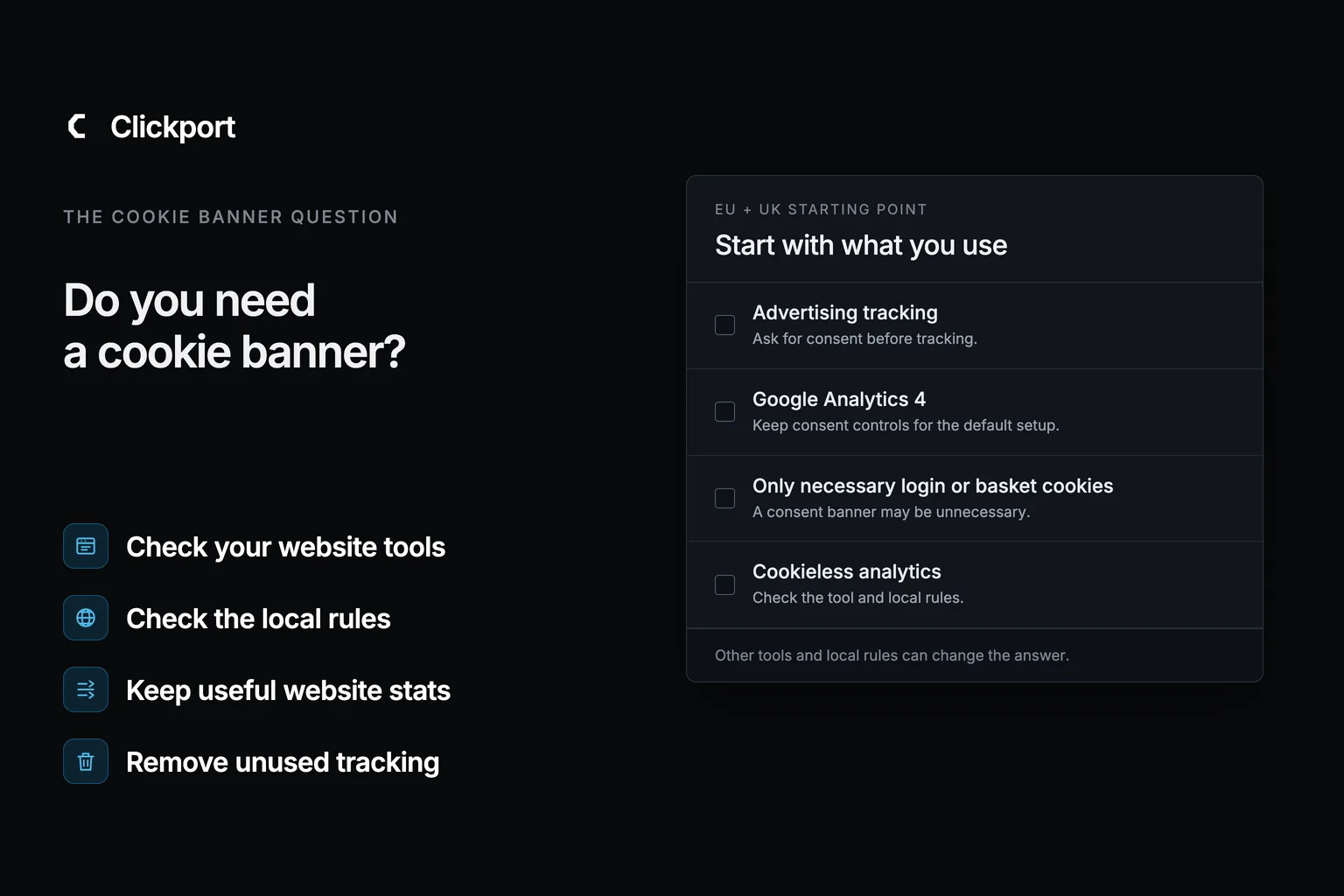
Not every website needs a cookie banner. For EU and UK visitors, advertising tracking needs consent before it starts. Cookies used only for a requested login or shopping basket can run without it. Your analytics, embedded tools and applicable local rules determine the rest.
The useful starting point is the website itself. An electrician wants enquiries. A shop wants orders. Neither needs to keep every script that somebody installed three years ago.
I built Clickport to help website owners understand their sources, pages and results without analytics cookies. Here are five illustrative businesses showing what they could change, what they could keep measuring, and what that means for their banner. The businesses and report numbers are examples, not customer results.
- For EU and UK visitors, advertising tracking needs prior consent. A working login or shopping basket can use necessary cookies without that consent.
- Your installed tools decide the next step. A small business or a WordPress website does not automatically need, or avoid, a consent banner.
- Replacing analytics does not remove advertising pixels, embedded calendars or video players. Review those separately.
- Clickport can measure sources, engagement, goals and connected sales without analytics cookies. It still uses browser storage, which needs a consent assessment.
- Keep consent controls until you have checked the remaining setup. Switching can improve your reporting even when a banner is still needed.
The quick answer for common website setups
Start here for EU/EEA and UK visitors. The country details below cover exceptions and the separate US and Canadian rules.
| Your website uses | Your next step |
|---|---|
| Advertising pixels or remarketing | Get consent before that tracking starts. Remove unused tags. |
| Default Google Analytics 4 | Keep consent controls while reviewing the cookie-based setup. |
| Only necessary login or basket cookies | A consent banner may be unnecessary if no other use requires consent. |
| Cookieless analytics | Check device storage and local rules. Cookie-free does not automatically mean consent-free. |
| Embedded calendars, videos or maps | Check what loads before use. Consider an ordinary external link. |
The EU device-access rule distinguishes necessary requested functions from other uses. The ICO explains advertising consent, and Google documents GA4's default cookies.
One point applies to all five examples: Clickport still uses browser storage. Replacing GA4 removes its analytics cookies only when GA4 is removed too. It does not establish that the replacement qualifies for a consent exception. Keep your existing controls until the remaining setup has been checked.
Local electrician: find the enquiries behind the visits
Brightside Electrical has a service website, a telephone link and a short enquiry form. It also has GA4 and an advertising pixel from a campaign the owner stopped running last year.
The owner wants to know whether the site brings suitable jobs. I would start by confirming that nobody still uses the old pixel, then remove it. Keeping an abandoned advertising tag does nothing to answer that business question.
In Clickport, I would set up Call link clicked and Enquiry received as separate goals. The second would use a confirmed success event after the website accepts the enquiry. Selecting a goal lets the owner inspect the sources and landing pages for those visits.
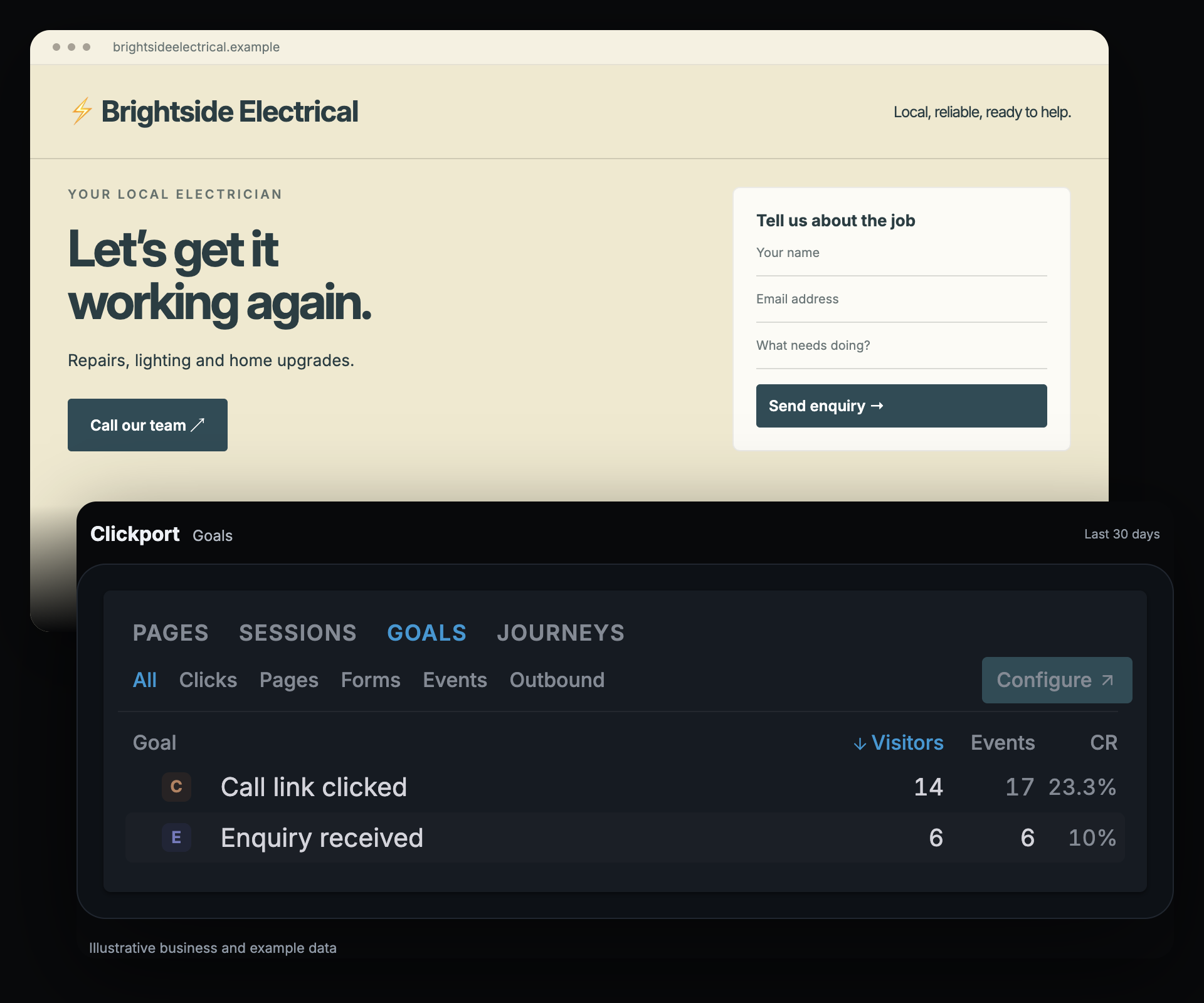
Suppose the repairs page gets visitors but few contact actions. I would check whether it makes the service area clear and whether the form works on a phone. A call-link click does not confirm a completed call, and an enquiry does not establish a booked job. The owner's job records answer those later questions.
What happens to the banner? Removing the unused pixel removes one reason for consent. The replacement analytics and any other scripts still need their own assessment. The reason to test Clickport is already concrete: a report the owner can use to improve the contact page.
Independent adviser: a booking link can be enough
Fieldwork Advice publishes retirement guides and invites readers to book an introductory call. A calendar is embedded beneath every article, even though most visitors leave after reading.
I would ask whether that calendar needs to load on every page. An ordinary Book an introductory call link can send interested readers to the booking service when they choose to go there. Remove the embed's script as part of that change; changing the visible button alone is not enough.
Calendly's cookie guidance makes an important distinction: hiding its embedded banner does not stop its cookies. Review the provider's current requirements if you keep the embed.
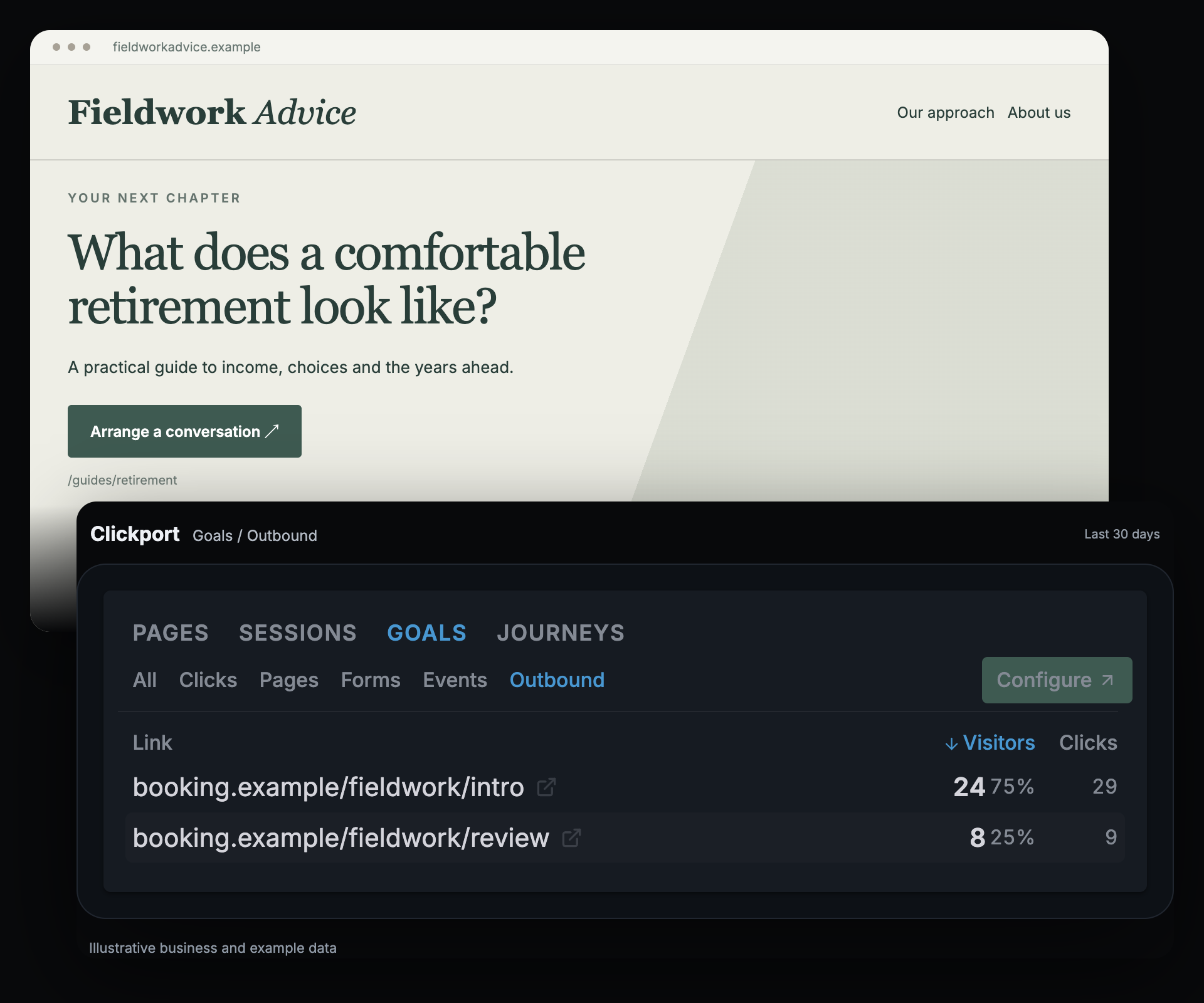
The adviser can still use Clickport's outbound-link report. A goal for the introductory-call link helps reveal which sources and landing pages appear in visits that reach it. If a retirement guide brings those visits, I would review its explanation and invitation before commissioning another general company update.
The calendar confirms completed appointments. Clickport's link goal records the handoff. Our external-booking examples explain how to connect those two parts without treating every click as a booking.
What happens to the banner? A plain link avoids loading the calendar embed on Fieldwork's page. The external booking service manages its own page, and Fieldwork still needs to assess its remaining analytics and tools. The measurement of interest in consultations can stay.
Online shop: keep the sales report and the advertising choice
Northline Goods sells bags and actively uses remarketing. Showing previous visitors an advertisement is part of its current marketing plan.
This shop has a clear answer: keep the required advertising consent controls. Changing analytics does not switch off the advertising pixel or make its purpose exempt. A shopping-basket cookie and an advertising cookie do different jobs, even when they sit on the same website.
The owner can still have a reason to change analytics. I would start with a sales question: which sources bring visits with recorded payments?
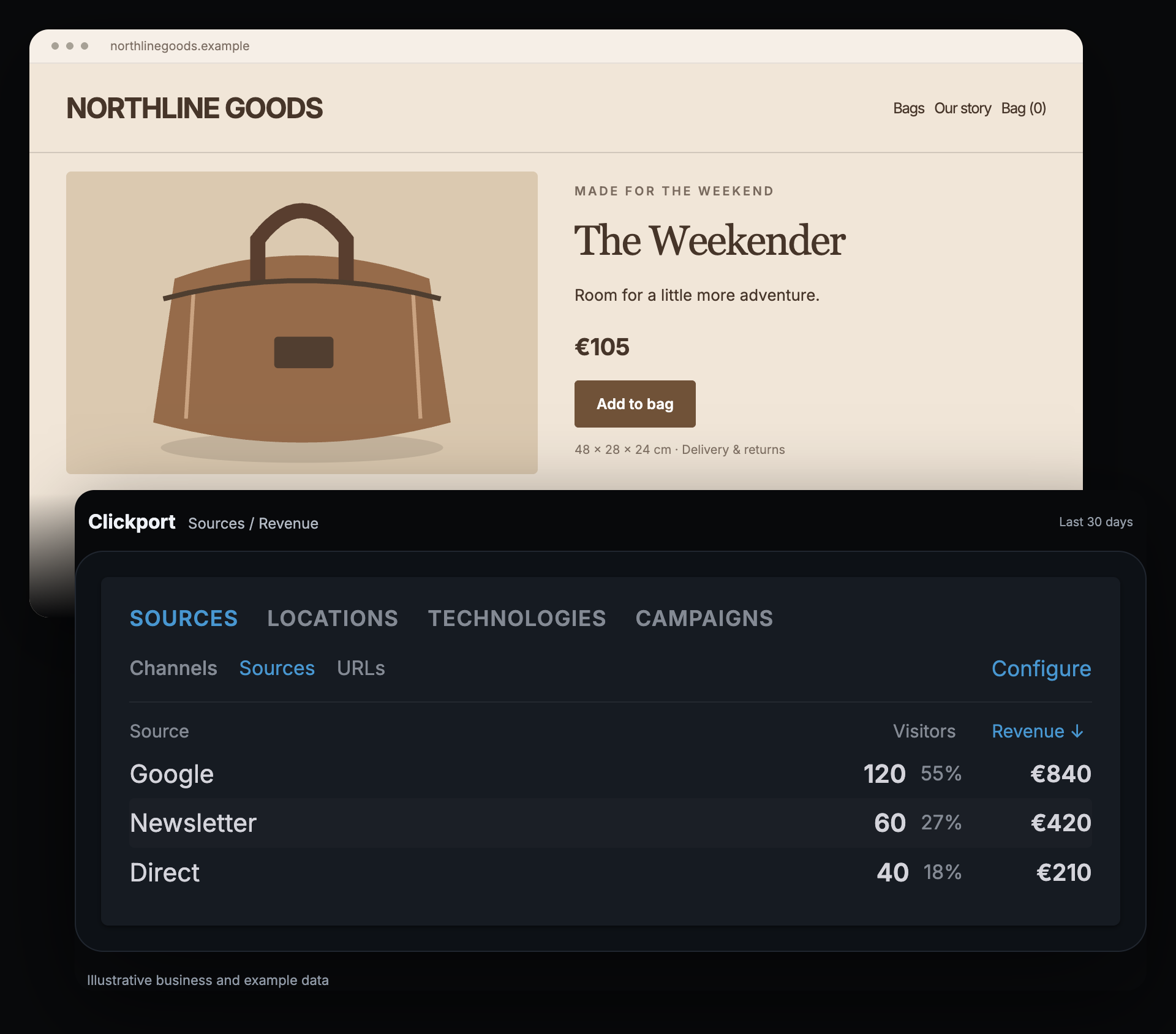
Clickport can report connected payment revenue through a supported payment setup. In this example, Google-referred visits account for €840 and newsletter visits for €420. Those amounts help the owner choose which sources and landing pages to investigate alongside order value and margins.
Payment tracking needs to be connected, and linking money to a source needs the matching visit reference. A payment without that link remains unattributed. The report does not establish that the campaign caused a sale or replace the shop's advertising platform.
What happens to the banner? It stays for the remarketing Northline chooses to keep. Clickport's value here is a usable view of website activity and connected sales. I would assess that benefit on its own rather than promise the shop a banner-free checkout.
Publisher: keep the reading report, review the video player
Common Ground publishes practical home-improvement guides. Its editor wants to know which articles hold attention and encourage newsletter signups. Some guides also load an embedded video as soon as the page opens.
I would review the video separately from the reading report. Does it help explain the article? If so, the editor might keep it with the appropriate controls, or use a locally hosted preview image linked to the video service. An external thumbnail can itself contact that service, so the preview's location matters.
YouTube's privacy-enhanced mode limits personalization. Its name does not guarantee that a player makes no requests or uses no browser storage.
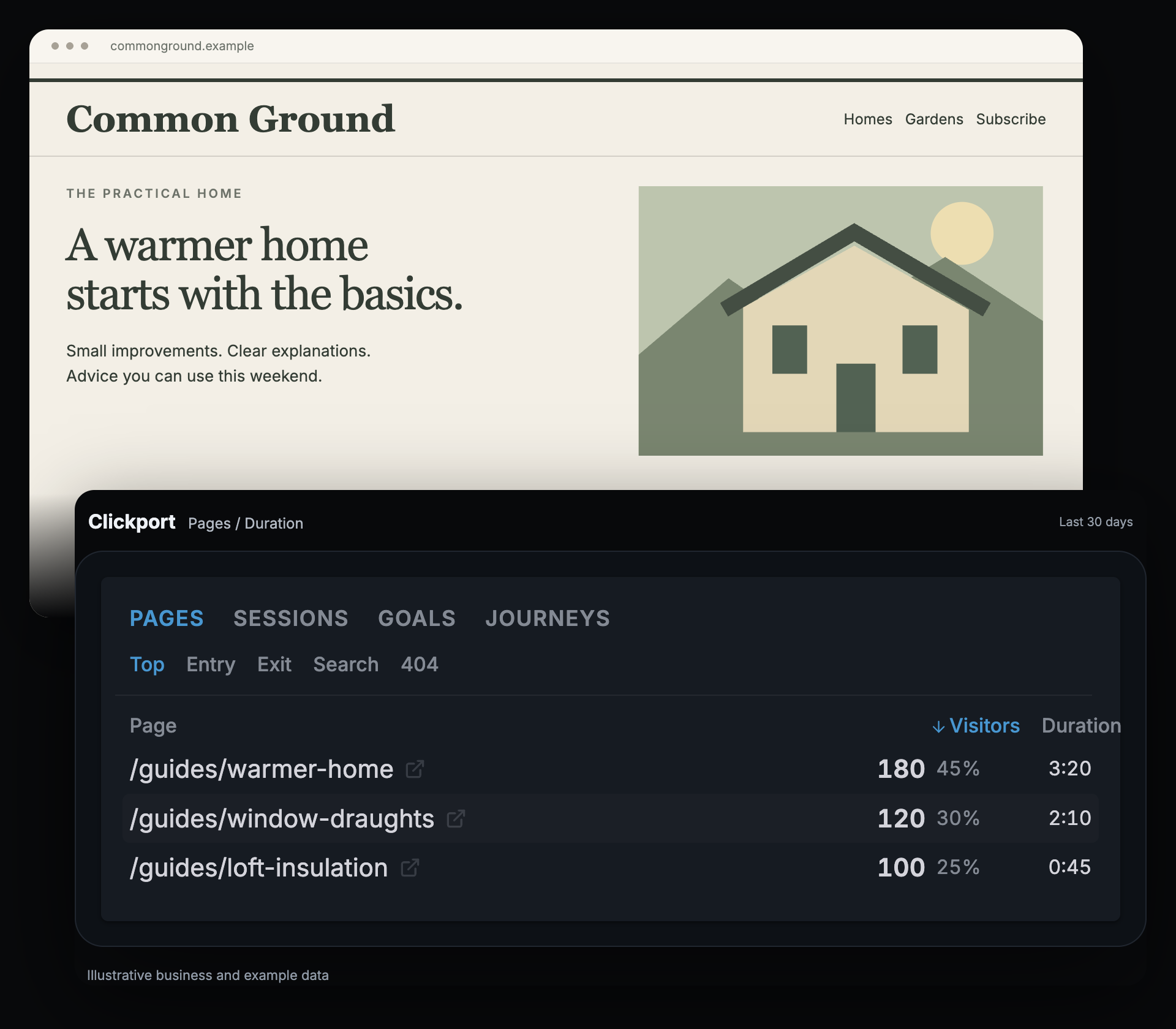
Clickport measures active time and scroll depth on tracked pages. These help the editor inspect how visitors use a guide. They do not prove that someone understood it or watched a video. A separate goal, fired after a successful newsletter subscription, answers the signup question.
If readers spend time on an insulation guide but rarely subscribe, I would examine the newsletter offer and where it appears. That is a useful editorial decision even if the site keeps a video player and its consent controls.
What happens to the banner? Replacing analytics does not change the video player's behavior. The decision depends on the player the publisher keeps, the analytics setup and any other tools. The editor can continue reviewing reading activity while making those choices.
SaaS business: separate the login from the signup report
Relay's website has pricing, registration and a customer login. The team wants people to understand the plans and finish creating an account.
A cookie used only to maintain a requested login can qualify as necessary. That does not make every script on the pricing or registration page necessary too. I would list the login function, analytics and any advertising tags separately.
For measurement, I would build a Clickport funnel from defined goals: Viewed pricing → Started registration → Completed signup. The final event should fire after successful account creation.
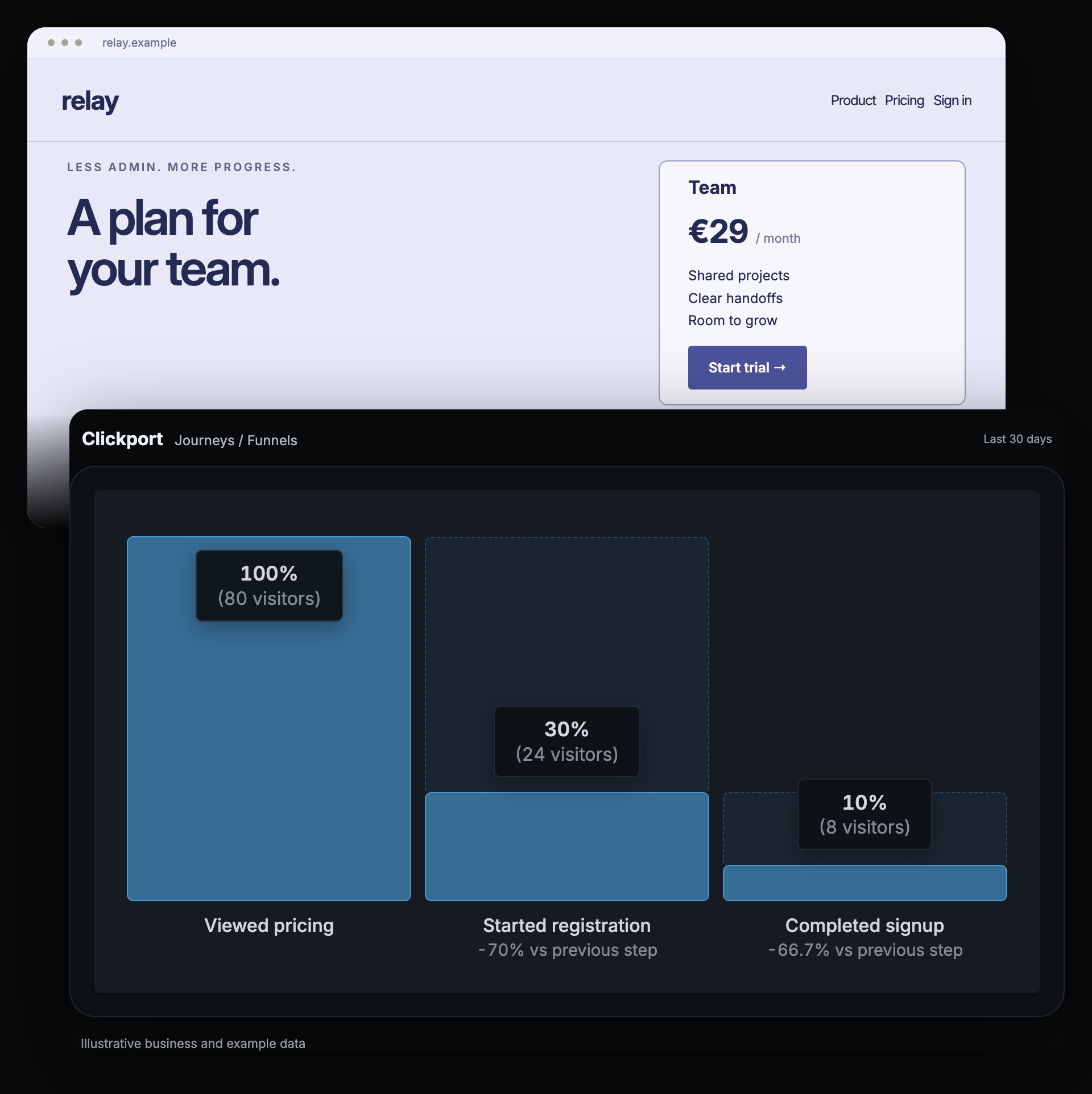
In this example, 80 visitors reach pricing, 24 reach registration and eight complete signup. I would walk through registration on a phone and a desktop. Are the fields clear? Does an error explain how to recover? Is account creation working?
The funnel identifies a place to investigate. It cannot tell the team why the other visitors stopped. The team should test its hypotheses and compare the same defined steps over time.
What happens to the banner? The necessary login cookie can stay. The analytics decision remains separate. Clickport can help Relay inspect signup drop-off without using analytics cookies, but that feature alone does not establish a consent exemption.
What should you change before removing the banner?
Choose the example closest to your website, then make a short list of the tools currently installed. Include anything added through plugins or a tag manager.
- Remove what no longer serves a purpose. Confirm that an old tag is unused before taking it out. Replace an embed with a plain link where that still serves visitors well.
- Choose one measurement question. Start with an enquiry, a booking-link click, connected revenue, reading activity or a completed signup. Check that the report counts the action you intend.
- Test the remaining setup. Keep existing consent controls until you know which uses still need them. Check what loads before a choice, after rejection and after acceptance. The developer checklist also covers return visits and withdrawal.
If you do not know what is installed, the GDPR checker can help identify known patterns in page HTML and headers. It does not run every script or certify the site.
Check your setup in three questions
Choose your visitors, analytics and extra tools for a starting point. The result links to a relevant example or the steps above.
Country rules and technical details
These details help you check the setup in your country or brief the person who maintains your website. This is general information, not legal advice.
What browser storage does Clickport use?
The tracker stores a session identifier and timestamp in sessionStorage. It also uses localStorage for an exclusion preference and experiment data. Bot detection reads limited browser signals, including language count and WebGL renderer information.
These uses need to be included in the consent assessment. A tool that sets no analytics cookies can still fall under rules about storing or accessing information on a visitor's device. The statistical exceptions below have conditions; do not assume that individual visit records or attributed sales qualify.
EU and UK: when can analytics work without prior consent?
In the EU/EEA, the ePrivacy rule covers storing or reading information on a visitor's device. Necessary login and basket functions can qualify for an exception. Analytics doesn't become necessary just because it helps your business. Check the national rules for any analytics exception.
In France, CNIL allows limited audience measurement under specific conditions. It must serve the publisher alone and produce anonymous statistics. Cross-site tracking, combining the data with other processing, and non-anonymous transfers to third parties fall outside that route. CNIL also gives information, lifetime, and retention recommendations. Its assessment process doesn't certify a product.
The UK statistical-purpose exception covers grouped statistics used only to improve your service. You must explain the use and provide a simple, free way to object. Advertising, individual profiling, and keeping individual records after grouping them fall outside it. The ICO explains the conditions.
These rules cover more than cookies. The EDPB explains the wider device-access rule. GDPR duties apply separately when personal data is involved. Choosing legitimate interests under the GDPR doesn't replace required cookie consent.
US and Canada: which rules should I check?
The US has no single general federal cookie-banner rule. State and sector privacy duties can still apply. In California, first check whether the CCPA covers your business. Covered businesses that sell or share personal information must provide the relevant opt-out. They must also honor qualifying browser signals such as Global Privacy Control.
COPPA can require parental consent for covered services collecting personal information from children under 13. California has additional rules for sensitive information and minors. A generic banner doesn't settle those duties.
Canada has federal and provincial privacy laws. Get meaningful consent where the applicable law requires it. The OPC's advertising guidance allows opt-out consent only under conditions. These include clear notice, effective control, and limits on sensitivity and retention. Otherwise, obtain explicit consent or don't use that practice.
Quebec requires prior information about technology that identifies, locates, or profiles people. CAI guidance expects those functions to be off by default. This isn't a rule that every browser cookie needs prior opt-in.
GA4 and YouTube: what should my developer check?
GA4 normally uses _ga and _ga_<container-id> cookies. In Basic Consent Mode, Google tags stay blocked until the visitor interacts with the consent mechanism. No data goes to Google before that interaction.
Advanced Consent Mode loads tags with denied defaults and can send cookieless pings. Consent Mode applies consent settings. It doesn't collect valid consent for you.
YouTube's privacy-enhanced mode limits personalization. It doesn't promise zero requests or browser storage. A local poster avoids contacting a thumbnail provider before playback.
The UK necessary-use exception for requested content can cover some player use. Block storage and access on page load, explain it below the embed, and limit it to requested playback. Extra advertising, analytics, personalization, or monitoring needs its own consent check. A plain Play button doesn't automatically establish informed consent.
A five-part test for your developer
Use a clean browser profile. Record the page, date, region, and browser-blocking settings. Check cookies, other browser storage, and network requests. Chrome's storage guide shows where to look.
- Before a choice: confirm that uses needing consent haven't started.
- After rejection: confirm that rejected tracking stays blocked on other pages too.
- After acceptance: confirm that only accepted uses start.
- On a return visit: confirm that the saved choice still works.
- After withdrawal: confirm that future tracking based on that consent stops.
Browser privacy shields can block requests independently of your banner. Record their settings so you don't mistake their work for the banner's work. Recheck after changing a plugin, tag, or embedded tool.
Frequently asked questions
Does a small website need a cookie banner?
It depends on its tools and the rules that apply. A small site with advertising tracking can need consent. A site using only necessary cookies may not. Business size alone does not settle it.
Does WordPress automatically need a cookie banner?
No. Check the public site while logged out, including its plugins, theme, analytics and embedded tools. WordPress itself does not decide the answer.
Can I replace the banner with a privacy policy?
A privacy policy explains what you do. It does not collect the visitor's consent. If any remaining use requires consent, the policy alone cannot replace that choice. GOV.UK's guidance distinguishes necessary-cookie information from a consent banner.
Does installing Clickport mean I can remove my banner?
No, not automatically. Clickport sets no analytics cookies but uses other browser storage. Your advertising tags and embedded tools also remain until you change them. Assess the complete setup before removing consent controls.
Start with one useful business question
Brightside needs enquiries, Fieldwork needs interest in consultations, Northline needs connected sales, Common Ground needs reading activity and Relay needs a working signup journey. Those are useful reasons to choose an analytics tool.
If getting that answer is difficult in your current setup, try Clickport free for 30 days, with no credit card required. Start with one website and the report that helps you decide what to improve. Use the switching guide for installation and the data-import guide for supported historical traffic reports. Set up your goals for new visits; the import does not bring over GA4 goals, funnels or custom events.
Then decide what your remaining tools require. For some websites that review may support removing a banner. For others, the worthwhile change is clearer reporting while keeping the consent controls they need.

Comments
Loading comments...
Leave a comment