Server-Side Tracking: What It Fixes and What It Doesn't
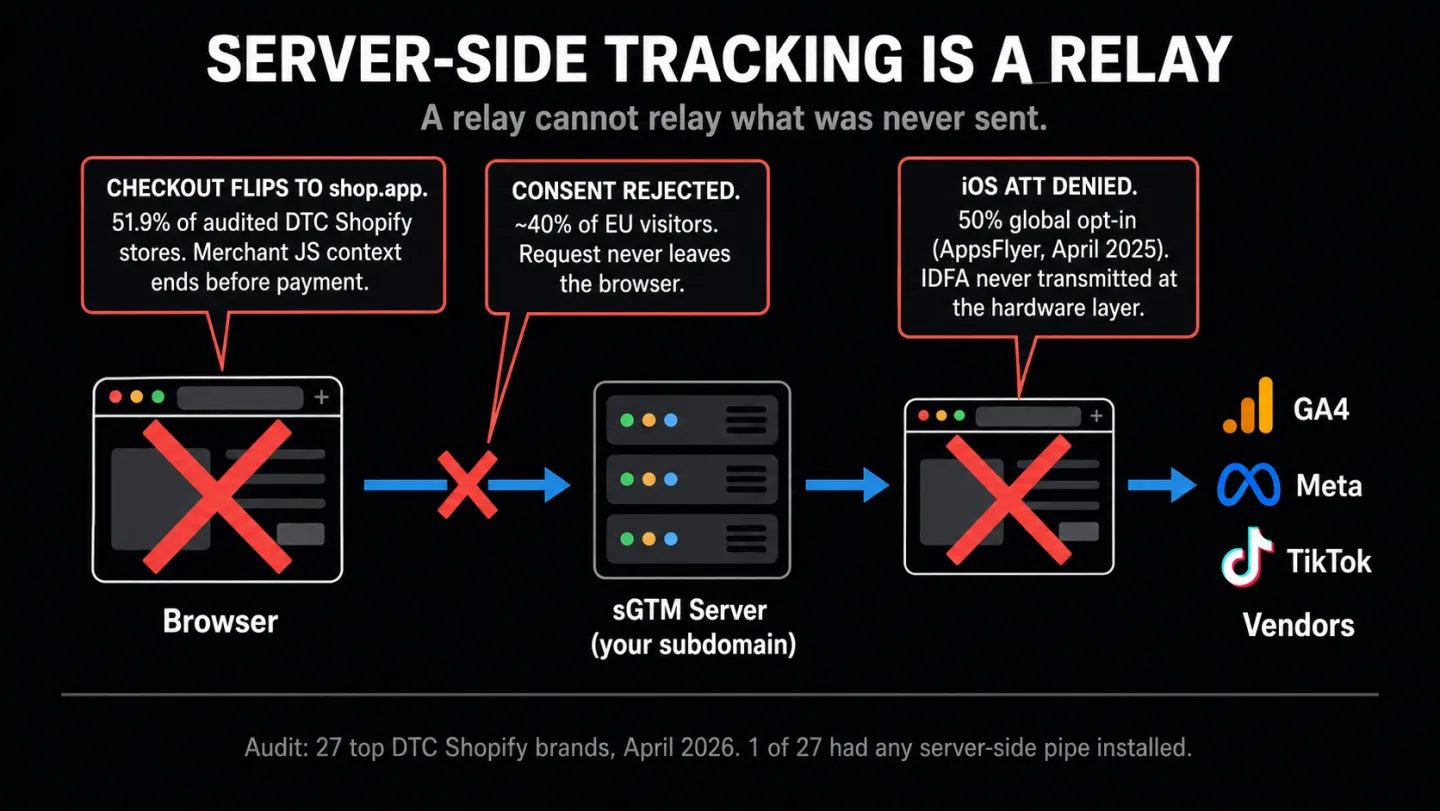
One out of 27. That's how many top DTC Shopify brands run server-side tracking, the supposed fix for every modern ecommerce data problem. We re-audited all of them. That means twenty-six of the best-run stores on the platform said no.
And in more than half the sample, the pipe wouldn't have mattered even if they had bought it. The reason isn't cost. It isn't complexity. It's that the events server-side tracking is supposed to rescue never originated anywhere it could reach.
- We checked 27 top Shopify stores in April 2026. One had server-side tracking installed. The other 26 looked at the price and passed.
- Server-side GTM forwards events the browser already sent. If Shop Pay, Apple Pay, PayPal, or a consent rejection stops the event from firing, there's nothing to forward.
- The honest cost on Shopify is $475 to $970 a month, plus $1,000 to $2,790 to set up. Google's own cloud hosting alone runs $150 a month.
- 51.9% of the stores send buyers to a Shopify-owned checkout domain while their Meta Pixel runs only in the browser. The purchase event never fires there, so there's nothing to relay.
- In Germany and France, roughly 40% of visitors reject cookies. Those sessions are gone before any tracking starts, server-side or not.
What server-side tracking actually is
Server-side tracking goes by several names: server-side GTM, sGTM, server-side tagging. It runs the Google Tag Manager container on a server you control instead of inside the visitor's browser. The browser still fires a request. That request lands on your server container. The container then relays the data to Google Analytics, Meta, TikTok, Pinterest, and whatever else is in your stack.
That's the whole architecture. No one gets confused by that part. They get confused about what the architecture solves.
Proxy. Not origin. The container does nothing on its own. It sits there and waits for requests from browsers. If the browser never sends a request, the container gets nothing. And browsers go quiet for plenty of reasons. An ad blocker stripped the GTM loader. The user rejected consent and the consent layer killed the fire. The event happened in a payment sheet the page script can't see. There's no magic here. A relay can't relay a message that was never sent.
Google's own Measurement Protocol documentation says the same thing. It tells you to keep a GA4 tag on your web page to feed data to the server container. So you still need a browser tag. sGTM changes where data is processed. It doesn't change how data originates.
That's the one sentence that matters most in this article. Every vendor blog skips right past it.
googletagmanager.com. Safari's 7-day JavaScript cookie cap truncating your returning-visitor window. Consent Mode v2 cookieless pings not reaching Google.Simo Ahava's 2020 article is still the clearest explanation of the architecture. Julius Fedorovicius at Analytics Mania frames it the same way. The browser sends one request to your server, and the server hands the data out to vendors.
Look at that word: hands out. You can't hand out data that doesn't exist.
The 27-store audit
In April 2026 we crawled the public HTML of 27 top DTC Shopify brands across apparel, beauty, food and beverage, and home goods. Names you would recognize. Every one is a category leader with real traffic and an active paid-social presence.
We looked for the fingerprints of the four big server-side services (Elevar, Stape, Littledata, Analyzify) plus generic custom-subdomain sGTM patterns (tag.*, tags.*, gtm.*, analytics.*, sgtm.*). The full crawl method and detection patterns sit with the sibling article at /blog/shopify-ga4-revenue-mismatch.
Here's what the re-audit showed once we filtered for server-side adoption alone.
23 of 27 stores, 85.2% of the sample, lean entirely on client-side tags. No server-side backup of any kind you can see. The average store runs 2.1 separate client-side tag domains.
14 of 27 fire the Meta Pixel client-side. Two-thirds have PayPal express turned on. 77.8% mention shop.app, pay.shopify.com, or checkout.shopify.com somewhere in their cart or checkout HTML.
In plain English: roughly four in five of these stores have no fallback at all.
These aren't companies that have never heard of server-side tracking. A brand running a seven-figure Meta ad spend has read every Elevar case study. They've sat through the Stape demos. They've seen the 30% data recovery claim.
And 26 of the 27 looked at the pipe and decided it wasn't worth the money. The rest of this article is why.
What server-side tracking does fix
Before the limits, give it fair credit. Server-side tracking closes a real set of gaps. Here are the wins, each one traced to a primary source.
/collect shapeSafari's Intelligent Tracking Prevention caps JavaScript-set first-party cookies at 7 days of inactivity. Which means a visitor who comes back on day 10 looks like a brand new person. Server-set cookies from a genuine first-party subdomain slip past that cap (webkit.org/tracking-prevention). If your checkout leans on durable attribution and your audience is heavy iOS, that's real recovery you can bank.
Ad blockers that go after google-analytics.com or connect.facebook.net by name miss requests that hit a custom subdomain instead. EasyPrivacy's live filter list confirms it: rules like ||google-analytics.com^$third-party match the hostname, not the path. A request to tag.brand.com slides right past them.
But it doesn't last forever. Brave's Shields follow the DNS chain and block the real destination anyway. uBlock Origin ships URL-path patterns like /collect that match the shape of the request no matter the domain.
So the large pool of users on simple domain-matching blockers gets recovered. The slice running Brave (over 100 million monthly active users as of September 2025, per brave.com/blog/100m-mau) doesn't.
If your audience is heavy iOS Safari, if you run paid social at scale, and if your dedup is clean, server-side tracking will pull back attribution that client-side can't. Stape's own 10-day test recovered 3.29% of events from ad blockers and 20.71% from Safari ITP. Real numbers, not marketing rounding.
That means a store already capturing 92% of its events gets a few more points on top. I think that's a fair description of the upside.
What server-side tracking cannot touch
There are two failure modes the rescue pipes never put on the sales page, because they can't fix either one.
Events that never fire. If a consent banner kills the tag because the user said no, no request leaves the browser. The server-side container has nothing to catch.
In Germany and France, roughly 40% of visitors reject cookies when the banner gives them a fair choice. The Advance Metrics 2024 study saw 40.6% rejection across 1.2 million interactions. etracker's 2025 benchmark puts data loss on fully compliant German banners at around 60%. Bielova et al. measured 17-47% rejection in controlled experiments with 3,947 people in France.
Which means sGTM recovers none of those sessions. They were born in a browser state where tracking was never allowed in the first place.
"Modern privacy regulations are not about technology. They are about consent. If a visitor did not give you consent for tracking, it does not matter how you collect data, client-side, server-side, whatever." (Julius Fedorovicius, Analytics Mania, updated November 2025)
Events that originate on a domain you don't control. Shop Pay, Apple Pay, PayPal express, and iframed 3DS flows finish on shop.app, pay.shopify.com, or the wallet provider's own payment sheet. Your merchant JavaScript stopped running the second the buyer tapped the button. sGTM can't relay what your pages never sent.
This isn't a bug. It's how Shopify designed the Customer Events system on purpose. A Shopify staff member put it in writing: "it's expected behaviour that the events don't fire in the Shop Pay view." The fix is "on our radar" for "the medium-term."
That thread is from 2024. Nothing has shipped since.
And this isn't a Shopify-only problem. iOS users who deny App Tracking Transparency never send the IDFA to any app at all. Adjust's 2025 benchmark puts opt-in at 35%. AppsFlyer's April 2025 report shows 50% among users who saw the prompt.
Put another way: pick either number and a big chunk of iOS users goes missing at the device layer, not the network layer. Server-side tracking can't rebuild what the hardware never emitted. Nothing can.
The Shopify origination gap
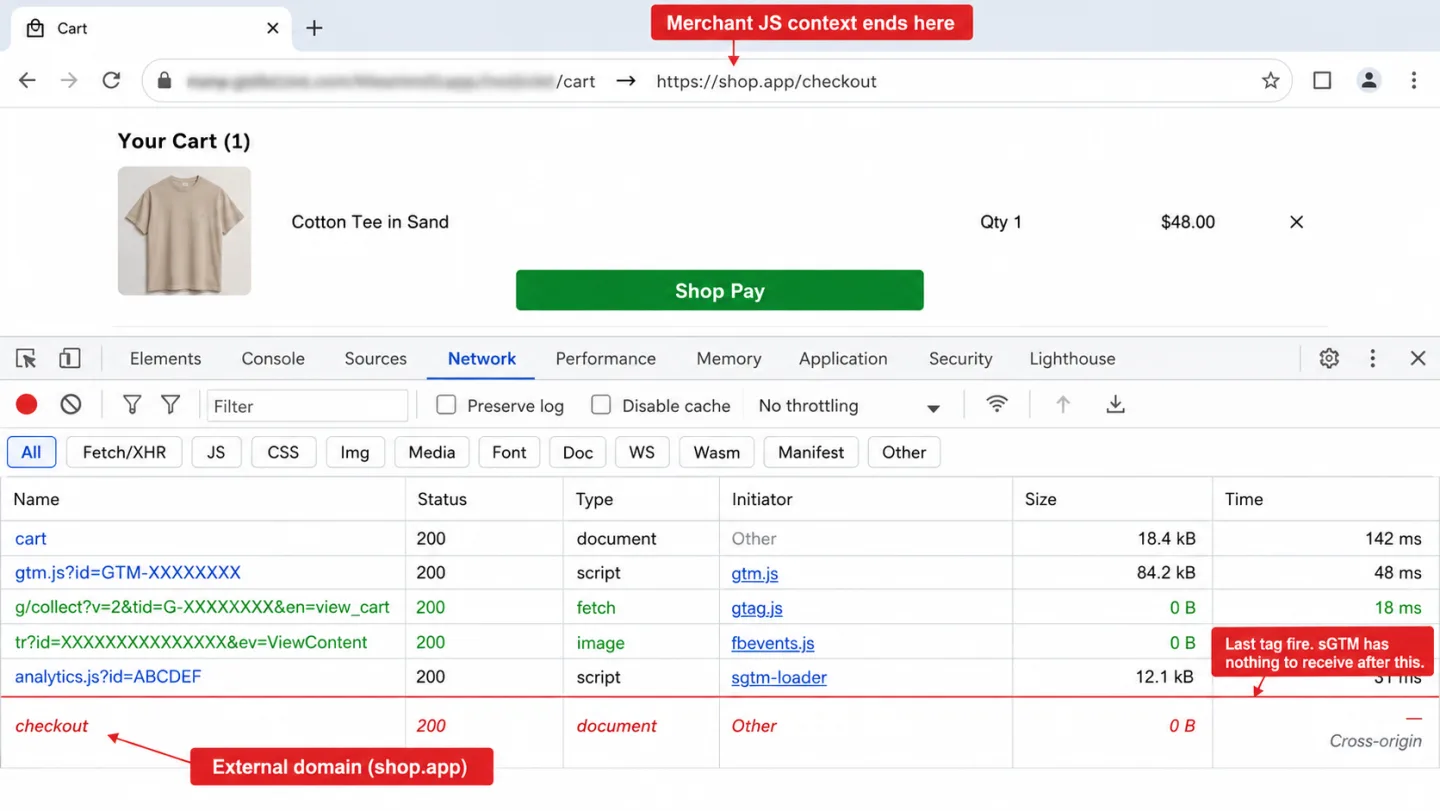
Out of 27 audited stores, 14, which is 51.9%, run the Meta Pixel client-side AND send checkout to an external Shopify domain. That means in those 14 stores, the Meta Pixel purchase event simply can't fire in the merchant's JavaScript context. The customer is on shop.app when payment goes through. The tag that was supposed to catch the purchase got left behind two steps earlier.
shop.app. Your JS context ends here. No more tag fires. The server-side container is still waiting for events.74.1% of audited stores have Shopify's Web Pixel sandbox switched on. Inside that sandbox, even Shopify's own pixel tags can't touch the page DOM, can't read localStorage, and can't reach the parent frame. Shopify says it plainly: "App pixels are loaded in a strict sandbox" (shopify.dev/docs/api/web-pixels-api).
There's no override. A developer can't get around it. This is the "native CAPI alternative" vendors point to as the answer, and even it doesn't have the access people assume.
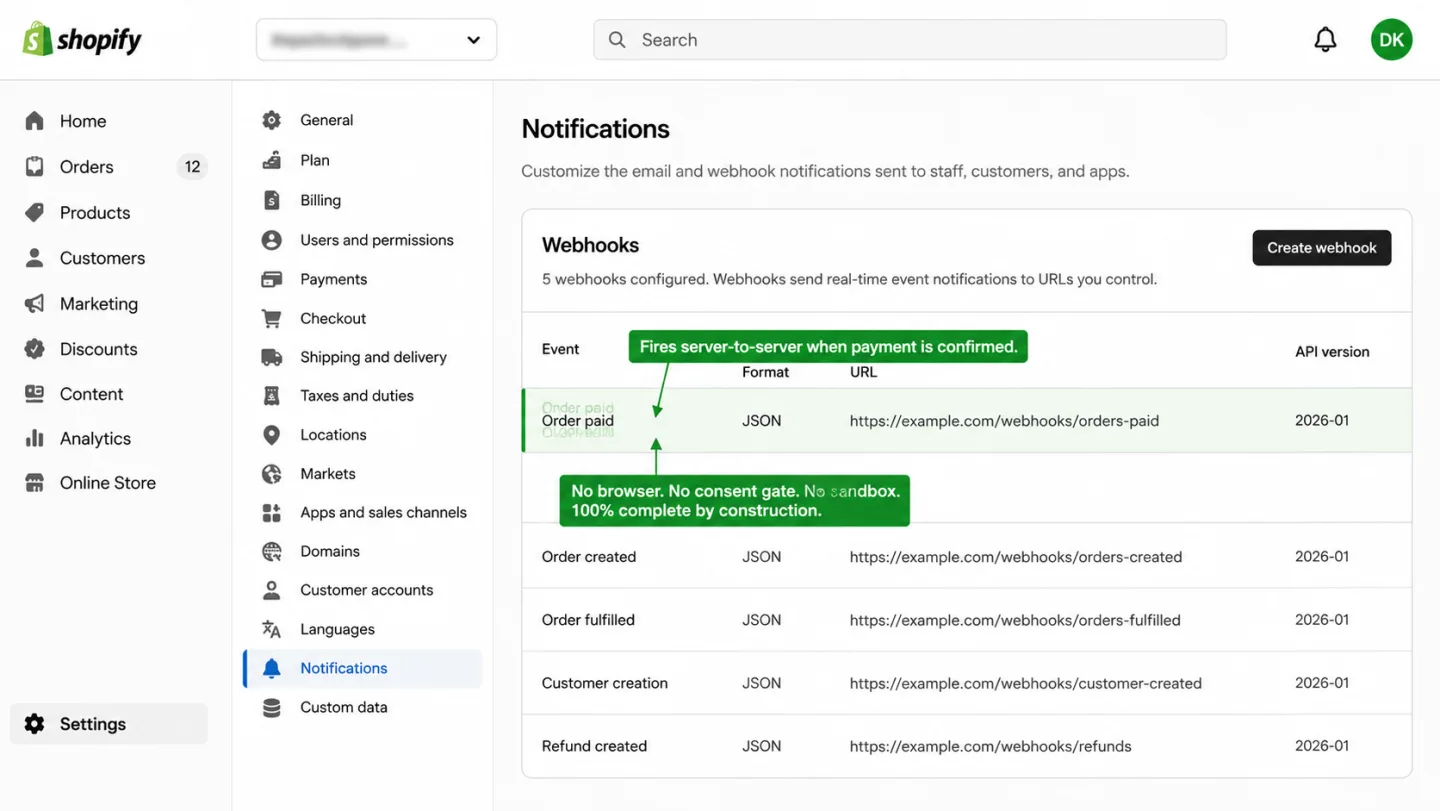
One event fires reliably no matter which checkout path the buyer takes: orders/paid. It's a server-to-server webhook Shopify sends from their own backend the moment payment is confirmed. No browser. No JavaScript. No consent context. No sandbox. That webhook is what origin-first analytics listens to instead of waiting on a relay. More on that in section nine.
What the rescue-pipe ecosystem actually costs in 2026
I pulled every pricing page live on April 15, 2026. Here's what it really costs.
| Vendor | Entry | Mid-tier | Top tier | Setup fee |
|---|---|---|---|---|
| Elevar | $0 (100 orders) | $200-$450 | $950 | $1,000+ |
| Stape | $0 (10K req) | $17-$83 | $167 | None |
| Littledata | $0.35/order | $199-$449 | $990 | None |
| Analyzify | $109 | $206 | Contact | $295 + $1,490-$2,790 sGTM add-on |
| Addingwell (EUR) | €0 (100K req) | €90-€210 | €1,190 | None |
Here's the honest math for a mid-traffic Shopify store at roughly 500,000 monthly site requests and 5,000 monthly orders, one that wants Meta CAPI plus durable GA4 attribution:
- Elevar Growth tier: $450/mo
- Stape Pro tier for sGTM hosting (500K requests): $17/mo
- Stape Meta CAPI Gateway pay-as-you-go: $8/mo per pixel
- Elevar Expert Installation: $1,000 one-time
Put another way: $475 a month ongoing and $1,000 to get it stood up. Swap Elevar for Analyzify and setup jumps to $295 plus a $1,490 to $2,790 sGTM add-on. Swap for Littledata Pro and the ongoing climbs to $449 a month.
Going DIY doesn't escape it. Google's own planning doc cites about $50 per instance per month with a three-instance minimum for production. That's $150 a month before logging, and before the engineer who owns the pipeline. seresa.io's analysis tacks on another $100 to $500 a month for logs and upkeep.
So call it $500 to $600 a month ongoing plus $1,000 to $2,000 to set up. Now ask what that buys back.
In practice, a store already capturing 92% of events gains another 4-6%. For a store at 70%, where EU consent rejection stacks on top of ad blockers, it claws back maybe 10% and leaves the 20% consent gap exactly where it was.
The only question that matters is whether that recovery covers the pipe. For some stores it does. For 26 of the 27 here, the math plainly doesn't.
The EMQ ceiling
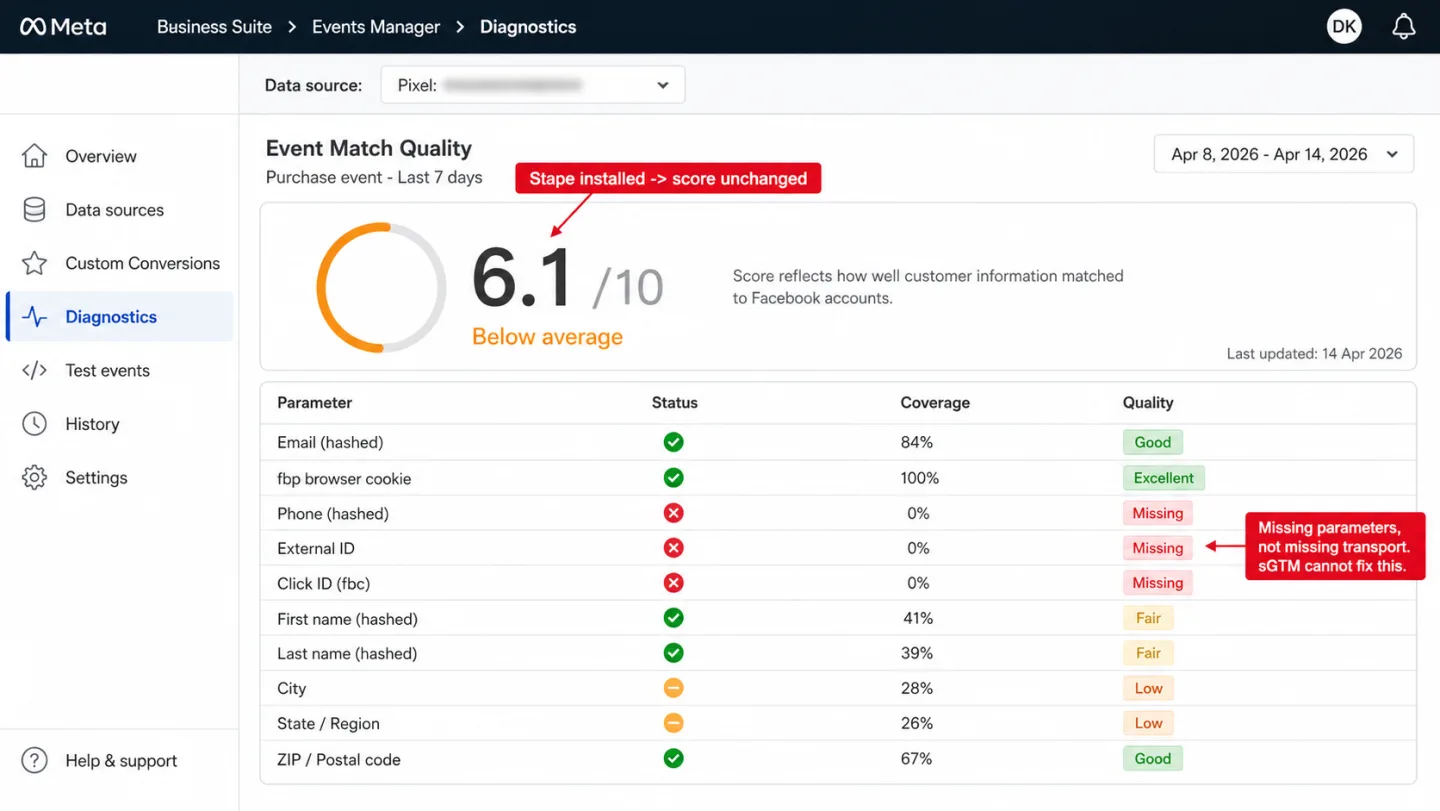
Meta's own documentation says it straight: Event Match Quality reflects how well customer information can be matched to a Facebook account. The parameters that move the score are hashed email, hashed phone, name and address, external ID, click ID, and the fbp cookie.
Where the tag runs isn't on that list.
You see the same frustration over and over on r/FacebookAds and the Stape forum. An operator spends three days installing GTM plus Stape, expects a 10 out of 10, and lands at 6.1. One commenter named the cause in one line. In plain English: EMQ depends on how many parameters you send Meta, not on where the tag runs.
Another operator watched event coverage fall to 0% and CPA double after switching providers, while the new provider kept insisting the dedup failure was "completely normal."
Dedup between the pixel and CAPI is the other quiet way this breaks. Meta matches event_id and event_name inside a 48-hour window. If one side is missing the ID, or the two sides build it differently, the same conversion gets counted twice.
A Shopify Community thread from March 2025 walks through dedup failing across four event types at once, because no event_id was going out. Those stores over-counted conversions for weeks, and Meta's auto-bidding happily optimized to the inflated number. The damage was real.
The decision framework
Instead of broad rules, here's a short scorecard. Six questions, one verdict tailored to your stack.
Origin-first: what the architecture looks like when events come from the server by design
There's a different architecture. Not a relay. A setup where the events that matter are born on the server, and the browser is an optional extra rather than the thing everything hangs on.
Shopify publishes an orders/paid webhook that fires when payment is confirmed. No browser involved. Every order fires it: Shop Pay, Apple Pay, PayPal, standard card, B2B invoice, subscription renewal. In other words: a webhook-driven purchase signal is 100% complete by design. The customer can close their tab halfway through checkout and the signal still fires. Ad blockers have nothing to block. Consent banners have nothing to gate. There's no client-side script to relay.
The same pattern shows up well beyond Shopify. WooCommerce has a woocommerce_payment_complete hook that fires server-side on completion (we audited 75 WooCommerce stores and not one had a server-side net in place). Stripe has a payment_intent.succeeded webhook. PayPal, Square, Adyen, and every modern processor emit the same kind of event.
They all share one thing. The purchase signal is born where the data really lives: on a server. Not in a tab that might not even be open anymore.
That's the idea Clickport is built around. The tracker is first-party and cookieless, so ITP and ad blockers don't meaningfully dent what it captures. (For why that category sidesteps most of the failures above, see the privacy-friendly analytics guide.)
And because Clickport has a Custom Events API, your server-side order handler can fire the purchase event straight through. One line of code. No CNAME. No Cloud Run container. No $1,000 installation. No EMQ to babysit. No dedup window to configure:
clickport.track('Purchase', { order_id: '12345' }, { revenue: 89.00 })
Call it from your Shopify webhook handler, your WooCommerce action, your Stripe receiver, or your own backend. The purchase attaches to the landing session Clickport already captured for that visitor.
If you landed here because your GA4 and Shopify admin don't match and you're looking at a $600-a-month quote, ask the architecture question before you sign anything.
The verdict
Server-side tracking isn't a scam. For a narrow set of stores it earns its keep: the checkout sits on your own domain, the audience is heavy iOS, and the ad spend is big enough that a few points of recovery pay for the pipe several times over. There's a real gap, and the pipe closes a real slice of it. I want to be fair about that.
For the 26 of 27 top DTC Shopify brands we audited in April 2026, the math didn't work. Not because they have never heard of server-side tracking. Because they have.
The question isn't "how do I move my tag to a server." The question is "where do my purchase events originate." If they originate in shop.app, no pipe closes the gap. If they originate in a consent-rejected session, no pipe closes the gap. If they originate in an iOS app where the user declined ATT, no pipe closes the gap. If they originate on a server you control, you never needed the pipe at all.
Pick the architecture that matches where the data actually lives.
Frequently asked questions
Is server-side tracking legal?
Yes, the architecture itself is legal. The real question is whether your implementation respects the same GDPR, ePrivacy, CCPA, and consent rules that apply to any tracking. Moving the processing from the browser to your server doesn't hand your data-controller duties back to anyone else. If a visitor in the EU has rejected non-essential cookies, your server-side container should not process their data, no matter how that data got there. The Norwegian Datatilsynet, France's CNIL, and Germany's BfDI have all said server-side tracking takes on the legal status of the data it relays. If the data is personal and you have no lawful basis, server-side doesn't fix it. If the data is genuinely anonymous and aggregate, server-side is fine. The architecture is neutral. The implementation is what regulators look at.
What is the difference between server-side tracking and server-side tagging?
In practice people use the two terms interchangeably, though server-side tagging is the narrower one. Server-side tagging means running tag containers (most often Google Tag Manager Server-Side, sGTM) on a server you control. Server-side tracking is the bigger bucket. It covers server-side tagging, direct server-to-API integrations (Meta CAPI, Google Enhanced Conversions), webhook-driven event capture (Shopify orders/paid, Stripe payment_intent.succeeded), and analytics tools that ingest events from any backend source. Most vendor blogs throw "tracking" and "tagging" around loosely. When someone says "we set up server-side tracking", they almost always mean sGTM. Other names you'll run into: SST (server-side tracking), backend tracking, tagless tracking, server-side analytics.
Does server-side tracking bypass ad blockers?
Partly. Blockers that match known vendor names like connect.facebook.net or google-analytics.com miss requests that hit a custom subdomain instead. Blockers that match URL path shapes like /collect still catch sGTM requests. Brave's Shields do CNAME uncloaking, which defeats the subdomain trick. uBlock Origin goes after the shape of the request, not just the hostname. On a well-configured custom domain, the baseline ad-blocker recovery from sGTM is around 3-7% of blocked events per Stape's own internal test. In other words: a long way from the 30% figure rescue-pipe vendors like to put on the page.
Is server-side tracking GDPR compliant by default?
No. Julius Fedorovicius at Analytics Mania puts it plainly: "Server-side does NOT make you automatically GDPR/CCPA/etc. compliant." If the user rejected consent, your server-side container should not be processing their data, however the data was collected. Moving the data flow to the server layer raises your data-controller responsibility, it doesn't lower it. Simo Ahava's 2022 piece makes the same point from the transparency angle: "Moving data flows server-side makes it more difficult to validate if the data is collected and processed legally and according to the user's wishes and choices."
How much does server-side tracking really cost in 2026?
A realistic managed deployment for a mid-traffic Shopify store runs roughly $541-$970 per month ongoing plus $1,000-$2,790 to set up. That covers Elevar or Littledata for the Shopify data layer, Stape for sGTM hosting, and the Meta CAPI Gateway. DIY Google Cloud Run is cheaper on raw infra ($150 a month for a 3-instance production setup), but you need a dedicated analytics engineer to build and run it. Once you price that engineering time in, the real cost of ownership usually goes up, not down.
What is the difference between sGTM and Meta CAPI?
sGTM is the transport layer. Meta CAPI is one of the places it sends to. You can send Meta CAPI events with no sGTM at all (a direct server-to-API integration). You can run sGTM and never send to Meta. Plenty of stores run both: sGTM as the container, CAPI as one vendor client inside it. The dedup mechanism (matching event_id plus event_name within 48 hours) lives on Meta's side. It applies whether the server call comes from sGTM, a direct integration, or Stape's standalone CAPI Gateway product.
Will server-side tracking fix my Shopify and GA4 revenue mismatch?
It depends on what is causing the mismatch. If the gap is Safari ITP and ad blockers, sGTM helps. If the gap is Shop Pay, Apple Pay, and PayPal express checkouts finishing on external domains, sGTM doesn't help. Our 27-store audit found that express-checkout gap touching 77.8% of the sample. The transport fix covers a smaller slice of the gap than most vendor pages let on. The mismatch article has the full breakdown.
Can I use server-side tracking without Google Tag Manager?
Yes. Server-side GTM is just one way to do it. Other options: direct server-to-API integrations with Meta CAPI, Google Enhanced Conversions, and similar endpoints. Cookieless first-party analytics tools like Clickport take events straight from webhooks, which is origin-first rather than server-side-relay. The "server-side" label covers a lot more than sGTM alone.
What's the difference between server-side tracking and cookieless analytics?
Server-side tracking is about where the tag runs: on your server or in the browser. Cookieless analytics is about whether persistent identifiers get used at all. The two are separate questions. An sGTM setup usually still leans on first-party cookies, since longer-lived cookies are half its pitch. A cookieless analytics tool sets no persistent identifier anywhere, client or server. Vendor blogs sometimes mash the two together. They are different choices, with different privacy consequences.
Stop paying for the relay
The pipe only helps if your problem is transport. For most DTC Shopify stores in 2026, the bigger problem is origination. Events that never fire because the user rejected consent. Events that fire in shop.app where your merchant JavaScript can't run. Events that never leave an iOS device because the user declined ATT. A relay does nothing for any of those.

Comments
Loading comments...
Leave a comment