Shop Pay, Apple Pay, PayPal: Why GA4 Misses Revenue
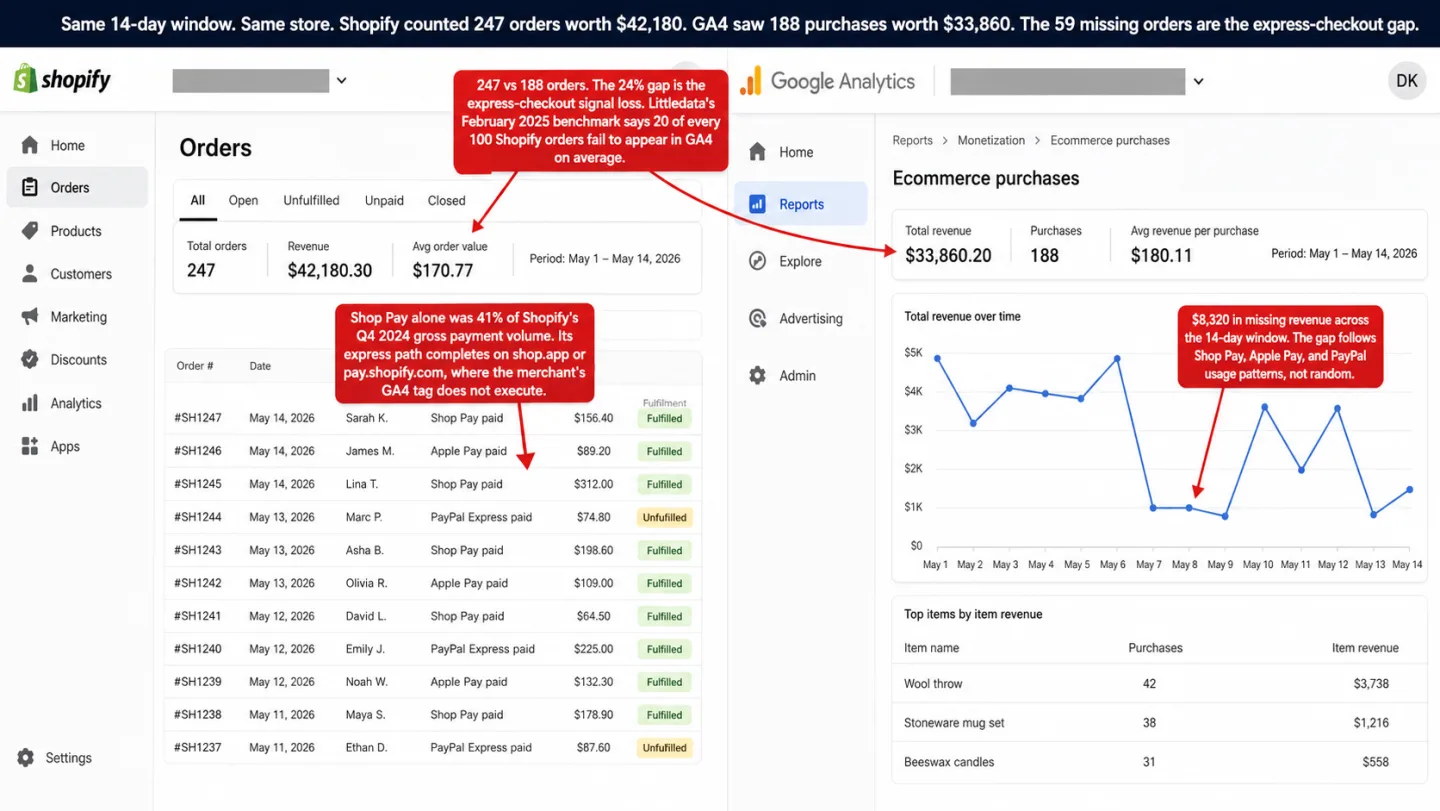
Your Shopify admin and GA4 never agree on revenue. Every store owner has seen the gap. Most assume it's GA4 being GA4.
It isn't. The orders go missing at the checkout domain, not in the report.
Shop Pay processes 41% of Shopify's payment volume. Its checkout runs on a domain your analytics can't reach. We crawled 27 top DTC Shopify brands in April 2026, and 78% of them send buyers to shop.app, pay.shopify.com, or checkout.shopify.com. Which means most of the best-known stores on the platform send buyers somewhere the merchant's own tag never loads.
Only one store in the sample had a server-side tracking pipe installed. The rest are in the gap. And the pipe every vendor sells you to close it doesn't close it.
- Shop Pay handles 41% of Shopify's payment volume. Its checkout finishes on shop.app, where your GA4 tag can't run. Shopify staff confirmed the missing purchase events are expected behavior.
- We audited 27 top Shopify stores in April 2026. 78% send buyers to a Shopify-owned checkout domain, and on those domains the store's own analytics can't run.
- The usual fix costs $200 to $990 a month for a server-side tracking service. Only 1 of the 27 stores had one installed.
- Server-side GTM can't close this gap. It forwards events the browser already sent. If the purchase event never fired, there's nothing to forward.
- The reliable fix is Shopify's orders/paid webhook. It fires on the server for every completed order: Shop Pay, Apple Pay, PayPal, with or without ad blockers or consent.
What we found in 27 stores (and why 78% are in the gap)
The mechanics come later. First, the audit.
On April 14, 2026 we crawled the public HTML of 27 well-known DTC Shopify brands across apparel, beauty, home goods, and food and beverage. Each one is a name you would recognize in its category, with real traffic and an active paid-social presence.
We aren't publishing the store list. The point is a platform-level problem, not a pile-on against any one brand. What matters is the shape of the sample: these are the stores an agency or a DTC founder would point to as best-in-class.
The 78% is the number to sit with. That's 21 of the 27 brands whose cart page already points at a Shopify-controlled checkout domain before the buyer does anything. We opened the cart HTML of the four most-trafficked brands by hand to be sure. All four embed shop.app/checkouts/internal/preloads right there in the markup.
So this isn't an edge case that fires only when someone taps Shop Pay. Shopify is pre-warming the shop.app checkout as the default path for these stores.
The 4% is the one that surprised me. Every ecommerce tracking article ranking on Google tells you to install a server-side pipe: Elevar, Stape, Littledata, Analyzify. We found one store out of 27 running any of them. Zero Elevar, zero Stape, zero Analyzify, one Littledata.
Which means 96% of the best-known stores on the platform are ignoring the entire $200 to $990 per month rescue industry. Not because they don't care about their data. Because the pipe doesn't fix the problem people think it fixes. I get to that in section six.
For a deeper view of where Shopify's native analytics fall short, see Shopify Analytics: The Store Owner's Guide to Better Data.
How we ran the 27-store audit
Here's the full method, so you can check the results above and rerun them yourself.
Sample. 27 publicly known DTC Shopify brands, pulled from commonly cited Shopify case studies and industry lists, then filtered down to the ones we could confirm were running on Shopify (by detecting cdn.shopify.com, Shopify.theme, or shopify-section markers in the homepage HTML). The mix spans apparel (9 stores), beauty and personal care (8), food and beverage (7), home goods (2), and one personal-care-adjacent store. No store with under 50k monthly visits made the cut. We leaned toward brands that already show up in industry reporting, so the sample reflects best-in-class DTC setup, not long-tail merchants. We're holding the store list back to keep the finding on the platform-level gap, not on arguments about any one brand's data point.
What we fetched. For each store, three public endpoints:
- The homepage (
/) - The cart page (
/cart) - The Shopify-default
/products.json?limit=1to get one product handle, then the product page (/products/{handle}) where the JSON endpoint returned data
No login. No items added to cart. No checkout started. No personal data touched. Every request used a Safari 17 desktop user-agent string, a 15 to 25 second timeout, and a 1.5 second pause between stores.
What we looked for. The crawler grepped each store's combined HTML for regex signatures of the tracking stack, express checkout path, and third-party pipes:
- GA4 measurement ID:
G-[A-Z0-9]{6,12},gtag/js?id=G-,"accountID":"G-",google-analytics.com/g/collect,"measurementId":"G-" - Google Tag Manager:
GTM-[A-Z0-9]{4,10},googletagmanager.com/(gtm|gtag).js - Meta Pixel:
connect.facebook.net,fbevents,fbq(,facebook.com/tr?,"pixelId":followed by 10+ digits,facebook-domain-verification - TikTok Pixel:
analytics.tiktok.com,ttq.load,ttq.page,tiktok.com/i18n/pixel - Klaviyo:
static.klaviyo.com,klaviyo.com/onsite,_learnq,klaviyoOnsite - Shopify native analytics:
shopify-analytics,monorail-edge.shopifysvc,trekkie.storefront - Web Pixel sandbox active:
web-pixels-manager,webPixelsManager,web_pixels_manager - Third-party server-side pipes:
getelevar.com,shopify.elevar.io,littledata.io,analyzify.com,stape.io,gtm.stape,.stape.net - Express checkout domains:
shop.app,pay.shopify.com,checkout.shopify.com - Express checkout buttons:
shopify-payment-button,shop-pay-button,shop_pay,apple-pay-button,ApplePaySession,paypal.com/sdk,paypal-button - Headless detection:
/products.json?limit=1returning non-JSON was treated as headless or JSON endpoint blocked
Limits, stated up front. Three of them matter, and I want them on the table before you read the numbers.
- Sandboxed pixel IDs don't always show up in SSR HTML. Shopify's Web Pixel sandbox renders the tracking config inside iframed JSON that gets hydrated client-side. A store running GA4 through the sandbox can show
web-pixels-managersignatures with no visibleG-XXXXXXmeasurement ID in the static HTML. So our GA4, Meta Pixel, and TikTok counts are floors, not ceilings. The real numbers can only be higher. - Headless storefronts push tracking even further client-side. Four stores in the sample (15%) run Next.js on top of a Shopify backend. Their marketing HTML is hydrated by React, which often loads tracking after the fact. For these stores, the SSR signal is at its weakest.
- A third-party pipe can hide when the merchant routes sGTM through a custom subdomain. We searched for vendor-owned domains (stape.io, elevar.io, littledata.io, analyzify.com) and for common sGTM patterns. A merchant who has cleanly CNAMEd their sGTM container to a fully custom subdomain won't match any of these. So the 1-of-27 figure is a floor for third-party sGTM adoption. The true number could be higher. It won't be much higher, because most setups leave at least one vendor-identifiable string in the HTML.
What the crawl tells us reliably. Which domain the checkout points at (shop.app, pay.shopify.com, checkout.shopify.com). Whether the Web Pixel sandbox is active, which is a strong yes-or-no signal. Whether a third-party pipe is visibly branded in the markup. And which express checkout buttons are declared. Those are the four signals the headline findings rest on.
| Signal detected in public HTML | Count | % |
|---|---|---|
| References shop.app / pay.shopify.com / checkout.shopify.com | 21 | 78% |
| Web Pixel sandbox active | 20 | 74% |
| Shopify native analytics (monorail / trekkie) | 20 | 74% |
| PayPal integration detected | 18 | 67% |
| Klaviyo | 17 | 63% |
| GTM container | 15 | 56% |
| Meta Pixel visible in SSR HTML | 14 | 52% |
| GA4 measurement ID visible in SSR HTML | 11 | 41% |
| Apple Pay button detected | 6 | 22% |
| Shop Pay button detected | 6 | 22% |
| Headless storefront (products.json blocked) | 4 | 15% |
| TikTok Pixel | 1 | 4% |
| Third-party server-side pipe (Elevar / Stape / Analyzify / Littledata) | 1 | 4% |
Spot-check. We opened the cart page HTML of the four most-trafficked brands by hand, to make sure the 78% wasn't just the regex seeing things. All four embed the string shop.app/checkouts/internal/preloads directly in their cart markup. Shopify is pre-warming the off-domain checkout as the default path for these brands. This isn't a corner case that needs a specific buyer to tap Shop Pay first.
Reproducibility. The whole audit is 80 lines of bash and Python. Curl each store's three URLs, pipe the combined HTML through grep -E for each regex above, write a row to CSV, aggregate with value_counts(). Anyone with a developer laptop and two hours can run it against their own sample and compare.
What we'll rerun. October 2026, same 27 stores, same regexes, published as a before-and-after diff. Two numbers I expect to move. The share of stores in full headless mode should go up. So should the share with the Web Pixel sandbox hiding pixel IDs, as more merchants migrate off checkout.liquid.
Shop Pay: where the purchase event goes to die
Shop Pay was 38% of Shopify's payment volume across all of 2024, and it peaked at 41% in Q4, per PYMNTS coverage of Shopify's Q4 2024 earnings call. Shopify's own BFCM 2024 report says Shop Pay sales grew 58% year over year across the BFCM weekend.
In other words: this is the most-used express checkout in ecommerce. It's also the one that breaks your analytics the hardest.
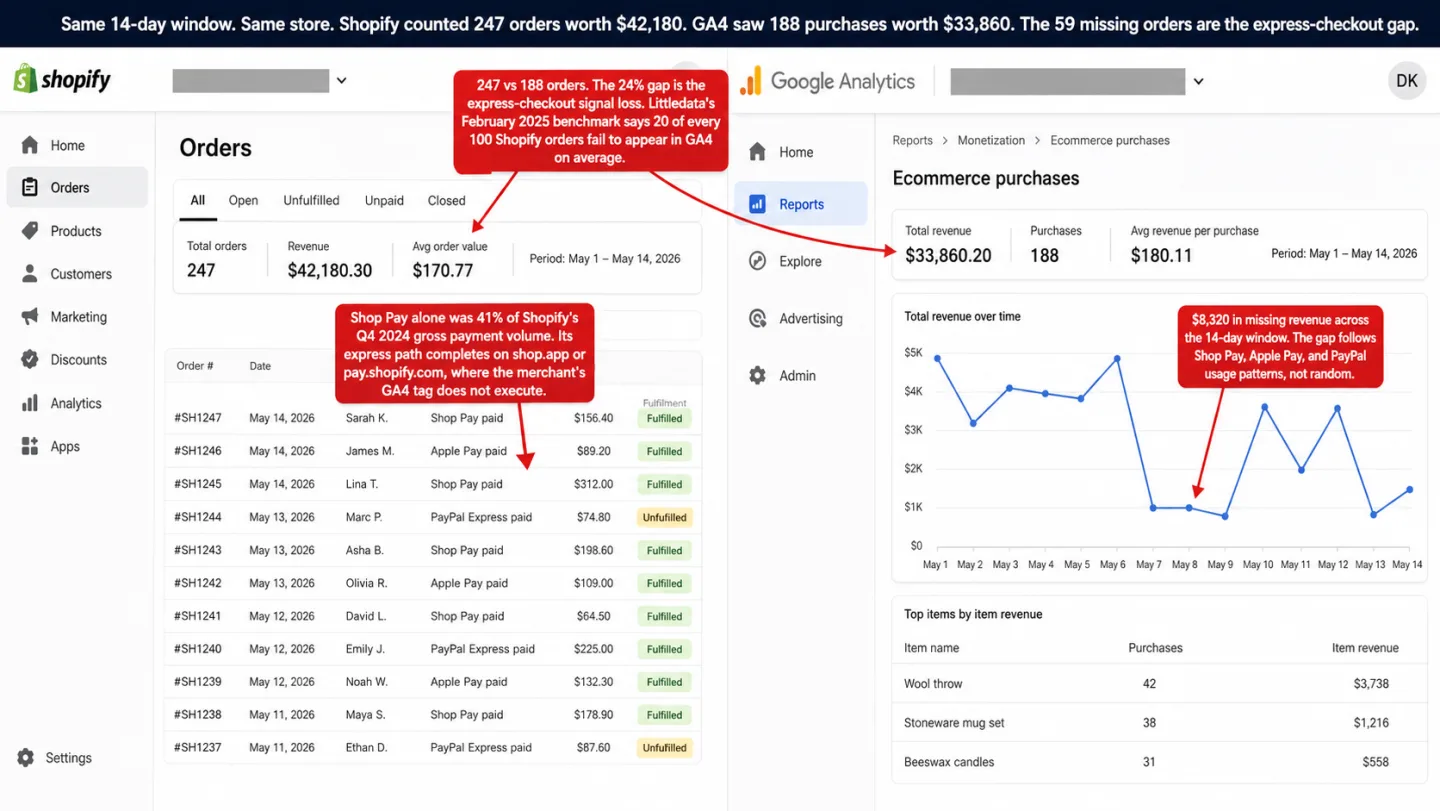
Here's what happens when a buyer taps Shop Pay on a product page. Shopify redirects the session to shop.app or pay.shopify.com. The merchant's JavaScript doesn't run there. GA4's tag, the Meta Pixel, any GTM container, the Klaviyo tracker: all of them stop at the domain line.
When the buyer finishes, Shopify sends them back to the merchant's thank-you page. That return trip was the one thing meant to save client-side tracking. It doesn't.
A Shopify staff member, Alan_G, confirmed in the Shopify developer community that the checkout funnel events, checkout_started, checkout_shipping_info_submitted, payment_info_submitted, don't fire in the Shop Pay view. His exact words: "at the moment, it's expected behaviour that the events don't fire in the Shop Pay view." The fix is "on our radar" for "the medium-term." No date. The thread is from June 2025. As I write this, no fix has shipped.
The checkout_completed event is the one that maps to GA4's purchase event and Meta's Purchase. It fires only when the buyer lands back on your thank-you page and your pixel gets its chance to run. For Shop Pay, that has been hit or miss. Merchants in the same thread report the event firing with an order total of zero, or not firing at all, or firing for some orders and dropping others. There's no single number for how often it works. The failure isn't consistent enough to have one.
There's a second failure mode, and it's worse because it makes no noise. In October 2025, a merchant named Jason reported that turning on Shop Pay Installments (Pay in 3) silently switched his checkout domain from brownieheaven.co.uk to shop.app. His Meta Pixel was verified on brownieheaven.co.uk, so the check now failed. Purchase events stopped reaching Meta. He burned £175 in ad spend over five days before he worked out why.
Shopify gave him no warning. In the end he turned Pay in 3 off to get his attribution back.
No merchant could have set this up to avoid it. The domain switch was Shopify's product decision. A Shop Pay feature update can break your Meta tracking tomorrow, and you'll hear about it from your ROAS dashboard, not from a Shopify email.
Apple Pay: the OS modal your tracker can't see into
Apple Pay on the web isn't an iframe. It isn't a pop-up. It's a browser-native modal that Safari and the OS draw, fully outside the merchant page. Apple's ApplePaySession documentation describes the flow in terms of "the system" showing the payment sheet, not the merchant page. Your page never owns the sheet.
So your JavaScript can't see what the buyer does inside it. The biometric check happens inside the Secure Enclave. The tap on "Pay" happens inside the sheet. Your page gets one callback, paymentauthorized, after the payment is already approved. Everything in between is dark.
Take a visitor who taps Apple Pay, passes Face ID, then closes the tab before the thank-you page loads. Your pixel sees nothing. No add_payment_info, no purchase, no checkout_completed. Shopify's official docs confirm that accelerated checkout buttons can sit right on the product page, skipping the cart entirely. The button renders inside a closed shadow DOM. Any tracking attached to it fails without a sound.
Then ITP stacks on top. Safari caps script-set first-party cookies at 7 days, and at 24 hours if the landing URL carried a click ID like fbclid or gclid. GA4's client ID and Meta's _fbp are both script-set cookies. So a buyer who comes back after 8 days looks brand new to your analytics.
Apple Pay doesn't cause this on its own, but the two feed each other. The people most likely to tap Apple Pay are mobile Safari users, which is exactly where ITP bites hardest. Per StatCounter (March 2026), Safari holds about 55% of US mobile browser share and 43.86% of UK mobile share.
One number to correct while we're here. The "53% Safari UK mobile" figure you see quoted everywhere is wrong. StatCounter's own dashboard shows 43.86%. Use the real one.
PayPal Express: redirects, popups, and the 15% who never come back
PayPal's Smart Buttons run three different flows, depending on the device and browser. On desktop with popups allowed, checkout opens in a pop-up. On mobile, or when the popup is blocked, PayPal falls back to a full-page redirect to paypal.com. PayPal's own documentation calls the popup the main mode and the redirect "older." In practice, every mobile Shopify checkout takes the redirect.
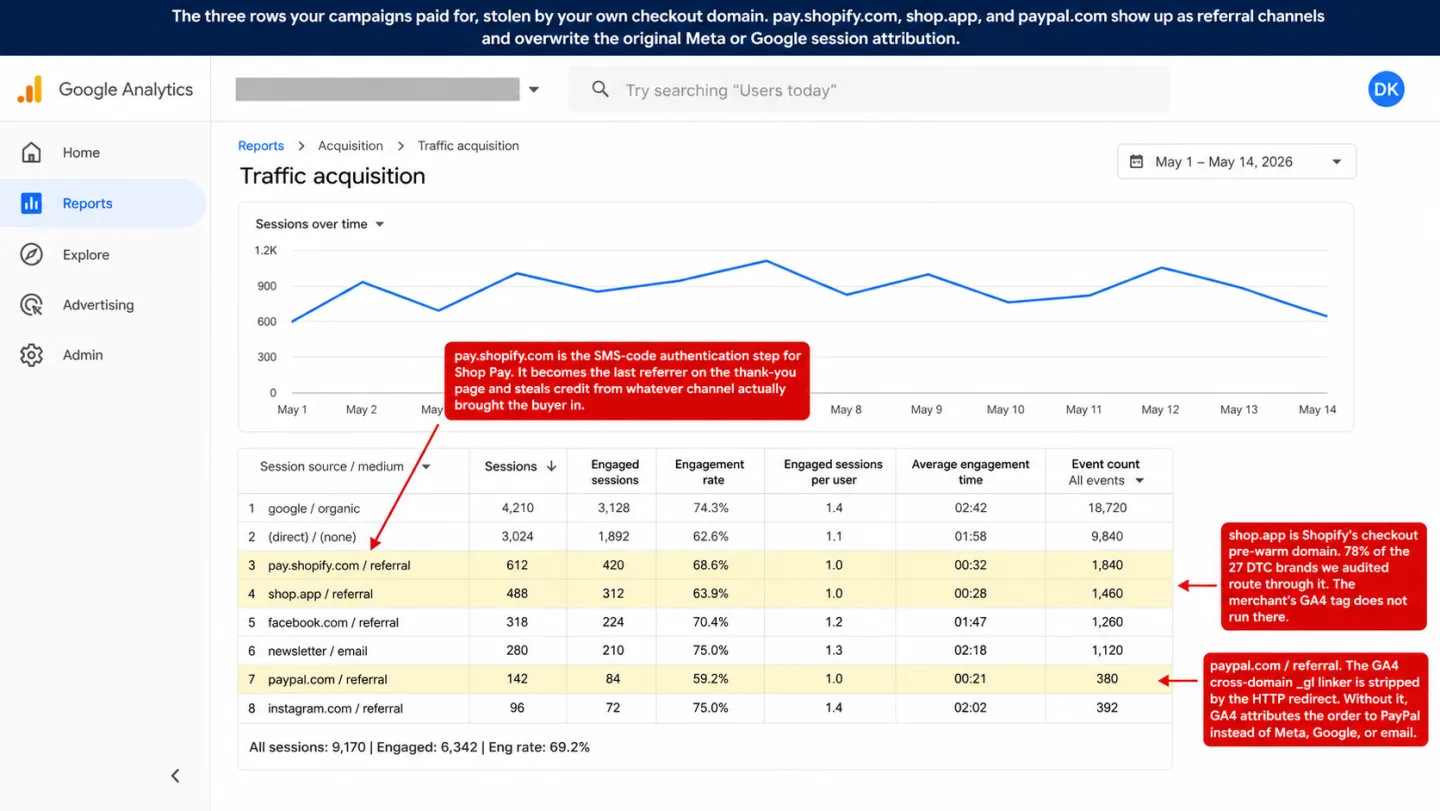
Here's why the redirect hurts. When PayPal sends the buyer back to your thank-you page, the redirect happens at the HTTP level. GA4's cross-domain linker parameter (_gl) gets stripped on the way. Google's own documentation admits the parameter "may end up being removed from the URL." Seresa.io put it plainly: "JavaScript cannot intercept an HTTP server redirect. That's the fatal gap."
Without _gl, GA4 starts a fresh session and credits paypal.com as the referrer. Whatever Meta, Google, or email campaign really brought the buyer in gets overwritten.
Then there are the 10 to 15% who never come back at all. MarketLytics measured this across their own GA setups: "In about 85-90% of cases, user returns to the site successfully and we can trigger a transaction. But those 10-15% of times a user closes the page after completing the order, is where the trouble lies." The payment cleared. The order is in Shopify's admin. The purchase event never fired, because there was no thank-you page load to fire on. Put another way: roughly one PayPal order in ten, sometimes more, never gets counted.
Venmo through PayPal's PPCP is worse still. Braintree's own documentation says the mobile fallback "currently requires a full page redirect," and that after the app-switch "some mobile browsers can return customers to the same tab, while others relaunch your checkout page in a new tab." So your session cookie, your linker parameter, and your client ID all have to survive a server redirect or a native app hop. Often they don't.
The consent layer that compounds every gap
Before checkout even starts, a real share of your visitors have already said no to cookies. That's GDPR working as designed, and it isn't going away.
The USENIX Security 2024 paper by Bielova et al. ran controlled banner tests on French users. When accept and reject got equal prominence, 34% rejected. When the banner spelled out the consequences, that climbed to 47%. In plain English: give people a fair choice and a third to nearly half opt out.
etracker's 2025 consent benchmark for Germany measured 60% data loss under a legally compliant banner. Weight that for the EU share of a typical DTC audience and your GA4 and Meta Pixel coverage is already down 15 to 30% before a single express checkout enters the picture.
The SHEIN fine makes the legal stakes real. CNIL issued a €150 million penalty on September 1, 2025. The violation wasn't a missing reject button. The reject button was there. It just didn't work. Cookies still landed after "Refuse all." So "has a reject button" is now the floor. The bar regulators enforce is "does the reject button do anything."
On a Shopify store, rejecting the banner does more than hide analytics data. Shopify's Web Pixels API documentation says the pixel manager won't load a pixel that requires consent when that consent is missing. The pixel never loads. The cookieless modeling pings that Google's Consent Mode leans on can't fire from inside the sandbox either. That visitor isn't a 50% signal you can model your way back to. They are a zero.
For more on why cookie-banner-free tracking matters architecturally, see What Cookie-Banner-Free Analytics Actually Means. For the full picture on GA4 gaps beyond checkout, see Why GA4 Is Not Showing Data, or use the GA4 Data Loss Estimator to score the general accuracy gap by ad blockers, consent, Safari ITP, and GA4's internal limits.
Why the $450/month server-side pipe barely moved the numbers
Server-side tracking is the answer every article ranking for this topic gives you. Here's how it works. sGTM (server-side Google Tag Manager) runs on infrastructure you control. It takes hits from the browser and forwards them to GA4, Meta, and the rest. In theory it gets around ad blockers, resets cookie expiry, and recovers lost events.
In practice it does some of that, and the price isn't what the blogs let on. Elevar charges $200/month for 1,000 orders, $450/month for 10,000, $950/month for 50,000, plus a $1,000 install. Littledata starts at $199/month and climbs to $990/month at 10,000 orders. Analyzify lists $109 to $206/month plus a one-time setup of $1,490 to $2,790. Stape is the infrastructure-only pick at $17 to $167/month, plus Google Cloud hosting that realistically adds $60 to $240/month. The real bill is higher than the headline number, every time.
Now the upside. Stape's own published case study recovered 20.71% of previously lost requests over a 10-day test, and 30.67% of purchase events specifically. That means about one in five lost requests came back, and nearly one in three lost purchase events. Genuinely good numbers for what sGTM does: recovering requests the browser made but that got blocked on the way out.
They tell you nothing about what sGTM can't do. And what it can't do is make an event that never happened. If Shop Pay doesn't fire checkout_completed, there's no hit to relay. sGTM is a better pipe, not a power source. It moves events that exist. It doesn't create the ones that don't.
Our audit found 1 store in 27 with a visible third-party pipe. I'm not saying these tools are useless. They really do recover 20 to 30% of otherwise-lost events. I'm saying 96% of this sample decided that recovery wasn't worth $200 to $990 a month. Looking at where the gap comes from, they have a point.
| Problem | sGTM / CAPI |
|---|---|
| Ad blocker blocks browser request | Fixed (routes via first-party domain) |
| Safari ITP caps cookie to 7 days | Partially fixed (server-set cookies can be longer-lived) |
| Shop Pay `checkout_completed` event never fires | Not fixed (nothing to relay) |
| Apple Pay sheet, buyer closes tab pre-thank-you | Not fixed (no client hit) |
| PayPal mobile redirect, `_gl` stripped | Not fixed (attribution lost before server relay) |
| Consent banner rejection (EU) | Not fixed (sandbox suppresses firing entirely) |
| Shop App upsell on `shop.app/thankyou` | Not fixed (order never recorded on merchant domain) |
| Pixel + CAPI event deduplication | Works if `event_id` matched on both sides; frequently broken |
Revenue Gap Calculator
Plug in your own numbers. The math is open and the source stats are linked right below the widget.
The two jobs you're accidentally asking one tool to do
Here's the reframe. Your Shopify admin is the source of truth for revenue. Every completed order is in it. The orders/paid webhook fires for every one, whether the buyer used Shop Pay, Apple Pay, PayPal, or the plain checkout. Shopify doesn't lose orders. Shopify loses analytics events.
Your analytics, done right, is the source of truth for one thing: which channel earned each order. Not whether the order happened. Not how much it was worth. Those are Shopify's job.
GA4 tries to do both jobs at once. It counts orders and attributes channels with the same client-side purchase event. So when that event fails at the payment sheet, both jobs fail in the same instant. The revenue count and the channel attribution die together, because the one event that carried both is gone.
The fix is to split the jobs. Count orders where orders get counted: in the Shopify admin. Capture the channel where the channel is knowable: at landing, before the payment sheet even exists. Then join the two by order ID the moment the webhook fires. The payment sheet drops out of the critical path entirely.
The industry already agrees on the diagnosis. Brad Redding of Elevar said it bluntly on the Honest Ecommerce podcast: "I don't think the vast majority of any site out there is going to say, 'Yes, my Google Analytics is 100% accurate.'" Edward Upton, Littledata's CEO, has been writing about this gap for years. Rand Fishkin put the bigger version on the SparkToro blog: "If you try to prove acquisition via traffic referral data you will become Google's fool."
The prescription the industry keeps writing is "ship more events, faster." That's the one thing the payment sheet refuses to go along with.
Decoupling attribution from the payment sheet: the architecture
Here's what it looks like in practice, on a Shopify store, with any analytics tool that has a server-side custom event API.
Step one: capture the session source at landing. When a visitor arrives, a first-party script reads the UTM parameters, the referrer, and any click IDs. It stores them with the session. The channel is locked in before checkout matters at all. (This only works if the inbound tags are clean; the UTM builder grades yours and shows the channel they'll classify into.)
Step two: at add-to-cart, the storefront writes that session context into Shopify's note_attributes on the cart. This is the move the whole thing turns on. note_attributes is a key-value list that Shopify keeps with the order. Whatever you put there rides through the Shop Pay redirect, the Apple Pay sheet, the PayPal popup, and the trip back. When the order shows up in the admin, your session context is sitting right there on it.
Step three: Shopify fires the orders/paid webhook. Not orders/create, which fires for unpaid orders too. orders/paid is the real "money received" event. Your handler checks the signature, pulls the session context out of note_attributes, and fires one server-side event to your analytics tool: revenue, currency, order ID, channel.
import crypto from 'crypto';

export async function handleShopifyWebhook(req) {
  const rawBody = await req.text();
  const hmacHeader = req.headers.get('x-shopify-hmac-sha256');

  const digest = crypto
    .createHmac('sha256', process.env.SHOPIFY_CLIENT_SECRET)
    .update(rawBody)
    .digest('base64');

  if (!crypto.timingSafeEqual(Buffer.from(digest), Buffer.from(hmacHeader))) {
    return new Response('Unauthorized', { status: 401 });
  }

  const order = JSON.parse(rawBody);
  const ctx = Object.fromEntries(
    (order.note_attributes || []).map(a => [a.name, a.value])
  );

  await fetch('https://clickport.io/api/event', {
    method: 'POST',
    headers: {
      'X-API-Key': process.env.CLICKPORT_API_KEY,
      'Content-Type': 'application/json'
    },
    body: JSON.stringify({
      type: 'custom',
      name: 'Purchase',
      url: order.landing_site || `https://${order.domain}/orders/${order.id}`,
      revenue_amount: parseFloat(order.total_price),
      revenue_currency: order.currency,
      meta_keys: ['order_id', 'utm_source', 'utm_medium', 'utm_campaign', 'payment_method'],
      meta_values: [
        String(order.id),
        ctx.utm_source || '',
        ctx.utm_medium || '',
        ctx.utm_campaign || '',
        order.payment_gateway_names?.[0] || ''
      ]
    })
  });

  return new Response('OK', { status: 200 });
}
That's 30 lines, HMAC check included. It runs as a Cloudflare Worker, a Vercel function, a Shopify App webhook handler, or a plain Express route. The /api/event endpoint is documented in Clickport's custom events documentation. The Shopify webhook registration and field reference live in Shopify's Admin API docs.
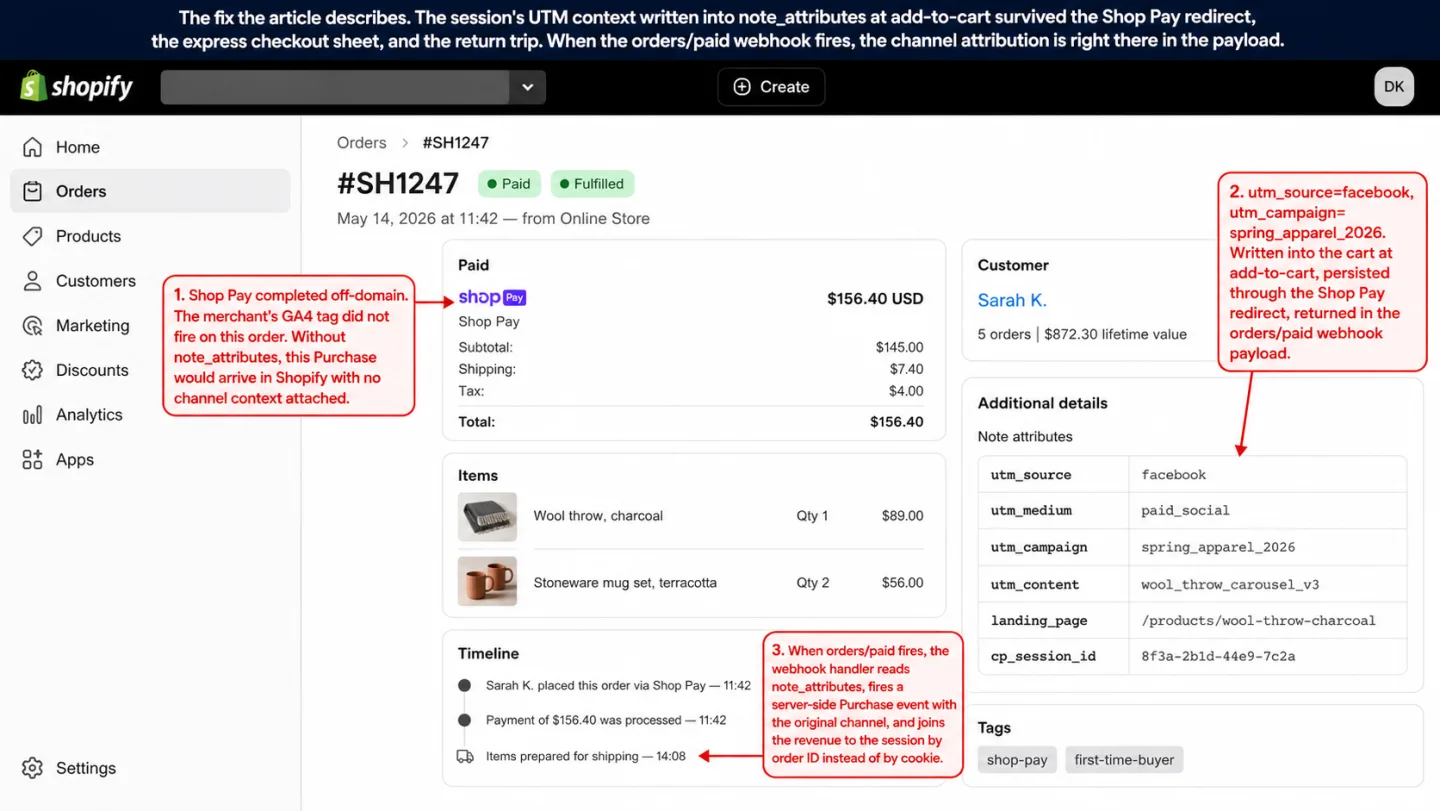
Here's what this buys you that server-side GTM can't. The server-side event doesn't wait on any browser event. If Shop Pay fires nothing, if Apple Pay suspended the tab, if PayPal never came back: no difference. The order landed in Shopify's admin. The webhook fired. The join happened on order ID, not on a cookie.
And here's what it doesn't buy you. It doesn't fix Meta Ads Manager's ROAS dashboard. Meta's optimization engine still wants Pixel and CAPI events, and that's a separate problem with a separate fix. What this architecture gives you is a true internal picture of which channel earned which revenue. That's the picture you make decisions on.
What this looks like in Clickport (and what it doesn't)
Clickport is a cookieless analytics product. The tracker is 5.6 KB and keeps nothing past the tab. No persistent cookies. No consent banner needed. The 16-channel classifier runs server-side and catches AI Search, social referrers, paid click IDs, and affiliate parameters that GA4 keeps dumping into "Direct." The custom events API takes the webhook payload above as-is.
Here's what the architecture gives you inside Clickport. Every completed Shopify order shows up as a Purchase event with the original session's channel attached. The $47,000 GA4 filed under "Direct" last month breaks out into 31% Meta paid social, 22% Google organic, 18% email, and 11% AI Search referrals from ChatGPT and Perplexity. The numbers hold up because the channel was captured before the payment sheet had a chance to break anything.
What it doesn't do, where I want to be straight with you:
- Clickport doesn't replace Shopify's admin as the revenue ledger. We read your orders. Shopify still owns them. If Shopify says $120,000 this month and Clickport says $119,800, Shopify wins. Every time.
- Shop App upsell orders completed on shop.app/thankyou can't be recovered by any analytics vendor, us included. The upsell happens entirely inside Shopify's domain, so its channel context is gone before anyone can grab it. That's a platform-level limit, not a tool problem.
- We don't do Meta CAPI forwarding or pixel deduplication out of the box. If you need your Meta Ads Manager ROAS to reflect the recovered events, that takes a separate CAPI setup. Shopify's native Meta channel is the easiest option there, Stape's sGTM the more robust one. Clickport gives you your internal attribution picture. It doesn't feed Meta's bidding signal.
- Our Shopify integration is a documented pattern, not an installed app. The code above is how real customers wire it up. There's no one-click app store install today. If you're a technical team or an agency, this is an afternoon of work. If you need a click-install, I'm not going to pretend we're there yet.
So here's the honest summary. Clickport solves the part of this problem the rest of the ecosystem is worst at: attributing revenue to the right channel after the payment sheet has broken the event chain. It doesn't solve the parts the ecosystem already does well, like Meta ROAS dashboards. Different tools for different jobs. I think that split holds for a lot of Shopify stores, not just ours.
Start a 30-day free trial. No credit card. The tracker installs in 60 seconds, and the webhook handler above is the second thing you ship.
Frequently asked questions
Why is my GA4 showing fewer purchases than Shopify?
Shopify's admin counts every server-confirmed order. GA4's purchase event fires only when the thank-you page loads in the buyer's browser and the script gets to run. Ad blockers, consent rejections, Safari ITP, Shop Pay domain hops, Apple Pay's OS sheet, and PayPal's mobile redirect all break that chain. A 10 to 20% gap is the industry baseline. Above 30% usually means express checkouts are a big share of how your customers pay.
Why is Shop Pay not tracking in GA4?
Shop Pay's express path finishes on shop.app or pay.shopify.com, domains where your GA4 tag doesn't run. Shopify's developer staff confirmed in June 2025 that checkout_started, checkout_shipping_info_submitted, and payment_info_submitted events "don't fire in the Shop Pay view" as "expected behaviour." The thank-you page can still get a checkout_completed event if the buyer comes back to your domain, but that's hit or miss. Add shopify.com and shop.app to your GA4 referral exclusion list to limit the attribution damage, and fire a server-side event from the orders/paid webhook if you want a revenue count you can trust.
Does Apple Pay break GA4 tracking?
Apple Pay's payment sheet is an OS-level modal that Safari and the operating system draw, outside the merchant page's document. Your JavaScript can't see the biometric check or the tap on "Pay." If the buyer closes the tab before the thank-you page loads, the purchase event never fires. ITP's 7-day cookie cap makes it worse for returning visitors. Apple Pay on mobile Safari is one of the highest-volume, least-trackable payment paths in ecommerce.
Why does GA4 show Direct for purchases that came from my Meta ads?
Two causes stack here. First, the checkout flow hops through payment.shopify.com or paypal.com, and those become the last referrer on the thank-you page, overwriting your original Meta attribution. Second, GA4's cross-domain _gl linker parameter gets stripped by HTTP-level server redirects, so session continuity snaps at the domain hop. Any session with no UTMs and no valid referrer falls into direct / (none). Two fixes: add shopify.com, shop.app, and paypal.com to your GA4 referral exclusions, and capture UTMs into Shopify's note_attributes before the buyer ever leaves your storefront.
What does pay.shopify.com mean in my GA4 referral sources?
When a buyer confirms Shop Pay through the SMS code modal on pay.shopify.com, that domain becomes the last touchpoint before your thank-you page loads. Brad Redding of Elevar documented this pattern years ago: pay.shopify.com turns up as its own referral channel and steals credit from the campaign that really earned the sale. Fix: GA4 Admin → Data Streams → Configure tag settings → List unwanted referrals → add shopify.com and shop.app.
Is it normal for GA4 to be 20% short?
Littledata's February 2025 benchmark says 20 of every 100 Shopify orders never show up in GA4, on average. That's with a standard client-side setup. Individual merchants have reported gaps as high as 84% (Shopify community thread, January 2025). A 10 to 20% gap you can live with. A 30%-plus gap means express checkouts are a real chunk of your payment volume, and you need a server-side purchase event fired from the Shopify webhook.
Keep reading
On WooCommerce instead of Shopify? The same purchase event goes missing, but the fix is closer because the checkout runs on your own server: WooCommerce Sales Not Tracking in GA4? We Audited 75 Stores.
For the wider Shopify picture, start with Shopify Analytics: The Store Owner's Guide to Better Data. For what GA4 hides past checkout, Why GA4 Is Not Showing Data is the companion piece. For the channel problem across all your traffic, Attribution Modeling: The Six Models with Actual Math shows why the "Direct" bucket is the worst lie in your dashboard. And for the cookie-banner argument under all of this, there's What Cookie-Banner-Free Analytics Actually Means.
We'll rerun the 27-store audit in October 2026 and publish the diff.

Comments
Loading comments...
Leave a comment