WooCommerce Sales Not Tracking in GA4? We Audited 75 Stores
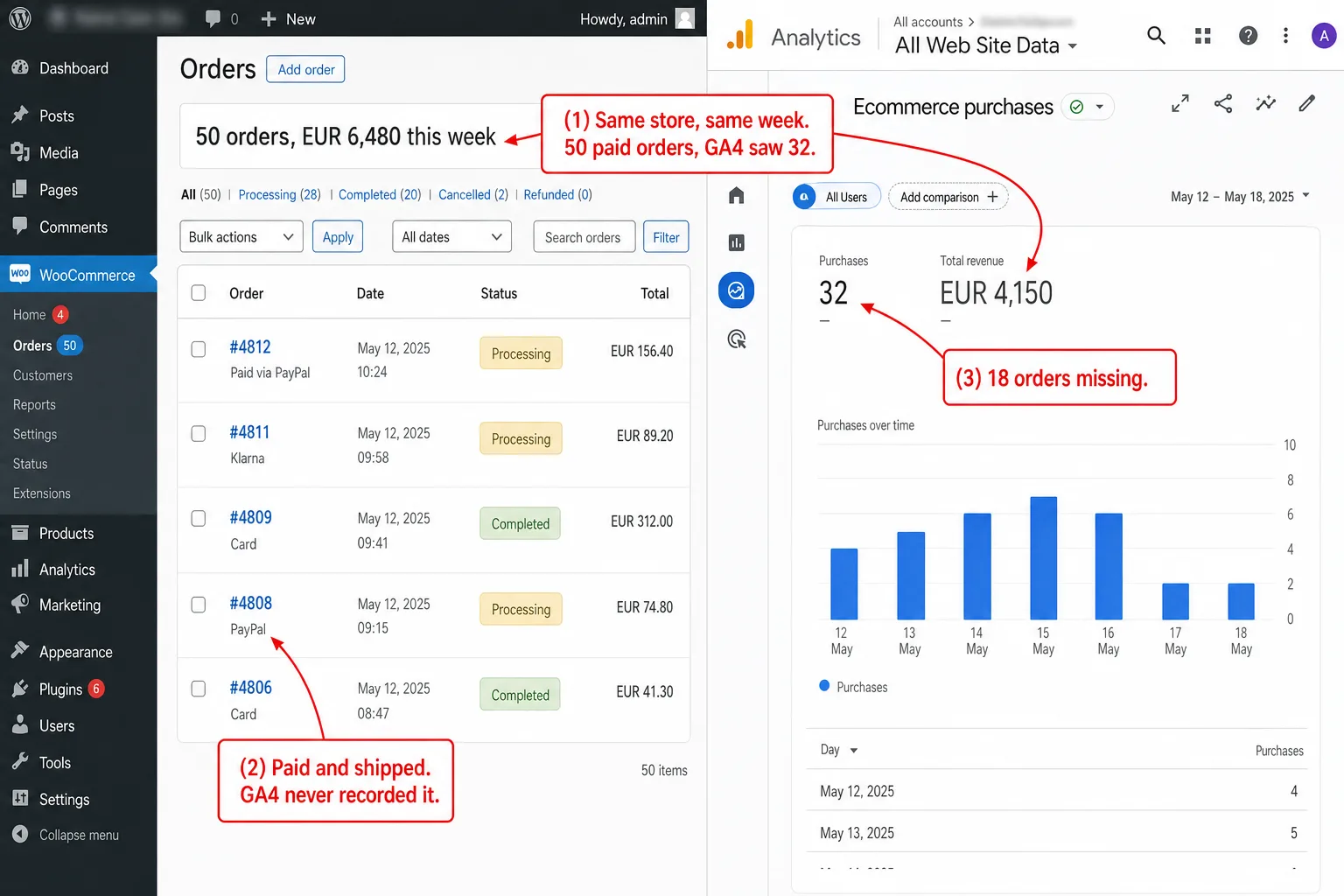
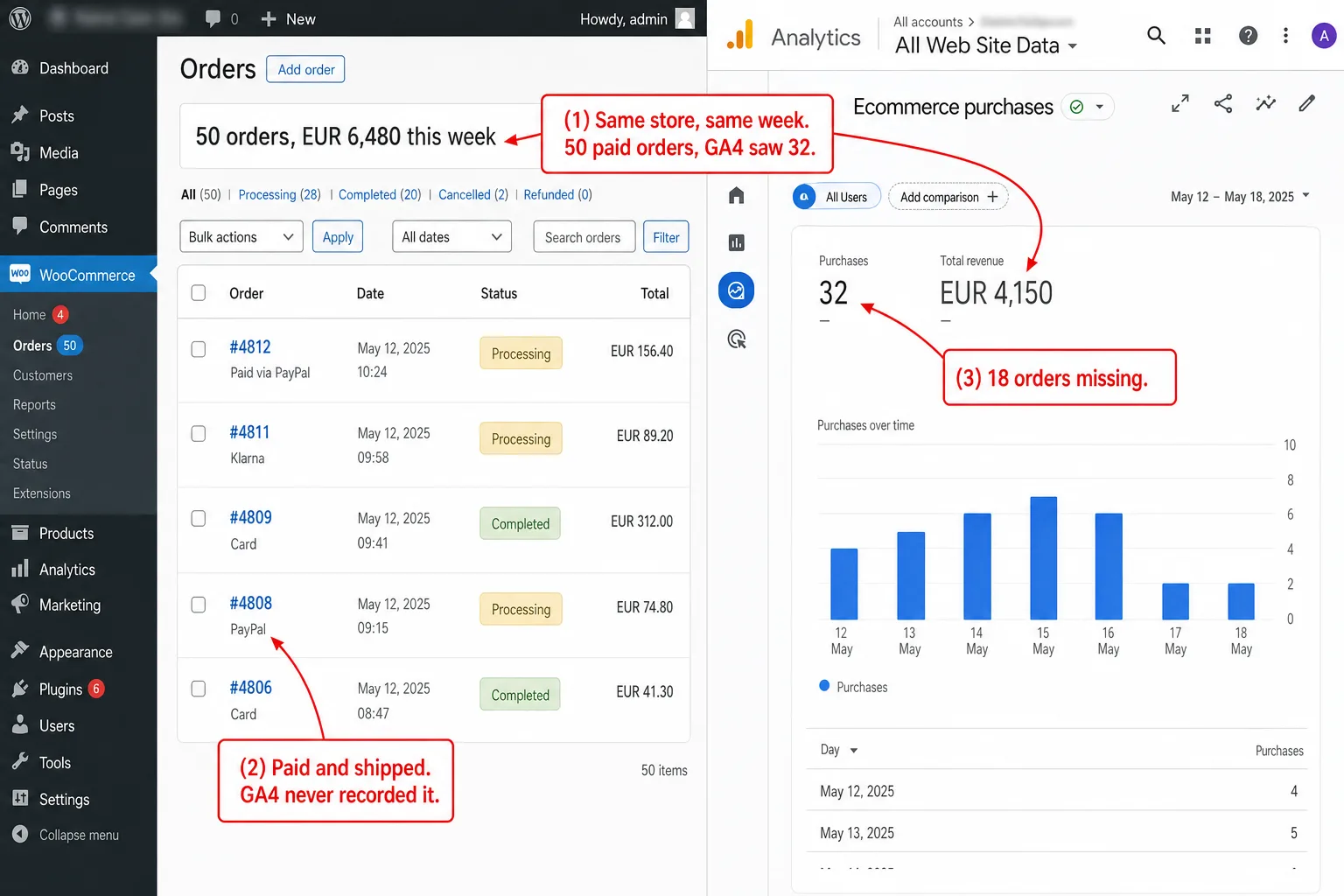
11 orders in WooCommerce. 3 in Google Analytics. That's the number one store owner posted to the WordPress.org forums, and it's the whole problem in one line. The sales are real. They're sitting in WooCommerce, paid and shipped. GA4 just never saw most of them.
This isn't a setting you forgot to tick. It's how client-side tracking works, and once you see why, you can't unsee it.
So I audited 75 live WooCommerce stores to find out how widespread it is. The result was more lopsided than I expected.
- WooCommerce orders go missing because GA4's purchase event fires once, in the browser, on the thank-you page. Block the script, reject the banner, or never return from PayPal, and the sale is invisible. A 15 to 25 percent gap is typical. EU stores often see 40 to 60.
- In a May 2026 audit of 75 live WooCommerce stores, 100 percent of those running GA4 or Tag Manager tracked purchases from the browser only. Not one had a detectable server-side fallback.
- 24 percent of the audited stores ran a consent banner that blocks analytics by default. With EU cookie-rejection rates of 34 to 47 percent, those stores lose a third or more of their order data before tracking even starts.
- Server-side Google Tag Manager doesn't fix this. It relays events the browser already sent. If the purchase event never fired, there's nothing to relay.
- The reliable fix is the woocommerce_payment_complete hook. It fires on the server the moment payment confirms, no matter what the browser, the ad blocker, or the thank-you page did.
Why WooCommerce orders go missing in Google Analytics
WooCommerce orders don't show up in Google Analytics when the GA4 purchase event fails to fire in the customer's browser. That event runs once, as JavaScript, on the order-received (thank-you) page. By then the order is already saved on your server. WooCommerce always has the sale. GA4 only has it if one fragile browser moment went perfectly.
That single dependency is the whole story. Your WooCommerce database is the truth about your revenue. Every paid order is in it, whether the buyer used PayPal, Klarna, or a card.
GA4 only learns about a sale if the buyer's browser loads the thank-you page, runs your script, and sends the event to Google. Anything that interrupts that chain erases the sale.
Plenty gets in the way. The buyer pays on PayPal's domain and closes the tab. An ad blocker kills the script. A consent banner holds it back. A caching plugin serves a stale copy of the page. In each case the order is real, the money is in your account, and GA4 saw nothing.
The industry has a rough number for how big this gap gets. A 15 to 25 percent shortfall is common for US stores. EU stores with consent banners routinely see 40 to 60 percent. In plain English: roughly one in five orders missing in the US, up to half of them in the EU.
Those figures float around vendor blogs with no clean published study behind them, so I treat them as directional, and you should too. The mechanism underneath them is solid, and you can check it yourself. That's what the rest of this is about.
The short version, before I dig in. The problem isn't your settings. No plugin checkbox fully fixes it. It's built into how the tracking works, and the fix is to stop trusting the browser with the one event that matters most.
How we audited 75 WooCommerce stores
In May 2026 I gathered 75 live WooCommerce stores and checked, one by one, how each one records a sale. The method is simple on purpose. You can run it again yourself.
Sample. 75 stores I confirmed run WooCommerce, weighted toward the EU and UK, because that's where both WooCommerce and consent banners cluster. I confirmed each store two ways: the WooCommerce Store API returning live JSON, plus at least one HTML fingerprint. Two signals minimum. One false match never counts.
What I fetched. Public pages only: the homepage, one product page, and the cart. No login. No purchases. No cart actions. No personal data. That choice is also the study's one real limit, and I'll say it straight: I can't reach the order-received page without buying something. So this audit measures the tracking setup a store shows on its public pages, not a confirmed lost order. Every finding below says "this store runs a setup with a known failure point," not "this store lost N orders."
What I looked for. GA4 measurement IDs (G-XXXXXXX), Google Tag Manager containers (GTM-XXXXXXX), old Universal Analytics tags (UA-XXXXX), Meta Pixel, consent-banner platforms (CookieYes, Complianz, Borlabs, Cookiebot, and others), and any sign of server-side tracking, meaning a first-party tagging endpoint (transport_url) or a known server-side host like Stape.
In plain English: every single store that could lose orders this way, will. The 100 percent is the one to sit with. In practice: of the 52 stores running Google Analytics or Tag Manager, every single one fired its purchase tracking from the browser. Zero had a server-side safety net I could find. This isn't a story about a few sloppy stores. The whole sample, agency-built stores included, leans on the same fragile browser moment.
The 24 percent is the big one. That means nearly a quarter of these stores run a consent banner that blocks analytics by default, until the visitor clicks accept. Put that next to how rarely EU visitors click accept, which I'll get to, and a large share of orders are gone before tracking even starts. The data problem begins at the banner, not checkout.
The 19 percent is the quiet one. In other words, almost one in five stores still has a Universal Analytics tag sitting in the page. Google turned UA off in July 2024. These owners think analytics is running. It collects nothing.
The GA4 purchase event is a single point of failure
Here's the exact sequence WooCommerce runs. The failure points only make sense once you've seen it.
When a customer finishes checkout, WooCommerce handles the order on the server in PHP, marks it as processing or completed, and drops the stock count. Then it sends the browser to the order-received page, at a URL like /checkout/order-received/{id}/?key=.... On that page a PHP hook called woocommerce_thankyou fires, and tracking plugins use it to print a dataLayer push or a gtag call into the HTML. The browser runs that JavaScript, which sends the purchase event to Google.
Notice where the money and the measurement split apart. The order is saved on the server, before the redirect. The purchase event is sent in the browser, after it. Everything that can go wrong lives in that gap between "order saved" and "event sent."
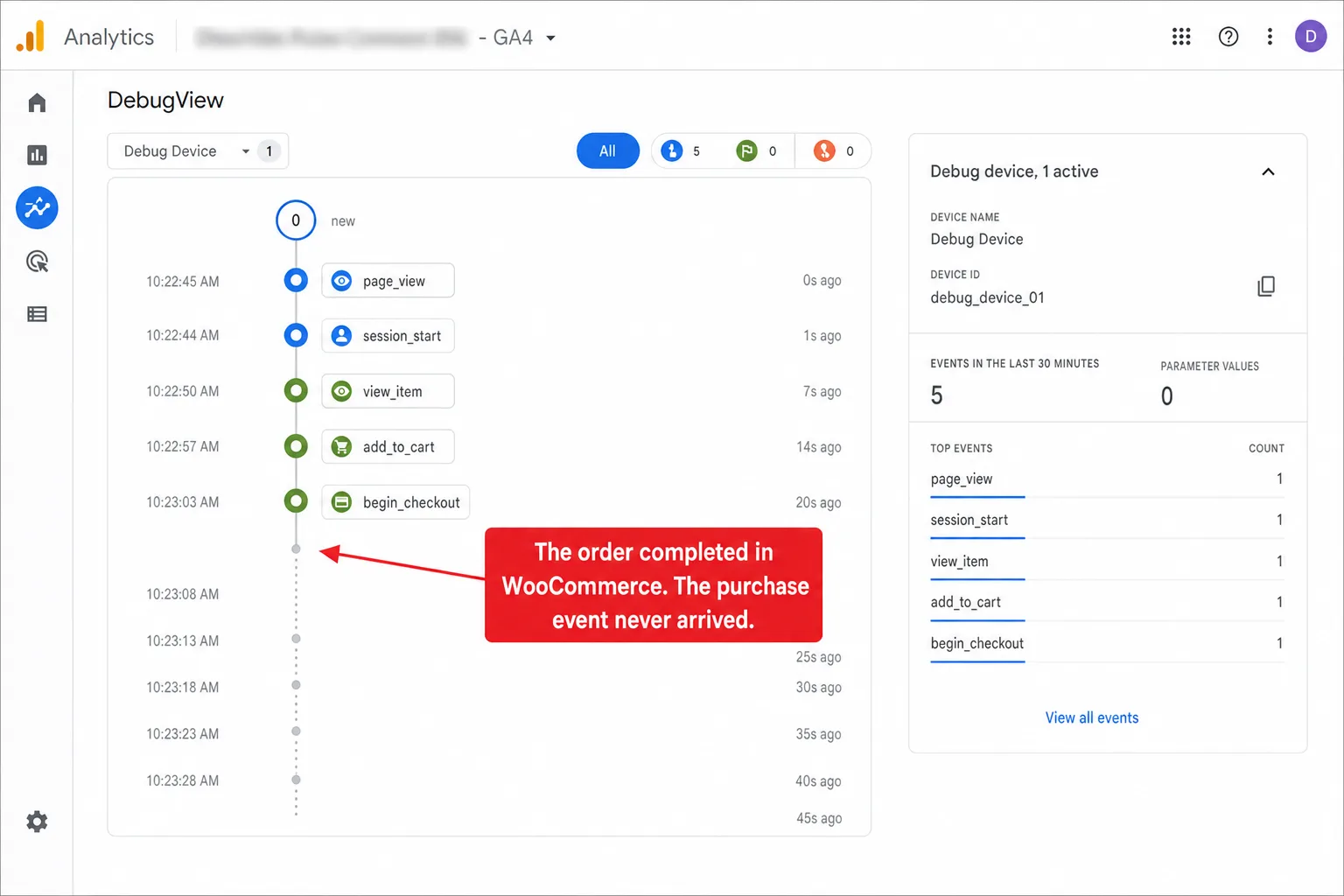
There's a detail in the WooCommerce code worth knowing, because it's the seed of the fix. The woocommerce_thankyou hook is PHP. It runs on your server. The only reason it ends up leaning on the browser is that plugins use it to print JavaScript instead of doing the work server-side. WooCommerce also fires a separate hook, woocommerce_payment_complete, the instant a gateway confirms payment, before the redirect, with no browser involved at all. Hold that thought. I come back to it later in this piece.
Caching, consent, and ad blockers: three ways the fire never happens
Three failure modes account for most of the everyday gap. None is exotic. All three are running on stores right now whose owners think their tracking is fine.
Caching plugins serve a thank-you page with no live order
Caching plugins make WooCommerce fast by serving saved copies of pages. The catch: WP Rocket, the most common one, excludes the cart, checkout, and my-account pages on its own. It doesn't exclude the order-received page.
If that page gets cached, the next buyer can be handed a stale copy carrying the wrong order data, or none. The purchase event fires with an empty value, or doesn't fire at all. Store owners have watched tracking go dark for days after a caching change, with no error anywhere to point at.
Minification makes it worse. When an optimization plugin combines and minifies JavaScript, it can reorder the inline script that pushes the purchase data. The event gets built before the container that reads it even exists. The page looks fine. The tracking is broken.
Consent banners block analytics before the sale is counted
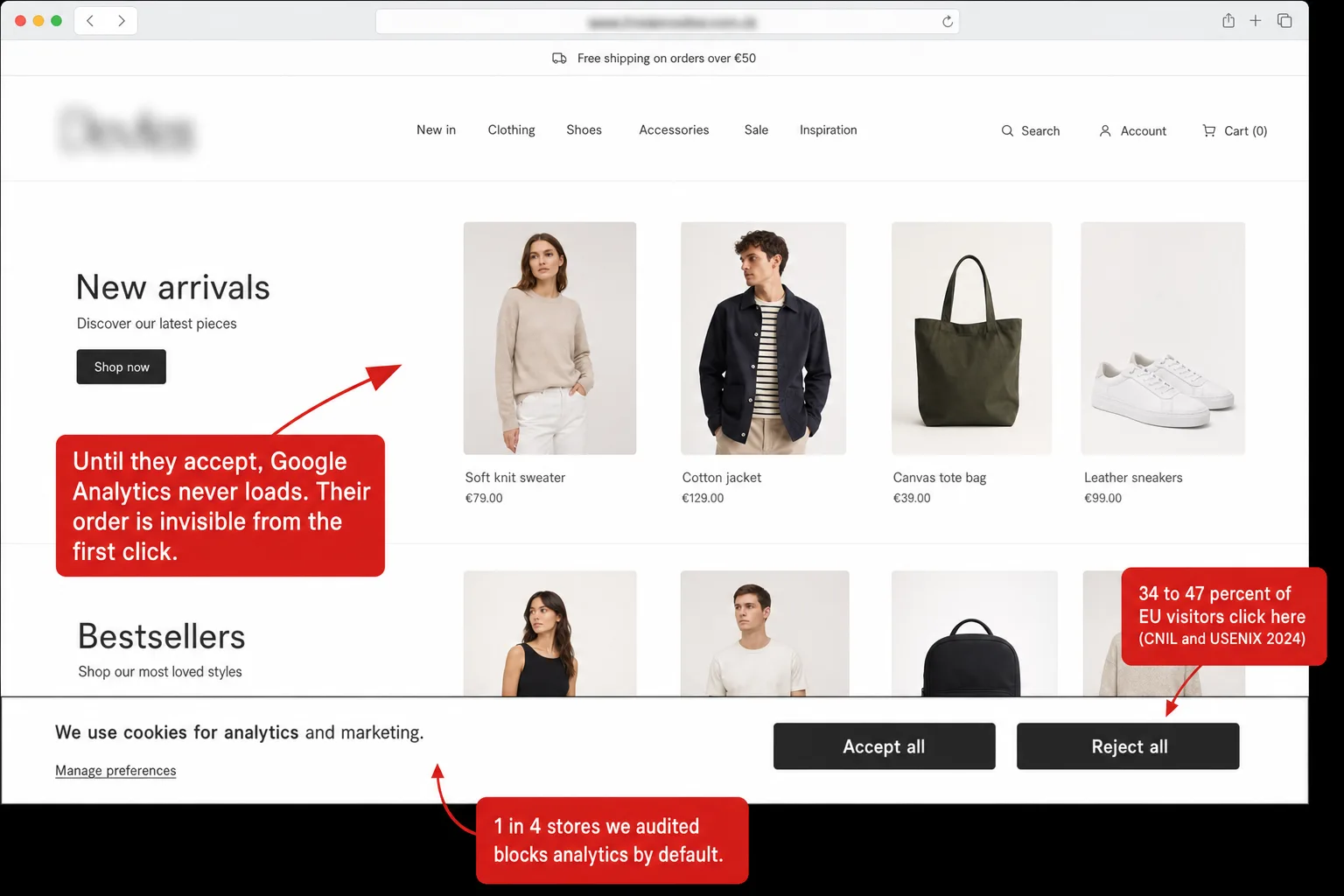
This is the EU's tax on client-side tracking, built right into the law, and it's the headline finding of the audit. 24 percent of the stores I checked run a consent platform that, by default, blocks Google Analytics until the visitor clicks accept.
The question that turns that into lost money is simple: how many visitors accept? The best evidence is a 2024 study run with France's data-protection regulator, the CNIL, with 3,947 participants. When the reject button got equal visual weight, 34 percent rejected. When the banner spelled out the consequences, 47 percent rejected.
In plain English: on a compliant banner, a third to a half of EU visitors say no. The purchase event never fires for a single one of them.
Google's answer is Consent Mode, which models some of the missing conversions. Read Google's own wording closely: it "recovers more than 70% of ad-click-to-conversion journeys lost due to user cookie consent choices." That's about Google Ads click attribution, not your GA4 revenue report.
And the modeling only switches on above traffic thresholds most small stores never reach. Which means for a normal WooCommerce shop, the rejected-consent orders just disappear from the reports.
Ad blockers and privacy browsers stop the script cold
Ad blockers don't just block ads. uBlock Origin, the most popular one, ships a privacy filter list that blocks Google Analytics and Tag Manager by default. The Brave browser blocks them itself, no extension needed. Worldwide, 29.5 percent of internet users ran an ad blocker as of mid-2025. That means roughly 3 shoppers in 10 arrive with a blocker in their pocket. Not all of them block analytics, but a good chunk do, and for those visitors the purchase event is never sent at all.
One thing worth correcting, because it gets repeated wrong everywhere: Firefox's standard tracking protection doesn't block Google Analytics by default. Safari doesn't block the script either. It does cap tracking cookies at seven days, which breaks attribution for returning buyers rather than dropping the sale outright. Brave and uBlock Origin are the two that genuinely stop the event.
Redirect payment gateways: where the most orders vanish
If consent is the EU's tax, redirect payment gateways are everyone's. This is probably the single biggest source of missing WooCommerce orders, and it has nothing to do with how carefully you set up GA4.
When a customer pays with PayPal Standard, Klarna, iDEAL, Sofort, or most "buy now, pay later" options, they leave your site. They finish paying on the provider's domain, where your tracking scripts can't run. Then the provider is meant to send them back to your order-received page, where the purchase event finally fires. Two things go wrong with that return trip, over and over.
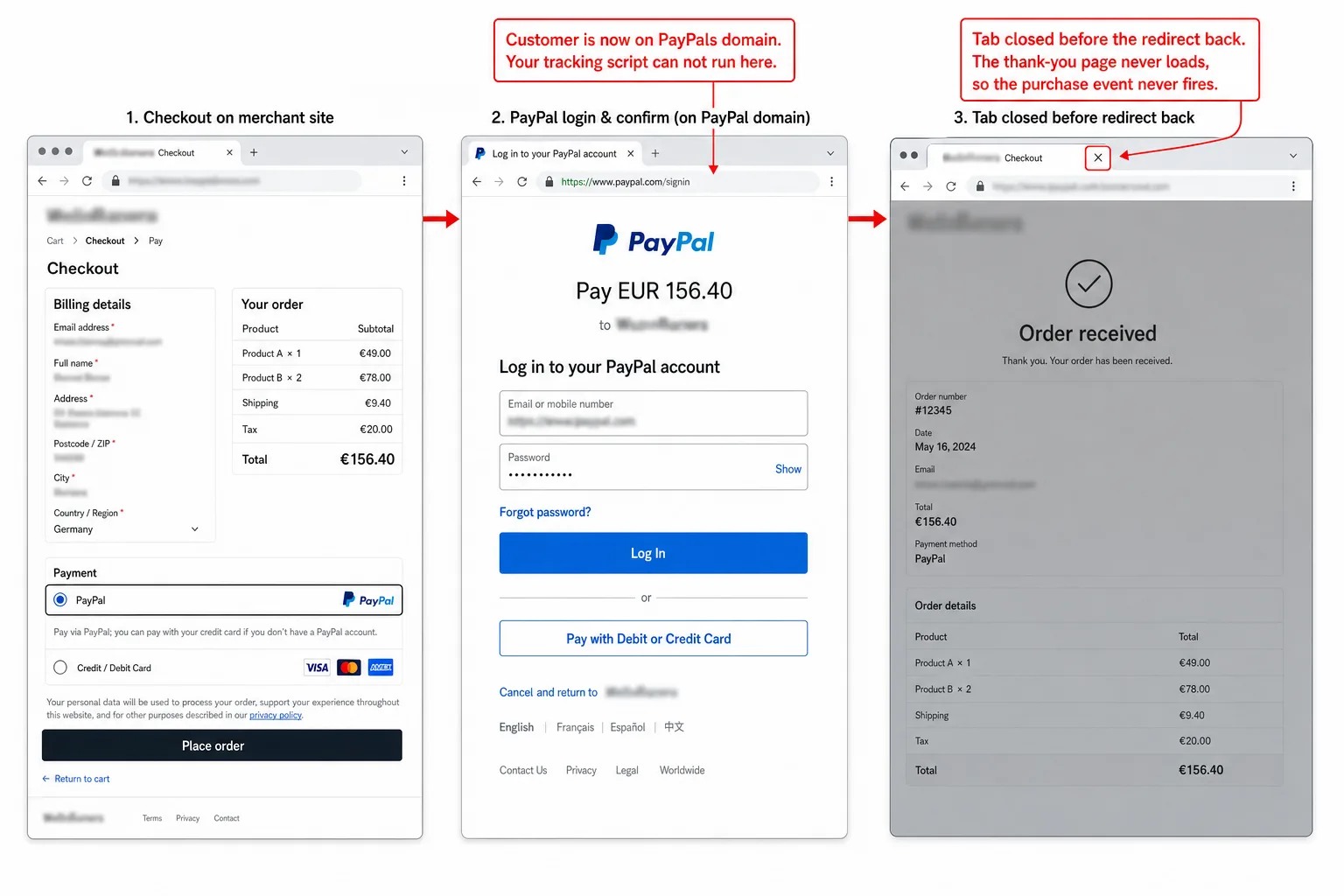
First, the buyer doesn't come back. They pay on PayPal, see PayPal's confirmation, and close the tab. As far as they're concerned, checkout worked. The order is in your WooCommerce admin. But the thank-you page never loaded, so the event never fired. On mobile, where PayPal often opens in its own app, this happens even more.
Second, even when they do come back, the trip is read as a brand-new session that arrived from paypal.com. The thing that really drove the sale, the Google ad or the newsletter link, is gone. So the order, if it's counted at all, gets pinned on PayPal as the referrer.
This is the part that should change how you read your own reports. Filter GA4 purchases by payment method. If your PayPal and Klarna orders come up short against your WooCommerce admin, you've found the leak. It isn't a tag you fired wrong. It's the redirect, and client-side tracking has no answer for it.
Block checkout and custom thank-you pages: the silent breakers
Two more failure modes deserve a flag, because they tend to break tracking that used to work. That makes them miserable to diagnose.
WooCommerce switched new stores to a React-based "block" checkout by default in version 8.3, released November 2023. As of early 2026, most live stores, somewhere around 88 percent, are still on the older classic checkout, but every new store starts on blocks. In plain English: the old checkout still dominates, but the default has flipped. The block checkout moved where and how some events fire. The final purchase event on the order-received page usually still works, because both checkout types land on the same page. But the mid-funnel steps tracking plugins counted on can go silent, and stores that built their flow around the old behavior can lose the purchase event entirely.
Custom thank-you pages are the more common silent breaker. Use a page builder like Elementor, Bricks, or Divi to swap out the default order-received template, or a funnel plugin that redirects to a custom "thanks" URL, and the woocommerce_thankyou hook may never fire on that page. The plugin that depends on it prints nothing. Orders go through, the page looks great, and GA4 records zero purchases. There's a well-documented bug in one popular tag plugin where WordPress's own text formatter slips paragraph tags into the inline tracking script, producing a syntax error that kills the event. Every one of these looks like a settings problem. None of them gets fixed by configuring harder.
Why server-side GTM isn't the fix you think
When people hit this wall, the advice they get is "go server-side, set up server-side Google Tag Manager." It sounds right, and for the redirect and ad-blocker problems it's only half a fix. Here's what the advice leaves out.
Server-side GTM is a relay, not a source. Google's own documentation describes the server container as receiving requests from the browser and passing them on. The browser still has to send the event first. The tagging server then enriches it and hands it to GA4, Meta, and the rest. That's genuinely useful for how long cookies live and for slipping past some ad blockers, because the request goes to your own subdomain instead of Google's.
Now hold it up against the failure modes above. If the buyer closed the PayPal tab and never loaded the thank-you page, the browser never sent anything, so the server has nothing to relay. If a consent banner blocked the script, nothing was sent. If the page came from cache without the event, nothing was sent. Server-side GTM can't relay an event that was never fired. For the biggest sources of missing orders it changes nothing, and it hands you a tagging server to host, a custom subdomain to maintain, and a monthly bill that runs from around 17 dollars on a managed host to 120 dollars and up if you run it yourself on cloud infrastructure. Meaning: rent, for a relay that can't originate.
Relay versus origination is the whole game. To fix missing orders you don't need a faster relay. You need to fire the event from somewhere that always knows the sale happened. That place is your server.
What 75 stores told us about server-side tracking
Which brings me back to the audit, and the number I keep coming back to.
Across all 52 audited stores running Google Analytics or Tag Manager, exactly zero had a server-side tracking signal I could find. No first-party tagging endpoint, no Stape, nothing. 100 percent were trusting the browser to fire the purchase event. And remember, that's a floor: a perfectly hidden server setup wouldn't show in public HTML, so the real count of stores with no server net is this high or higher.
Sit with what that means next to the rest of the data. Nearly a quarter of these stores block their own analytics with a consent banner by default. One in five is still feeding a dead Universal Analytics tag. And not one has the server-side capture that would make the whole client-side mess survivable. Every troubleshooting guide eventually points at the same rescue. Not one store I checked had it.
If this sounds like your store, it almost certainly is, because it was true of every store I looked at. The good news: the fix is real, it's free, and on WooCommerce you're allowed to do it, which is more than Shopify merchants can say.
The durable fix: capture the order on the server, not the browser
Here's the reframe that makes the whole thing solvable. You're asking one fragile browser event to do two jobs at once: count the sale, and name the channel that drove it. Split them.
Counting the sale is your WooCommerce database's job, and it never drops one. Naming the channel is analytics' job, and that part gets captured at the start of the visit, not at checkout. The only thing left to do at the end is join "this order ID happened" to "this session brought it." You can do that on the server, where both facts are already known and no ad blocker can get in the way.
The tool for it's the woocommerce_payment_complete hook. It fires in PHP, on your server, the moment a gateway confirms payment. It doesn't care whether the buyer's browser loaded the thank-you page, ran your script, or accepted cookies. It fires for the PayPal order whose buyer closed the tab. It fires for the visitor who rejected consent. It fires for the uBlock Origin user. Every paid order, once, server-side. (One caveat: offline methods like direct bank transfer sit on hold until you confirm the money landed, so for those you'd hook woocommerce_order_status_processing instead. For card, PayPal, and the rest, woocommerce_payment_complete is the one.)
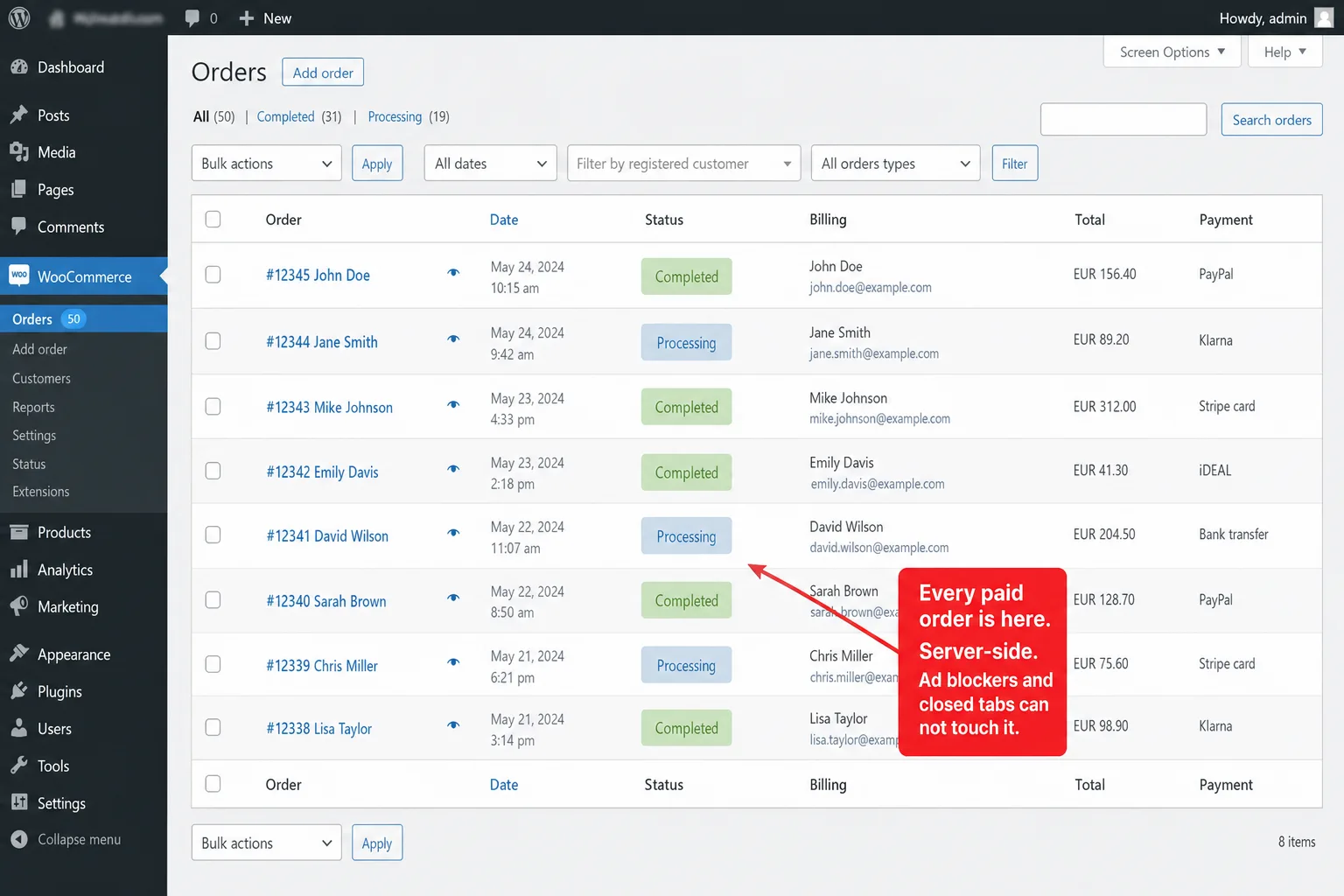
From that hook you send the order to your analytics with one server-to-server call. Here's the shape of it, posting to a custom-event endpoint:
add_action( 'woocommerce_payment_complete', function ( $order_id ) {
    $order = wc_get_order( $order_id );
    if ( ! $order ) {
        return;
    }

    wp_remote_post( 'https://clickport.io/api/event', array(
        'headers' => array(
            'Content-Type' => 'text/plain',
            'X-API-Key'    => 'ck_your_site_key',
        ),
        'body' => wp_json_encode( array(
            'type'           => 'custom',
            'name'           => 'Purchase',
            'url'            => $order->get_checkout_order_received_url(),
            'revenue_amount' => (float) $order->get_total(),
            'revenue_currency' => $order->get_currency(),
            'meta_keys'      => array( 'order_id', 'payment_method' ),
            'meta_values'    => array( (string) $order_id, $order->get_payment_method() ),
        ) ),
        'timeout'  => 5,
        'blocking' => false,
    ) );
}, 10, 1 );
That's the whole idea. The order is captured at the source of truth, with its revenue and currency, and nothing in the browser can stop it. Run it alongside your existing GA4 setup if you want to keep the client-side data for the buyers GA4 does catch. The server-side event is the safety net underneath it.
How to audit your own store in 15 minutes
Before you change anything, measure your own gap. It takes about 15 minutes, and it tells you whether you have a small leak or a flood.
Open WooCommerce, go to Analytics, and write down your order count and revenue for the last 30 days. That's your truth. Now open GA4, go to the Monetization or ecommerce purchases report for the same 30 days, and write down its purchase count and revenue. Divide one by the other. If GA4 shows 85 percent or more of your real orders, you have a normal client-side gap. If it shows less than 75 percent, something is actively breaking, and the calculator below helps you guess which one.
The numbers the calculator uses are conservative on purpose, and they stack the way the real failures stack: consent first, because it happens before the buyer ever reaches checkout, then redirects, then ad blockers on whatever's left. Your real gap could be smaller if you're mostly on-site card payments, or bigger if you lean on PayPal and Klarna in the EU. Either way, hold its output up against the real WooCommerce-versus-GA4 number you measured. If they land in the same neighborhood, you've found your leak.
Where Clickport fits, and where it doesn't
I build Clickport, so read this section with the right amount of doubt. I'd rather tell you exactly what it does and doesn't do than oversell it.
Two real advantages for a WooCommerce store. First, Clickport is cookieless and needs no consent banner, because it uses no cookies and no cross-site identifiers. That whole consent-rejection loss, the 24 percent of stores blocking their own analytics, just doesn't apply. There's no banner to reject. Second, the same woocommerce_payment_complete hook above can post the order straight to Clickport's event API, server-side, so the orders that PayPal and ad blockers hide from GA4 still get counted. The order-received page is on your own domain, not a payment provider's, so even the client-side path has fewer holes than it does on hosted platforms.
Now the limits, because they're real. Clickport is cookieless by design, which means it has no cross-session identity. It can't tell you a buyer's lifetime value, repeat-purchase rate, or cohort retention, because it doesn't follow people across visits. It captures the order and its revenue at the moment of purchase, ties it to the session that drove it, and shows that revenue against your goals and in your data export. If you need customer-level lifetime analytics, Clickport isn't the tool, and I'd rather you knew that now.
What it's good at is the thing this whole article is about: counting every sale, and the channel that earned it, with no consent banner and no reliance on a browser moment that fails a quarter of the time. If that's the gap you're trying to close, start a free trial and wire up the hook. If you want the idea first, how Clickport works and why we're cookieless both go deeper.
For the Shopify version of this same problem, where the checkout is locked down and you can't run the server hook, read Shop Pay, Apple Pay, PayPal: Why GA4 Misses Revenue. For the bigger question of what going server-side does and doesn't solve, Server-Side Tracking: What It Fixes and What It Doesn't is the companion piece.
Frequently asked questions
Why is my WooCommerce conversion tracking not working?
Almost always because the purchase event fires in the browser on the thank-you page, and that page isn't being reached or the script isn't running. The usual culprits: payment gateways like PayPal and Klarna that send customers off-site so they never come back to the order-received page, ad blockers that stop the tracking script, consent banners that block analytics until the visitor accepts, and caching plugins that serve a stale thank-you page. The order is saved in WooCommerce either way. Only the analytics event is lost.
How do I check if my WooCommerce purchase tracking is working?
Place a real test order and watch GA4's DebugView (Admin, then DebugView) with Google's Tag Assistant connected. A purchase event should show up within a minute, carrying a transaction ID, value, and items. If Tag Assistant says the tag fired but DebugView stays empty, the event is being dropped after it's sent. If nothing fires at all, the problem is on the page itself. Also compare your WooCommerce order count against GA4 purchases for the same 30 days. A gap over 25 percent means something is actively breaking.
Why am I getting clicks but no conversions in GA4?
Pull the two causes apart. If GA4 shows sessions but almost no purchases while WooCommerce shows real orders, the tracking is broken, usually a payment redirect or a blocked script, not your traffic. If WooCommerce and GA4 roughly agree on order count but the conversion rate is just low, then it's a traffic-quality or store problem, not tracking. Check that a test order lands in GA4 first. That one check tells you which problem you have.
Does WooCommerce have built-in analytics?
Yes. WooCommerce has an Analytics menu with reports for revenue, orders, products, categories, coupons, taxes, and more, read straight from your database. Because it doesn't lean on browser scripts, ad blockers, consent rejection, and payment redirects can't touch it. That makes it your reliable source of truth for what really sold. What it doesn't show is where your traffic came from or how visitors behaved before buying. For that you need a separate analytics tool next to it.
Why don't my WooCommerce orders match my GA4 revenue?
Because they're counting different things. WooCommerce records every paid order on the server. GA4 records only the orders whose purchase event made it through the browser. The difference is the orders lost to redirects, consent, ad blockers, caching, and script errors. A 15 to 25 percent shortfall is common, and EU stores with consent banners often see 40 to 60 percent. WooCommerce is right. GA4 is undercounting.
Will server-side tracking fix missing WooCommerce orders?
Depends which kind. Server-side Google Tag Manager only relays events the browser already sent, so it brings back none of the orders lost to redirects, consent blocks, or unloaded thank-you pages. Capturing the order from a server hook like woocommerce_payment_complete does fix those, because it fires the event from your server the instant payment confirms, with no browser involved. The hook is the durable fix. Server-side GTM alone isn't.
Stop losing orders you already earned
Your WooCommerce database has every sale. The only question is whether your analytics does too, and for most stores the honest answer is no, by a margin they've never measured. It isn't a setting you got wrong. It's that the most important event in ecommerce is being asked to fire in the one place that fails most often: a customer's browser, on a page they might never see.
You can keep patching the client side, or you can capture the order where it's already guaranteed: on your server, the moment the money lands. Start a free trial, wire up the hook, and watch your analytics match your bank account for once. No credit card, no consent banner, two-minute setup.

Comments
Loading comments...
Leave a comment