Why GA4 Revenue Never Matches Stripe
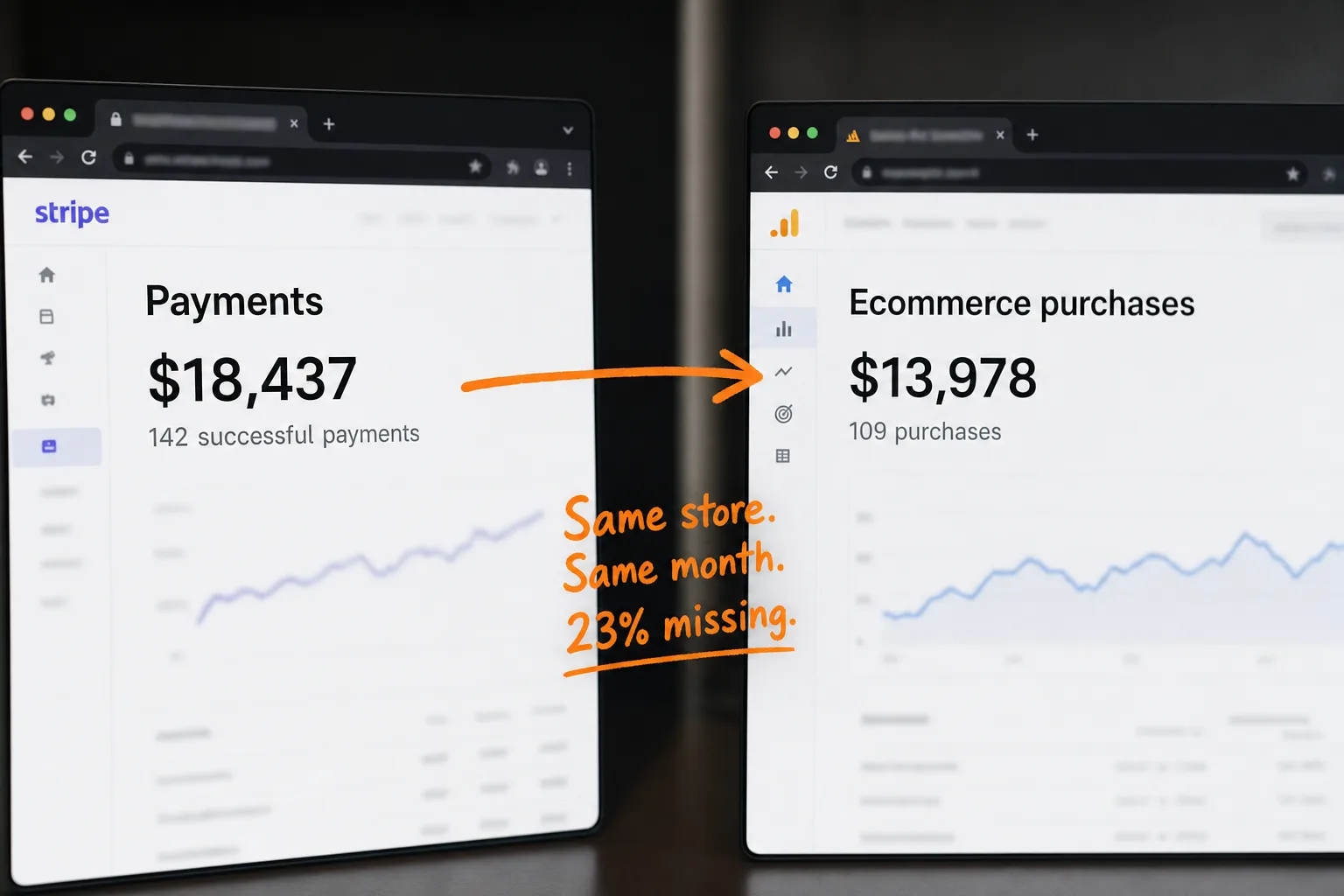
Your Stripe dashboard says $18,437 this month. GA4 says $13,978. Which number does your accountant believe? Stripe. Every time. The money is real, the analytics is the estimate, and the estimate runs 20 to 30 percent low for most stores. Put another way: for every five sales you make, your analytics loses track of one.
Most founders assume they've misconfigured something. A missing tag, a broken thank-you page, some GA4 setting buried four menus deep. So they rebuild the tracking, the gap stays, and they conclude analytics is just like this.
It isn't a configuration error. It's structural. The purchase happens in a place your analytics can't see, and everything downstream inherits that blindness. This article walks through exactly where your revenue leaks, what the standard fixes cost you, what I found when I read the privacy documentation of 12 attribution tools, and a way to tie revenue to traffic that doesn't need any of their machinery.
- Stripe Payment Links and hosted Checkout run on buy.stripe.com and checkout.stripe.com. Your GA4 tag doesn't run there, so GA4 only records a purchase if something else tells it one happened.
- GA4's consent-mode modeling needs at least 1,000 denied-consent events per day for 7 days before it even starts estimating. Most Stripe merchants never hit that. Denied purchases aren't modeled, they're gone.
- 29.5% of internet users worldwide used an ad blocker in Q2 2025 (32.5% in the US). Most ad blockers also block GA4, which blocks the purchase event with it.
- I read the public documentation of 12 Stripe-integrated attribution tools in July 2026. 11 of 12 rely on cross-session identifiers: cookies, browser IDs, fingerprints, or email joins. That's the tracking your consent banner has to disclose.
- Stripe passes a client_reference_id from the Payment Link URL through to the payment webhook. That passthrough is enough to tie a payment to the session that clicked, with no cookie and no persistent identity.
The gap is structural, not a reporting bug
Here's the shape of the problem, with numbers from a typical month:
You might think a gap that size would be a scandal. It's not. It's the industry baseline.
The bank-vs-analytics gap has been measured. Littledata compared a month of paid Shopify orders against what reached Google Analytics across stores processing 50,000 orders a month, back in 2021: 12 of every 100 orders never arrived. That means even a well-configured store was blind to one order in eight. The best setup in their sample tracked 96 percent of orders. The worst tracked 78. And that was before consent mode tightened and before Safari's cookie caps matured. The leaks have grown since, not shrunk.
I wrote about the Shopify version of this problem in the express-checkout audit. Stripe merchants have the same disease with a different anatomy. Let's open it up.
Your checkout runs on a domain your analytics can't see
Follow one buyer through a Stripe Payment Link:
Stripe Payment Links and hosted Checkout are Stripe-hosted payment pages. The buyer pays on buy.stripe.com or checkout.stripe.com, domains Stripe operates. Merchant code doesn't run on the hosted page. That's a feature, not an oversight: it's why your PCI compliance burden is nearly zero and why you'd pick Payment Links in the first place.
But GA4 has no idea the sale exists unless something sends it a purchase event. On your own site, your tag fires it. On Stripe's domain, there's no tag. The event never originates. And an event that never fired can't be relayed, filtered, or recovered later. You can't clean data that was never collected.
Stripe's own recommendation for conversion tracking is telling. Their post-payment docs suggest you redirect buyers to your own confirmation page and pass the Checkout Session ID in the URL, so your site can fire the events itself. In plain English: route the buyer back to somewhere your JavaScript exists, and hope. It works when the buyer waits for the redirect, has no blocker installed, and accepted your cookie banner. Three conditions, each of which fails routinely. Which brings us to the other three leaks.
Three more leaks: consent, blockers, and midnight
The checkout domain is the biggest hole. It's not the only one. Even purchases that complete on your own site, through a redirect confirmation page or an embedded checkout, still drain through three smaller ones.
These other external checkout and booking examples explain which actions remain visible before a visitor leaves.
Consent mode. When a visitor declines your cookie banner, GA4 stops reading and writing analytics cookies and falls back to anonymous pings. Google then offers to model the missing behavior with machine learning. Sounds reassuring. Now read the fine print on when modeling activates: your property needs at least 1,000 events per day with denied consent for seven days, plus 1,000 daily users with granted consent for seven of the last 28 days. That means a site below roughly 30,000 denied events a month doesn't qualify. A SaaS doing $30k MRR doesn't clear that bar. Your denied-consent purchases aren't modeled. They're gone.
Blockers. 29.5 percent of internet users worldwide used ad-blocking tools in Q2 2025, and 32.5 percent in the US. That's GWI survey data compiled by DataReportal, which means roughly one visitor in three arrives with a shield up. It's also the visitor who buys developer tools, B2B software, and anything technical. The blocker doesn't distinguish between your ad pixel and your purchase event. Both die.
Midnight, and other reporting quirks. Stripe timestamps a payment when the charge succeeds. GA4 timestamps the purchase when a browser fires the event, which can be a different day at the boundary. Then GA4 applies data thresholding, withholding report rows it deems too small to be privacy-safe. In practice, that means small precious segments, like the three customers your new campaign converted this week, are exactly what gets withheld from you.
Stack the four leaks and a 23 percent gap stops being mysterious. It's the expected output of the architecture. Not a bug you can fix in settings. A design you have to route around.
Doesn't Stripe have analytics built in?
Fair question, and worth answering before we look at third-party fixes. Stripe ships a payments analytics dashboard: acceptance rates, payment-method performance, decline reasons, fraud signals. If your question is "how healthy is my payment processing," Stripe answers it well.
But ask Stripe "which marketing channel earned this money" and you get silence. Stripe sees the payment, not the visit. It doesn't know your buyer read two blog posts, came back through your newsletter, and clicked Buy on the pricing page. It can't, and it doesn't pretend to.
So the two systems fail in mirror image. GA4 knows the marketing and loses the money. Stripe knows the money and never saw the marketing. Every tool in the next section exists to marry those two halves. The question is what each one demands in exchange.
What the standard fixes cost you
The industry's answer to an event-origination problem has been to build pipes. Three families of them:
| Approach | What it takes | Identity model |
|---|---|---|
| DIY Measurement Protocol | A developer, a webhook receiver, client-ID plumbing between your site, your backend, and Google's servers. Maintenance forever. | GA4 client ID stored in a cookie you must smuggle into Stripe metadata |
| CDP / sync apps | A second data platform between Stripe and GA4. Another vendor, another DPA to sign, another place your customer data lives. | Email or click-ID joins building a persistent customer profile |
| Attribution suites | $100 to $1,000+ per month for multi-touch dashboards built for ad buyers, on top of the analytics you already run. | First-party cookies, identity graphs, or device fingerprints |
Take the DIY route first, since it looks free. Google's own Measurement Protocol docs describe it as a way to augment client-side collection, not replace it. It relays events your server knows about. So you write a webhook receiver, listen for Stripe's payment events, and forward each one to Google. A weekend project, plus a lifetime of maintenance.
The catch isn't the plumbing. It's the identity column. For your forwarded purchase to land in the right session, your checkout must carry the GA4 client ID through Stripe and back. That ID lives in a cookie. The 29.5 percent with blockers never got the cookie. Visitors who declined consent don't have one either. And Safari expires script-set cookies after seven days, one day if the visitor arrived through a decorated ad click, which means a Safari user who found you through a Tuesday ad and bought the following Friday is already two cookies past recognizable. You built a pipeline to deliver events into sessions that no longer exist.
The CDPs and attribution suites solve that by going bigger: don't depend on one fragile cookie, build a durable profile of the person instead. Email joins, click IDs, identity graphs, fingerprints. It works, in the sense that the dashboard fills up.
Notice the pattern, though. Every fix answers "who bought?" with "the person we've been tracking." The pipe is incidental. The identity is the product.
I read the docs of 12 attribution tools. 11 track people across sessions
To check whether that pattern holds, I spent a day in July 2026 reading the public documentation of twelve attribution tools that integrate with Stripe: the help centers, the developer docs, the privacy and GDPR pages. Tools like Cometly, Triple Whale, Ruler Analytics, HockeyStack, Dreamdata, RedTrack, and SegMetrics, the names that rank for "revenue attribution" and fill Stripe's app marketplace. I'm not linking them, and this isn't a pile-on. Their docs are mostly honest. That's the point: the mechanism is documented, in their own words.
Eleven of twelve. Put another way: nearly the entire category that sells "know which channel earned this payment" answers the question by recognizing the person across visits, which is exactly the practice your cookie banner exists to disclose.
The details are worth a minute, because you'll recognize the categories from your own consent banner. One tool's consent guide states plainly that its cookies "shouldn't load until the user consents." Another documents a first-party visitor cookie with a one-year expiry and recommends listing itself in your cookie banner under Analytics. A third fingerprints the device: screen size, plugins, timezone, geolocation, hashed into an ID, and its own GDPR page says tracking should occur "only after explicit opt-in." So even the fingerprint route, the one built to survive cookie deletion, comes with a consent requirement in the vendor's own documentation.
The "cookieless" marketing deserves its own line. Three of the twelve market a cookieless mode. In two of the three, the docs show identity persisting anyway: through email joins, click IDs, or order matching. No cookie, same profile. And one tool's FAQ calls its identifier derivation proprietary, which is its own kind of answer.
None of this makes those tools evil. Multi-touch attribution across weeks genuinely requires knowing it's the same person on every visit. If that's what a business needs, this is what it costs. But be clear-eyed about the trade: you close your revenue gap by adopting exactly the tracking model that consent banners, blockers, and Safari were built to resist. The gap came from that model failing. The fix is more of it.
What session attribution can honestly claim
There's a smaller, sturdier claim available. Not "we follow this customer across every visit for a year," but: this payment came from this visit. The visit that clicked through to checkout has a source, a campaign, a channel, a country, a device. Join the payment to that one visit and you can answer the question you opened your analytics to ask: which channels earn money?
What session attribution gives you, with no persistent identity:
- Revenue by source, campaign, and channel, from the click that bought
- Revenue on your funnels, with real amounts behind the final step
- Refunds netted against the source that earned the original payment
What it can't give you, and what I won't pretend it can:
- Multi-touch journeys across weeks of visits. That requires recognizing the person on every visit, which is precisely the identity machinery above.
- Lifetime value and cohorts. Same reason. A renewal charge three months later happens with no visit at all; nothing honest can attribute it to an ad.
You might read that list of limits and think it disqualifies the approach. Here's the part the attribution industry doesn't advertise: at typical SaaS and creator scale, multi-touch was never delivering what its dashboard implied. Safari caps the cookie at seven days. A third of your buyers never carried the cookie. Consent-decliners below Google's thresholds were never modeled. Which means the seven-touch journey report was a sample of the trackable minority, presented with the confidence of a census. A first-touch that ITP forgot isn't data. It's absence wearing a suit.
Session attribution measures less and misleads less. I'll take that trade.
How payment-link attribution works without cookies
The mechanism that makes this possible is small, and Stripe documents it in one paragraph. Payment Links accept a client_reference_id URL parameter: up to 200 characters of alphanumerics, hyphens, and underscores that Stripe carries through checkout and hands back in the checkout.session.completed webhook. It's a passthrough. Whatever you append to the link comes back attached to the payment.
That's the whole trick. Your analytics script already knows the current visit's session ID. When a visitor clicks a link to buy.stripe.com, append it:
https://buy.stripe.com/abc123
   becomes, at click time:
https://buy.stripe.com/abc123?client_reference_id=cp-1846293017
The buyer pays on Stripe's domain, where no script of yours runs, and it doesn't matter anymore. When the checkout.session.completed webhook arrives server-side, it carries cp-1846293017. Look up that session, and the payment inherits its source, campaign, channel, country, and device. The join happens on the server, after the fact, from data the payment brought along with it.
Walk through what didn't happen. No cookie was written. Nothing persisted on the buyer's device. The token names one session and nothing else; it expires when the session does, and it can't be used to recognize the person next week. There's nothing here for a consent banner to disclose, because nothing identifies the visitor beyond the single visit.
Blockers lose most of their bite too. A blocker can stop the visit from being recorded, in which case the payment still counts as revenue, just without a source. What a blocker can't do is silently delete the payment: the webhook comes from Stripe's servers, not the buyer's browser. Your revenue total stays true to the bank even when attribution is blind. That's the correct failure mode. GA4 fails the other way around: it loses the payment itself.
This is how Clickport's Stripe integration works. The tracker decorates checkout links automatically at click time, so for Payment Links and hosted Checkout there's no code to write at all. If your backend creates Checkout Sessions itself, it's one line:
// browser: read the session token
const ref = window.clickport.checkoutRef(); // "cp-1846293017"

// server: pass it when creating the Checkout Session
const session = await stripe.checkout.sessions.create({
  client_reference_id: ref,
  line_items: [...],
  mode: 'payment',
  success_url: 'https://example.com/thanks',
});
Connecting takes one restricted, read-only API key. You scope it yourself in the Stripe dashboard: Charges read, Checkout Sessions read, nothing else. Clickport refuses full secret keys on purpose; an analytics tool has no business holding write access to your payment processor. Payments sync in real time through a signed webhook, refunds come back as negative revenue against the original source, and the last 90 days backfill on connect, so the chart isn't empty on day one.
Three honest edge cases, so you're not surprised later:
- Renewals and invoices. The first subscription payment attributes to the session that started it. Renewal charges arrive with no visit attached, so they count as revenue without a source. Each purchase carries an attributed yes/no property, which means the split is visible in your dashboard instead of swept under a modeled rug.
- Cross-device buyers. Someone who reads your pricing page on a phone and pays on a laptop shows up as two sessions, and the payment attributes to the one that clicked checkout. Following the person from phone to laptop is identity-graph territory, and you now know what that costs.
- Pre-decorated links. If your checkout URLs already carry a
client_reference_idof your own, nothing is overwritten. Your reference wins, and those payments simply stay unattributed in analytics.
What this looks like in your dashboard
Revenue stops being a separate report you reconcile against and becomes a metric that sits with the rest:
Look at that table for a second. The newsletter sends 312 visitors against Google's 1,842, and earns $4,890 against Google's $6,240. In plain terms: per visitor, your newsletter is nine times more valuable than your search traffic. You'd never learn that from a pageview report, and you'd never trust it from a dashboard that lost a third of the payments.
A Revenue stat appears in the dashboard header, next to Engagement. Click it and a revenue line joins the chart. Filter to any source, campaign, country, or device and the revenue re-computes for that slice. Purchases and refunds show up as custom events you can build goals and funnels on. And if you sell outside Stripe too, the manual revenue API still works alongside it: one clickport.track() call with an amount, and it lands in the same KPI.
None of it needs a cookie banner line item, because nothing identifies the visitor beyond the single visit. That's the same reason Clickport doesn't need one in general.
Your payment processor already knows the truth about your revenue. The only question is whether your analytics reports that truth, or an estimate filtered through cookies that a third of your buyers never accepted. Measure the money where it happens, join it to the click that earned it, and be honest about the rest.
If you sell through Stripe, the integration docs show the whole setup, and you can try Clickport free for 30 days. Reconciling two dashboards every Monday isn't a founder job. Retire it.

Comments
Loading comments...
Leave a comment