How to Track User Journeys on Your Website (2026)
Your visitors don't move through your site in a straight line. Someone lands on a blog post, jumps to your pricing page, doubles back to the homepage, skims your docs, then leaves. Journey analytics is how you see those real paths instead of guessing at them. Here's how to track user journeys on your website, find the routes that turn into signups, and do it all without a cookie banner.
- Journey analytics shows the order visitors do things in. A user journey or flow describes the path someone takes; a conversion funnel measures how many people finish a path you define, and where they drop off.
- Clickport's Flows auto-discover the most common 2 to 5 step paths with zero setup. Funnels measure a path you define in 2 to 8 steps with a drop-off chart. One click turns a discovered Flow into a tracked Funnel.
- It's cookieless and consent-free, so you measure every visitor. The tradeoff is that journeys are session-scoped, within about 24 hours, with no cross-session identity.
- GA4 tracks journeys with Path Exploration and Funnel Exploration, but you build each one by hand in the Explore section, it samples above 10 million events, and it keeps that data just 2 months by default.
- A conversion funnel turns a vague 'people drop off somewhere' into a number you can act on, like 'three out of four people who reach pricing never start a trial.' You discover the real path in Flows, then measure it as a funnel in one click.
What is website journey analytics?
Website journey analytics is the order visitors do things in, not just the things they did. Your Pages report tells you that 1,000 people saw your pricing page. Journey analytics tells you where they came from, what they looked at next, and how many of them reached a signup.
Three words get mixed up here, so I'll keep them straight.
The whole arc toward a goal. "Found us on Google, read two posts, came back a day later, signed up." It describes what someone did.
The page-by-page path inside one visit. "Home, then pricing, then docs, then signup." You discover it from the data.
A path you define, scored. "Of everyone who hit pricing, how many reached signup?" It measures what people did.
The simple version: journeys and flows show you the paths. A funnel counts how many people finish one. You want both, because they answer different questions, and the best part is connecting them.
What you can learn from visitor paths
The reason to look at paths is that they answer the questions a pageview count can't. Here's what I see people find, by the kind of site they run.
If you run a SaaS or a product site, work backward from your signup. Which pages show up on the way there? Often it's a specific comparison post or a docs page doing the quiet work, not the homepage you spent a month polishing. Once you know, you link to it more.
If you publish content, start from your most-read post and see what people do next. If the answer is "nothing, they leave," the post needs a stronger next step. If they jump to a related article, you've found a pairing worth promoting.
If you sell online, look at where people drop between the product page and the cart. A path view shows you the exact step that leaks, so you fix one thing instead of redesigning everything.
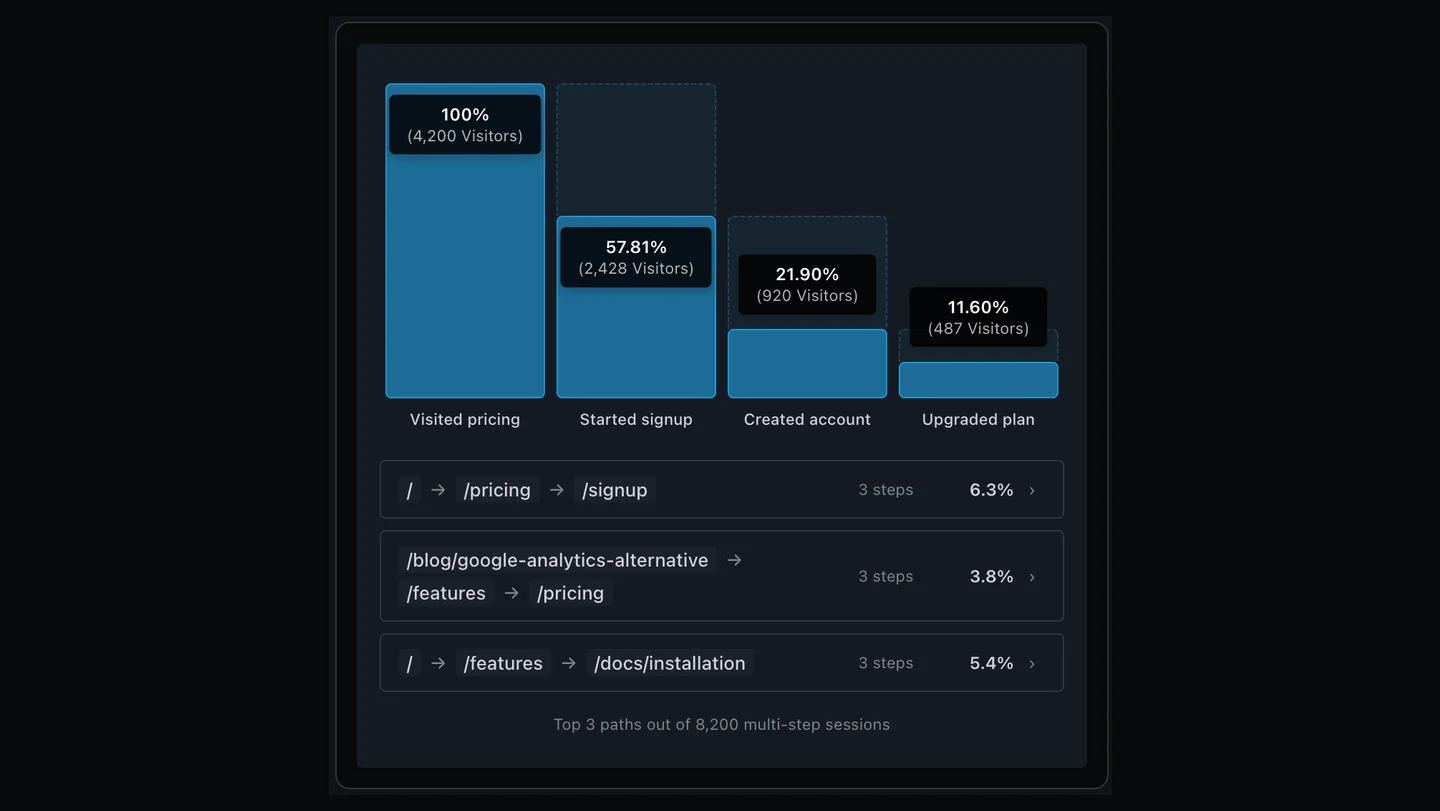
You don't have to imagine any of this. A funnel turns "people drop off somewhere" into "three out of four who reach pricing never start a trial." One is a shrug. The other is a to-do. The Journeys panel ranks the real paths for you, then measures the one that matters. Here's what that looks like.
How to track user journeys in Clickport
I built Clickport to keep both halves in one place, the Journeys panel. Flows discovers the paths. Funnels measures them. And one click moves you from one to the other.
Start with Flows to see the real paths
Open the Flows tab and the most common routes are already there, ranked by how many sessions followed them. Nothing to define, no goals to set up, no waiting for fresh data. It reads the pageviews your tracker already collects and shows you the top paths of two to five steps.
This is where you catch the path you never designed. The blog post that quietly feeds your pricing page. The detour through docs before signup. Click any row and it opens into a drop-off chart, so you see how many people made it to each step. And when one path puzzles you, open a single visit that took it: the session timeline plays the whole thing back, page by page, second by second.
Turn a path into a Funnel to measure it
When you've got a path in mind, a funnel measures it. You pick the steps, two to eight of them, and the chart shows the drop-off between each one. Each step is either one of your saved goals, a click, form, or custom event, or just a page path you type in.
In this one, three out of four people who hit pricing never start a trial. That's the leak worth your time. By default the funnel is relaxed, so people can wander between steps and still count. Flip on strict order and only back-to-back steps count, which is handy for short, deliberate flows.
If this is the visibility you've been missing, Clickport does all of it cookie-free. Start a free 30-day trial.
Discover, then measure, in one click
This is the part I'm proudest of. When a Flow shows you a path worth watching, you click Save as funnel, and the discovered path becomes a tracked funnel on the same chart. No retyping, no separate setup.
Flows shows the real paths
The top routes, ranked by sessions. Nothing to define, nothing to wait for.
Save the one that matters
One click turns a path into a funnel. No goals created, nothing to clean up.
Watch it over time
Segment by source, compare date ranges, see the drop-off move.
I looked at how other tools handle this. The closest any of them gets is letting you eyeball an auto-discovered flow, then build a separate funnel from scratch. The discovery and the measurement never quite meet. Joining them in one click is the whole idea.
GA4 Path Exploration vs Clickport
If you do this in Google Analytics today, you're using Path Exploration and Funnel Exploration, both tucked inside the Explore section. They're capable, and they're a lot of clicks. Path Exploration isn't a report you open. It's a thing you build from scratch each time: pick a node type, pick forward or backward, pick a metric, expand the nodes by hand. Nothing is discovered for you.
It also hides things. Each step shows the top 5 nodes until you expand it, and the rest roll into an "Others" node (Google's docs). Big reports get sampled above 10 million events, which means the numbers become estimates. And the data only reaches back as far as your retention setting, which is 2 months by default and 14 at most on the free tier. In plain English: you build it by hand, the numbers are estimates, and the window is two months unless you change it.
I'll be fair about where GA4 wins. It can model deeper paths than we can, up to 10 steps, and because it uses cookies it can follow someone across several visits. We can't do that, on purpose, which I'll get to next.
| What you want to do | GA4 Explore | Clickport |
|---|---|---|
| Find the common paths | Build by hand each time | Auto-ranked in Flows |
| Skip the cookie banner | No, needs consent | Yes, cookieless |
| Get exact numbers | Sampled above 10M events | Always exact counts |
| See your full history in a funnel | 2 months, 14 max | Full history on save |
| Track a discovered path | Rebuild it by hand | One-click Save as funnel |
| Model very deep paths | Up to 10 steps | 5 flows / 8 funnels |
| Follow one person across visits | Yes, via cookies | Within a session |
What cookieless tracking can and can't show you
I'll be straight about the tradeoff. Clickport doesn't use cookies, so it doesn't carry an ID across visits. A journey is session-scoped: we connect one person's steps inside a visit, within about 24 hours, then it resets. In practice: if someone reads your pricing on Monday and signs up Tuesday, that's two journeys to us, not one.
If you need to follow a single user across weeks and devices, that's a job for cookies and consent, and you should use a tool built for it. That's a real need, and it isn't this tool.
But look at what the cookie costs. A compliant setup can't count an EU visitor until they accept, and when the banner offers an easy reject, over 60% of them decline. On top of that, 29.5% of people worldwide run an ad blocker, and Google's tag is one of the most-blocked scripts there is. In plain English: stack those up and a cookie-based tool is often working from half your traffic. Its cross-visit journeys are detailed stories about the visitors it still gets to see.
We measure everyone instead. The journeys are shorter, but they're complete, and no banner gets in the way.
FAQ
What is the difference between a user journey, a user flow, and a conversion funnel?
A user journey is the broad path someone takes toward a goal, sometimes across several visits. A user flow is the page-by-page path inside one visit. A conversion funnel is a path you define in advance, where the tool counts how many people finish each step and where they drop off. Journeys and flows describe behavior; funnels measure it.
What is path analysis?
Path analysis is finding the routes visitors actually take, instead of checking one path you set up ahead of time. A funnel tests steps you choose; path analysis is open-ended and surfaces the paths you didn't expect. Clickport's Flows view discovers these top paths automatically, and its Funnels view measures the ones you define.
How do you track user journeys in Google Analytics?
In GA4 you use the Explore section: Path Exploration for the sequence of pages and events, and Funnel Exploration for completion and drop-off. You build each one by hand, it relies on cookie-based identity that usually needs consent, it samples above 10 million events, and it keeps that data 2 months by default. In practice, a cookieless tool surfaces the same paths without the setup or the consent dependency.
Do you need cookies to track user journeys?
Not within a visit. Paths and flows are rebuilt from the ordered pageviews in a single session, which doesn't need a stored ID. You only need cookies to stitch one person's journey across multiple visits or devices. Within-session journeys, flows, and funnels work fully cookieless and consent-free.
What are the four stages of a conversion funnel?
The classic model is Awareness, Interest, Desire, and Action (AIDA). Awareness is first discovery, Interest is engagement, Desire is evaluation, and Action is the conversion. Each stage holds fewer people than the one before it, which is what gives the funnel its shape.
Track user journeys without the cookie banner
Visitors take their own routes, and most of those routes I'd never have thought to draw. The way to act on them is to discover the real paths first, then measure the ones that matter, without losing half your traffic to a banner on the way.
That's what Flows and Funnels do together: find what's really happening, promote the path worth tracking in one click, and watch the drop-off move. Cookie-free, consent-free, no sampling.
Start my free 30-day trial. No credit card. See your real visitor paths in 60 seconds.

Comments
Loading comments...
Leave a comment