Google Site Kit Dropped My PageSpeed by 40 Points. Here's What I Did.
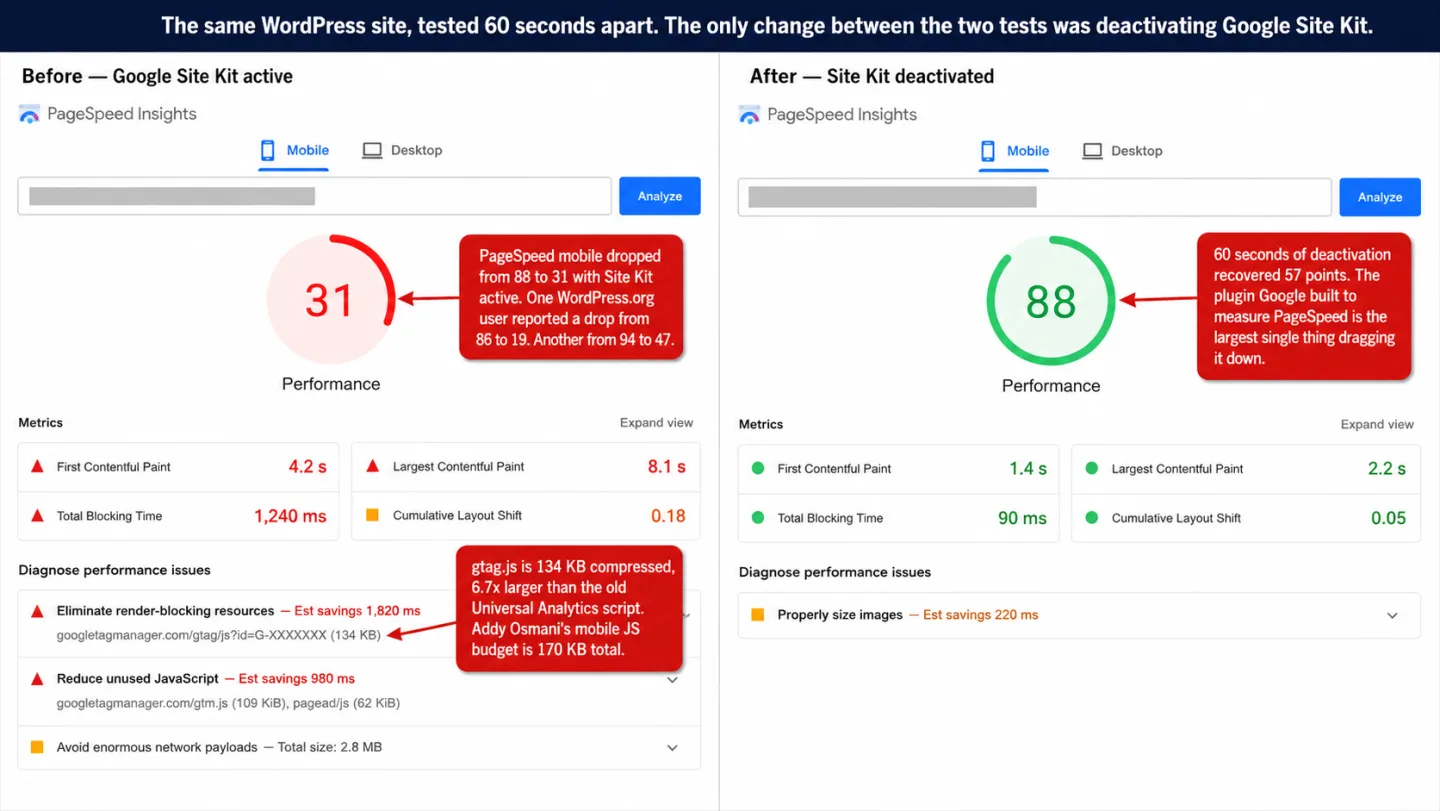
My client's mobile PageSpeed score jumped from below 40 to 88 in about 60 seconds. I didn't optimize a single image. I deactivated Google Site Kit. That was the whole fix, and I couldn't believe it either. I'd already spent two weeks on the slow way: tweaked images, minified CSS, deferred every script I could find. The score barely moved. The thing dragging it down was a plugin Google built to help.
Disclosure before we go on: I run Clickport, a lightweight analytics tool, so I have a horse in this race. The PageSpeed numbers below come from WordPress.org, GitHub, and PluginTests, not from me. Check them yourself.
- Site Kit users report PageSpeed drops of 20 to 67 points. One site dropped from 86 to 19. Another went from 94 to 47. Google's support team calls this 'a slight impact on performance.'
- Site Kit loads GA4's 134 KB gtag.js script on every page and adds 1.13 MiB of PHP memory overhead on the server. Its memory usage has grown 42% across recent versions.
- Only 40% of WordPress sites pass Core Web Vitals on mobile. Every 100ms of added load time costs roughly 1% in conversions. A PageSpeed drop is a revenue drop.
- A WordPress core contributor filed a GitHub issue in May 2025 proposing a performance fix for Site Kit's script loading. As of March 2026, it remains unresolved.
- Clickport's tracker is 1.9 KB gzipped, 70x smaller than gtag.js. No WordPress plugin, no PHP overhead, no cookies, no consent banner needed.
The PageSpeed drops users are reporting
Google Site Kit has 5 million active installs. That's five million WordPress sites loading the same plugin. Plenty of them report the same thing on the WordPress.org support forums. You're not imagining it. The numbers aren't small.
One user watched their score fall from 86 to somewhere between 19 and 31 the moment they switched Site Kit on. In plain English: a 55 to 67 point penalty from a single plugin. Another dropped from 94 to 47. A third went from 90 to 50. Ed Rishel, a developer who wrote about the experience, lost 40 points. None of them touched their content. They'd flipped one switch.
Documented drops from WordPress.org and Google's own support forums:
- 86 → 19 (67-point drop) -- levanii, WordPress.org
- ~50 points lost across multiple sites -- jomfruane, WordPress.org
- 94 → 47 (47-point drop) -- lianazaman, WordPress.org
- 90 → 50 (40-point drop) -- Google AdSense Community
- +22 points recovered after deactivating -- boionfire81, WordPress.org
These aren't stray complaints in one thread. Site Kit has 143 one-star reviews on WordPress.org. That means 14.6% of every review it has ever had, and speed is one of the loudest grievances. One reviewer watched LCP climb from 2.4 to 8.4 seconds once Site Kit was on. The biggest element on the page took three and a half times longer to appear. Another said the site sat there "waiting forever for googleads.doubleclick.net," and they didn't even run Google Ads.
Want to know if Site Kit is the thing slowing you down? The check takes a minute, and I'd run it before anything else. Deactivate Site Kit. Run PageSpeed Insights. Compare the two scores. Multiple users see a jump of 20 points or more within seconds of switching it off. If that sounds like your site, read on. You'll keep your analytics data and stop paying for it in speed.
What Site Kit actually loads on your site
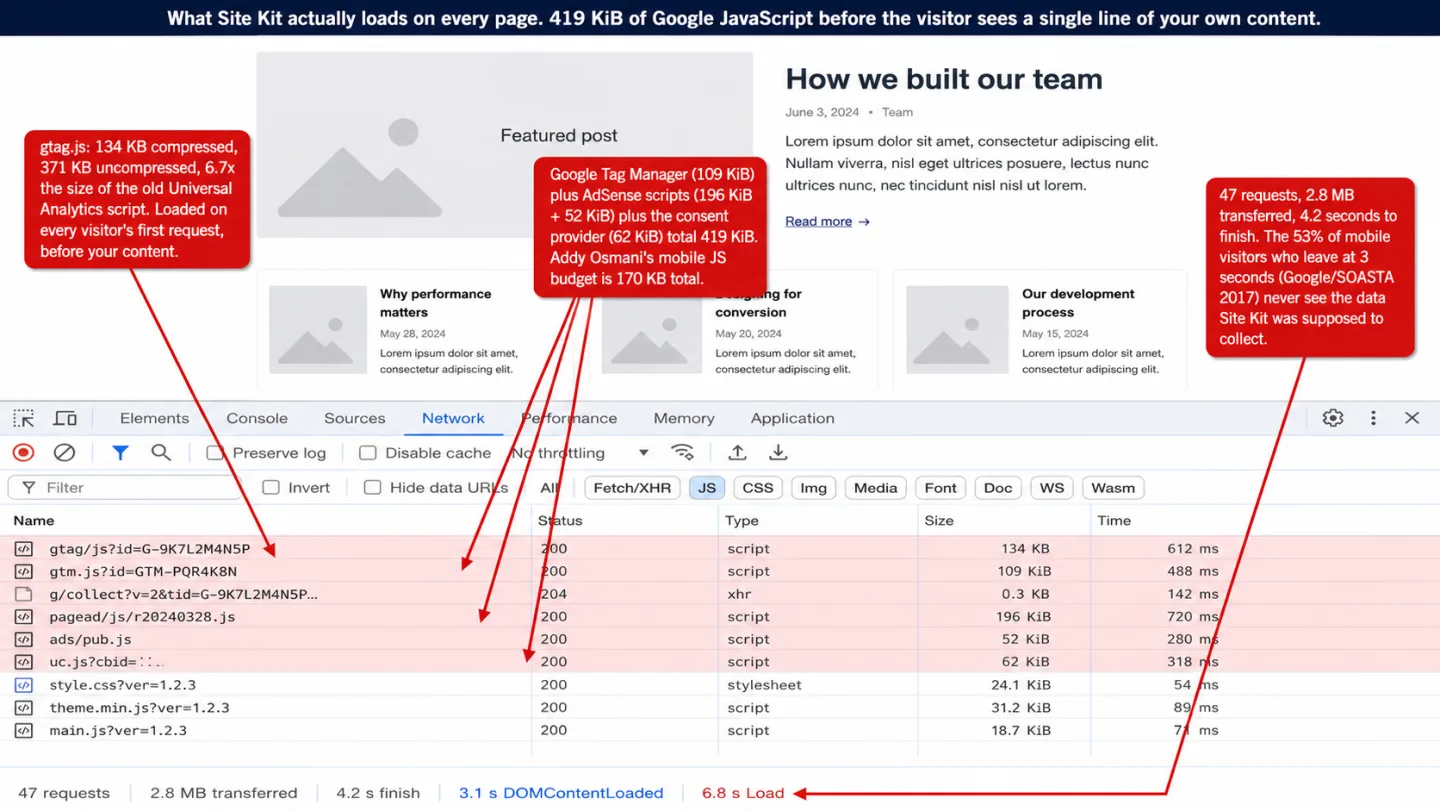
Google's official documentation says Site Kit itself "only inserts a meta tag on the front-end." That's true, in the narrowest reading possible. Site Kit inserts the meta tag. Then it inserts GA4's gtag.js, which weighs 134 KB compressed and 371 KB raw. That means 6.7 times the size of the old Universal Analytics script. The meta tag is the small print. The 134 KB is the bill you actually pay.
Connect AdSense, Tag Manager, or Consent Mode and Site Kit loads those scripts too. One user documented four Google JavaScript files on a single homepage, over 419 KiB in total: Google Ads scripts (196 KiB plus 52 KiB), Google Tag Manager (109 KiB), and a consent provider script (62 KiB). In plain English: nearly half a megabyte before your first paragraph.
On the server, Site Kit loads its PHP framework on every page request. Not only your admin pages. Every page a visitor opens. The Plugin::register() method fires at WordPress init priority -999 and spins up roughly 30 subsystems: Authentication, Modules, Permissions, Assets, REST API routes, and more. Your visitors will never see any of it. It runs for them anyway, and it's on every request.
2+ DNS lookups (googletagmanager, google-analytics)
3-5 network requests per pageview
371 KB of JS to parse on main thread
+ AdSense, GTM, consent scripts if connected
~30 subsystems initialized at boot
0.062s added page generation time
REST API routes registered
+ OAuth token management overhead
Paste the GA4 snippet by hand and you get the same gtag.js on the frontend with zero PHP overhead on the server. No 1.13 MiB of memory. No 30 subsystems waking up on every request. No REST API routes registered for a dashboard your visitors never open. Same script out front, none of the weight behind it.
The PHP overhead Google does not mention
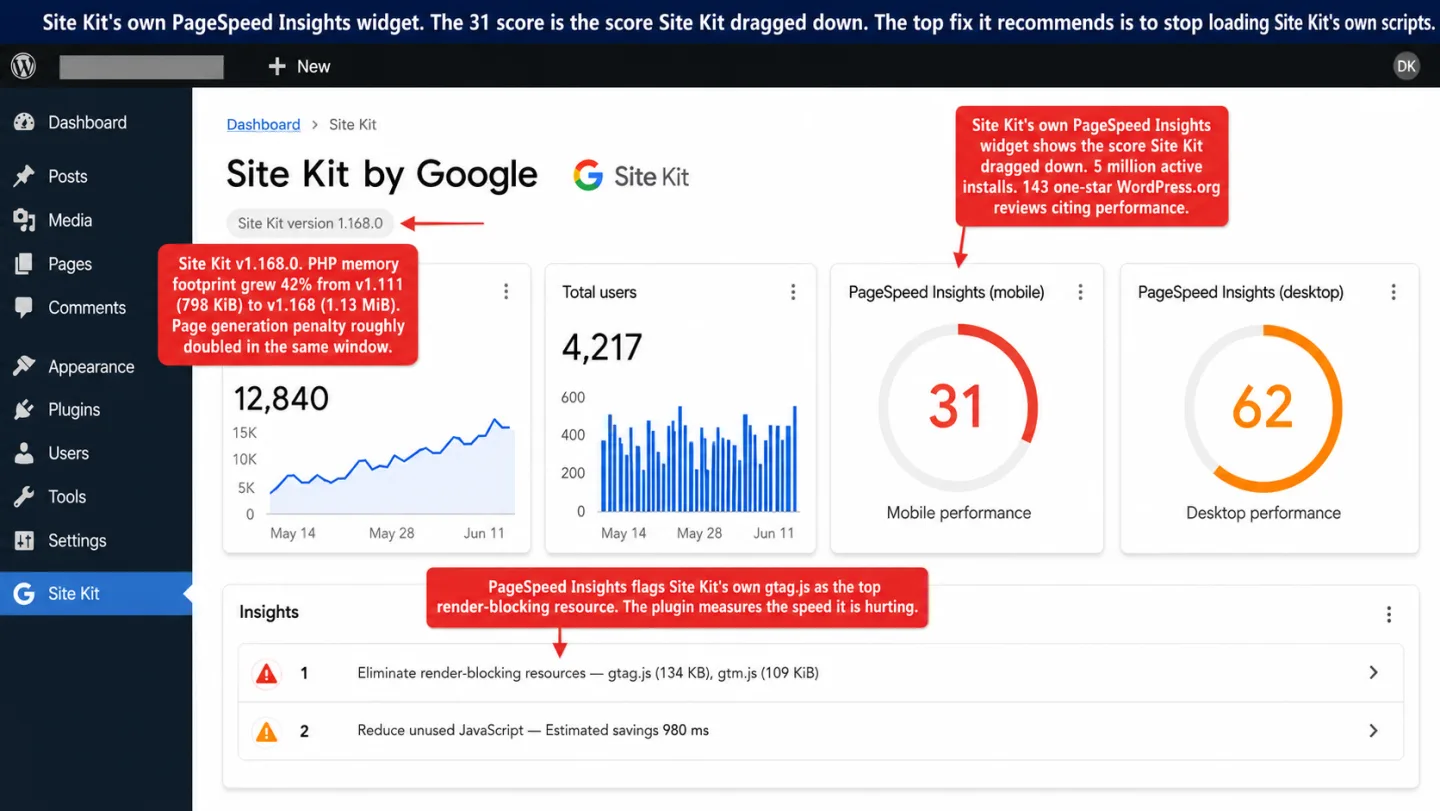
PluginTests.com tracks Site Kit's server-side footprint version by version. Here's the part that bugs me: the line goes the wrong way.
Memory use is up 42% across those versions. That means the plugin gets heavier with every release, not lighter. The page generation penalty has roughly doubled. And that's just the cost of having the plugin sit there installed. Under the right conditions it gets a lot worse.
In December 2020, a developer running a site with 10 million monthly pageviews filed a GitHub issue about 20-second page loads. The cause: Site Kit was making synchronous API calls to Google's servers mid-render for logged-in users. Pages that usually loaded in under 0.5 seconds would suddenly take 10 to 20 seconds and more. The server had four AMD EPYC processors and 64 GB of RAM. None of it helped, and I've seen this exact thing on smaller servers too.
In January 2025, a P0 bug crashed WordPress dashboards on sites running New Relic Browser Agent. The two collided into an infinite loop in Site Kit's notification code that ate every byte of memory the server had. It's the kind of bug you don't forget. A separate out-of-memory issue from December 2024 is still open.
On the frontend, a GitHub issue asking to trim Site Kit's 2.7 MB vendor bundle by dropping 21 unused npm dependencies has sat open since December 2021. Four years, and there's still no fix.
PageSpeed is not a vanity metric
A 40-point PageSpeed drop isn't just a green number going red. It's traffic and money walking out the door, and you can measure it.
Google's own research found that 53% of mobile visitors leave a page that takes longer than 3 seconds. That means more than half of your phone traffic, gone before the page even finishes. Push load time from 1 second to 5 and the odds of a bounce jump 90%. Which means four seconds can nearly double your bounces. Amazon measured that every 100ms of added latency cost it 1% in sales. That means speed isn't a nice-to-have, it's the till. Vodafone ran an A/B test where a 31% LCP improvement brought 8% more sales. Speed isn't a vanity score. It's the till.
Core Web Vitals are a Google ranking signal, and have been since June 2021. Yet only 40% of WordPress sites on mobile pass all three of them, against 57% for Wix and 56% for Drupal. Which means WordPress starts the race behind. WordPress starts the race behind. Site Kit pushes it further back.
Alex Russell, a performance engineer at Microsoft who used to work on Chrome, has written that building sites to the limits of high-end hardware is "active malpractice." Addy Osmani, from Google's own Chrome team, puts the mobile JavaScript budget at under 170 KB compressed. GA4's gtag.js eats 79% of that budget on its own, before your site ships one line of its own code. In plain English: the tracker leaves almost nothing for your actual page.
So your analytics plugin is the thing keeping you from passing Core Web Vitals. In plain English: the plugin is costing you traffic.
The irony: Site Kit measures the speed it hurts
Google makes PageSpeed a ranking factor. Google builds a plugin that drags PageSpeed down. Google's PageSpeed tool then points at Google's own plugin as the problem. You're the one stuck in the middle: a lower score, less traffic, and a polite suggestion to optimize the scripts Google put there.
I'm not the first to spot it. Per Karlsson from BKWine tested Site Kit before and after with GTmetrix and wrote: "Very ironic since Google is the big champion of fast pages and even uses it as a ranking factor in searches. Well, obviously they are not following their own advice."
The fix isn't complicated. In May 2025, Weston Ruter, a WordPress core contributor, filed an issue on the Site Kit repository with three asks: add fetchpriority="low" to the gtag script, move it out of the head into the footer, and drop the pointless DNS prefetch for googletagmanager.com. He even shipped a prototype plugin to prove the fix works.
The maintainer's reply in October 2025: "Thanks for the bump, I'll raise this with the team." As of March 2026 the issue is still open. Nothing's shipped.
The consent banner tax
The cost doesn't stop at the analytics script. Site Kit loads Google Analytics, Google Analytics sets cookies (_ga, _ga_<container-id>), and cookies mean you need a cookie consent banner in the EU. You can scan your site to see exactly which tracking scripts fire before anyone has clicked anything. The banner you bolt on to cover for that's more JavaScript on the page.
And consent banners aren't light. OneTrust, one of the popular ones, adds 124 to 347 KB depending on how you set it up. So in the EU the real Site Kit bill isn't just gtag.js. It's gtag.js (134 KB), plus the banner (50 to 200 KB), plus any other Google service you have wired in. You can clear 300 KB of tracking and consent JavaScript before your site paints its first image.
Now for the part that should change your mind. More than half of EU visitors reject cookies when the Accept and Reject buttons are given equal weight (etracker 2024 data). In Germany and France the rejection rate runs higher still. Every one of those visitors is invisible to Google Analytics. They're browsing, and you're blind to them. You slowed the page down for all of them, and you'll only count the minority who clicked Accept.
Google's own GDPR stance makes the hole deeper. The community asked for built-in consent management back in August 2019. After 22 comments over nearly five years, Google closed the issue as "Not Planned" in May 2024. To get Site Kit GDPR-compliant you end up running three plugins at once: Site Kit, the WP Consent API bridge, and a third-party consent platform. Each one adds PHP overhead. Each one adds JavaScript. Each one's a thing that can break at three in the morning.
Cookieless analytics skip all of it. No cookies, no personal data, no consent banner, and so no banner JavaScript and no three-plugin tower to keep standing.
Three options for fixing the problem
If Site Kit is dragging down your PageSpeed, you have three ways out.
Option A: Remove Site Kit, paste the GA4 code manually
Grab the gtag.js snippet from your GA4 property. Paste it with WPCode, a free plugin with 2 million installs. You'll keep everything GA4 gives you, Enhanced Measurement and all, so outbound clicks, file downloads, scroll depth, and site search still work. The only thing that changes is you check analytics.google.com instead of your WordPress dashboard.
One WordPress.org user reported a 22-point PageSpeed bump from this exact swap. That means the PHP weight, gone, for the same data. The frontend JavaScript's identical. The PHP overhead's gone.
The catch: you still ship GA4's 134 KB script on every page, you still need a cookie banner in the EU, and you still lose the majority of European visitors who reject cookies.
Option B: Delay the GA4 scripts with a caching plugin
WP Rocket's Delay JavaScript Execution holds back all JavaScript until a visitor does something on the page: moves the mouse, scrolls, clicks. PageSpeed scores jump. WP Rocket even ships ready-made exclusion checkboxes for Google Analytics and Tag Manager.
The catch: while the JavaScript is held back, GA4 doesn't load and doesn't fire until that first interaction. Anyone who lands, reads, and leaves without touching the mouse is completely invisible. You'll get a better PageSpeed score and worse data. You haven't fixed the problem, you've moved it.
Option C: Replace the whole stack
Drop both Site Kit and Google Analytics and run a standalone analytics tool instead, one that needs no WordPress plugin, loads none of Google's scripts, and asks for no consent banner.
That's what Clickport does. One script tag. No WordPress plugin. No Google dependency. No cookies. No consent banner. The tracking script is 1.9 KB gzipped. That's 70 times smaller than GA4's 134 KB. No plugin means the PHP overhead's zero. No cookies means the banner's got nothing to ask permission for.
What is your analytics costing you?
Put your own numbers in this calculator and see roughly how much traffic and revenue your analytics setup is quietly costing you.
What a 1.9 KB tracker looks like
The gap between a 134 KB analytics script and a 1.9 KB one isn't a number on a slide. It's fewer network requests, less time blocking the main thread, and a page that becomes usable sooner.
| Site Kit + GA4 | Clickport | |
|---|---|---|
| Script size (gzipped) | 134 KB | 1.9 KB |
| WordPress plugin required | Yes (+1.13 MiB PHP memory) | No (script tag only) |
| Cookies / consent banner | Required in EU (+50-200 KB JS) | None needed |
| DNS lookups added | 2+ (Google domains) | 1 |
| Real-time data | Reports delayed 24-48h | Yes (30-second refresh) |
| Scroll, click, form tracking | Partial (Enhanced Measurement) | All automatic, all plans |
| Session drill-down | No | Yes |
| Works on non-WordPress sites | No | Yes |
| EU visitors tracked | ~40% (after consent) | No consent gap |
| Multisite support | Added March 2026 | Yes (drag-and-drop) |
Clickport tracks scroll depth, outbound links, file downloads, form submissions, 404 errors, internal search terms, and copy detection on its own. It does goal tracking with revenue attribution, cross-filtering, annotations, a world map, and CSV and PDF exports. It runs on WordPress, Shopify, Next.js, static sites, anything that serves HTML.
Installing it's one line of code in your theme header. Data shows up in real-time within seconds. No Google account to connect. No OAuth tokens that expire on you. No "Gathering data" screen that drags on for two days. No fights with your caching plugin, your security plugin, or your page builder.
Start your free 30-day trial. One script tag. Real-time data in 60 seconds. No plugin, no cookies, no consent banner.
What you lose by removing Site Kit
Let me be fair to it, because I want this honest. Site Kit is genuinely handy if you want Search Console, Analytics, and PageSpeed data in one WordPress screen instead of three separate Google properties. Check those numbers every day and you'll save a few clicks. That's the whole upside.
That convenience is the whole list of what you give up. Every figure Site Kit shows you also lives at analytics.google.com and search.google.com/search-console. Site Kit holds no data of its own. Uninstall it and GA4 keeps every pageview, session, and conversion right where it was.
You also let go of a few things you never wanted: the PHP overhead, the clashes with Wordfence, Elementor, and WPML. The OAuth that drops almost daily for some people. The multisite support that took nearly seven years to land after the request went in back in 2019.
If you want analytics that run without a plugin, without consent banners, without a speed penalty, and without leaning on Google, Clickport does that. 30-day free trial. No credit card. Two minutes to set up.
And if you run the deactivate-and-retest check and the numbers surprise you, email me a screenshot.
For the same payload teardown across every major WordPress analytics tool, not just Site Kit, see Lightweight WordPress Analytics: I Measured Them All. The plugin Google built to watch your PageSpeed turned out to be the heaviest thing on the page. You don't have to keep it there.
FAQ
Does Google Site Kit slow down WordPress?
Yes. Users on WordPress.org report PageSpeed drops of 20 to 67 points after installing Site Kit. The plugin adds 1.13 MiB of PHP memory on every page request and loads GA4's 134 KB gtag.js on the frontend. Google's own documentation calls this "a slight impact on performance." A drop from 86 to 19 isn't slight.
How many PageSpeed points does Site Kit cost?
It depends on what you have connected. With just Analytics, users report 11 to 22 point drops. Add AdSense on top and the documented drops run 40 to 67 points. The worst case on record is a score falling from 86 to 19.
Can I use Site Kit without Google Analytics?
Yes. You can connect only Search Console and PageSpeed Insights. Set up that way, Site Kit adds just a meta tag to the frontend and skips gtag.js. The PHP overhead on the backend stays put either way.
Does removing Site Kit delete my analytics data?
No. Your data sits on Google's servers, not in the plugin. Uninstalling Site Kit does nothing to your GA4 data. Everything is still there at analytics.google.com.
Is Site Kit safe to use?
Site Kit had one security hole (CVE-2020-8934): a privilege-escalation bug that let subscriber-level users grab Search Console owner access. It's patched now, but it's a reminder. It was patched in v1.8.0. The bigger point is that every WordPress plugin widens your attack surface. 96% of WordPress vulnerabilities come from plugins. A script tag has no PHP, so it has no PHP-level hole to open.
What is the lightest WordPress analytics option?
If you want to stay on Google Analytics, paste the GA4 snippet by hand with WPCode instead of running Site Kit. If you want the GA4 weight gone entirely, lightweight standalone trackers like Clickport (1.9 KB gzipped), Plausible (1.3 KB), and Fathom (2.0 KB) come in 65 to 100 times smaller than GA4's 134 KB. I compared the full set in our GA alternatives breakdown.
Does Site Kit support WordPress Multisite?
Site Kit only got multisite support in March 2026, nearly seven years after the request first went in back in July 2019. Before that there was no multisite support at all, and network-activating the plugin was reported to break user registration.
Will removing Site Kit improve my Core Web Vitals?
Removing Site Kit clears the PHP overhead. Drop GA4 too, or swap it for a lightweight tracker, and you pull 134 KB of JavaScript off every page load. That feeds straight into Largest Contentful Paint (LCP) and Total Blocking Time (TBT), two of the three Core Web Vitals.

Comments
Loading comments...
Leave a comment