The Best WordPress Analytics in 2026 Isn't a Plugin
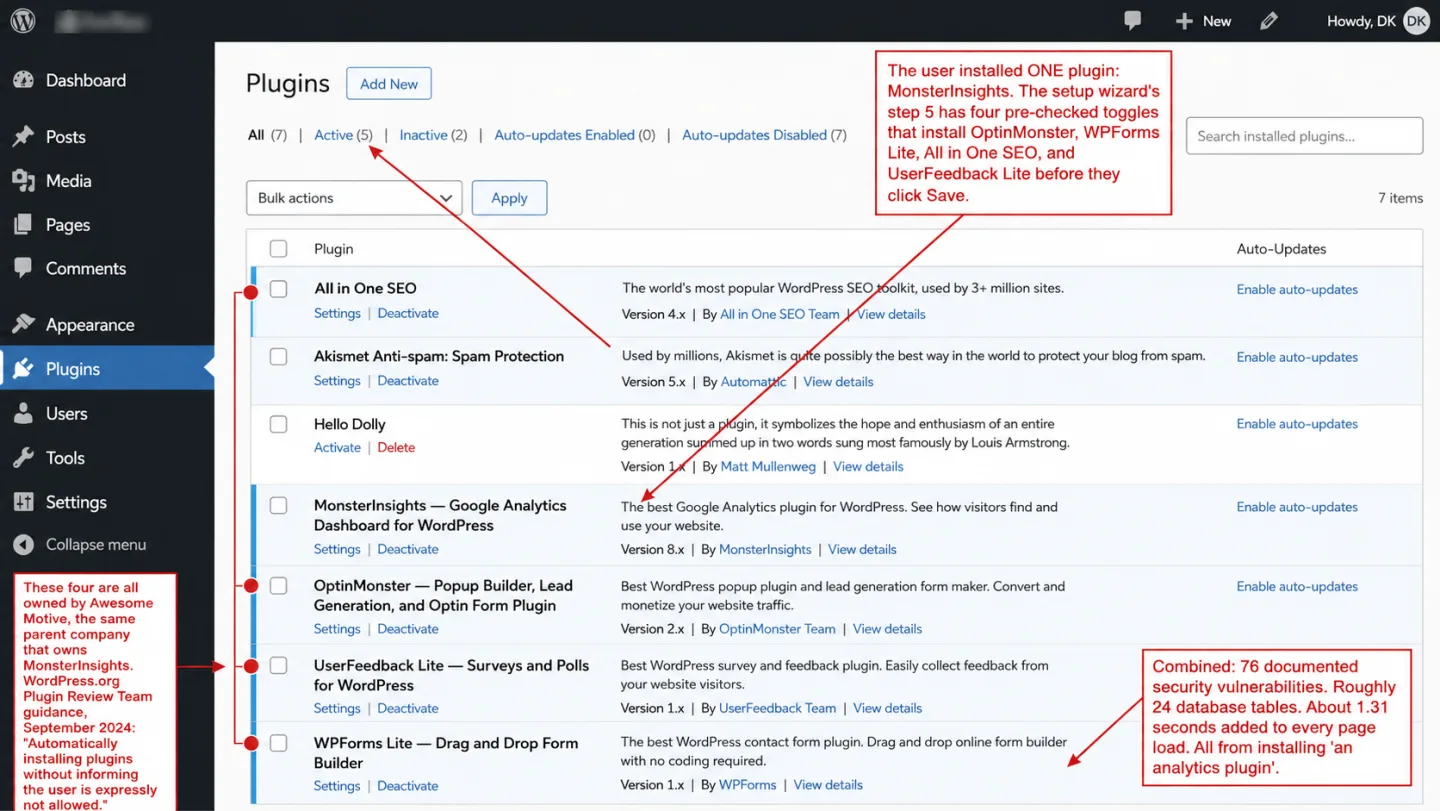
You searched for the best WordPress analytics plugin. My answer is that the best one isn't a plugin at all. Every analytics plugin makes your site slower, less secure, and harder to maintain, including the ones with 3 million installs and 5-star ratings. The best WordPress analytics in 2026 installs nothing in WordPress.
- The most popular WordPress analytics plugin installs four additional plugins during setup, all owned by the same company. Combined, those six plugins carry 76 documented security vulnerabilities.
- 96% of all WordPress security vulnerabilities come from plugins. In 2025, 11,334 new WordPress ecosystem vulnerabilities were discovered. Heavily targeted flaws were exploited within a weighted median of 5 hours.
- A typical analytics plugin adds 1-2 seconds to page load, creates 24 database tables, and leaves 65+ entries in your database even after uninstalling. A script tag adds zero server-side overhead.
- Every major 'best WordPress analytics plugin' listicle is published by WPBeginner, which shares a founder with the company that makes the plugin it ranks number one. The review site and the product are run by the same person.
- Cookieless analytics tools like Clickport use an under-2 KB script tag. No WordPress plugin required, no cookies, no consent banner. Setup takes two minutes. Removal takes ten seconds.
Why every "best analytics plugin" list is biased
Search Google for "best WordPress analytics plugin" and the top result is almost certainly WPBeginner. WPBeginner ranks MonsterInsights number one. WPBeginner and Awesome Motive share the same founder, Syed Balkhi. Awesome Motive owns MonsterInsights.
That's not a coincidence.
It's a business model.
Awesome Motive controls over 30 WordPress brands with a combined 25 million active installs. In plain English: one company, most of the plugin economy. The portfolio includes MonsterInsights, WPForms, All in One SEO, OptinMonster, Duplicator, WPCode, SeedProd, and WP Mail SMTP. WPBeginner, the largest WordPress tutorial site, is run by Balkhi too.
The pattern repeats. Search "best WordPress form plugin" and WPBeginner recommends WPForms. Search "best WordPress SEO plugin" and WPBeginner recommends All in One SEO. Search "best WordPress popup plugin" and WPBeginner recommends OptinMonster. In nearly every "best plugin" category where Awesome Motive has a product, that product takes the number one spot.
The disclosure exists, on a separate page. It mentions affiliate marketing and links to Awesome Motive's site. The recommendation articles themselves don't say it plainly. So a reader hunting for an honest pick has no idea the reviewer and the product are the same person.
IsItWP, the OptinMonster blog, the WPForms blog, the MonsterInsights blog: same playbook. Search one query and every result on page one can be an Awesome Motive property recommending an Awesome Motive product. As WPJohnny wrote, Awesome Motive has become "the WordPress equivalent of Google, a giant conglomerate gobbling up any and all competition."
I'm not Awesome Motive. I have no affiliation with WPBeginner. I do run an analytics product, and I'll be upfront about that the whole way down. But the case I'm making, that the best WordPress analytics isn't a plugin, doesn't hinge on which product you pick. It hinges on what a plugin does to your site.
What the most popular analytics plugin installs on your site
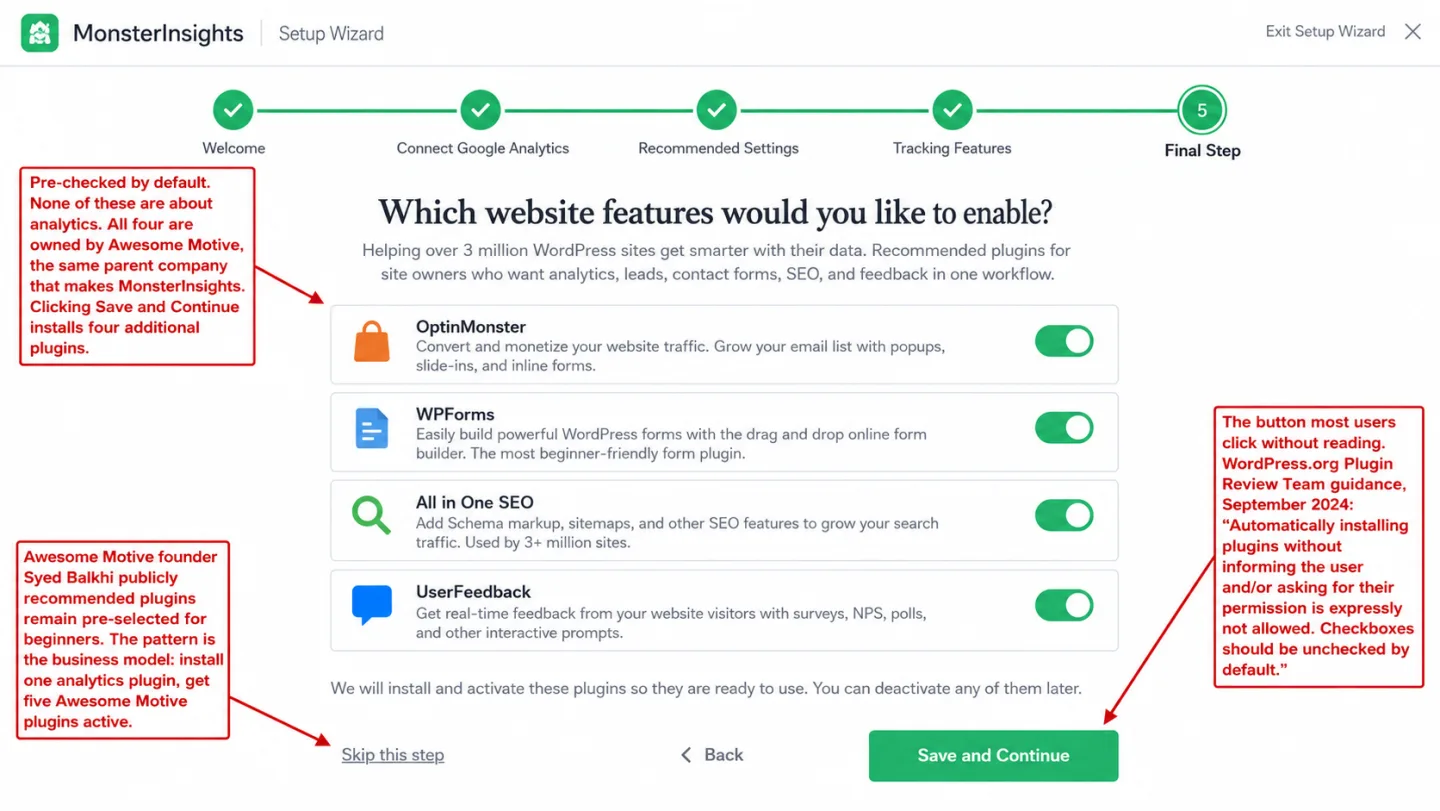
MonsterInsights has 3 million active installs. I've watched people activate it: a setup wizard walks you through five steps. In plain English: one click, five plugins. Step five asks "Which website features would you like to enable?" and shows you a set of toggles. Those toggles are pre-checked by default. Click "Save and Continue" without unchecking them and MonsterInsights installs four more plugins:
- OptinMonster (popups and lead generation)
- WPForms Lite (contact forms)
- All in One SEO (SEO toolkit)
- UserFeedback Lite (surveys)
All four are Awesome Motive products. On WordPress multisite, a fifth plugin, Duplicator, has been reported to auto-activate network-wide without asking first.
Most people never notice, and I don't blame them. One WordPress.org reviewer wrote: "I only discovered these additional plugins by accident in my admin dashboard. Initially, I thought I was logged into a different account." Another found "three or five new plugins installed" the day after setup and titled the review "Not a Bad Tool But Bad Ethics." They went looking for analytics and found a haul.
WordPress itself says this isn't allowed. In September 2024 the WordPress.org Plugin Review Team published official guidance: "Automatically installing plugins without informing the user and/or asking for their permission is expressly not allowed." They want checkboxes unchecked by default. Syed Balkhi, the founder of Awesome Motive, commented on that very post arguing the plugins should stay pre-selected for beginners.
MonsterInsights isn't the only one doing this. It's just the loudest example of a pattern that runs all the way through the WordPress plugin world. When the real business of your analytics tool is selling you four more products, the analytics aren't the product. You are.
The performance cost of plugin-based analytics
Every WordPress plugin runs PHP code on your server on every single page request. Even a plugin that only drops a script onto the frontend still fires up the PHP that decides what to drop. That's the hidden cost. Most plugin reviews never measure it.
MonsterInsights Lite adds 0.23 seconds and 96 KB of PHP memory on every request. That's the plugin on its own, before it loads a thing. On the frontend it then loads Google's gtag.js at 134 KB compressed. Say yes to the setup wizard and the bundled plugins pile more on top.
Do the math on a cheap host. On shared hosting with a 128 MB PHP memory limit, WordPress core eats roughly 40 MB and a theme another 5-10 MB. The MonsterInsights bundle takes 20-46 MB more. That leaves almost nothing for WooCommerce, a page builder, or a sudden burst of traffic. Sites running this mix on budget hosting keep reporting random 503 errors.
The flip side is just as clear. One WordPress.org reviewer documented their mobile Speed Index falling from 7.1 seconds to 2.4 seconds the moment they deleted MonsterInsights. That means removing one plugin made the page 66% faster.
A script tag does none of this. It adds zero PHP memory, zero server-side processing, zero database queries. In plain English: your server never lifts a finger. The JavaScript runs in the visitor's browser after the page has already loaded. Your server never knows it's there.
Speed is money, and the numbers are brutal. Google's own research found 53% of mobile visitors leave when a page takes longer than 3 seconds. That means more than half of your phone traffic, gone before it counts. Amazon's internal testing found every 100ms of latency costs 1% in sales. So if your analytics plugin is the thing slowing your site down, it's costing you more than it could ever measure.
76 security vulnerabilities you did not sign up for
Installing a WordPress plugin means handing a stranger full PHP access to your server. That plugin can read your database, write files, make network calls, and rewrite how WordPress behaves. One bad line in it can mean someone owns your whole site.
This is where most of the damage comes from. 96% of all WordPress security vulnerabilities live in plugins, not in WordPress core. Which means every plugin you add is another way in. In 2025 Patchstack documented 11,334 new WordPress ecosystem vulnerabilities, up 42% on the year before. 91% of them were in plugins. And once a heavily targeted flaw goes public, the weighted median time before attackers start exploiting it is 5 hours. Which means you don't have a weekend to patch. You have an afternoon.
MonsterInsights and its four bundled plugins carry a combined 76 documented security vulnerabilities across WPScan, Patchstack, and the NVD. In plain English: one analytics plugin, the attack surface of six.
None of this is hypothetical. The AIOSEO privilege escalation (CVE-2021-25036, CVSS 9.9) let any subscriber turn themselves into an admin by changing one letter to uppercase. Weeks after it was disclosed, 800,000 sites were still wide open. Duplicator's file download bug (CVE-2020-11738) was attacked in the wild: people used it to pull down wp-config.php and walk off with the database password. Someone even published a Metasploit module for it. WPForms shipped a missing-authorization bug (CVE-2024-11205, CVSS 8.5) that let any subscriber hand themselves arbitrary Stripe refunds.
You went to install an analytics plugin.
You ended up with the attack surface of six.
A script tag lives inside the browser sandbox. It can't read your database. It can't write files to your server. It can't create admin accounts. It can't escalate anything. The whole of it is one JavaScript file, boxed in by the browser's same-origin policy. On the server side, the attack surface is zero.
The upsell tax
MonsterInsights Free isn't free analytics. Put another way: it's a demo for paid analytics.
You get a handful of basic reports. The rest are blurred out behind a paywall. Scroll tracking needs Plus at $99.50 a year, which renews at $199. Form tracking needs Pro at $199.50 a year, which renews at $399. That means the price doubles the day year two starts. Every feature Google Analytics hands you for nothing is locked behind a subscription that doubles in price the moment your first year ends.
One WordPress.org reviewer put it plainly: "Everything Google Analytics can tell you for free is locked behind a very expensive paywall. This is literally my own free-to-access data now locked up." Your own numbers, fenced off and sold back to you.
Then remember each bundled plugin runs the same play. WPForms Pro renews at $399 a year. OptinMonster Pro renews at $870 a year. AIOSEO Pro renews at $399 a year. Walk the full upgrade path that MonsterInsights keeps nudging you down and you land at $2,067 a year. In plain English: over two grand a year to display free data.
The nagging never lets up either. MonsterInsights Free fires multiple upsell touchpoints at you across the plugin, and each bundled plugin throws in 2-3 of its own. One reviewer wrote what I hear a lot: "No matter what, if you don't have Pro then you get a nag screen to 'connect to MonsterInsights' on EVERY SINGLE admin page. Editing post? Good, time to nag."
Here's the part that stings. All of it just to show you data Google Analytics already gives you for free at analytics.google.com. The whole pitch is putting that data inside your WordPress dashboard. Which means that bit of convenience costs you speed, security, and up to $2,067 a year.
What removing an analytics plugin looks like
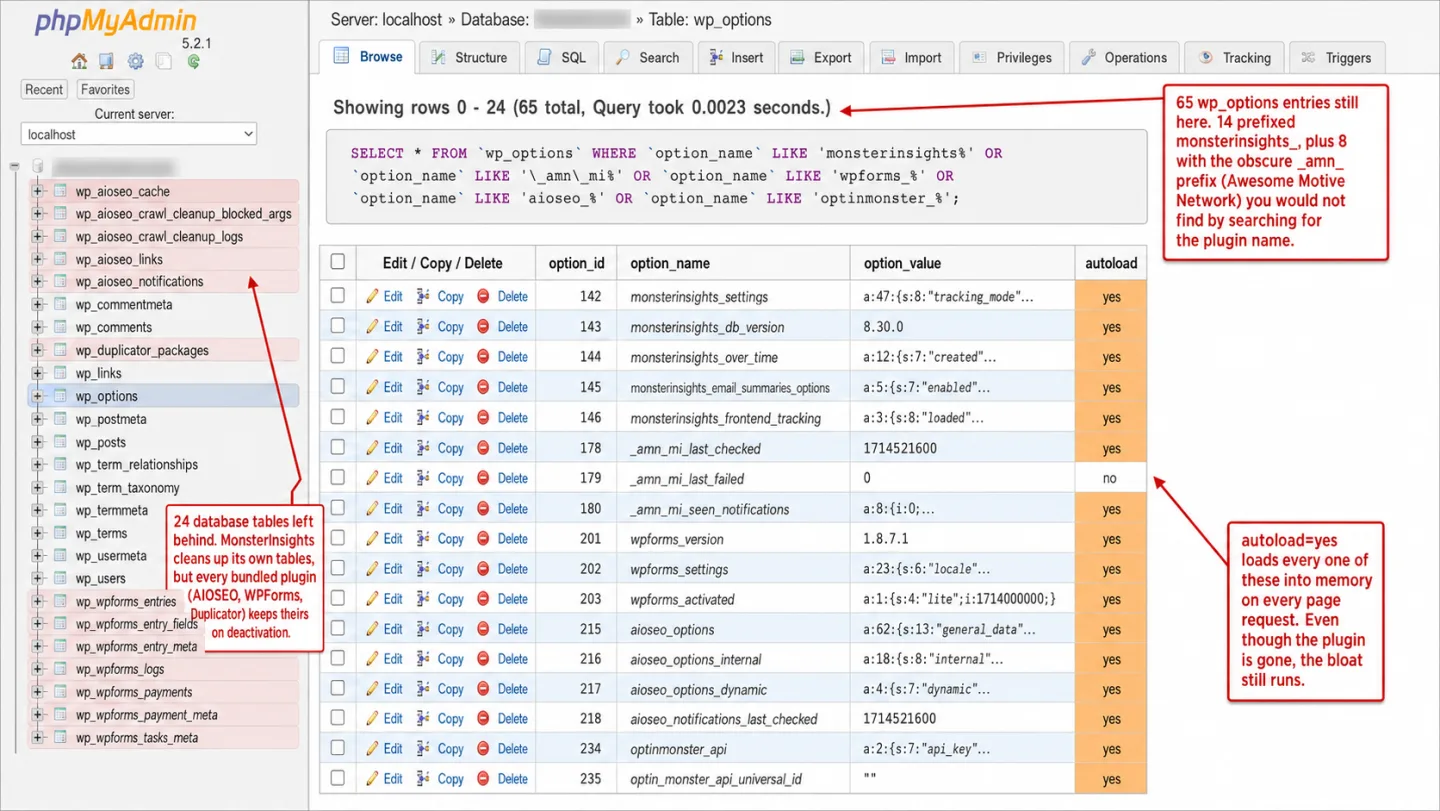
Decide to leave a plugin-based analytics setup and you find out the door is harder to walk through than the entrance.
MonsterInsights on its own leaves 14 entries in wp_options after you uninstall it. In plain English: deleted is not gone, some prefixed _amn_ for Awesome Motive Network, which you would never spot by searching for "monsterinsights." Its own uninstall docs say nothing about cleaning the database. A GitHub Gist by Luke Cavanagh spells out 14 separate WP-CLI commands to scrub it by hand.
The bundled plugins are worse. WPForms creates 9 custom database tables. AIOSEO creates 5 or more. That means five plugins each leaving their own mess, and people report its uninstall toggle doesn't reliably remove all of them. Duplicator adds its own table on top. Add it up and the MonsterInsights ecosystem leaves roughly 24 database tables and 65 or more wp_options entries behind. Translation: you uninstall one plugin and clean up after five.
The mess at the exit is the bundleware pattern showing its hand. You installed one thing. Now you have to uninstall five things and mop up after every one of them. A script tag adds nothing to your database. To remove it you delete one line. There's nothing to clean up because there was never anything left behind.
The script tag alternative
The analytics tools growing fastest in 2026 aren't WordPress plugins at all. They're standalone services that run off a single <script> tag in your site's HTML.
Here's the whole thing:
<script defer src="https://clickport.io/tracker.js"
  data-domain="yourdomain.com"></script>
One line. No plugin. No setup wizard. No OAuth handshake with Google. No companion plugins. No database tables. No PHP memory overhead. Paste it into your theme header, or drop it in with the free WPCode plugin if you'd rather not touch theme files. Your data shows up in real time within seconds.
It works because the heavy lifting happens somewhere else. The analytics run on an external server, not on your WordPress install. Your server's only job is to render HTML and send it to the visitor. The visitor's browser loads the tracking script once the page is already on screen, and the script ships pageview and engagement data off to the analytics provider. Your site does no extra work.
None of this is new. Google Analytics itself runs off a script tag. The catch is that GA4's tag weighs 134 KB, sets cookies, and drags a consent banner in the EU along with it. That means weight you didn't ask for. Cookieless analytics tools use a script that weighs 1-5 KB, sets no cookies, and asks for no banner. So you see visitor data from everyone your consent banner used to turn away, not just the few who click Accept.
A script tag also goes anywhere. WordPress, Shopify, Webflow, Next.js, Hugo, plain static HTML. Move off WordPress one day and your analytics move with you. You've nothing to export. Nothing to export, nothing to set up again. The script tag doesn't care what builds your HTML.
If you want the byte-by-byte numbers on every major WordPress analytics tool (tracker payload, plugin code weight, database writes per pageview), I measured them all in Lightweight WordPress Analytics: I Measured Them All.
Plugin analytics vs. script tag: the full comparison
| Plugin (e.g. MonsterInsights) | Script tag (e.g. Clickport) | |
|---|---|---|
| Setup time | 5-step wizard, OAuth, companion plugins | Copy one line, paste, done |
| Plugins installed | 1-5 (varies by wizard choices) | 0 |
| PHP memory overhead | 96 KB - 1.2 MB per request | 0 |
| Frontend script size | 134 KB (GA4 gtag.js) | Under 2 KB |
| Database tables created | 0-24 (depends on bundle) | 0 |
| Security vulnerabilities | 10-76 documented (per bundle) | 0 server-side attack surface |
| Cookies / consent banner | Required (GA4 sets _ga cookies) | None needed (cookieless) |
| EU visitors tracked | ~40% (after consent rejection) | No consent gap |
| Real-time data | GA4 reports: 24-48h delay (real-time view exists but MI Free paywalls it) | Yes (30-second refresh) |
| Works outside WordPress | No | Any platform with HTML |
| Removal effort | 15-60 minutes + DB cleanup | Delete one line (30 seconds) |
| Annual cost | $0 (limited) to $399+/yr | From €9/mo, all features |
The comparison isn't close, and I've run it both ways. Plugin-based analytics made sense back in 2012, when WordPress had no clean way to put code in the header and Google Analytics was the only game in town. In 2026 it's the reverse. Pasting a script tag into your header is less work than clicking through a setup wizard, and the tool on the far end of that tag can track scroll depth, outbound clicks, form submissions, copy events, and 404 errors on its own.
Maybe you still want Google Analytics itself. You don't need a plugin for that either. Paste the GA4 snippet in with WPCode and you get the same data with none of the PHP overhead, none of the companion plugins, none of the upsell screens. The only thing you give up is the widget inside your dashboard. The thing you get back is a second of load time.
The best WordPress analytics in 2026
Here is the part where I tell you what I built. Clickport is a script tag analytics tool. It tracks pageviews, sessions, sources, countries, devices, and engagement on its own. The tracking script is under 2 KB gzipped. No WordPress plugin. No cookies. No consent banner.
Scroll depth, outbound link clicks, file downloads, form submissions, internal search terms, 404 errors, and copy detection are all tracked on every plan. Goal tracking with revenue attribution comes with it. Real-time data refreshes every 30 seconds. PDF reports and CSV exports are built in. You can drill into a single session, annotate your timeline, and filter across every dimension.
Setup is one script tag and your data shows up within seconds. It runs on WordPress, Shopify, Next.js, and anything else that serves HTML. Switch platforms and nothing changes.
Pricing starts at €9 per month for 10,000 pageviews. In plain English: every feature is on every plan. There's no "Pro" tier hiding scroll tracking behind a paywall. There's no nag screen on every admin page. There are no companion plugins riding along.
And if you're mid-cleanup on a plugin bundle and something looks off, email me what you're seeing.
Start your free 30-day trial. No credit card required. No plugin required. No surprises.
FAQ
What is the best analytics plugin for WordPress?
The best WordPress analytics in 2026 isn't a plugin. A lightweight script tag gives you the same data with zero PHP overhead, no database tables, no security vulnerabilities, and no plugin conflicts. If you really do need a WordPress plugin, paste the GA4 code snippet in with WPCode (free) instead of installing a whole analytics suite.
Does MonsterInsights install other plugins?
Yes. The MonsterInsights setup wizard offers to install four companion plugins, with the toggles pre-checked: OptinMonster, WPForms Lite, All in One SEO, and UserFeedback Lite. All four belong to Awesome Motive, the same parent company. On multisite, Duplicator has been reported to auto-activate across the whole network too.
How many security vulnerabilities do WordPress analytics plugins have?
MonsterInsights on its own has 10 documented vulnerabilities. Add the four plugins its wizard installs and the total reaches 76. The nastiest are a CVSS 9.9 privilege escalation in AIOSEO and a CVSS 9.0 remote code execution in Duplicator that was attacked in the wild.
Can I use Google Analytics without a plugin?
Yes. Copy the GA4 snippet from your Google Analytics property and paste it into your theme's header with WPCode or a child theme's functions.php. Same data, no PHP overhead, no companion plugins. The only thing that changes is you check analytics.google.com instead of your WordPress dashboard.
What is the lightest WordPress analytics option?
Script-tag analytics win on weight. Clickport's tracker is under 2 KB gzipped. Plausible is around 1.3 KB. Fathom is around 2.0 KB. Every one of them is 65 to 100 times smaller than GA4's 134 KB payload, and none of them adds any server-side overhead to WordPress. (For non-WordPress setups and a wider field, see my comparison of 15+ Google Analytics alternatives.)
Do I need a cookie consent banner with WordPress analytics?
If your analytics tool sets cookies, and GA4 does, you need a consent banner in the EU. Cookieless tools like Clickport set no cookies, so they need no banner. That cuts 50-200 KB of consent JavaScript and lets you count the visitors your banner used to hide, instead of just the 40% who click Accept.
Is WPBeginner's MonsterInsights recommendation trustworthy?
WPBeginner is owned by Awesome Motive, which also owns MonsterInsights. The site discloses an "affiliate" relationship but never states the outright ownership plainly. In nearly every product category where Awesome Motive sells a plugin, WPBeginner happens to rank that plugin number one.
How do I completely remove MonsterInsights?
Deactivate and delete MonsterInsights and any companion plugins it brought along. Then clean 14 wp_options entries by hand with WP-CLI or phpMyAdmin (search for "monsterinsights%" and "_amn_mi%"). If the bundled plugins were active, drop their tables too: 9 from WPForms, 5+ from AIOSEO, and 1 from Duplicator. There's a detailed cleanup guide from WP Bullet.

Comments
Loading comments...
Leave a comment