How to A/B Test Your Website Without Paying for Tools
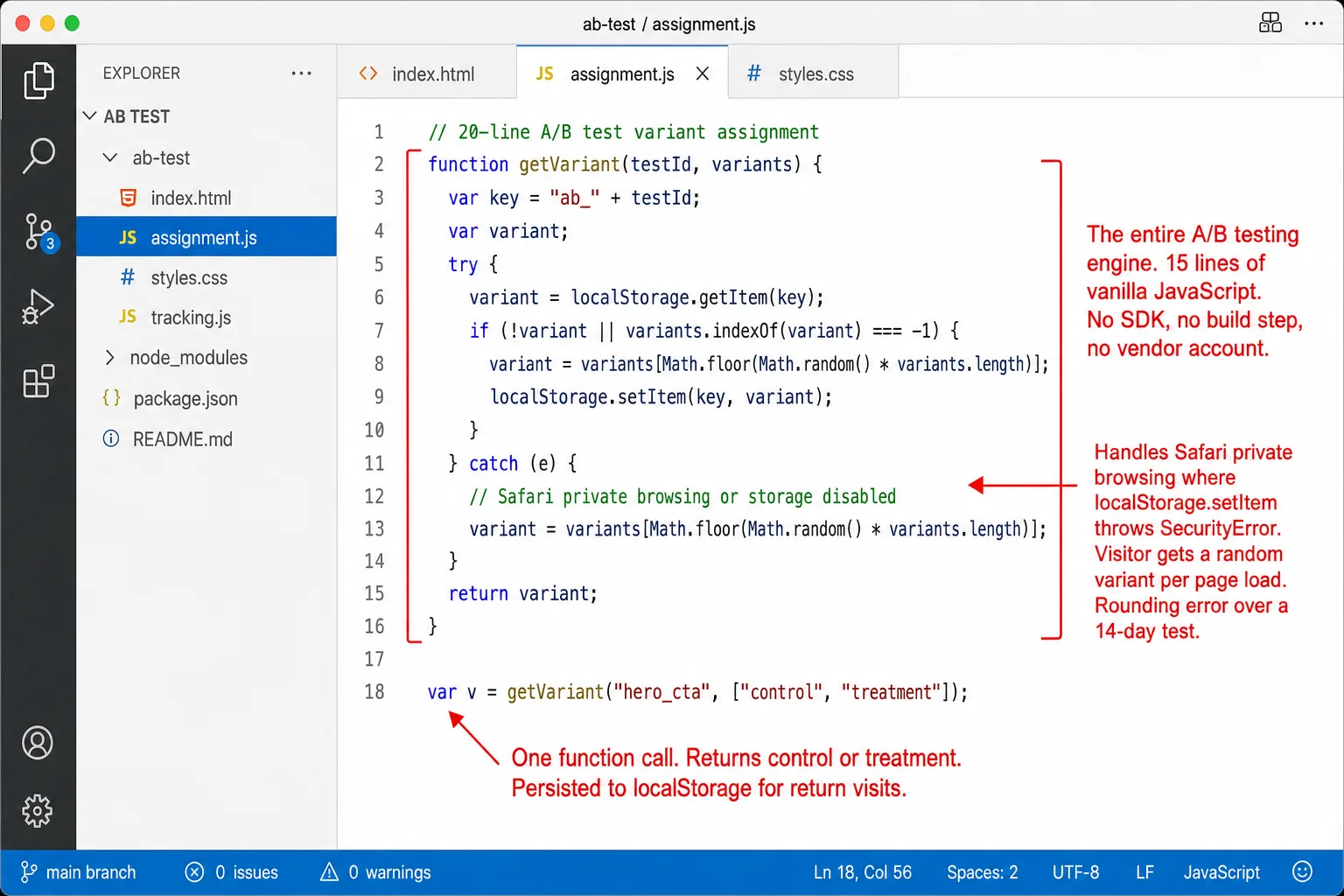
A working A/B test is 20 lines of JavaScript. I spent two weeks evaluating VWO, Optimizely, and Convert before I admitted that to myself. Google Optimize is gone. The cheapest dedicated replacement costs $299/month. So what are you paying for? A visual editor and a billing page. The test itself is random assignment, variant display, and conversion measurement. You already have two of those three.
Disclosure up front: I run Clickport, the kind of analytics tool this guide plugs into for the measuring half. I'm selling that half of the medicine. The JavaScript half is yours free either way.
- Google Optimize shut down in September 2023. It dominated the free A/B testing market. The cheapest dedicated replacement (Convert) costs $299/month. GrowthBook and Statsig offer free tiers but require technical setup.
- A working A/B test needs three things: random assignment, variant display, and conversion measurement. The first two take 20 lines of JavaScript. The third is a custom event in your analytics tool.
- At 95% confidence and 80% power, a site with a 3% conversion rate needs ~28,000 visitors to detect a 20% improvement. At 500 daily visitors, that takes 56 days. Low-traffic sites should test bold changes, not button colors.
- Evan Miller's research shows that checking A/B test results early inflates false positives from 5% to 26%. Pre-calculate your sample size. Don't look until you hit it.
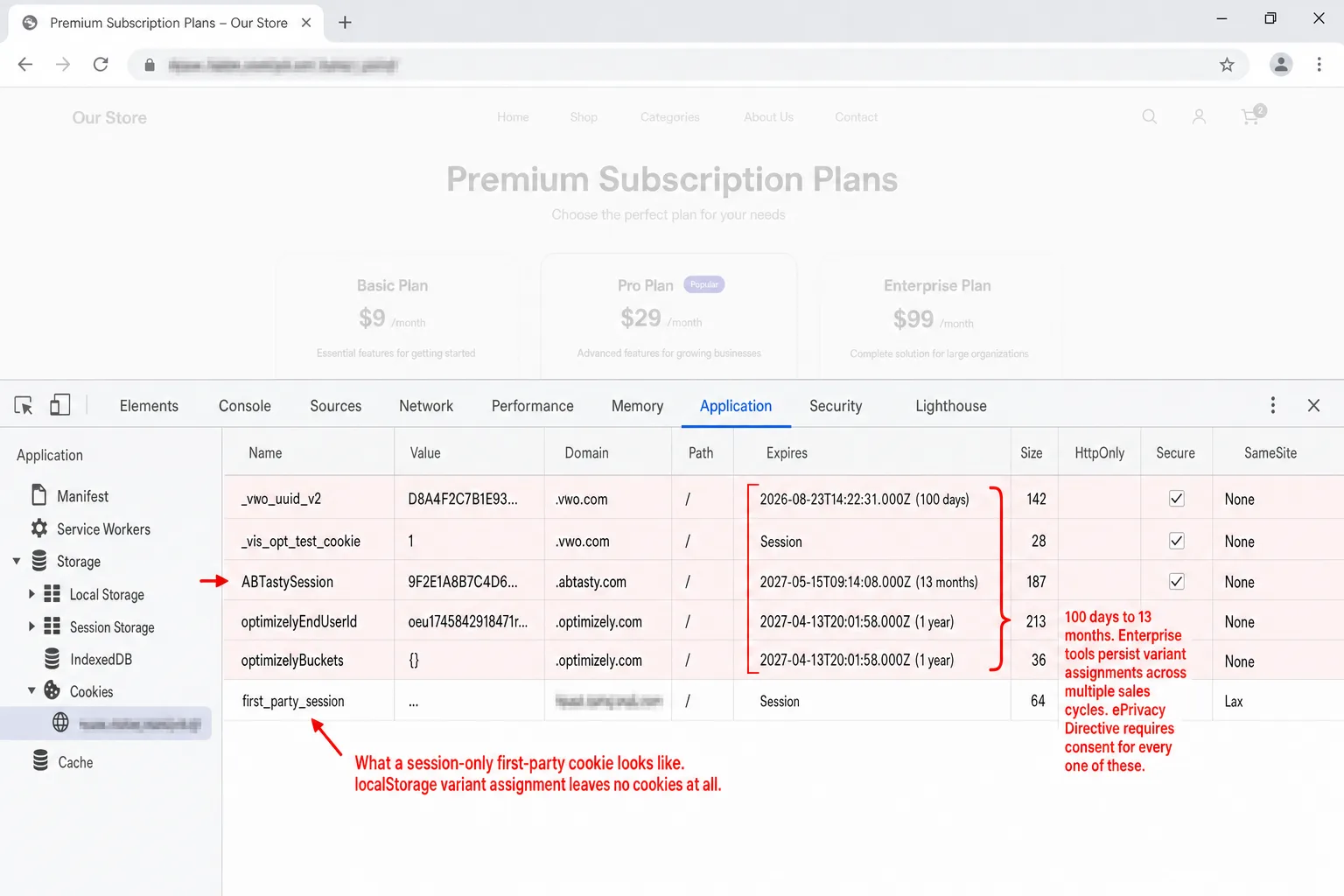
- Enterprise A/B testing tools set cookies with 100-day to 13-month lifetimes and transmit data to vendor servers. Under the ePrivacy Directive, this requires consent. A client-side localStorage approach with no vendor keeps the privacy footprint minimal.
What Google Optimize left behind
Google Optimize shut down on September 30, 2023. It was the free tool everyone reached for. Over 500,000 websites were running it the day it closed. In plain English: half a million sites lost their testing tool overnight. Then Google pointed those people at Optimizely, VWO, and AB Tasty.
Not one of them is free. I checked. Here's what they cost.
That jump from a few hundred dollars to tens of thousands isn't an accident. It's the business model. One Hacker News commenter described the jump after Optimizely's acquisition: "We were a monthly customer... for a few hundred dollars a month. Then they went to the annual cost of $30K+ upfront and ended all monthly options." In plain English: the free tier died and the ladder got pulled up.
Free tiers do exist. GrowthBook is open source and genuinely free to self-host. Statsig gives you 2 million events a month for free. PostHog includes A/B testing in its free tier up to 1 million events. All three share the same catch. You wire in an SDK, you set up the technical side, and you put a data warehouse or event pipeline behind it before you get anything useful out. (Since August 2026, Clickport has experiments built in, measured on your existing goals, if you'd rather skip the JavaScript below.)
There's a simpler path. Say you want to know whether "Start your free trial" converts better than "Get started." You don't need any of those tools. You need 20 lines of JavaScript and an analytics tool that tracks custom events.
What an A/B test actually is
Strip the jargon away and an A/B test is three things.
If your analytics tool tracks custom events, step 3 is already done. Steps 1 and 2 are vanilla JavaScript. And the payoff can be huge. The Obama 2008 campaign tested 24 combinations of buttons and images on their splash page. The winning version lifted signups by 40.6%. That one change is estimated to have brought in $60 million in extra donations. Which means 1 test out-earned the whole design budget. So A/B testing works. The only real question is whether it should cost you $300/month.
The 20-line JavaScript split
Here's a complete variant assignment function you can ship as is. It stores the choice in localStorage so each visitor keeps seeing the same version on every return.
function getVariant(testId, variants) {
  var key = 'ab_' + testId;
  var variant;
  try {
    variant = localStorage.getItem(key);
    if (!variant || variants.indexOf(variant) === -1) {
      variant = variants[Math.floor(Math.random() * variants.length)];
      localStorage.setItem(key, variant);
    }
  } catch (e) {
    // Safari private browsing or storage disabled
    variant = variants[Math.floor(Math.random() * variants.length)];
  }
  return variant;
}
That's the whole assignment engine. The try/catch handles Safari private browsing, where localStorage.setItem() throws a SecurityError. When that happens, the visitor gets a fresh random assignment on every page load. Over a 1-2 week test, that's a rounding error.
Preventing the flash of original content
The biggest trap in client-side A/B testing is the flash. The visitor sees the original version for a split second, then JavaScript swaps it. It looks broken. The fix is a small inline script in the <head> that runs before the browser paints anything.
<head>
  <script>
    (function() {
      try {
        var v = localStorage.getItem('ab_hero_cta');
        if (!v) {
          v = Math.random() < 0.5 ? 'control' : 'treatment';
          localStorage.setItem('ab_hero_cta', v);
        }
        document.documentElement.setAttribute('data-ab-hero', v);
      } catch(e) {
        document.documentElement.setAttribute('data-ab-hero', 'control');
      }
    })();
  </script>
</head>
Then style each variant with plain CSS attribute selectors. You never touch the DOM.
[data-ab-hero="control"] .hero-title { }
[data-ab-hero="treatment"] .hero-title { color: #2cc96b; }

[data-ab-hero="control"] .cta-button::after { content: "Get started"; }
[data-ab-hero="treatment"] .cta-button::after { content: "Start your free trial"; }
The variant is baked into a data-* attribute on <html> before the browser renders anything. It doesn't flash and it doesn't thrash.
QA override
Add a URL parameter override so you can preview each variant without clearing localStorage every time.
// Add to the getVariant function
var params = new URLSearchParams(location.search);
var forced = params.get('ab_' + testId);
if (forced && variants.indexOf(forced) !== -1) return forced;
Now ?ab_hero_cta=treatment forces the treatment variant. Send that URL to your team so they can check each version before you go live.
Tracking variants with custom events
Assignment and display are done. The last piece is measurement. Fire a custom event on page load to record which variant the visitor saw. Fire another one when they convert.
var variant = getVariant('hero_cta', ['control', 'treatment']);

// Record exposure
clickport.track('AB Test', {
  test: 'hero_cta',
  variant: variant
});

// Record conversion (on the success action)
document.querySelector('.cta-button').addEventListener('click', function() {
  clickport.track('Signup', {
    test: 'hero_cta',
    variant: variant
  });
});
The custom events API takes up to 30 properties per event, each one a key-value pair. Use a single event name (AB Test) with a variant property. Don't make a separate event name for every variant. The dashboard's property breakdown then splits the counts by variant on its own.
To track revenue, add a third parameter.
clickport.track('Purchase', {
  test: 'hero_cta',
  variant: variant
}, { amount: 49.99, currency: 'USD' });
Then create a Goal that matches the conversion event name. The Goals panel gives you conversion counts and rates. Compare those across your variants and you have your winner.
variant property to see this breakdown.The whole thing, from assignment to conversion tracking, is under 30 lines of JavaScript. No SDK. No build step. No vendor account.
How many visitors you actually need
This is where most A/B testing guides go fuzzy. They say "statistical significance" and move on. Here's the math instead.
A sample size calculation needs three inputs.
- Baseline conversion rate: the rate you've right now (say, 3%)
- Minimum detectable effect (MDE): the smallest win worth catching (say, 20% relative, which takes you from 3% to 3.6%)
- Significance level: how sure you want to be that the result is real and not noise (the standard is 95%)
The formula, assuming 80% statistical power, is this.
n ≈ 7.849 × (p₁(1-p₁) + p₂(1-p₂)) / (p₂ - p₁)²
Here p₁ is your baseline rate and p₂ is the improved rate. The constant 7.849 is just (1.96 + 0.8416)² worked out. In plain English: those 2 numbers carry the 95% significance and the 80% power.
You don't need to remember any of this. Use the calculator below. Or use Evan Miller's calculator, which is the industry standard.
The uncomfortable truth about low traffic
Drag the sliders around. A site with 100 daily visitors and a 2% conversion rate needs over 190 days to catch a 20% improvement. In plain English: 6 months of waiting on a single test.
Big sites get around this with sheer volume. Booking.com runs over 25,000 experiments a year on the back of billions of pageviews, and even then only 10% of those experiments come back a winner. That means 9 in 10 lose, even at that scale. At Microsoft the split is one-third of experiments produce positive results, one-third land flat, and one-third come back worse. Most tests don't win, even for the people with the most traffic on earth.
So here's the hard part for the rest of us. If fewer than 5,000 people a week reach the page you want to test, classic A/B testing won't give you a trustworthy answer in any reasonable time. That isn't a reason to stop improving your site. It's a reason to change how you test.
- Test bold changes, not button colors. A wholly different headline moves the needle far more than a new shade of green. The bigger the effect, the fewer visitors you need to see it.
- Set your MDE to 50% or higher. Go hunting for big wins, not 5% nudges.
- Talk to people, not just numbers. Five user interviews tell you more about why visitors leave than a six-month split test on button text ever will.
When to stop (and why you should not peek)
Evan Miller's 2010 article "How Not to Run an A/B Test" is, I think, the single best thing ever written on A/B testing for people who aren't statisticians.
His finding is brutal and simple. If you keep checking your results and stop the moment they look significant, your real false positive rate isn't the 5% you think it is. It's 26%. In plain English: 1 bogus winner in 4.
The reason is that significance jumps around when the sample is still small. Early on, random noise throws up differences that look real and then vanish as more data comes in. Look 10 times and stop the first time you see p < 0.05, and you've handed yourself 10 separate chances to be fooled.
Three rules keep you honest.
1. Work out your sample size before you start. Use the calculator above. Write the number down. That number is your finish line.
2. Run for at least two full weeks. Even if you hit your sample size on day 5. Monday visitors aren't Sunday visitors. You want at least one full weekly cycle, ideally two, so day-of-week swings even out.
3. Don't look until both conditions are met. Sample size reached, and minimum duration passed. This is the hardest rule to keep. It's also the one that matters most.
Is your result real?
Your test ran two weeks. You hit your sample size. One question is left. Is the gap between your variants real, or is it noise?
The math behind the answer is a two-proportion z-test. In plain words, you take the conversion rate of each variant, weigh it against how many visitors it had, and work out the odds that a gap this big showed up purely by chance.
If the confidence comes back under 95%, you've two choices. Keep the test running and let more data settle it. Or accept that the gap is too small to catch at your traffic, and go test something bolder.
Convert's platform data shows that 60% of finished A/B tests deliver under 20% lift. Put another way: 6 tests in 10 barely move anything. At companies like Booking.com only about 10% of experiments win at all. Most tests don't find a winner. That's normal, not failure. The whole point is to stop yourself shipping a change that looks better but is really just noise.
The privacy question nobody asks
Nearly every "how to A/B test" guide skips privacy. Here's why it shouldn't.
Enterprise A/B testing tools set cookies. VWO stores variant assignments in a cookie with a 100-day lifetime. AB Tasty sets one with a 13-month lifetime. Optimizely spreads multiple cookies and localStorage entries across the browser. And all three send the variant data back to their own servers. Which means your test lives on 3 vendors' clocks, not yours.
The ePrivacy Directive, Article 5(3), says you need consent to store information on someone's device. The CJEU nailed this down in the Planet49 ruling (2019): consent must meet full GDPR standards, even for non-personal data. The EDPB's Guidelines 2/2023 go further and stay technology-agnostic, reaching past cookies to any storage or access on a user's device. So localStorage is in scope too.
There's one notable exception. CNIL's guidance exempts A/B testing from consent if it stays first-party, is limited to audience measurement, and users are told about it and given a way to opt out. France is the most permissive EU jurisdiction on this right now.
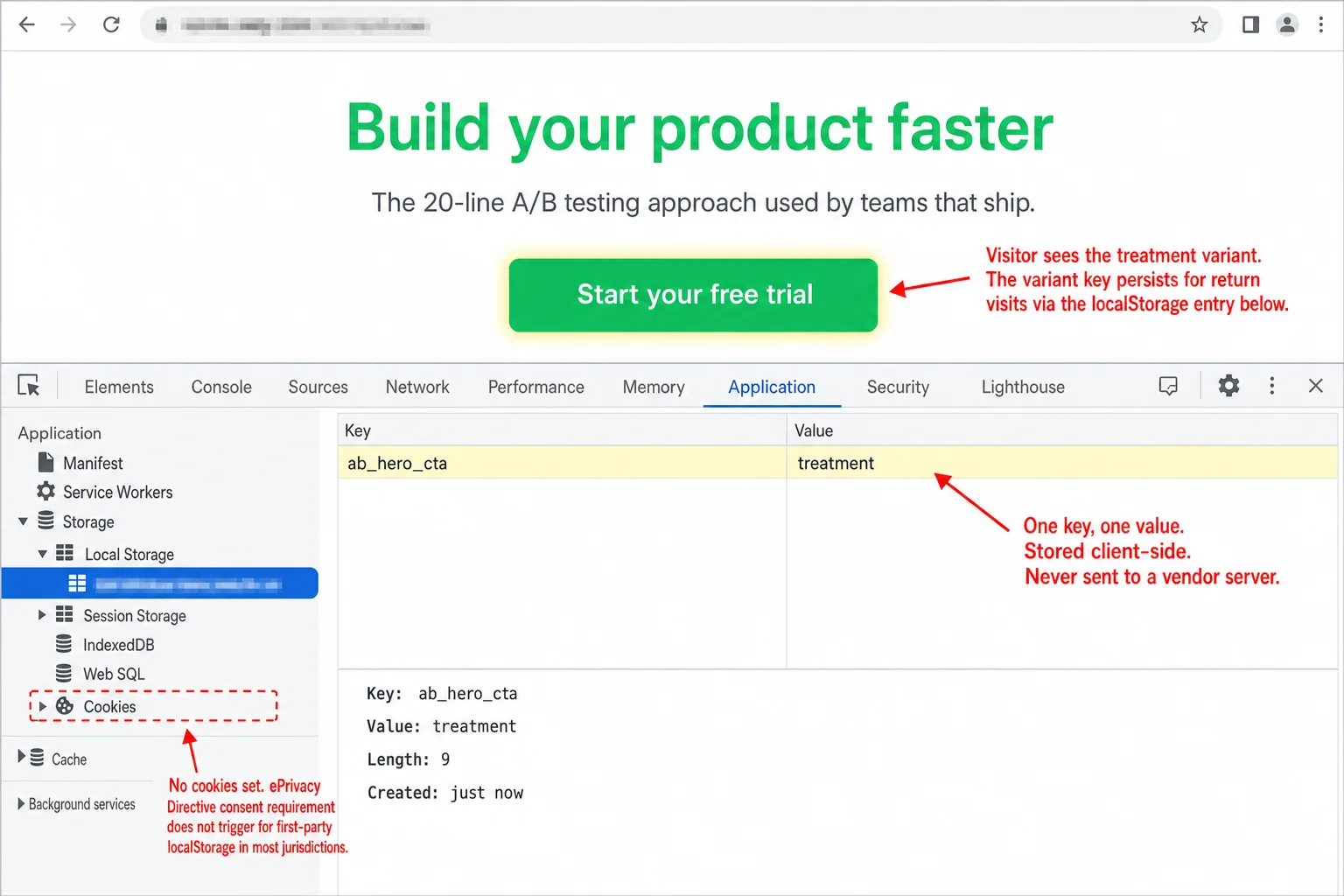
The DIY approach in this guide leans on localStorage, and that keeps the privacy footprint tiny. The variant string ("control" or "treatment") sits on the visitor's own device. It's never sent to a third-party vendor. It holds no personal data. Pair it with a cookieless analytics tool that sets no cookies and needs no consent, and the whole A/B testing stack runs without ever triggering a cookie banner.
Google has its own SEO rules for A/B testing on top of all this. Use 302 redirects, not 301, for URL-based tests. Set rel="canonical" on variant URLs. And never show Googlebot a different version than the one your visitors see. Leave a test running far too long and you risk a manual action.
What paid tools give you (that this approach doesn't)
I'm not going to pretend the DIY approach does everything. It covers simple split tests: two versions of a headline, a CTA button, or a page layout. For most websites running one or two tests at a time, that's plenty. Paid tools start to earn their price when you need:
- A visual editor so people who don't write code can build variants themselves
- Multivariate testing with more than two variants across several elements at once
- Automatic traffic allocation that quietly shifts visitors toward the winner in real time
- Sequential testing methods that are mathematically safe to peek at, so the peeking trap above doesn't apply
- Team collaboration with approval steps and a shared history of every experiment
If you've 100,000+ monthly visitors, a CRO team, and several experiments running side by side, a paid tool pays for itself. I'd pick GrowthBook at that scale: open source, self-hostable, warehouse-native, and free with no traffic limits. For everyone else, JavaScript and custom events get you 80% of the value at 0% of the cost.
Frequently asked questions
How much traffic do I need to A/B test? It comes down to your conversion rate and how big a change you want to catch. A site at a 3% conversion rate needs roughly 28,000 visitors to spot a 20% relative improvement at 95% confidence. That means about 2 months at 500 visitors a day. Use the calculator above to get your own number.
Is A/B testing worth it for small websites? Only if you test bold changes. A site with 300 daily visitors can't reliably catch a 10% improvement. It can catch a 50% improvement in about 4 weeks. So test whole new headlines, offers, or page layouts, not button colors and font sizes.
Does A/B testing affect SEO?
Not if you do it right. Google's official guidance says to use 302 redirects for URL-based variants, set rel="canonical" on variant pages, and never serve Googlebot content that differs from what people see.
Do I need cookie consent for A/B testing? If you use a third-party tool that sets cookies and sends data to vendor servers, yes. If you use client-side localStorage with no vendor in the loop, the legal picture is murkier. CNIL exempts first-party A/B testing outright. Most other EU DPAs haven't ruled on it one way or the other.
How long should I run an A/B test? At least 7 days, which is one full business cycle, and ideally 14. Even if you hit your target sample size sooner, wait out the full run so day-of-week swings and the novelty effect have time to settle. I'd default to 14.
What is the difference between A/B testing and multivariate testing? A/B testing pits two versions of one element against each other (headline A vs. headline B). Multivariate testing changes several elements at once (headline × button color × image) and measures how the combinations perform. Multivariate testing needs far more traffic to do this.
Can I A/B test with Google Analytics? GA4 can count custom events per variant, but it has no way to assign or display a variant on its own. You'd still need the JavaScript split from this guide, plus GA4 custom dimensions to record which version each visitor saw. And the 24 to 48 hour data delay means you can't watch a test in real time.
The three-line summary
Assign randomly. Display consistently. Measure with custom events. Everything else is a billing page. Your analytics tool is already half the A/B testing stack. If it tracks custom events, you have the rest sitting in front of you.
Start your free 30-day trial. No credit card required.
And if your test math comes back murky, email me the numbers and I'll take a look.

Comments
Loading comments...
Leave a comment