AI Visibility Scores Won’t Answer These Six Questions
I called AI visibility scores the new vanity metrics, and I still think that’s what they are. A number going up in a prompt-testing dashboard doesn’t tell a shop owner whether anyone bought something, or an adviser whether anyone asked for a consultation.
The useful questions start with the business. Which pages are AI assistants requesting? What happens when someone arrives from an AI answer? Where do they stop before the action you want them to take? Those are questions we built Clickport to help answer.
Consider six businesses, each with a different decision to make. You don’t need to run all six reports. You need the one that helps with your next piece of work.
- A higher AI visibility score does not establish more customers or revenue. Start with the business decision you need to make.
- AI page requests show which content assistants fetch. AI-referred visits and configured goals show a separate part of the picture: what happens on your website.
- An online shop can examine attributed revenue; an adviser can examine enquiries; a SaaS business can examine signup drop-off. They need different reports.
- Record an action for what it is. A call-link click is not a completed call, and an AI page request is not a new customer.
Start with a question your business needs answered
A visibility score summarizes a set of answers collected by a monitoring tool. If your brand appears more often in that set, the score may improve. That still leaves a business owner asking what changed outside the test.
Checking an answer can tell you whether it contains a wrong price or an outdated description. That’s a specific thing you can investigate. Turning selected answers into a rising percentage doesn’t establish that more people discovered you, visited you or bought from you. I wouldn’t make that percentage the target for a small business’s marketing budget.
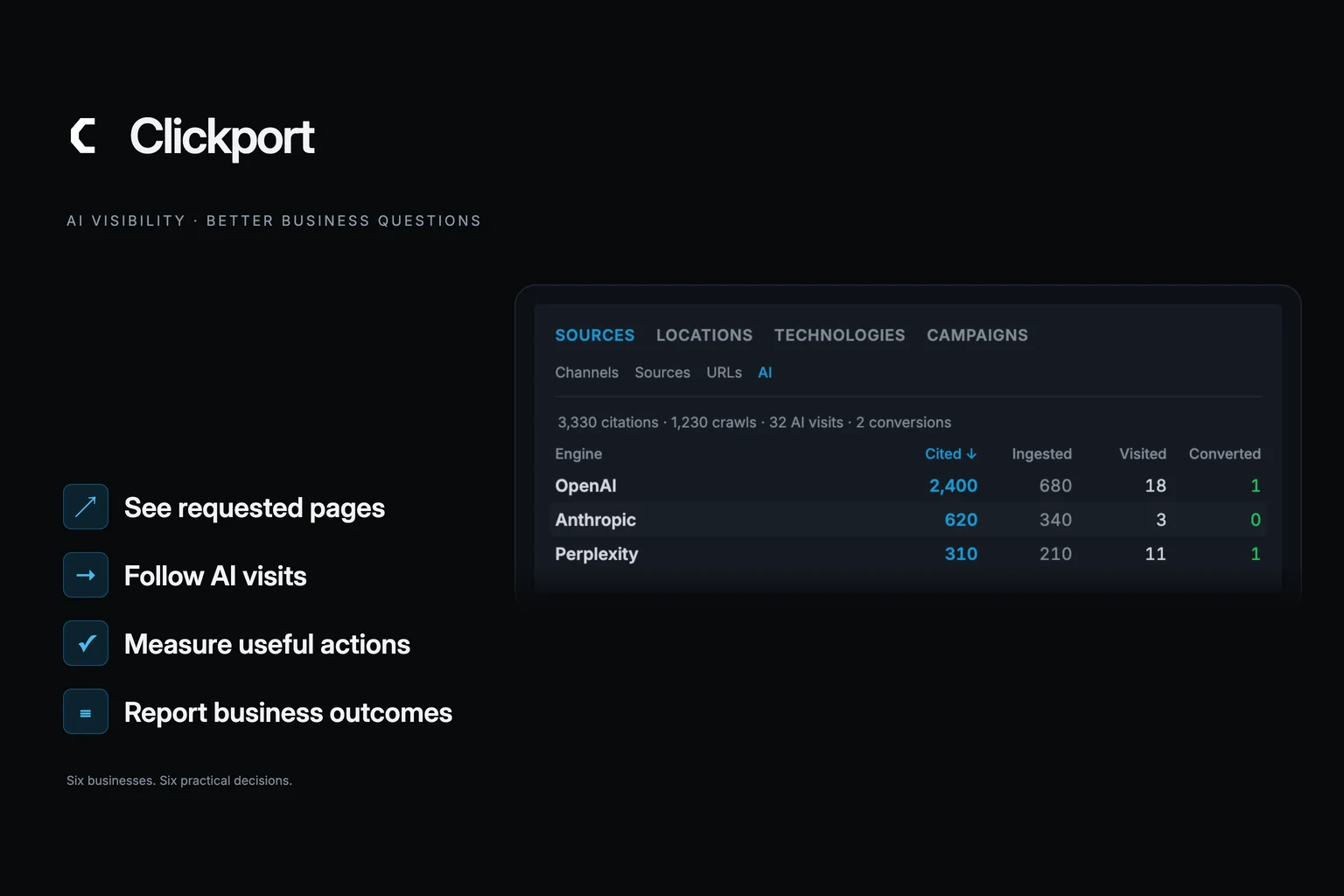
With Clickport, I’d start with observed activity. The AI tab shows requests made to your website by AI agents, including pages fetched during conversations. It also shows identifiable AI-referred visits and the visits that completed your configured goals. You can select an engine and see the pages it requested.
That gives you something concrete to inspect even when nobody clicks through. For example, an assistant may repeatedly request a guide that you haven’t updated in a year. The request is useful evidence about the page receiving attention. It doesn’t need a proprietary score attached to it.
The human side answers another question: what did visitors do after arriving? Here, you can use sources, pages, goals, revenue and funnels, just as you would for other traffic. Some AI visits arrive without an identifiable referrer, so attributed AI traffic won’t capture every visit AI influenced. And the request counts aren’t linked to individual people’s later purchases.
There’s a setup distinction too. The browser tracker measures website visits and actions. Recording AI requests needs a server-side connector. Paid revenue needs the corresponding payment tracking. I’d rather explain those requirements than show a score that seems to answer everything.
The adviser has another article to write
Fieldwork Advice has time to publish one useful guide this month. The adviser could write another general market update, expand an existing retirement article, or explain a question that keeps coming up in consultations.
A report saying “AI visibility rose” doesn’t help much with that choice. Opening the actual pages does.
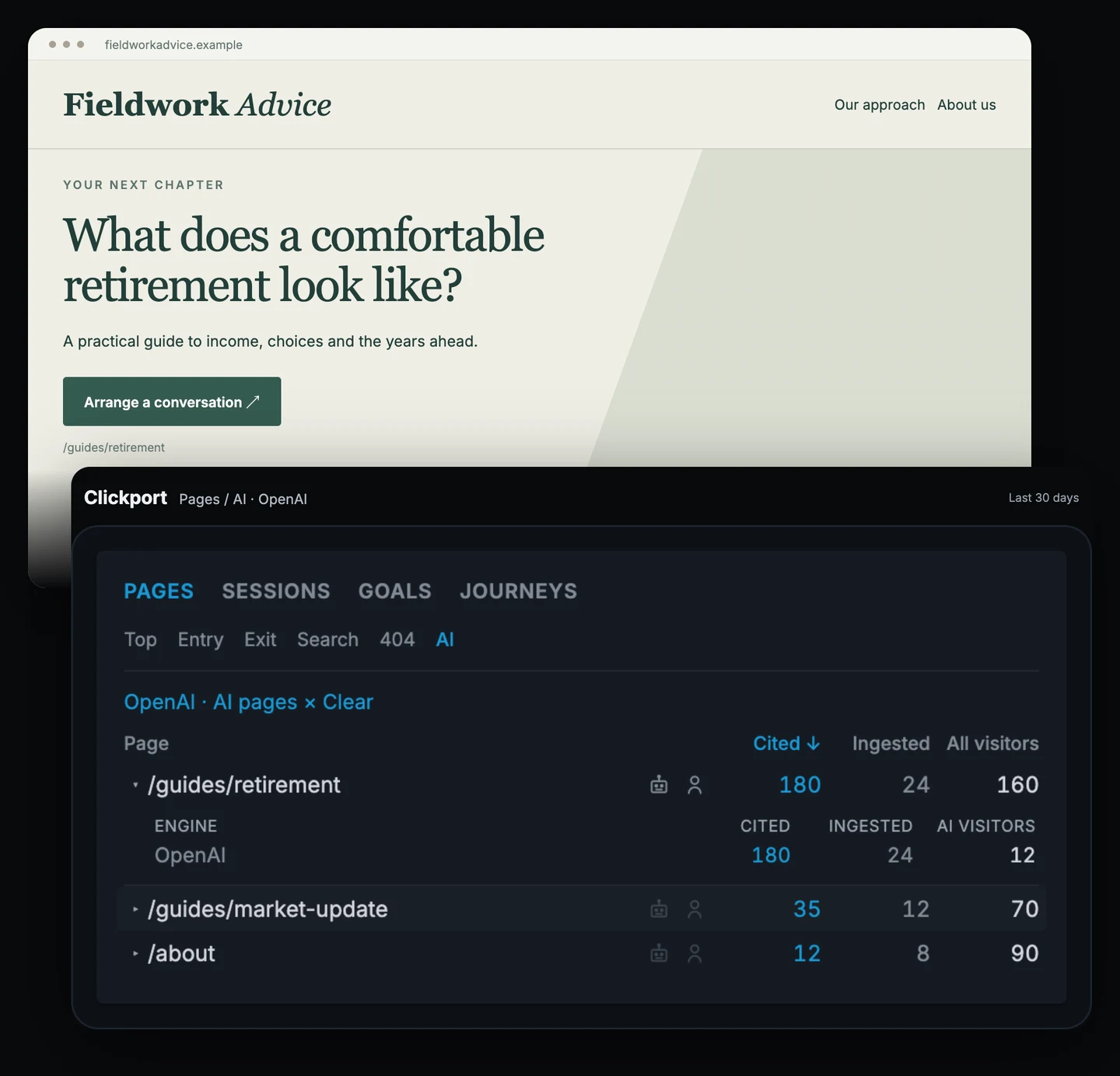
In this example, OpenAI has requested the retirement guide 180 times during the selected period. Twelve identifiable AI visitors landed on it. The more general market update received fewer requests.
I’d read the retirement guide before commissioning a new article. Is the explanation still current? Does it answer the obvious follow-up questions? Does it make clear who the advice is for and how to arrange a conversation?
Then I’d look at enquiries. A goal for a confirmed enquiry can show whether AI-referred visitors take that step. If the site sends people to an external calendar, a booking-link click is an earlier action, and should be named accordingly. You can track that handoff without pretending it proves a consultation happened.
This is where the two types of data become useful together. Request activity points the adviser towards a page worth reviewing. Human arrivals and enquiries help assess what happens on the website. Neither tells the adviser what every person asked in their private chat, and that isn’t necessary to inspect the guide and improve its next step.
I wouldn’t automatically turn 180 requests into an instruction to publish ten more retirement articles. I would use them as a reason to spend an hour on a page that assistants are already fetching. That’s a smaller, more defensible decision than buying another month of content to move a score.
Show the shop owner the orders
For an online shop, I’d open the revenue view first.
Suppose Northline Goods records €840 in revenue attributed to ChatGPT-referred visits over 30 days, alongside €210 from Perplexity. Those amounts don’t need to be impressive by anyone else’s standards. They need to be understandable in the context of the shop’s orders, margins and time.
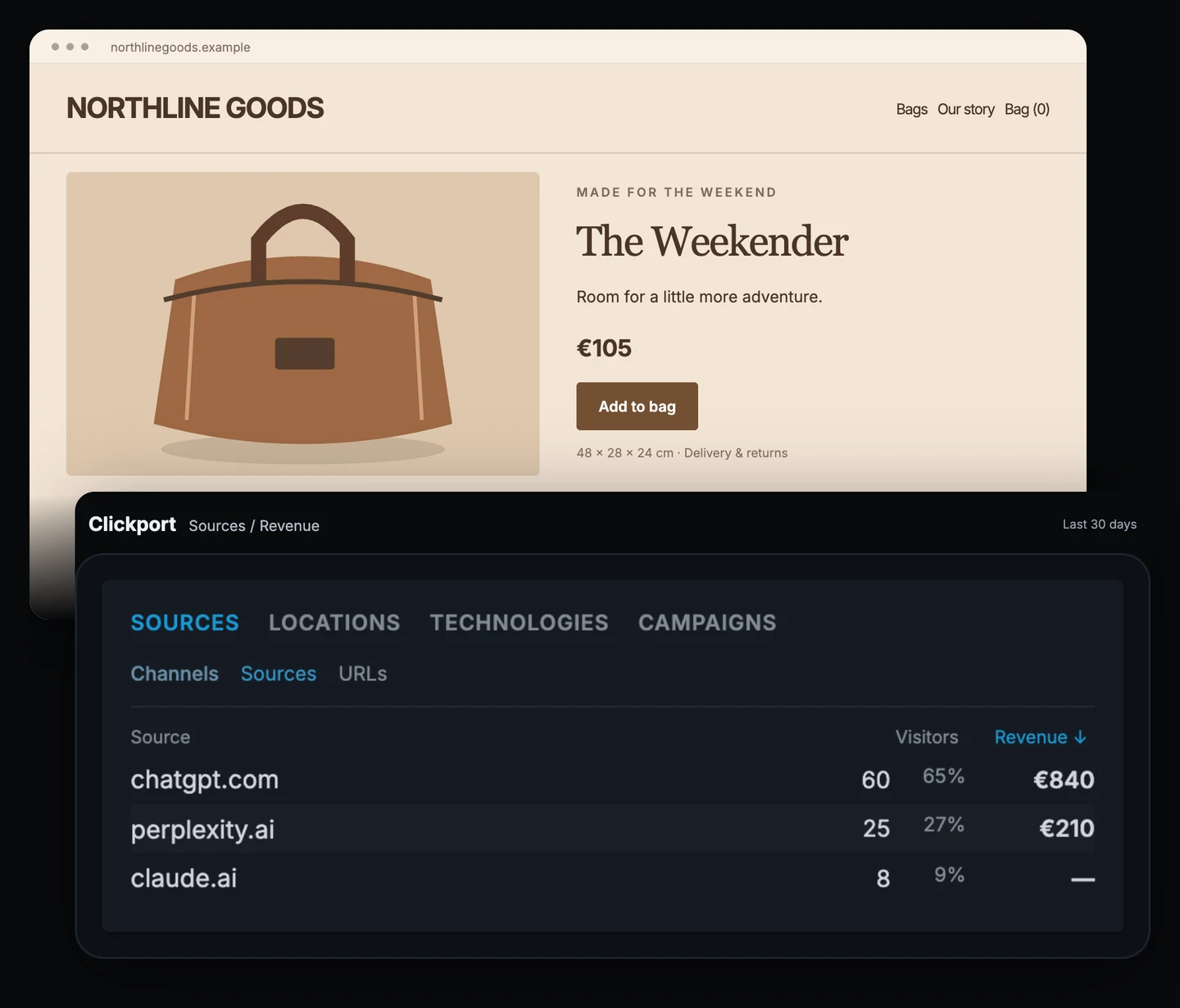
Now there are sensible questions to ask. Which pages did those visitors enter on? Were they looking at a product or a buying guide? Was the purchase information clear enough for someone arriving directly, without seeing the homepage first?
For Northline, the product page is a weekend bag. I’d inspect dimensions, delivery information, returns and the photographs showing what fits inside. If identifiable AI visitors are reaching that page and buying, I want the page to keep doing its job. If they reach it and stop, I want to understand that experience before spending money on more exposure.
Clickport’s source report can show attributed payment revenue when revenue tracking is connected and the payment can be associated with the originating session. A recorded payment without that association remains unattributed. It should not quietly become an AI sale because that would make a nicer report.
There’s also an important difference between money received and a fixed value attached to a goal. Calling every checkout-button click “€100 of revenue” won’t help the owner reconcile the dashboard with the business. Use actual payment events for the sales question.
A source with a small number of visits can deserve attention. It can also fluctuate sharply when a few orders account for most of its revenue. I’d review the underlying volume and more than one period before moving a substantial budget. A handful of good orders is a reason to look closer, not proof that every AI visitor is unusually valuable.
None of this requires the owner to know whether the shop appeared in 18% or 24% of a monitoring tool’s selected answers. It requires a useful connection between a visit and a recorded order.
A busy publisher dashboard can still mean few readers
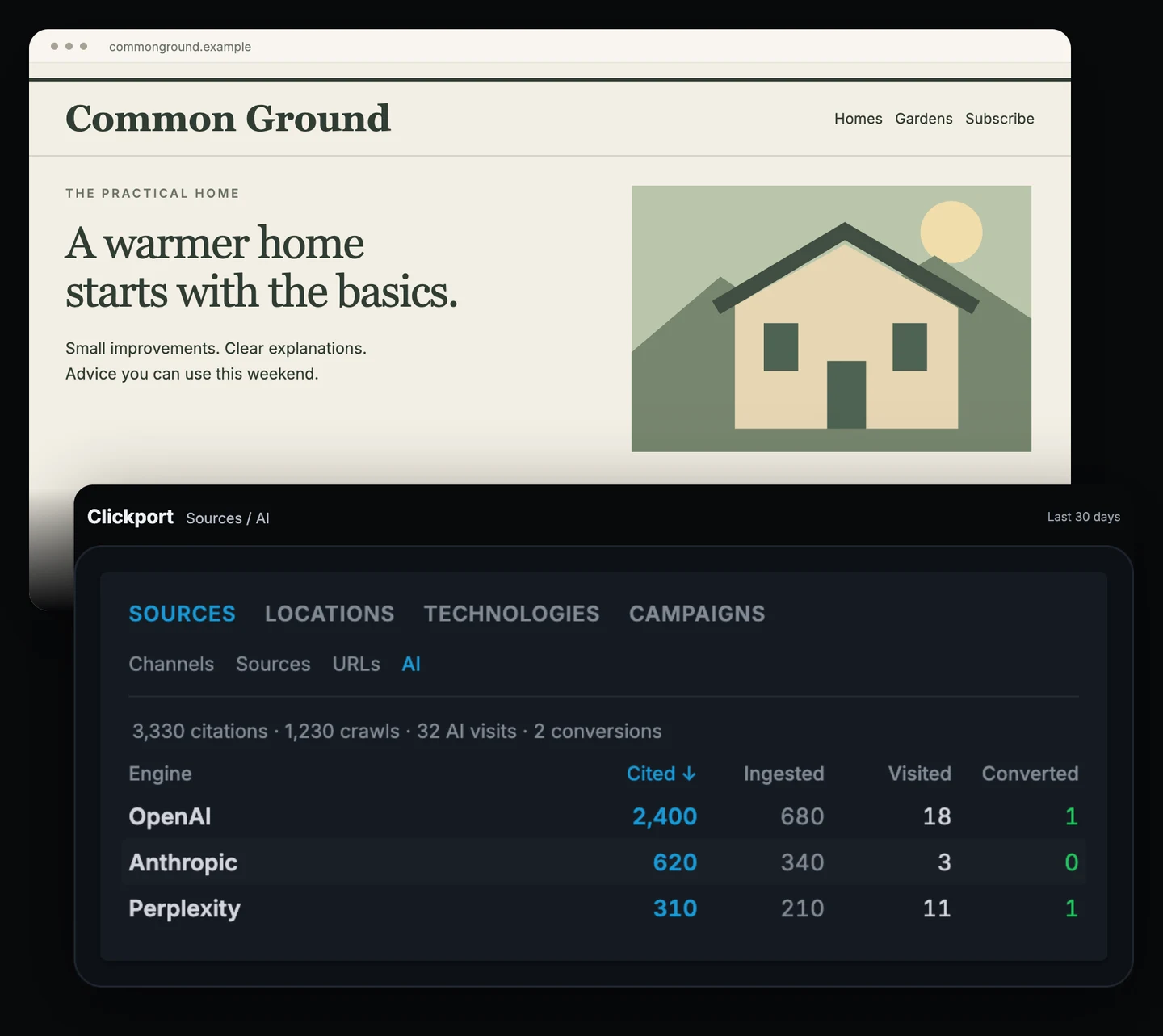
Common Ground publishes practical guides to looking after a home. Its articles are being requested by AI assistants, but the people arriving from those assistants are a much smaller part of its traffic.
Here the useful result may be disappointing. The report doesn’t turn heavy requesting into an audience success just because the first column is large. The publisher can see which engines request the site, which articles receive that activity, and how much identifiable referral traffic arrives.
This distinction exists beyond Clickport. Cloudflare’s crawl-to-referral reporting measures content requests separately from requests arriving with AI referral signals. Its methodology also explains that missing referrers can overstate the ratio. The two activities need to be examined with their definitions intact.
For Common Ground, I’d use the page view to identify the guides receiving attention. Then I’d inspect what those pages offer someone who does arrive. Is there a useful reason to read another article? Does the newsletter offer something specific? Is the advice current enough that I’m happy for people to encounter it through an assistant?
The publisher might decide to improve those pages. It might decide its limited acquisition budget belongs elsewhere because observed AI arrivals remain small. Either can be a reasonable next step. The dashboard supplies evidence for that discussion; it doesn’t promise that allowing more requests will produce more readers.
The question for the next editorial meeting is concrete: what is this activity contributing to the website’s own goals?
A visibility score can make the report look more cheerful. It can’t answer that question for the publisher.
The enquiry form is where the local business needs help
Consider a local electrician with a straightforward website: the areas served, the jobs offered, a telephone number and an enquiry form. The owner wants people with suitable jobs to get in touch.
I’d set up two plainly named actions: Call link clicked and Enquiry submitted. Then I’d examine those goals with the human AI Search source filter applied.
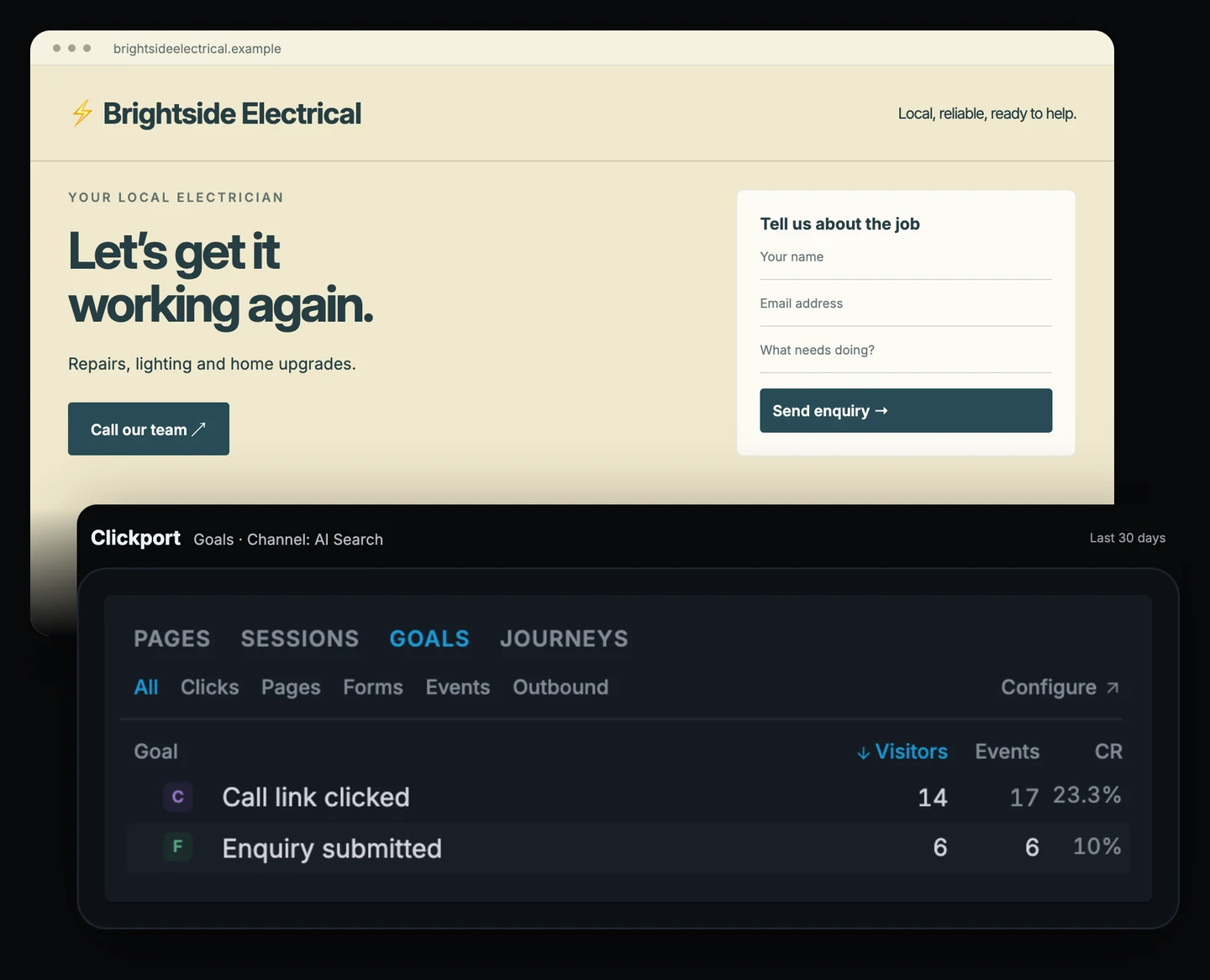
Suppose the period shows 14 visitors clicking the call link and six submitting an enquiry. Those groups can overlap. They aren’t necessarily 20 prospective customers, and none of the numbers tells us whether a job was suitable or won.
They do tell the owner something about what identifiable AI visitors do on the site. If visitors arrive but rarely take either step, the contact experience deserves a look. Can a phone user find the number? Is the service area obvious? Does the form ask for more information than someone can reasonably provide before a first conversation?
I’d test the form myself before ordering a fresh batch of “AI-optimized” service pages. A form that is hard to use is a concrete problem to fix. The owner can then watch the relevant actions over a comparable period, with enough traffic to make the comparison useful.
Set up the enquiry goal around the action you need: the native form submission, or a confirmed success event after the site accepts it. Keep booked-job and invoice reporting in the business systems that record those outcomes.
This business doesn’t need an elaborate report. It needs a dependable contact route and a way to see whether visitors use it.
They reached pricing. Why didn’t they sign up?
Relay, a SaaS business, has a different problem. People are finding the pricing page. Some start registering. Far fewer finish.
The team can keep asking whether assistants mention Relay. Or it can examine the part of the journey already happening on its website.
A saved funnel, filtered to AI Search, might show 80 visitors reaching pricing, 24 reaching registration and eight completing signup. The steps use defined goals, with a completion event fired after successful signup.
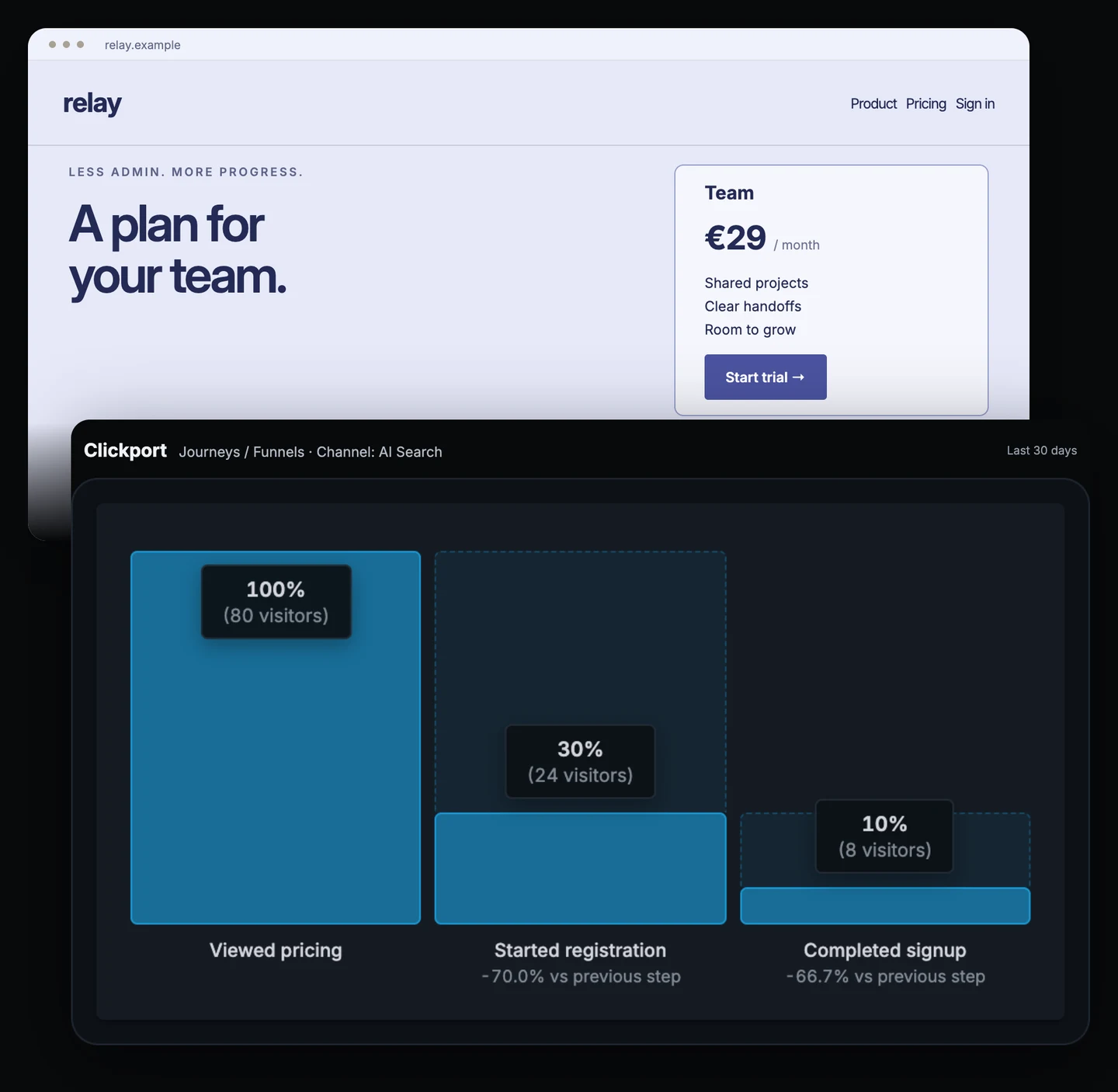
That gives the team two different places to investigate. Fifty-six of the visitors reaching pricing did not reach registration in this funnel. Of the 24 that reached registration, 16 did not complete signup.
The numbers don’t tell the team why. Pricing might be wrong for those visitors. The plans might be difficult to compare. Registration might ask for too much, or it might fail in a particular browser. Those are hypotheses to check, not explanations the funnel has proven.
I’d start by walking through the flow on a phone and a desktop. Does the promise on the pricing page match what registration asks for? Are the required fields clear? Does an error explain how to recover? The report has given that inspection a place to begin.
If the team changes registration, it can examine the same defined steps afterwards. It should also consider traffic mix and sample size before announcing an improvement. Eight completed signups don’t make a stable universal benchmark.
A visibility score could rise while this signup path remains exactly as awkward as before. More appearances in test answers won’t reveal a broken validation message. The useful measurement is close to the work the team can do today.
Give the agency’s client something to act on
The agency has to explain all this to someone else.
Imagine a client opening a monthly report that says their AI visibility improved. They still need to decide whether to renew the work, update a page, change an offer or invest in another channel. The report should help them make that decision.
For an agency such as Studio Ledger, I’d show the client’s observed engine activity and the pages behind it. Then I’d add the relevant on-site outcomes, using goals whose meaning the client understands.
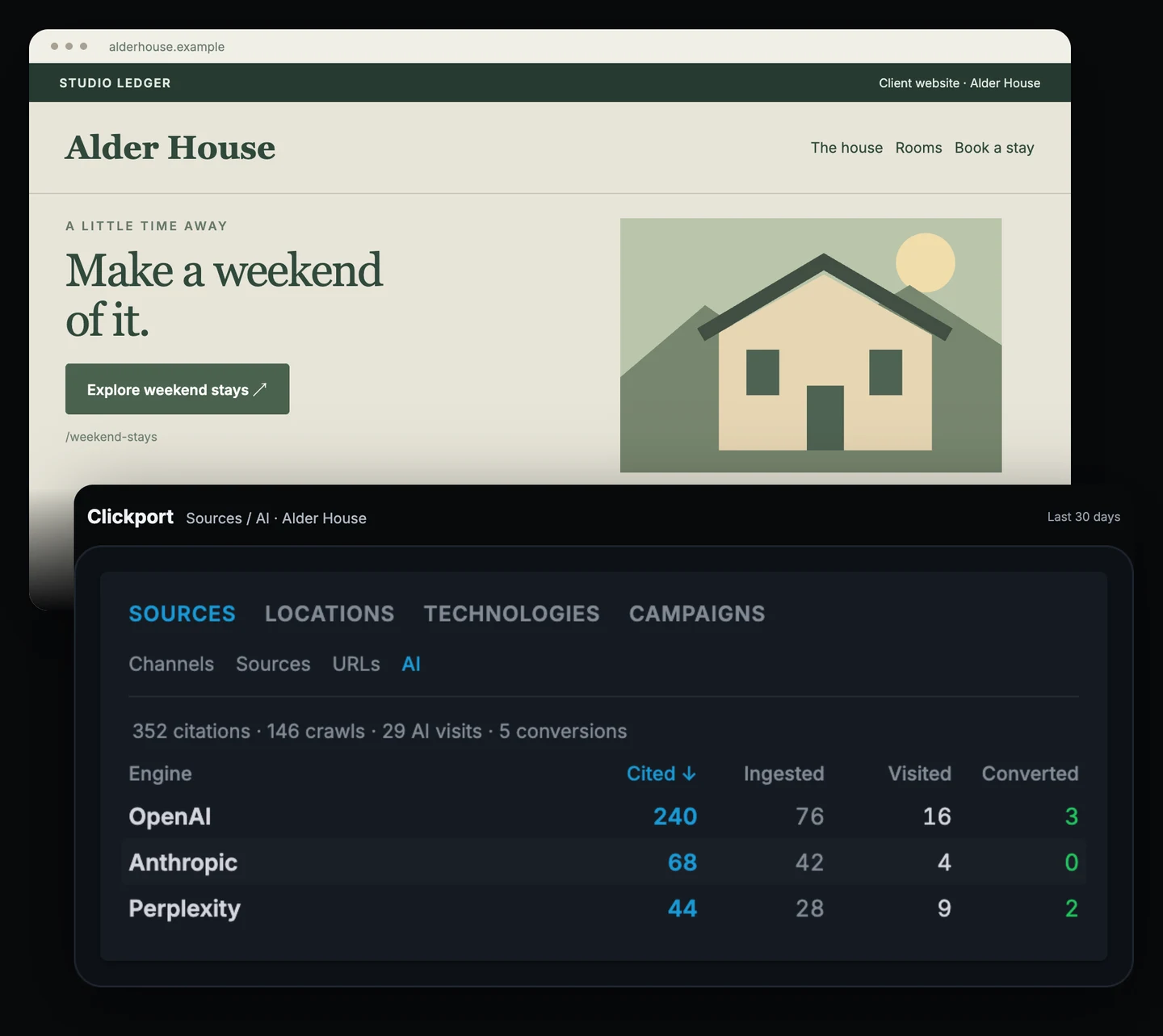
A useful note could say: “AI assistants are requesting the weekend-stays page. We’ll review its booking information and check the booking-link goal for visitors arriving from AI.” If those bookings finish elsewhere, the report should say what the site can measure and where the booking provider’s data is needed.
That note points to a piece of work the client can understand and review when the next report arrives.
Agencies that build their own reporting products can use the Clickport API to retrieve AI engine and page data for a specified client site. The reporting layer can show those numbers alongside the appropriate visit and goal data. That takes integration work; it isn’t a reason to invent a different score and put the agency’s logo on it.
I’d rather send a client a modest report with a clear next action than a dramatic percentage that I can’t connect to their business. Sometimes the honest report is that there isn’t enough attributable traffic yet to judge. That helps the client decide how much attention the channel deserves too.
Pick the number that changes what you do next
My objection to AI visibility scores hasn’t changed. A score improving is not evidence that a business improved. The practical answer is to work backwards from the decision: the article to review, the product page to inspect, the form to fix, the signup step to investigate, the client recommendation to make.
We built Clickport to put observed activity within reach of those decisions. You can see which pages AI agents request, which identifiable visitors arrive, and what those visitors do on your site. The examples above need different views because the businesses need different answers.
If that is the reporting you want, try Clickport and start with one goal that matters to your business. If you’re moving from Google Analytics, the switching guide walks through the setup. Add AI request tracking when you want to see the pages assistants are fetching, and keep the report tied to the work you can act on.

Comments
Loading comments...
Leave a comment