Track Conversions When Customers Buy or Book Elsewhere
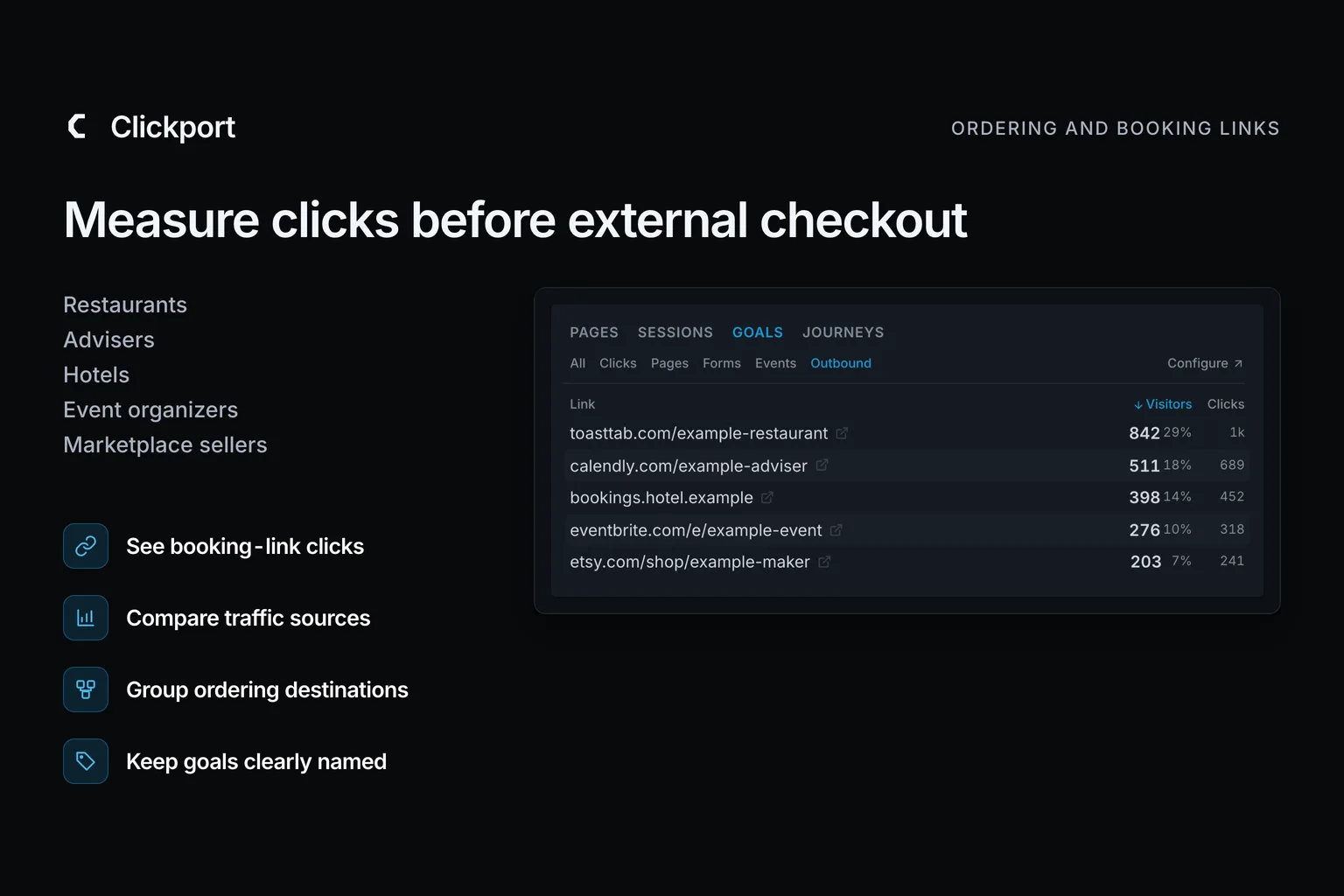
Your booking service tells you who booked. Your website analytics should help you understand how people reached the booking link. Together, they help you decide which pages and campaigns deserve more attention.
To track conversions when customers buy elsewhere, I would start with the links that send them there. Clickport records ordinary external-link clicks on pages where its tracker is installed. You can select a destination and see the traffic sources, campaigns and landing pages for those visits.
Here are five ways to use that information. Each example connects a website action with a practical marketing decision.
- Track the external link click on your website. Use the ordering or booking service to confirm the completed outcome.
- Name each goal for the action it records. A booking-link click does not confirm an appointment or a sale.
- Select an outbound action in Clickport to see the sources, campaigns and landing pages for those visits.
- Use website clicks to choose which page or campaign to investigate. Use the external service to check completed bookings and orders.
- Confirmed bookings or revenue can reach Clickport through a supported custom integration. They do not appear automatically from an outbound link.
How do you track conversions across separate websites?
Start with two questions: Which visits reach the buying or booking link? Which orders does the external service confirm?
Clickport's outbound-link report answers the first. The ordering service, calendar or marketplace answers the second. A click is a useful step towards a purchase, but it does not confirm one.
You can use those clicks to review your marketing before connecting any order data. An integration is needed if you want confirmed external bookings or payments inside Clickport.
Restaurants: a busy lunch campaign can hide a quiet catering page
A lunch promotion brings people to the menu. That looks encouraging in a traffic report, but the restaurant also wants larger catering orders. Those are different offers, with different customers and ordering links.
For Juniper Kitchen, I would track Takeaway link clicked and Catering link clicked separately. Selecting either goal in Clickport lets the owner review the sources and campaigns behind those visits.
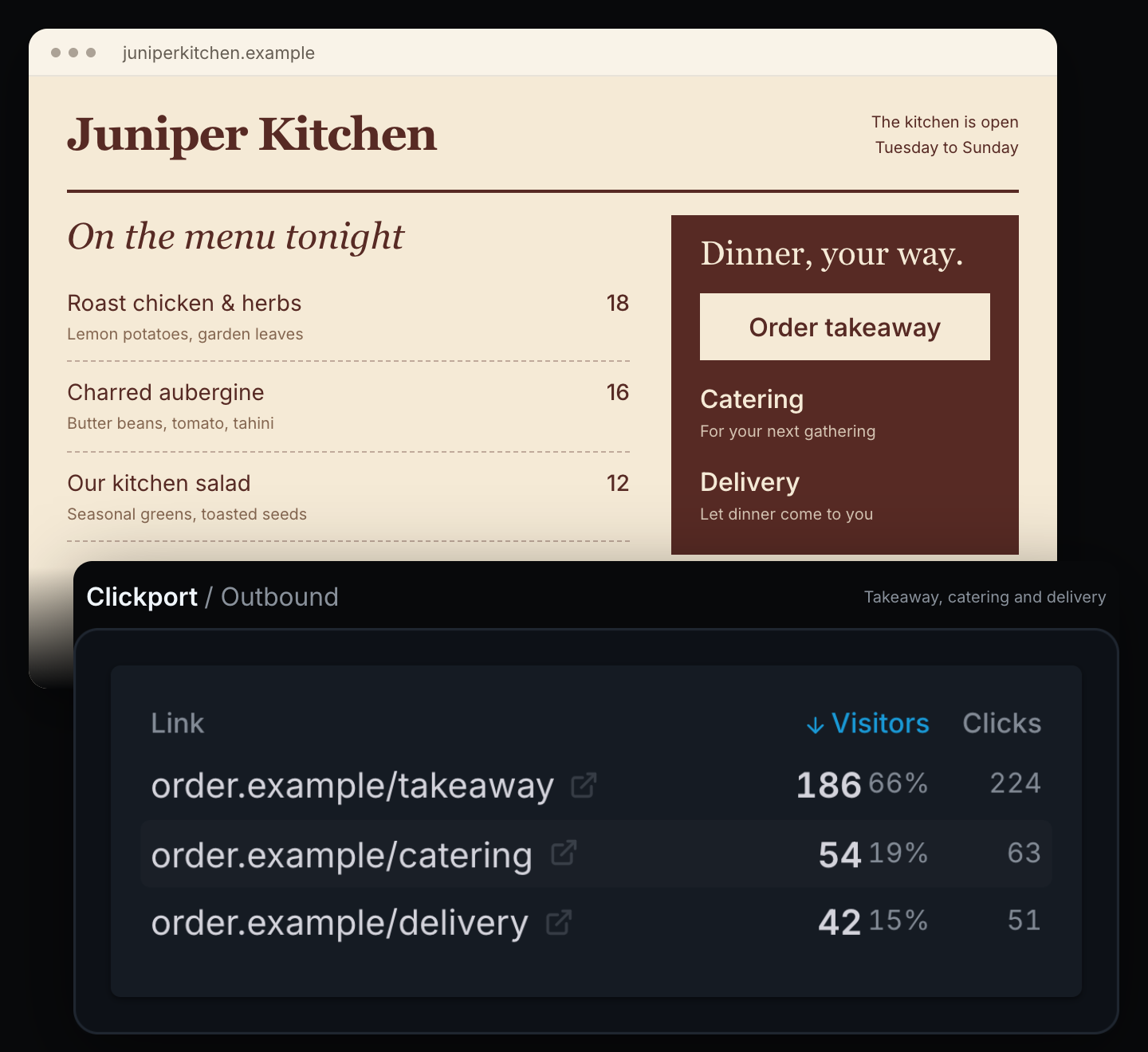
If the lunch campaign gets visits but few takeaway clicks, check the menu and delivery area before buying more traffic. Catering needs its own review: are visitors finding the offer, and do the enquiries suit the restaurant?
The separate links make this possible. If diners choose pickup or delivery only after leaving the website, Clickport cannot infer that choice from a shared ordering link.
The ordering service may already answer part of the question. Toast documents revenue-by-referrer reporting for selected Digital Storefront Pro customers in a limited release. Use the restaurant's sales records to check orders; use Clickport to investigate the website activity that comes before them.
Advisers: give the next article a better reason to exist
Which would you publish next: another company update or a practical retirement guide?
Pageviews give you one way to judge. Consultation-link clicks give you another. For Fieldwork Advice, I would select the introductory-call goal and look at the landing pages for those visits. This shows where people started before they reached the booking link.
A retirement guide that brings those visits is worth examining. Does it answer the reader's main questions? Is the consultation invitation clear? That gives the adviser a concrete basis for improving the guide or testing a related topic.
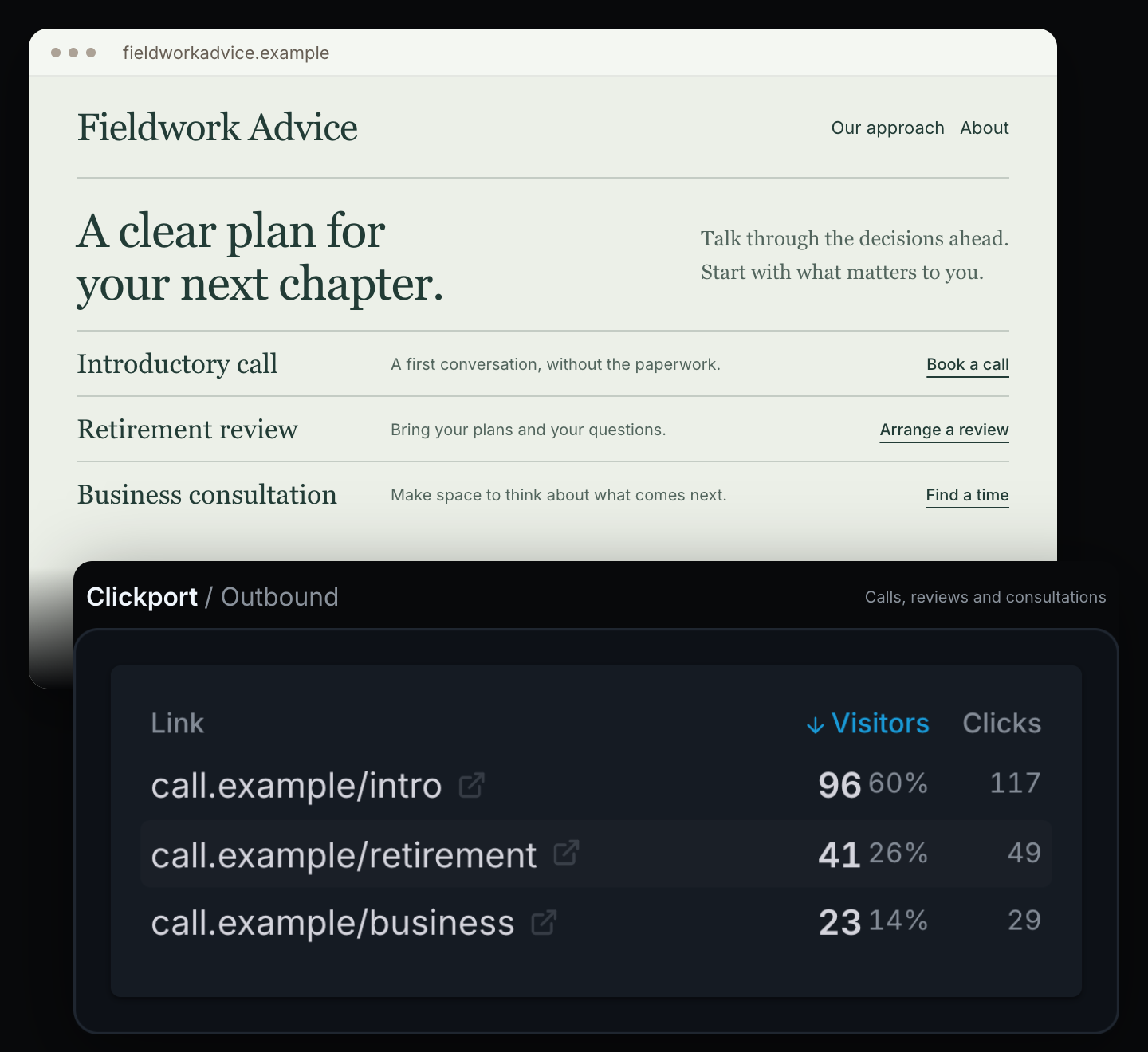
The calendar setup matters here. An ordinary link to a booking page fits this approach. A calendar embedded inside the page needs a separate check, because ordinary link tracking does not capture every action inside it.
Calendly provides a confirmed scheduling message that a developer can connect to a Clickport custom event. That would support a separate Appointment booked goal. Until that connection exists, keep the goal named for the link click. Attendance and becoming a client are later steps.
Hotels: check the offer before changing the promotion
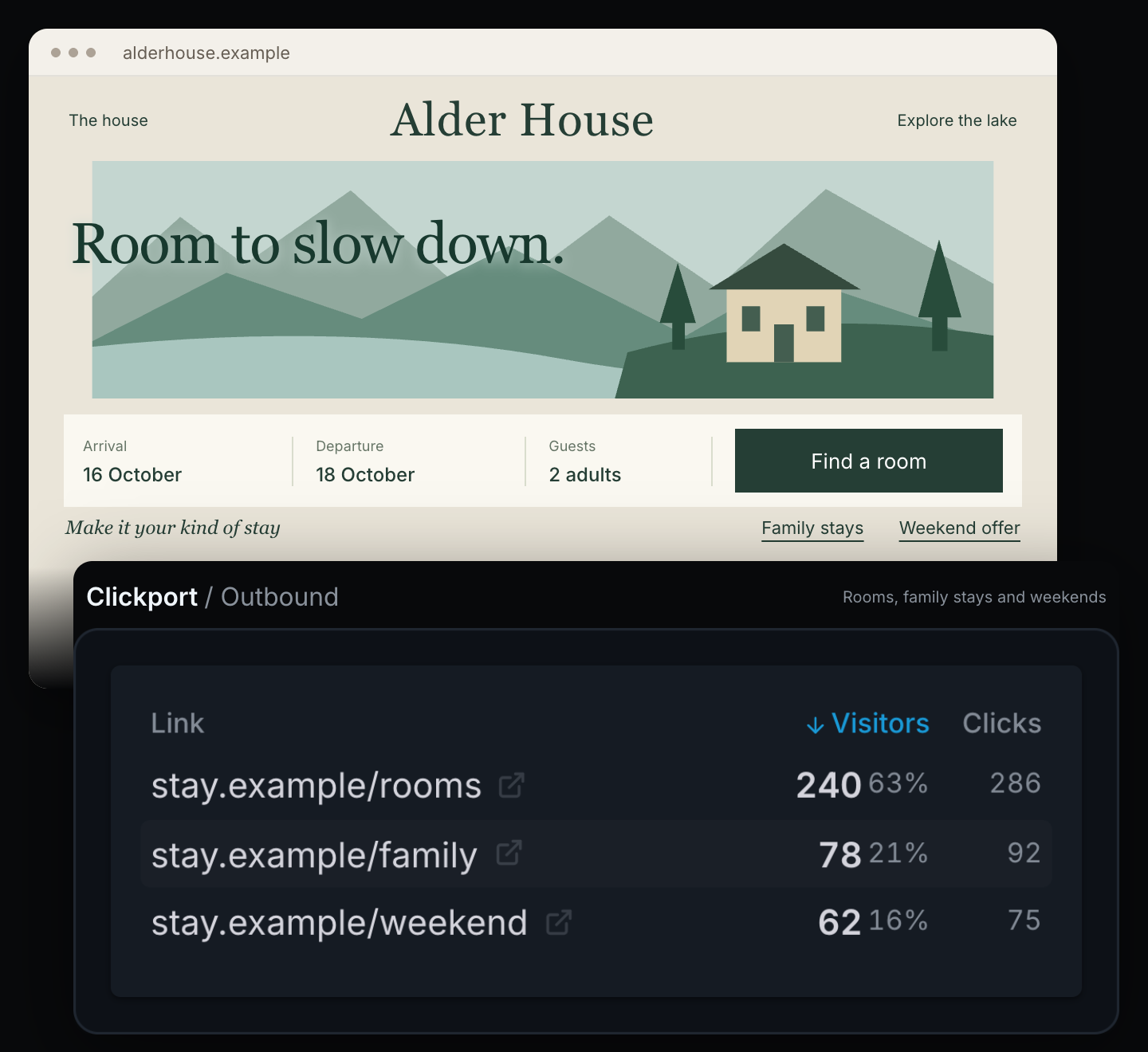
Alder House offers rooms, family stays and weekend packages. In this example, each has a link to the booking engine. That gives the hotel three actions to review, rather than one combined count of website visits.
Say the family package attracts visitors but few booking-link clicks. The useful next step is to inspect the offer: does it explain occupancy, meals and how to book? If people do click, check availability and reservations in the booking engine. Missing rooms and an unclear website require different responses.
Clickport helps with the website side. Select the package goal to compare its traffic sources and landing pages. That narrows the investigation before the hotel sends more visitors to the offer.
There is one setup detail I would check early: booking URLs often contain dates or guest counts. A stable destination condition lets one goal match different versions of the same package link.
Cloudbeds documents booking-confirmation and transaction tracking through configured analytics integrations. This example uses an external booking page; embedded booking engines need a different setup.
Event organisers: clicks, orders and seats are different counts
One person can click a workshop link twice and buy three tickets in one order. That produces three valid numbers: two clicks, one order and three tickets.
For Sunday Studio, I would keep the ticket platform's seat counts beside the website report. A sold-out pottery workshop needs a different response from a glazing class with places left.
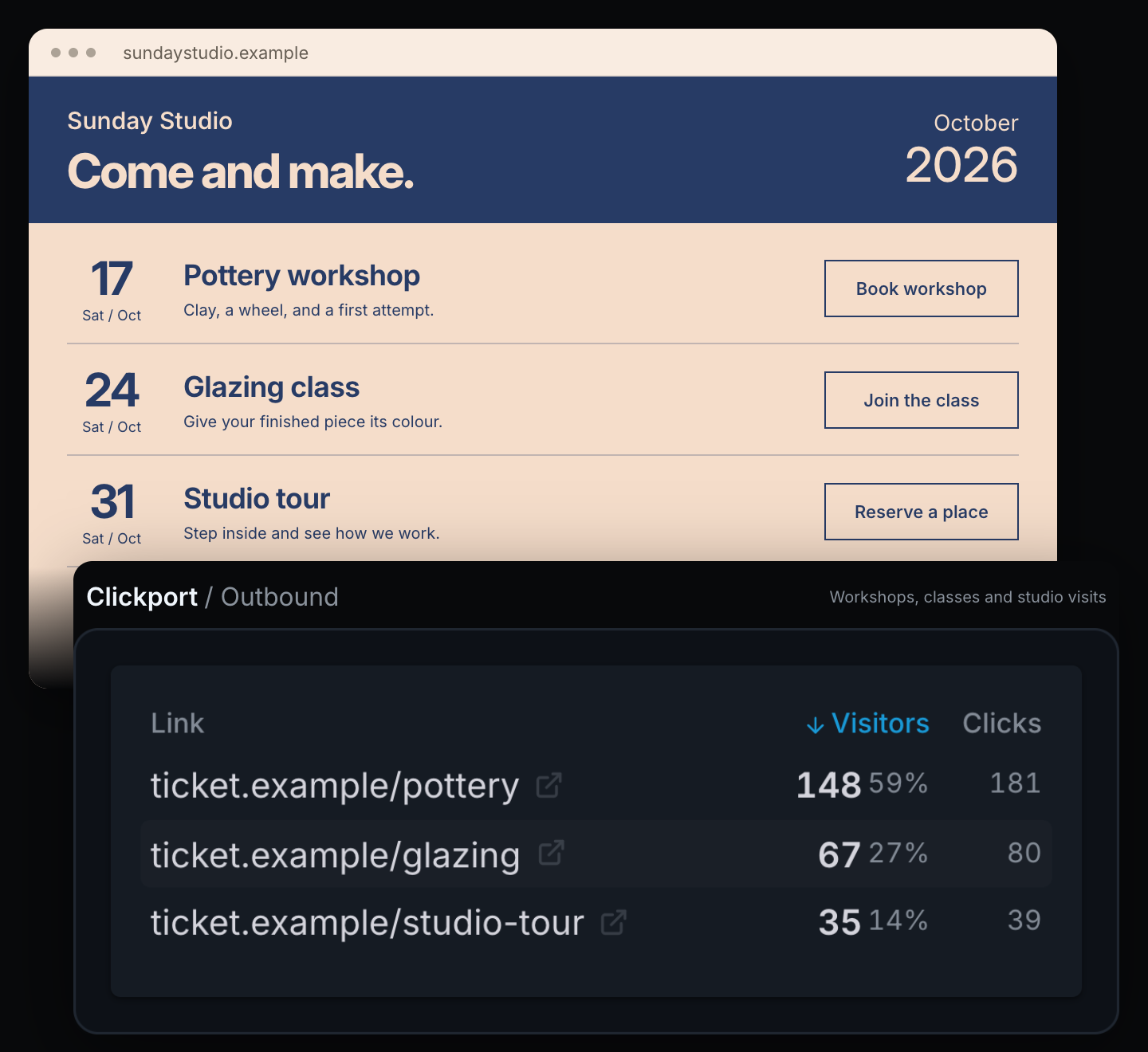
Clickport lets the organiser select each workshop's ticket-link goal and review the sources and campaigns for those visits. If a class has few clicks, check its description, date and price information. If it gets clicks but few orders, inspect the ticket page and remaining availability.
This helps decide where to focus the next promotion. It does not turn website clicks into ticket sales.
Eventbrite reports orders and tickets separately. Its report includes embedded-checkout sales but excludes the widget's page views. Read the two reports alongside each other; dividing all tickets sold by website clickers does not give a reliable purchase conversion rate.
Makers and retailers: the marketplace cannot explain every website visit
Morrow Clay sells through marketplace listings, but its own website has a different job. It presents the collection, explains how pieces are made and helps shoppers choose.
Some buyers will find the maker through marketplace search and never see that website. Others might read a mug-buying guide and follow a product link. The marketplace's total sales cannot tell the maker how that guide performs.
In Clickport, selecting the mug-link goal reveals the sources and landing pages for visits with those clicks. If the guide appears among them, I would review its product choices and keep the links current. A related buying guide could be the next content experiment.
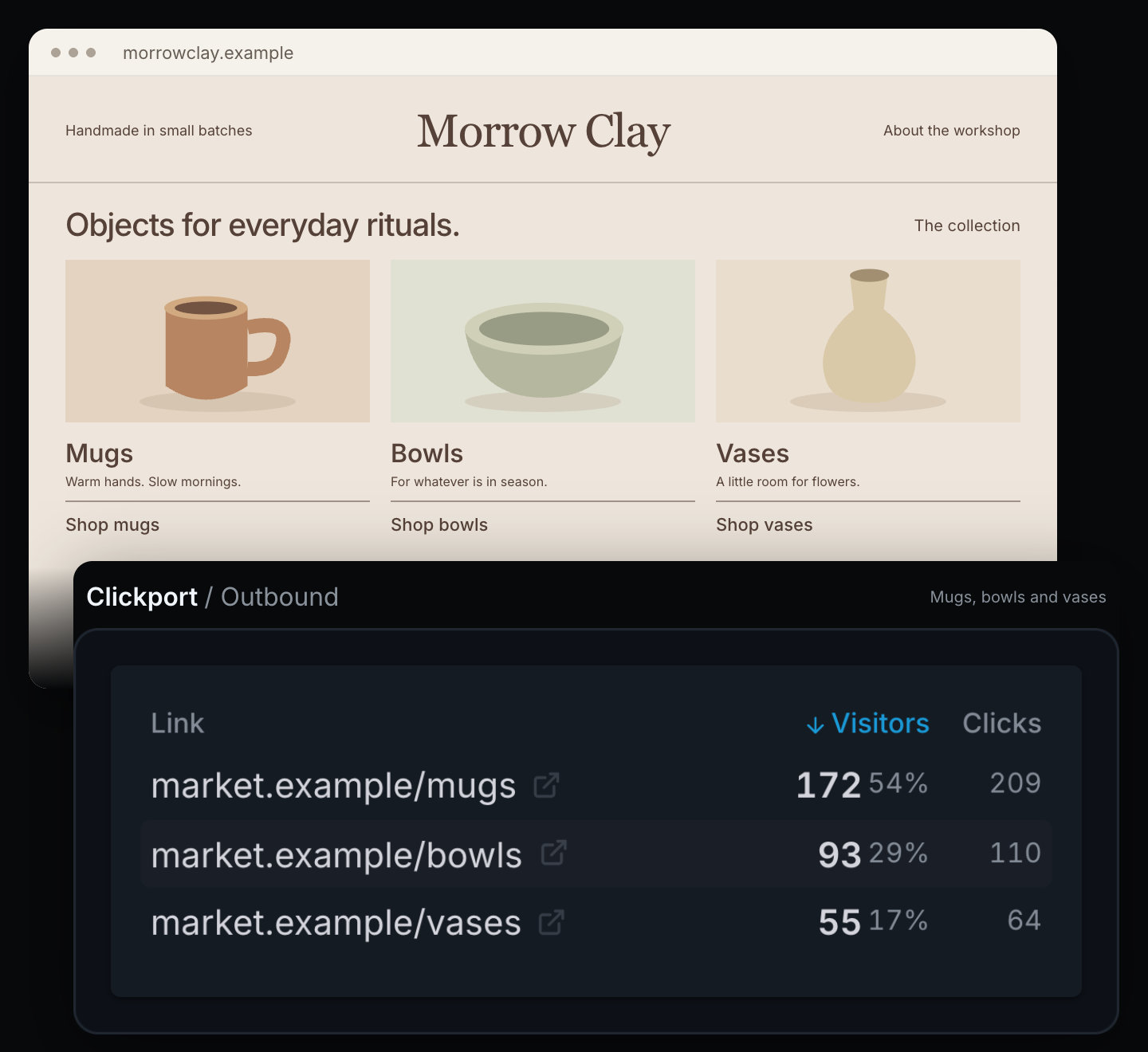
There is no need to create a goal for every listing on day one. Start with a product group that matters, then separate individual links when they need different decisions.
Keep the marketplace's official tracking links intact. Etsy's Share & Save reporting reports associated orders under its own rules. Clickport covers activity on the maker's website; it does not provide analytics inside an Etsy-only shop.
Set up one useful goal and check what it counts
I would start with one action that matters to the business. Use an ordinary external link with descriptive visible text for this first check.
- Find the recorded link. Trigger it on a page with Clickport installed, then inspect the Outbound report and the recorded destination.
- Configure a Click goal. In site settings, open Goals & funnels → Goals → + Add goal. Choose Click under Type and add URL or Domain conditions. The goal guide explains the fields.
- Name the action precisely. Use “Ticket link clicked” or “Catering ordering link clicked.” Select No value unless you deliberately want an estimated monetary value.
- Save the goal. Turn off Count as conversion for the click goal if your summary should count only confirmed purchases. The click goal still appears in reports. Select Save goal.
- Check the result. Review the Goals report and a matching visit's event timeline. Confirm the destination, conditions, date range and website timezone. A goal badge also helps when its display is enabled.
Selecting a Detected link clicks entry adds a Button/link text condition. Add destination conditions when the text appears on other links. Choose ALL when both the text and destination must match.
Read Visitors and Clicks separately: someone can click more than once. Visitor identifiers rotate daily, so longer-period totals do not represent persistent customers.
For changing URLs, match a stable destination. For embedded widgets or buttons driven entirely by JavaScript, check the outbound-link setup guide.
Need confirmed bookings or payments in Clickport?
What can your setup confirm?
Use the selector to choose the evidence your setup can supply. Provider connections need to be implemented and tested before selecting a confirmed-outcome option.
A developer can connect a verified booking confirmation to a custom event. A backend can send confirmed payments through the Revenue API. Linking a payment to its website visit requires a valid reference retained through checkout. Without it, the payment remains unattributed. For purchases inside AI channels, see what counts as an AI sale and how to separate order records from website visits.
The connection must handle repeated messages, cancellations and refunds. For example, Calendly sends creation and cancellation events for a rescheduled booking. Check webhook access before choosing that route.
A thank-you page alone can miss customers who never return or count a reload. Use the provider's confirmation when a goal needs to mean a completed order.
If you’re also evaluating traffic from AI assistants, these six business examples show how to use requests, visits and goals to decide what to work on next.
Is Clickport a useful next step for your website?
If your current reports stop at pageviews, start with the action that matters next: an ordering, booking or product-link click. Clickport lets you select that action and examine the sources, campaigns and landing pages behind those visits.
That gives you a practical review: find an offer that attracts attention, investigate a page with few next-step clicks, or choose a campaign to test again. Check completed orders in the external service before making a sales claim or a larger spending decision.
If your current setup already answers these questions clearly, this article alone is not a reason to replace it. If getting those answers is the obstacle, I would test Clickport with one real business question.
Start a 30-day trial, with no credit card required, and set up one outbound goal. Use the switching guide when moving an existing website. For client work, include the result and your proposed next action in a business report.

Comments
Loading comments...
Leave a comment