Site Search Analytics: Which Searches Lead to Sales?
Someone lands on your shop, types "duvet" into the search box, looks at the results and leaves. Someone else types "linen sheets" and buys two sets. Both searches tell you something your menus never will: what people came for, in their own words, and whether your site could give it to them. Site search analytics puts those words next to your sales, so you can see which searches lead to orders and which end in nothing. GA4 collects the words, but it has no ready-made report for them.
Below, five example businesses show what the numbers say and what they'd change: a bedding shop, a scheduling app, a recipe site, a letting agency and a language school. The businesses are made up. The dashboard panels are real Clickport reports, filled with the example numbers.
- Your search box records what visitors want, in their own words.
- Put searches next to a goal to see which ones lead to sales.
- A popular search with few sales often points to results that miss the mark.
- Searches for things you don't offer show demand before you build anything.
- GA4 collects search terms but has no built-in site search report.
How do you see what visitors search on your site?
Most search boxes send visitors to a results page whose address carries the search, such as yoursite.com/search?q=duvet or yoursite.com/?s=duvet. An analytics tool can read the word from that address. Clickport does this without any setup on WordPress, WooCommerce, Shopify, Webflow, BigCommerce, Magento, Shopware, HubSpot and Zendesk, and on many other sites with a search box.
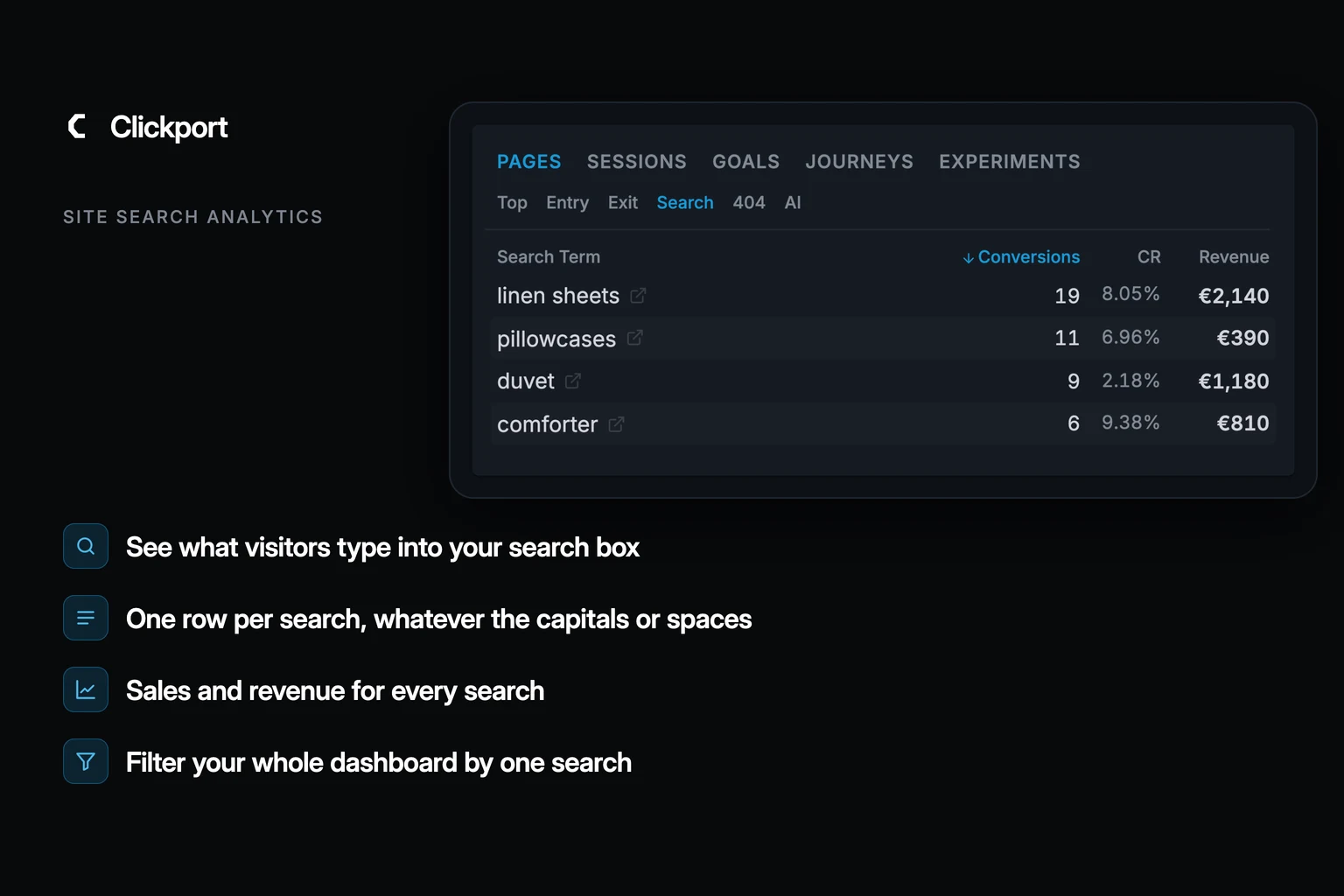
The searches sit in the Pages panel under Search: one row per search, with the visitors who searched it and the views of the results page. "Duvet", "duvet" and "duvet " count as one row. Add a goal as a filter, such as a purchase or a signup, and each search shows its conversions, its conversion rate and, when the goal carries money, its revenue. Click a search, and the whole dashboard narrows to the visits that used it.
GA4 collects the words too. Its enhanced measurement looks for the same kind of address. But in the words of Google's own migration guide, as checked on 13 October 2026, "Google Analytics 4 does not include built-in Site Search reports" (Google). You build an exploration and filter it to the search event, or add the search term to a report yourself. Universal Analytics had a whole Site Search section, with search exits and refinements (Google). For other Universal Analytics reports and where they went, see what GA4 took away.
Two limits apply to every example below. Search boxes that show results in a pop-up, without changing the page address, need one line of code from your developer before an analytics tool can see them (how it works). And the sales columns count the whole visit, before and after the search: someone who searches two words and buys counts toward both rows.
Larkfold Linen: why do "duvet" searchers buy less?
Larkfold Linen sells washed linen bedding from a small warehouse in Dublin. Its supplier is American, so the product names say "comforter". The owner opens the Search list, filters it to the Purchase goal and looks at the last 30 days.
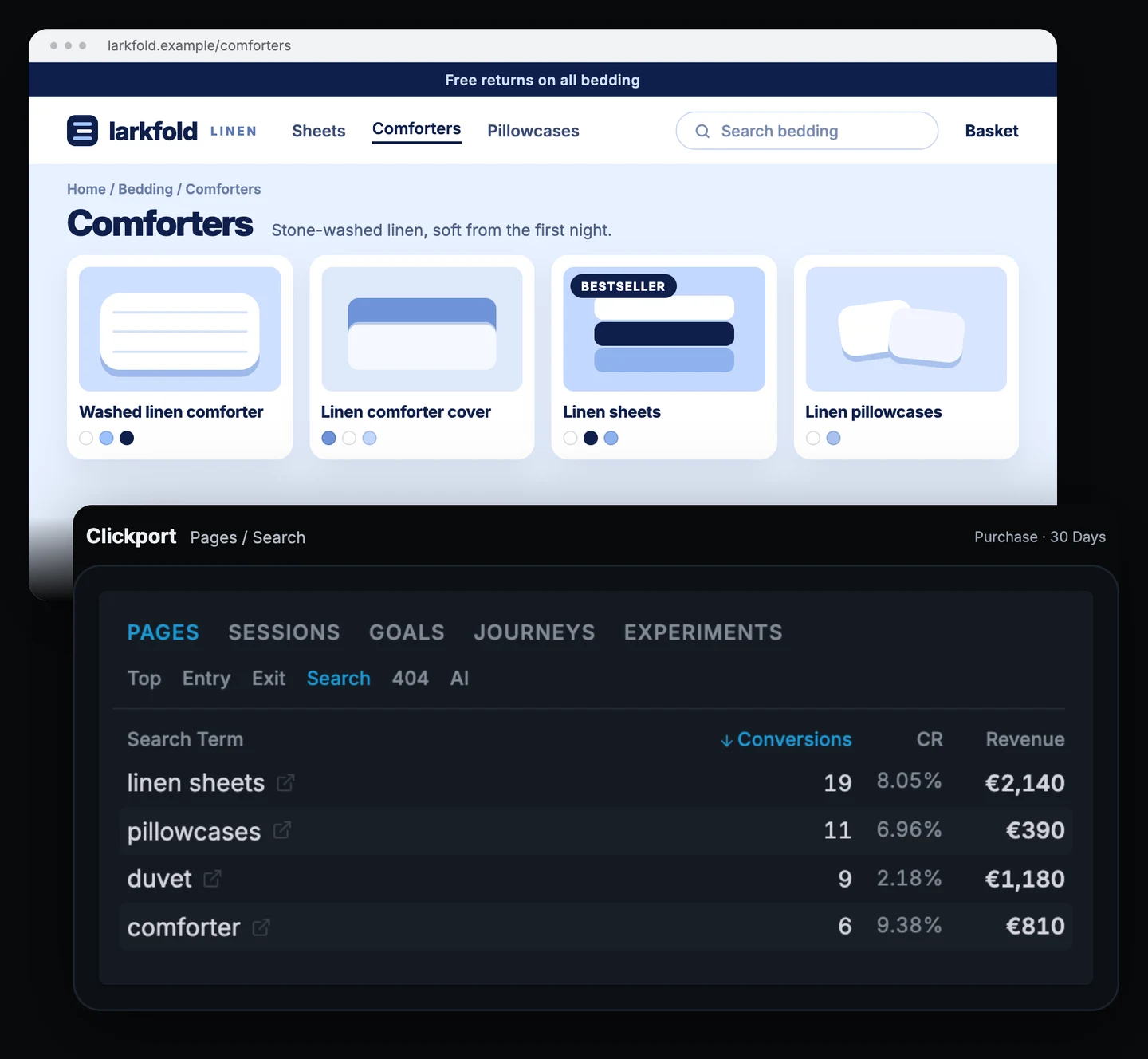
| Search | Searchers | Purchases | CR | Revenue |
|---|---|---|---|---|
| linen sheets | 236 | 19 | 8.05% | €2,140 |
| pillowcases | 158 | 11 | 6.96% | €390 |
| duvet | 412 | 9 | 2.18% | €1,180 |
| comforter | 64 | 6 | 9.38% | €810 |
Larkfold's searches over 30 days with the Purchase goal. Searchers are the visitors who searched each word, from the same list without the goal filter.
"Duvet" is the most searched word in the shop, with 412 visitors, and it has the worst conversion rate. "Comforter" converts at 9.38%, but only 64 people type it. They want the same thing. The shop's own search matches product names, so a search for "duvet" misses the comforters most people came for.
If duvet searchers bought as often as comforter searchers, that would be about 39 buyers instead of 9. I'd rename the products to say both words, for example "Washed linen duvet (comforter)", and add "duvet" as a search synonym if the shop platform allows it. Then I'd compare the same list a month later.
Larkfold isn't unusual here. Baymard Institute's 2026 benchmark of more than 170 ecommerce sites and apps found that 56% of them fail to adequately support users' search needs.
One more search is missing from the figure, because rows without a purchase drop out of the goal view. Switch the goal filter off and "weighted blanket" shows up with 97 searchers. Larkfold doesn't sell one. That's a cheap product test: list one blanket and watch that row.
Slotfinch: are "cancel" searches a warning?
Slotfinch is a booking app for hairdressers and tutors. Its help centre has its own search box, and last month the top search was "cancel", from 138 visitors. That sounds like 138 lost subscriptions. The team clicks the row to see what those people did.
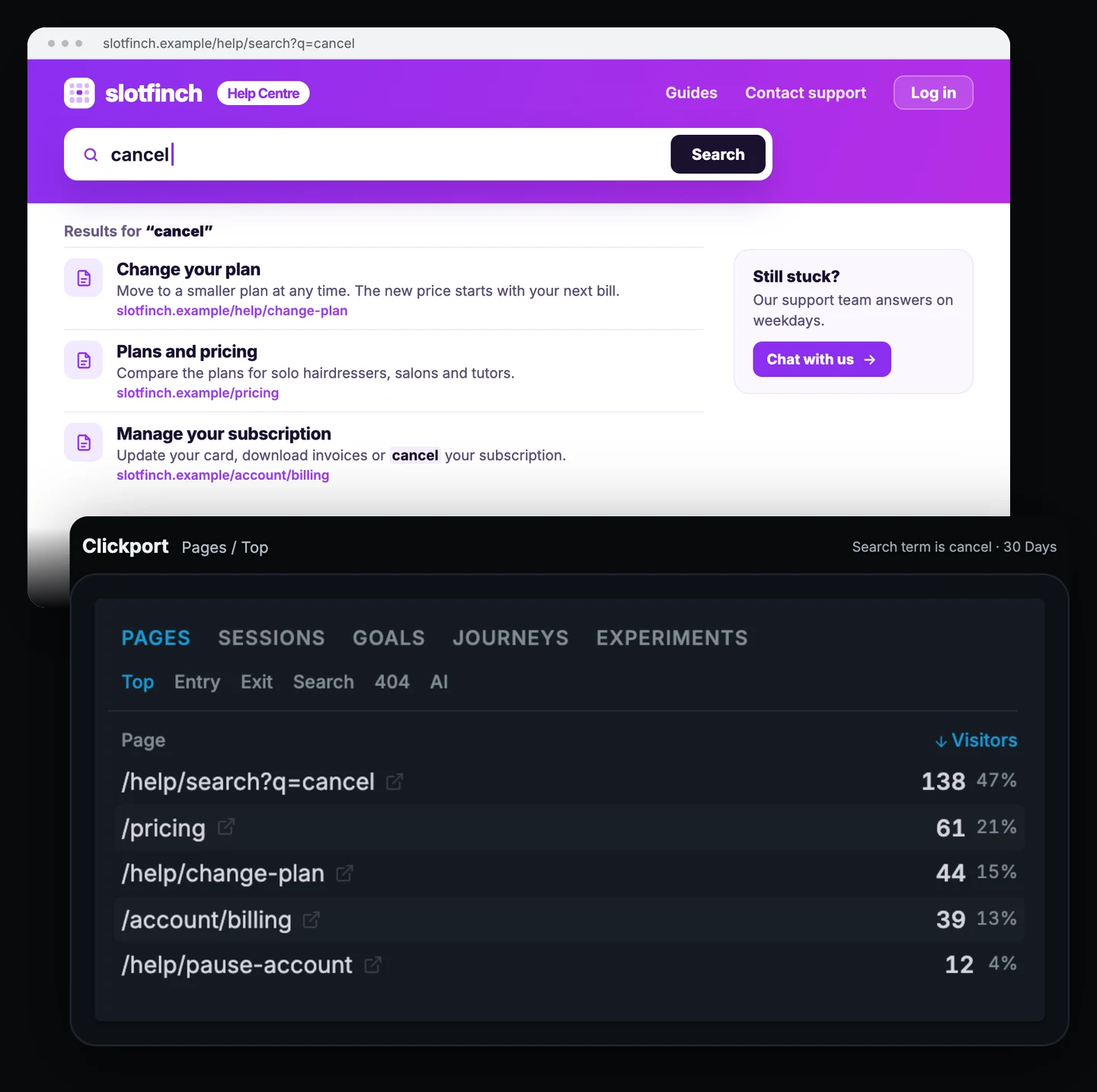
| Page | Visitors who searched "cancel" |
|---|---|
| /help/search?q=cancel | 138 |
| /pricing | 61 |
| /help/change-plan | 44 |
| /account/billing | 39 |
| /help/pause-account | 12 |
Slotfinch's pages over 30 days, filtered to visits that searched "cancel".
The first row is the results page itself, so it holds all 138. The rest is more interesting: 61 of them opened the pricing page and 44 read how to change plan. Many of these people want to pay less. A smaller plan or a pause keeps them as customers, yet only 12 found the page about pausing an account.
I'd put "Switch to a smaller plan" and "Pause your account" at the top of the results for "cancel", so the pause page is the first thing these people see.
The website can't see what happens inside the app. If the app runs the Clickport script, send the cancellation as a custom event and make it a goal. The Search list then shows how many "cancel" searchers cancelled in the same visit, before and after the change. A cancellation a few days later isn't linked to the search.
Saltcrumb: which recipe should they write next?
Saltcrumb is a recipe site that earns money from ads and two e-cookbooks: a $19 gluten-free baking book and a $24 one-pot book. The editor plans the next month of recipes and opens the Search list.
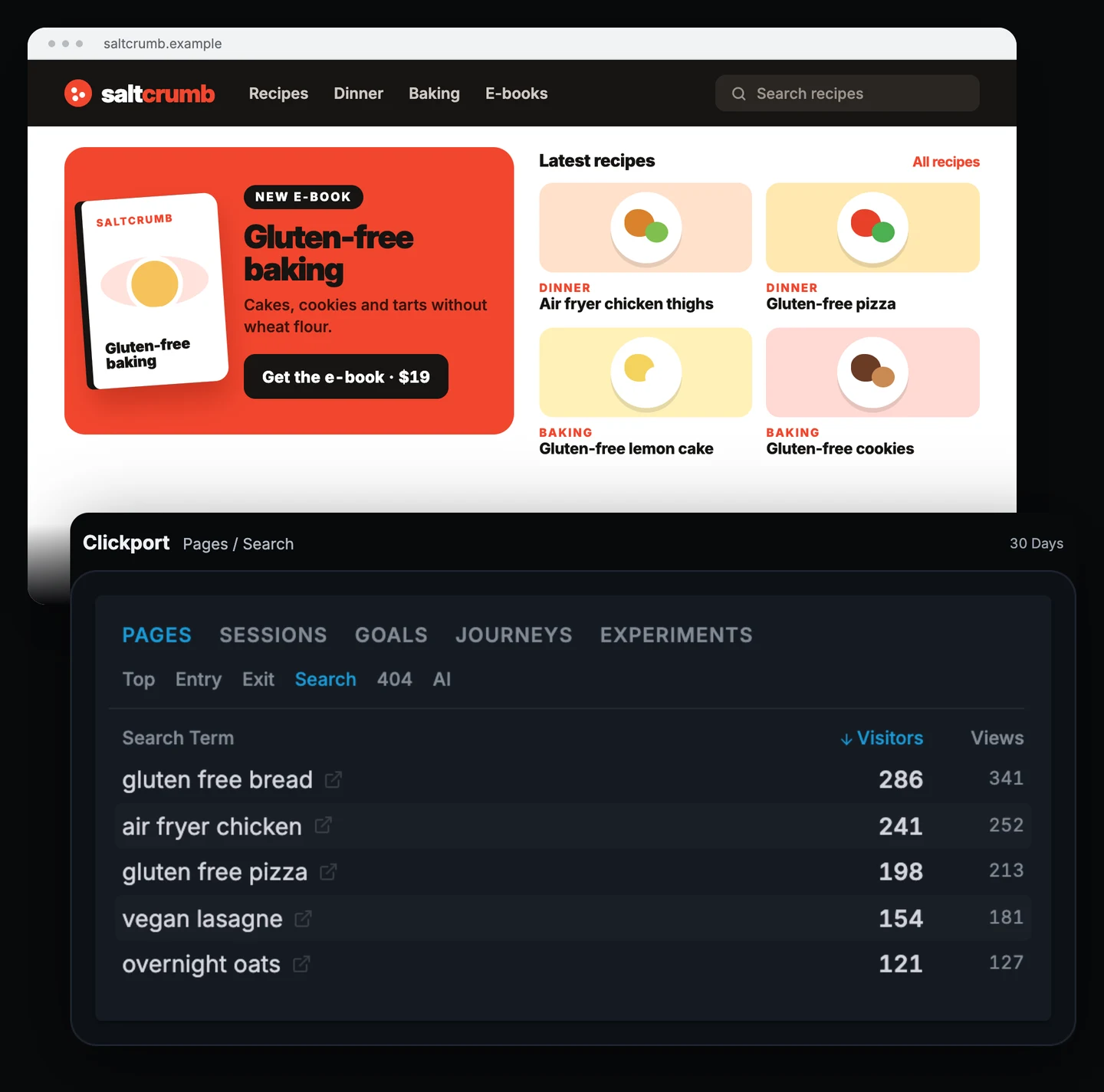
| Search | Visitors | Views | Sales | CR | Revenue |
|---|---|---|---|---|---|
| gluten free bread | 286 | 341 | 31 | 10.8% | $589 |
| air fryer chicken | 241 | 252 | 6 | 2.49% | $144 |
| gluten free pizza | 198 | 213 | 12 | 6.06% | $228 |
| vegan lasagne | 154 | 181 | 4 | 2.60% | $96 |
| overnight oats | 121 | 127 | 2 | 1.65% | $48 |
Saltcrumb's searches over 30 days. Sales, CR and revenue come from the same list with the Cookbook purchase goal as a filter.
"Gluten free bread" leads with 286 visitors, who viewed the results 341 times. That's the most views per visitor in the list, and "vegan lasagne" comes next. They're the two searches without a recipe. People go back to the same results when the first look didn't help, although paging through results and reloads add a few views too. Saltcrumb has gluten-free cakes, cookies and pizza, but no bread, and no vegan lasagne.
The gluten-free searchers also buy. With the Cookbook purchase goal on, 31 of the bread searchers bought the gluten-free book, the best rate in the list, and the pizza searchers come second. "Air fryer chicken" is the other end: Saltcrumb has a good recipe for it, people find it, cook and leave. For a site that lives on ads, that's fine.
I'd write the gluten-free bread recipe first and link the e-book from it, then the vegan lasagne. The search box only shows what visitors already on the site want. To see what people type into Google before they arrive, I'd check Search Console as well.
Teague & Orr: which search filters are the listings missing?
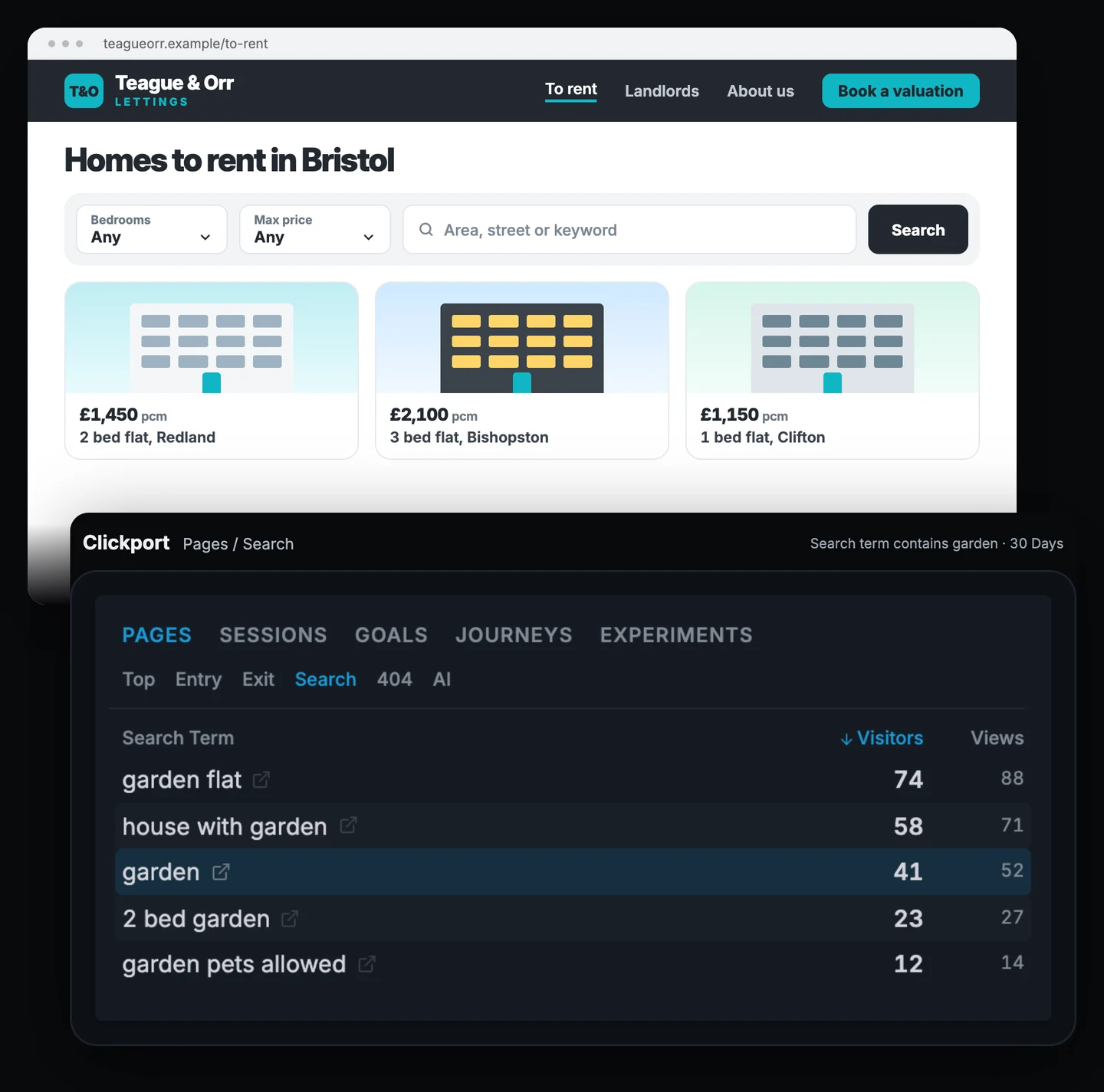
Teague & Orr Lettings rents flats and houses in Bristol. The listings page lets people filter by bedrooms and price, nothing else. The office manager types "garden" into the Search term filter, with "contains", to catch every search that mentions it.
| Search | Visitors | Views |
|---|---|---|
| garden flat | 74 | 88 |
| house with garden | 58 | 71 |
| garden | 41 | 52 |
| 2 bed garden | 23 | 27 |
| garden pets allowed | 12 | 14 |
Teague & Orr's searches over 30 days that contain "garden".
Five different searches ask for a garden, and the biggest comes from 74 visitors. Without the "garden" filter, "pets allowed" shows up too, with 96 visitors. The agency has 14 properties with a garden right now, but the listing titles don't say so.
The goal here is a viewing request. With the garden filter and the Viewing request goal together, the conversion rate is 3.1%, against 8.4% for the site as a whole. People who want a garden are not finding the properties that have one.
I'd add "Garden" and "Pets allowed" to the listing filters and put both words into the titles of the properties that have them. The numbers help on the other side of the business too: when a landlord asks whether a garden flat will let quickly, the agency can show how many people searched for one last month.
The list only counts people who used the search box. Visitors who scrolled the listings and gave up never typed anything, so the real demand for gardens is likely higher.
Parlaro: which course should the school build next?
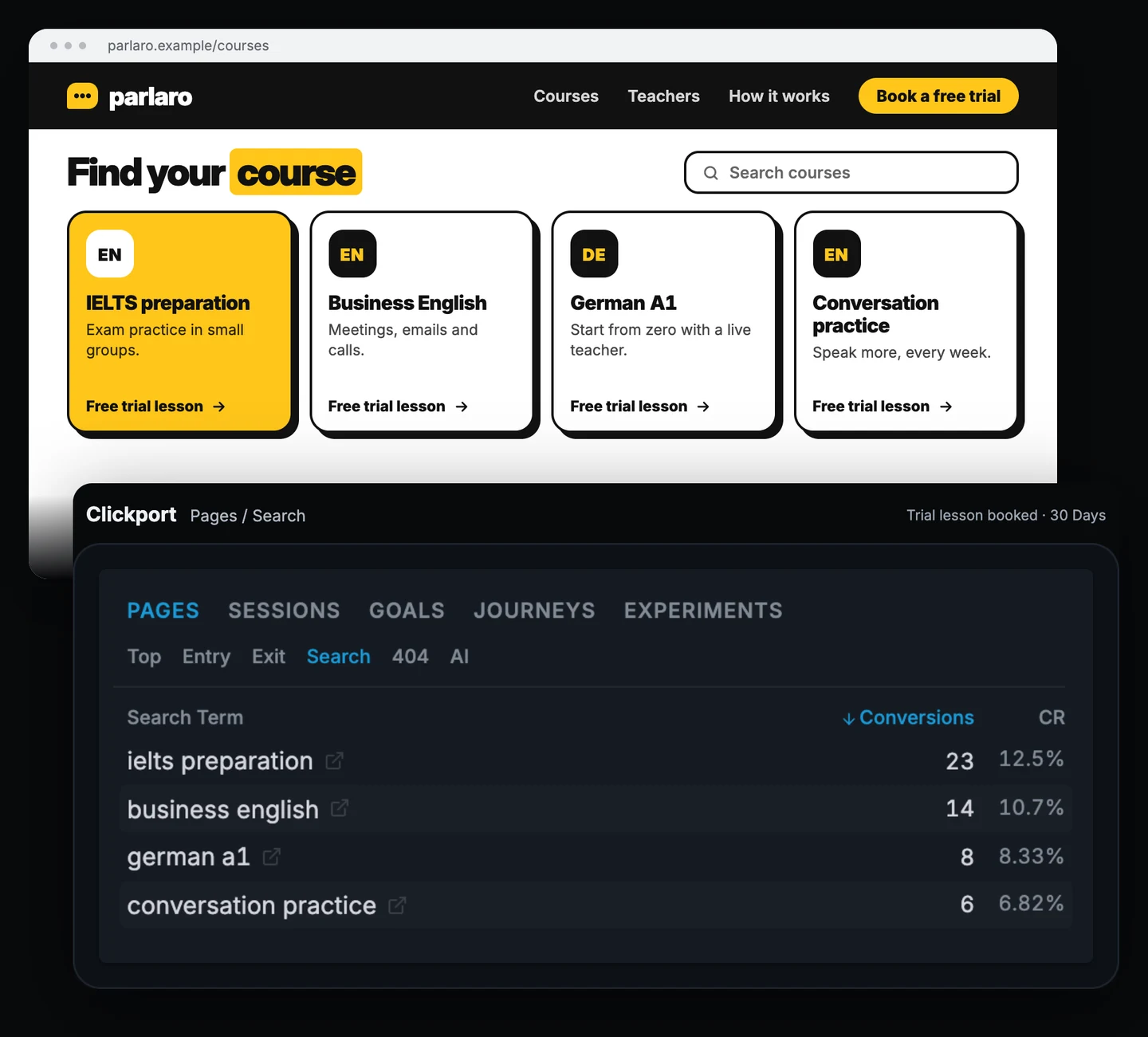
Parlaro teaches languages online in small groups, and every course starts with a free trial lesson. The founder wants to know which searches lead to trial bookings and filters the Search list to the Trial lesson booked goal.
| Search | Searchers | Trial lessons | CR |
|---|---|---|---|
| ielts preparation | 184 | 23 | 12.5% |
| business english | 131 | 14 | 10.7% |
| german a1 | 96 | 8 | 8.33% |
| conversation practice | 88 | 6 | 6.82% |
| spanish for kids | 167 | 0 | 0% |
Parlaro's searches over 30 days with the Trial lesson booked goal. "Spanish for kids" comes from the list without the goal filter.
IELTS preparation brings the most trial lessons and the best rate, so it deserves a place on the home page. The surprise is the row that isn't in the figure. "Spanish for kids" is the second most searched course, with 167 searchers, and Parlaro doesn't offer it. None of those 167 visits ended in a trial booking, so the row drops out of the goal view.
That's a strong hint, but a search is cheap and a course is not. Before building one, I'd publish a "Spanish for kids" page with a waiting list and make the sign-up a goal. Four weeks later, Parlaro knows how many parents left an email.
A trial lesson isn't a paying student yet. If students pay for a course on the website, connect Stripe or Paddle and filter by the purchase. The list then shows revenue for searches made in the same visit as the payment.
Start with last month's searches
Open the Search list for the last 30 days and pick one goal that means money for you: a purchase, a trial, an enquiry. Then look for three things:
- A popular search with a low conversion rate. Check what the results page shows for it.
- A search with no matching product, page or course. That's demand you can test.
- A search for something you already have. Your menu or your product names are hiding it.
If you only need a list of search words and GA4 already records them, an exploration there gives you that list. Clickport adds the sales next to each word and turns any search into a filter for every report.
Clickport shows all of this from the day you install it, with no setup for search boxes that put the search in the page address, and no cookies. You can try it free for 30 days, no credit card required. If you're moving from GA4, the switching guide shows how to set it up.
Frequently asked questions
How do I track site search in GA4?
Site search is part of enhanced measurement, which is on by default when you create a web data stream (Google). Check that its site search option is still switched on. GA4 then records a view_search_results event when the results page address contains q, s, search, query or keyword, and you can add other parameter names in the advanced settings. To read the terms, build an exploration filtered to the view_search_results event, or add the Search term dimension to a report. Google's documentation lists the settings.
Why don't my search terms show up in GA4?
The usual reasons: site search is switched off in enhanced measurement, your search uses a parameter name GA4 doesn't look for, your search box shows results without changing the address, or you're looking in the standard reports, which have no site search section.
Can I see which searches lead to sales?
Yes, if your sales are a goal. In Clickport, filter the Search list by the goal, and each search shows its conversions, conversion rate and revenue for goals that carry money. The count is per visit, before and after the search: someone who searched two words and bought counts toward both.
What if my search box doesn't change the page address?
Then no analytics tool can read the search from the address. Many pop-up and instant search boxes work this way. Your developer can send each finished search to Clickport with one line of code, explained on the site search page.
Do I need cookies to track site search?
No. Clickport reads the search from the address of the results page and works without cookies.

Comments
Loading comments...
Leave a comment