Newsletter Sponsorship ROI: Is the Ad Worth Renewing?
You paid $1,500 for a mention in a newsletter. A week later, your analytics shows a small bump in Direct traffic, but nothing else stands out. Without a tagged link, you can't tell how many of those visitors came from the ad, let alone whether they signed up or bought something.
The newsletter will send you its own report, usually showing opens and clicks. That's useful, but it doesn't tell you whether the ad brought in customers. And that's what matters when the publisher asks if you'd like to book another slot.
The five examples below each answer a different question: which newsletter to book again, why a discount code and analytics show different sales figures, how to measure ads when customers take weeks to buy, whether a premium slot is worth the extra cost, and how to report the results to a client.
The businesses are fictional. The dashboard reports are real Clickport reports, filled with the example figures.
- A newsletter ad is worth renewing when the sign-ups or sales it brings justify the price.
- Give every ad placement its own tagged link so you can track its visitors in your analytics.
- In GA4, links tagged with utm_medium=newsletter usually appear under Unassigned, not Email.
- In Clickport, a sale counts for the channel that brought the visitor when they bought.
- A typical native newsletter ad gets clicks from 0.17% of ad views. A strong one gets 0.52%.
Is newsletter advertising worth it?
The simplest way to judge an ad is to work out how much you paid for each sign-up or sale it brought in. Then compare that cost with what a sign-up or sale is worth to your business.
Say a newsletter charges $850 and brings you four trial sign-ups. That's about $213 per trial. Whether that's a good deal depends on how many trials become paying customers and how much you earn from each one.
Newsletter publishers often report opens, clicks and the price per thousand opens. These figures help you compare placements, but they don't tell you whether the ad was profitable. For that, you need to track what happens on your own website.
Paved's guide to newsletter advertising recommends tagging links and tracking the resulting traffic in your own analytics. That's the right place to start.
Newsletter publishers know that renewals depend on results, too. On 28 October 2026, Kyle Poyar, who sells sponsorships in his Growth Unhinged newsletter, wrote that getting the first deal with a brand is easy compared with getting the renewal: "Brands expect to see real quantifiable ROI or they won't write another check."
How do you measure a newsletter ad on your website?
Give every ad placement its own tagged link. These tags, called UTM parameters, are extra details added to a URL. They tell your analytics where a visitor came from and which campaign brought them to your site.
For example:
?utm_source=clinic-owners&utm_medium=email&utm_campaign=sep-clinic-owners
Here, clinic-owners identifies the newsletter, email identifies the channel, and sep-clinic-owners identifies the campaign.
Without these tags, visits from email apps can arrive without information about where the visitor came from. Your analytics may then classify them as Direct traffic. Our free link builder creates tagged links for you.
Some newsletter platforms add tags automatically. As of 29 October 2026, beehiiv does this by default. Its help pages show both Email and newsletter as possible medium values.
If you add your own tags with utm_medium=email, beehiiv keeps them, and both GA4 and Clickport classify the visits as Email. If you rely on the publisher's automatic tagging, click a link in the sent newsletter and check the URL to see which tags it uses.
This matters because GA4's Email channel expects the source or medium to match email, e-mail or e_mail. A link tagged utm_medium=newsletter will usually end up under Unassigned instead. Clickport classifies both email and newsletter traffic as Email.
In Clickport, each campaign appears as a row in the Campaigns tab, with the newsletter listed as its source. Set up a goal for sign-ups, or connect Stripe or Paddle to track sales. Then filter the report to that goal, or click Conversions above the chart or the green Revenue figure, to see what each campaign brought in.
If you tagged different ad positions separately, filter to the campaign and open the Content sub-tab to compare them.
There are four limitations to keep in mind:
- Later purchases: Clickport credits a sale to the channel that brought the visitor to the site when the purchase happened. If someone clicks your newsletter ad on Tuesday but returns through Google on Friday to buy, Google gets the credit. The newsletter may still have influenced the purchase.
- Credit and cause: a campaign row shows which sales came with a click on the ad. It can't show whether those buyers would have found you anyway. Read it as the sales the ad is credited with, not proof of extra sales.
- Ad costs: Clickport doesn't know what you paid for a placement. Divide the price by the sign-ups or sales yourself to calculate your cost per result.
- Discount codes: Clickport doesn't read discount codes. Your shop or payment system reports orders made with each code, which can help you spot purchases that your website analytics doesn't attribute to the newsletter.
The examples below show how to work with these limitations when deciding whether to renew a sponsorship.
Pinecrest: which of three newsletters should we book again?
Pinecrest sells scheduling software to physiotherapy clinics. In September, it bought one ad in each of three newsletters: a general startup newsletter with 58,000 subscribers, a newsletter for clinic owners with 8,500 subscribers, and a health-IT newsletter with 21,000 subscribers.
Each placement had its own tagged link and campaign name. A Clickport goal records every time someone starts a trial. Filter the Campaigns report to that goal, and you can compare the results.
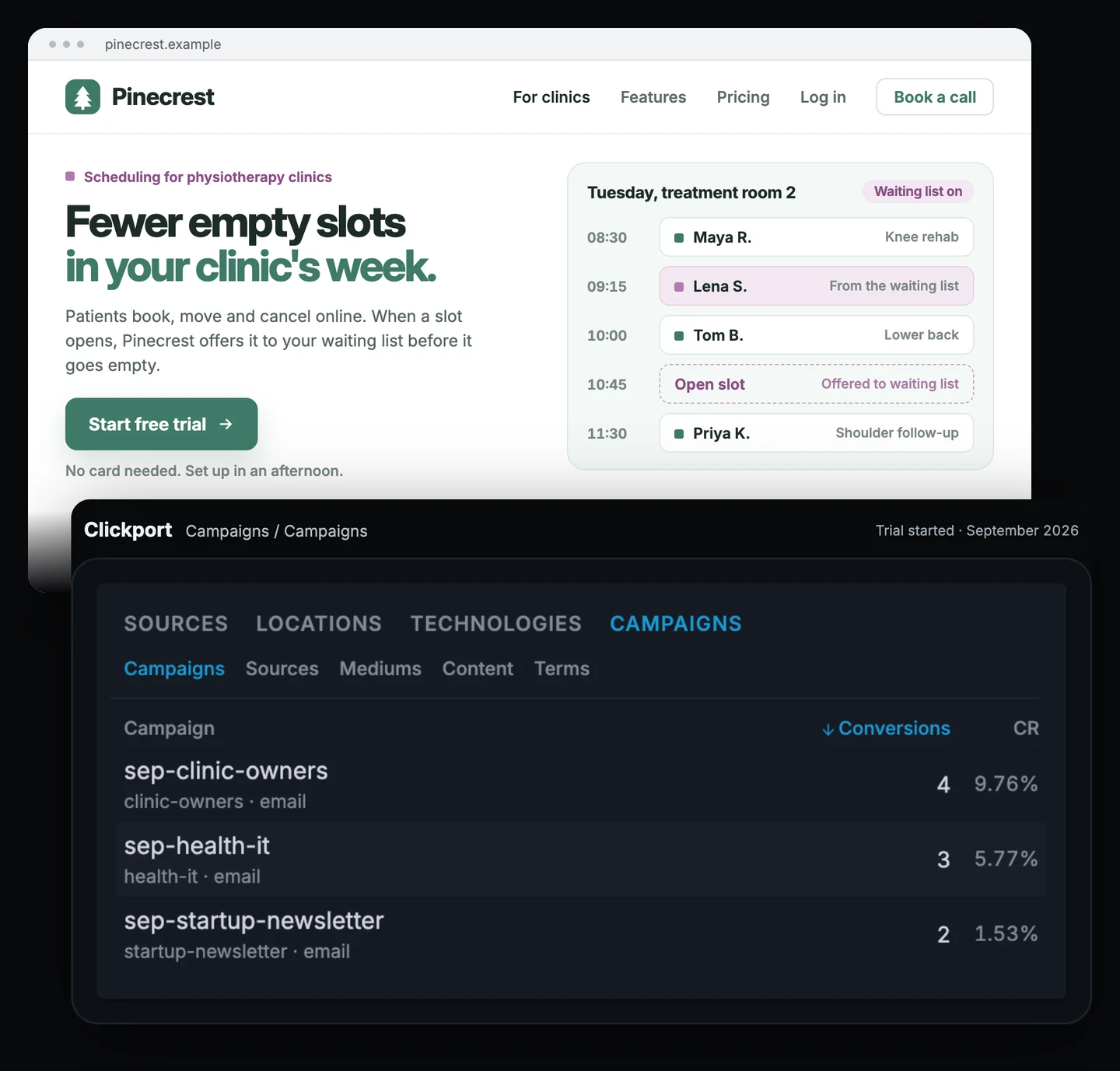
| Newsletter | Price | Visitors | Trials | Cost per trial |
|---|---|---|---|---|
| Startup, 58,000 subscribers | $4,200 | 131 | 2 | $2,100 |
| Clinic owners, 8,500 subscribers | $850 | 41 | 4 | $213 |
| Health IT, 21,000 subscribers | $1,600 | 52 | 3 | $533 |
The startup newsletter has the biggest audience, but its readers come from all kinds of businesses. Few run physiotherapy clinics. The smaller clinic-owner newsletter sent only a third as many visitors, but almost one in ten started a trial.
Four trials is still a small sample, so it's too early to declare a winner. I'd book the clinic-owner newsletter twice more and combine the results before making a longer-term decision.
I wouldn't renew the startup newsletter at that price. For the health-IT newsletter, I'd try one more placement with a clearer offer aimed at clinic owners.
These figures don't include people who clicked the ad and started a trial on a later visit through another channel. Treat them as the minimum results attributed to each placement, not a complete count of everyone the ad influenced.
Quillbury Pens: the discount code shows ten orders, but analytics shows six. Which is right?
Quillbury Pens sells fountain pens and ink online. It paid $600 for a spot in a stationery newsletter's gift guide. The ad included a tagged link and a 10% discount code, QUILL10.
The shop uses Stripe for payments and has connected it to Clickport. A goal records each purchase.
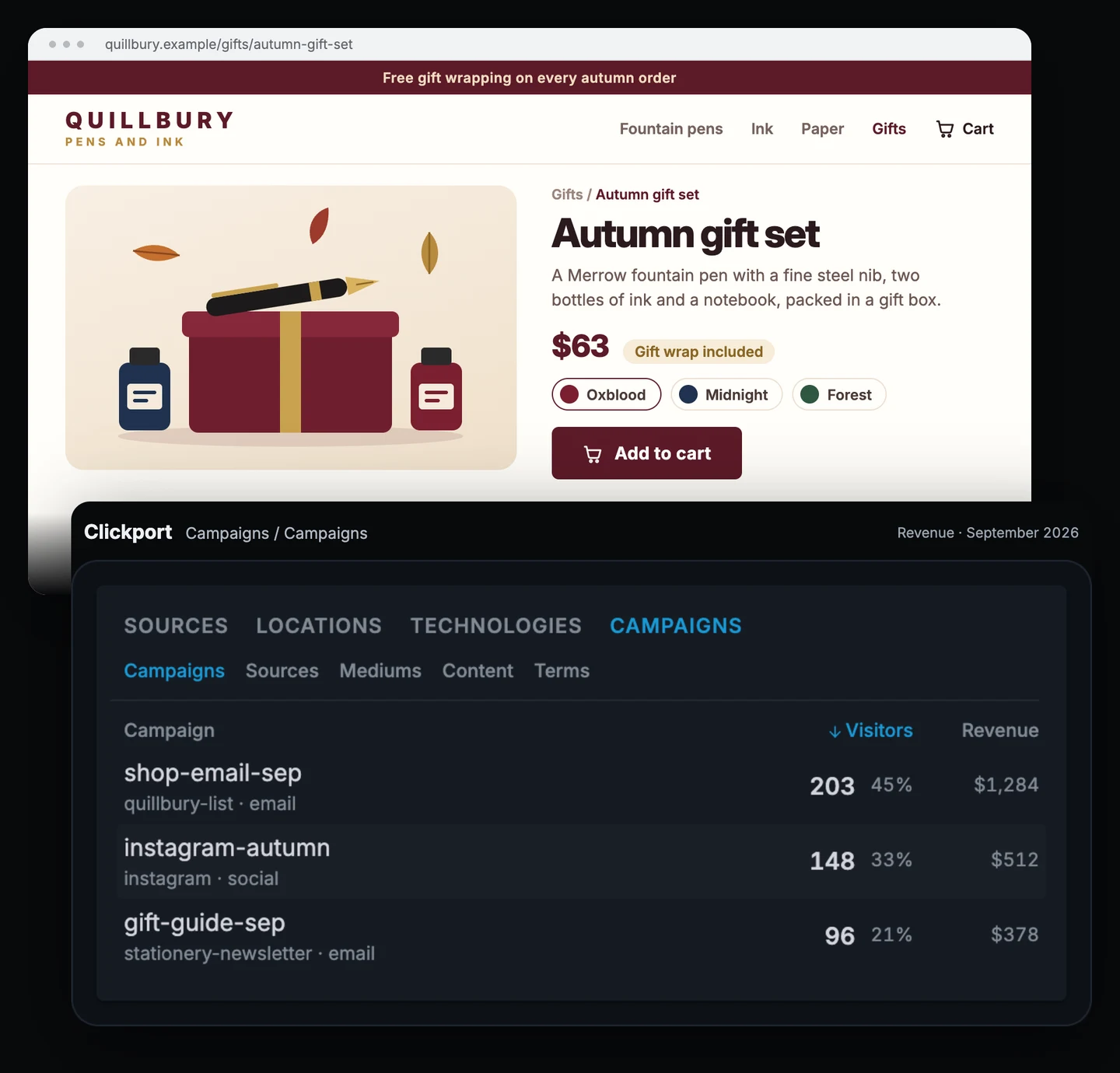
With revenue tracking switched on, the Campaigns report shows $378 from 96 visitors who came through the gift guide. For comparison, Quillbury's September email brought in $1,284 from 203 visitors, and an Instagram post brought in $512 from 148 visitors.
The shop's discount code report shows more orders:
| Report | Orders | Revenue |
|---|---|---|
| Clickport, gift guide campaign (96 visitors) | 6 | $378 |
| Shop, orders using QUILL10 | 10 | $611 |
Neither figure tells the whole story.
Clickport counts purchases made during visits attributed to the ad. If someone clicks the newsletter link, leaves the site and returns two days later by typing the address, that later purchase won't appear in the gift guide's campaign row.
The discount code catches some of those later purchases. But it has its own limitation: people can share the code, so an order using QUILL10 doesn't prove that the buyer saw the newsletter.
The two reports suggest that the gift guide was associated with between $378 and $611 in sales. They don't establish the exact amount the ad generated.
After the cost of the goods, packaging, shipping and payment fees, Quillbury keeps about 45% of each sale. Even at the higher revenue figure, that leaves about $275 to cover the $600 placement. Based on these orders, the ad didn't pay for itself.
I'd share both reports with the publisher and negotiate a lower price for another placement, around $250. If the publisher won't agree, I'd spend the money on another newsletter.
Stackmend: the readers came, but the demo requests came later
Stackmend sells error-monitoring software to development teams, mostly through annual contracts worth about $12,000. It booked three issues of a developer newsletter at $3,000 each.
Few people buy a $12,000 tool during the same visit in which they discover it. Stackmend needs to look beyond immediate conversions to understand whether the ads are working.
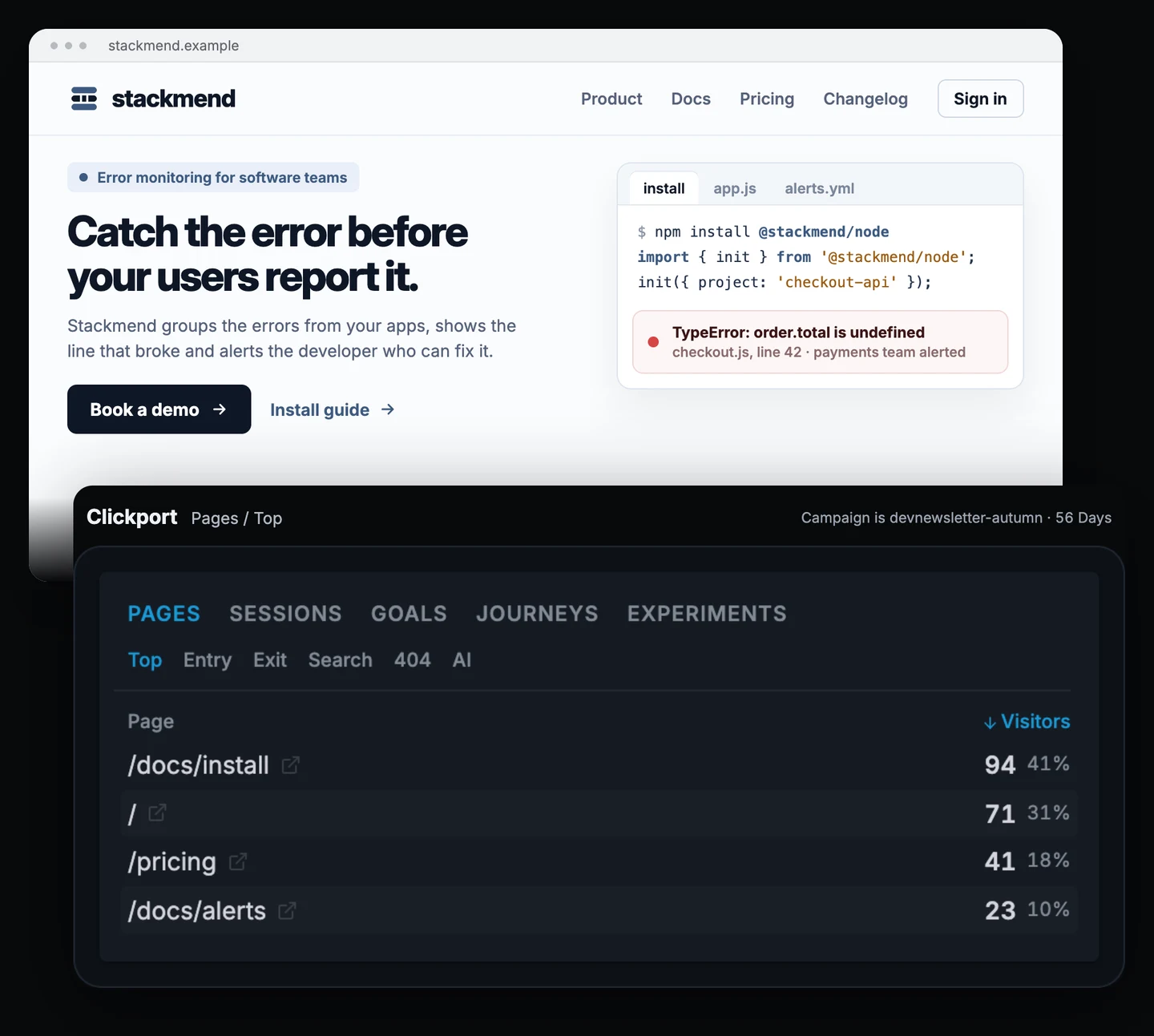
Across the three issues, Clickport recorded 212 visitors. Some read several pages: 94 visited the installation guide, 71 the homepage, 41 the pricing page and 23 the alert documentation. One visitor requested a demo during that visit.
One demo request might look like a poor result. But the installation guide and alert documentation suggest that readers were exploring how the product works. They may return days or weeks later through Google or by typing the address directly. Those later visits won't be credited to the newsletter campaign.
Stackmend also asks people who request a demo, "How did you hear about us?" Over eight weeks, 6 of 31 demo requests named the newsletter.
I'd take that figure to the renewal discussion alongside the 212 visitors and the pages they read (how to compare those answers with your analytics). The analytics shows what readers did on the site; the form gives you another way to find out what brought them there. Neither tells the whole story on its own.
The three placements cost $9,000. If just one of those six demos becomes a $12,000 annual contract, the campaign could pay for itself, depending on Stackmend's costs and margin.
Poyar makes a similar point about high-ticket products: "If a brand closes one $100,000 deal after a quarter of ads, the CPM barely matters." For Stackmend, the useful question is how many qualified sales conversations and paying customers the sponsorship helped generate.
Fernway Photo School: is the top slot worth the higher price?
Fernway sells an online portrait-photography course for $290. A photography newsletter with 32,000 subscribers offered two placements: a top-of-issue sponsor slot for $700 and a one-line classified ad near the bottom for $180.
Fernway bought one of each in separate issues. Both used the same campaign name, but each had a different content tag: utm_content=top and utm_content=classified.
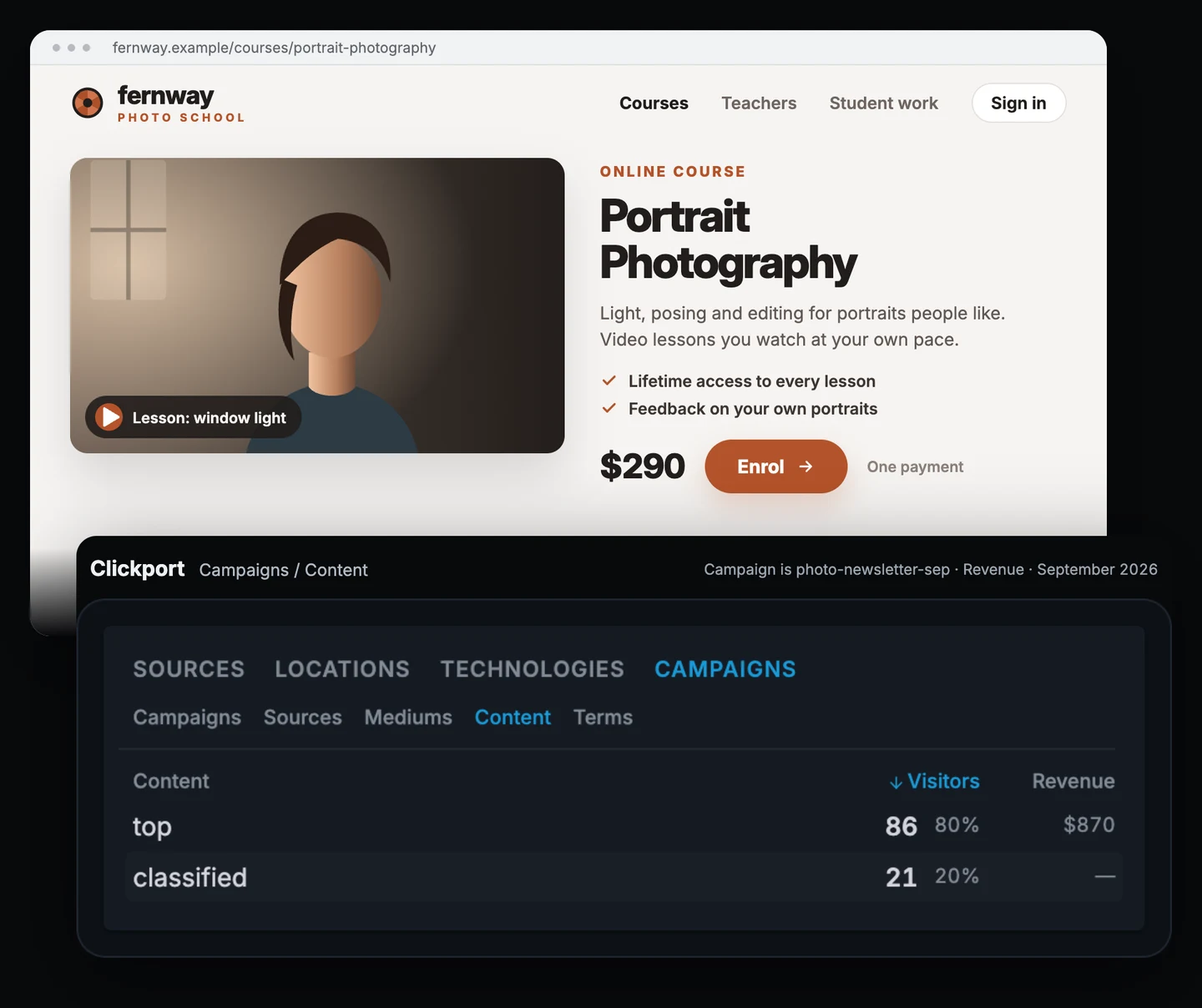
| Placement | Price | Visitors | Enrolments | Revenue |
|---|---|---|---|---|
| Top slot | $700 | 86 | 3 | $870 |
| Classified line | $180 | 21 | 0 | $0 |
The top slot generated $870 in course sales, $170 more than its $700 price. The classified ad brought no sales.
That suggests the top slot performed better, but three enrolments aren't enough to establish a reliable pattern. The two ads also ran in different issues, so other differences may have affected the results.
Passendo's October 2026 data supports the general idea that placement matters. A typical newsletter ad at the top received 0.49 clicks per 100 ad views, compared with 0.16 at the bottom.
I'd book the top slot once more before making it a regular part of the marketing budget. I'd drop the classified line unless the publisher can offer a lower price or a better way to reach potential buyers.
If the next top slot brings no sales, Fernway will have spent $1,400 for $870 in tracked revenue across the two top slots. That's a good reason to test again before committing to a longer sponsorship.
Tidemark: why did 340 clicks become 251 visitors?
Tidemark is an agency that buys newsletter ads for clients. One client, an expense-tracking app, paid $1,400 for an ad in a finance newsletter.
Two days later, the newsletter's report showed 340 clicks. Clickport, which Tidemark uses to track the client's site, recorded 251 visitors from the campaign over the same period. The client wanted to know which number was wrong.
Neither number is necessarily wrong. They measure different things.
One reader might click the ad twice, creating two clicks but only one visitor. Some clicks never result in a fully loaded page because the reader closes the tab or loses the connection. Clickport also excludes visits it identifies as bots.
Tidemark reports the results its client can check on its own website. The campaign's Account created goal recorded 6 sign-ups after 48 hours and 9 after two weeks.
That second check matters because not everyone reads a newsletter as soon as it arrives. Poyar also reports sponsorship results with "48 hour and 2 week stats".
Instead of sending screenshots, Tidemark sends the client a password-protected share link locked to a saved segment for the campaign. The client can open the report and check the figures whenever they want.
The note that goes with it is short:
Finance newsletter, September issue: the newsletter reported 340 clicks in the first two days, while your website recorded 251 visitors from the ad. After two weeks, the campaign had brought in 9 new accounts, 6 of them in the first 48 hours. At $1,400 for the placement, that's about $156 per account. I'd book one more issue before deciding whether to continue.
What's a good CTR for a newsletter ad?
CTR stands for click-through rate: the share of people who click an ad or link, out of those who had the chance to see it. The number depends on what you count as the starting point.
Passendo's October 2026 data puts the typical click-through rate for a native newsletter ad at 0.17% of ad views, rising to 0.52% for a strong ad. These figures count clicks on the ad itself.
The click-through rate for all links in a newsletter is usually higher. Omeda reported a median of 1.16% of delivered emails for media newsletters in the first half of 2026.
Before comparing two newsletters, ask how each calculates its rate. One publisher might divide clicks by subscribers, another by delivered emails, and another by opens. Those figures aren't directly comparable.
Open rates also need caution. Apple's Mail Privacy Protection can load email images whether or not the recipient reads the message, which inflates reported opens. Klaviyo's help centre explains this limitation, and Paved recommends asking publishers for click data rather than relying on opens.
A high click-through rate doesn't guarantee sales, either. The ad still needs to reach the right audience, make a convincing offer and lead to a page where visitors can take the next step.
To estimate what a placement might deliver before booking it, enter the publisher's figures into the calculator below. It counts the ad click rate as a share of opens, the same way Passendo counts clicks per ad view. Treat the result as a forecast, not a promise. Once the campaign runs, your analytics will show what happened on your site.
What to check before booking your next newsletter ad
Decide what would make you renew the placement, then set up your tracking before the newsletter goes out.
- Tag every placement. Use
utm_medium=emailand give each campaign or ad position its own name. - Track the result that matters. Set up a goal for sign-ups, or connect your payment provider to measure sales and revenue.
- Allow for delayed purchases. If customers take weeks to decide, ask "How did you hear about us?" on your sign-up or enquiry form.
- Check the results twice. Review the campaign after 48 hours and again after two weeks.
- Calculate your cost per result. Divide the placement price by the sign-ups or sales recorded, then decide whether you'd pay that amount again.
The newsletter's report tells you how many clicks it recorded. Your own analytics shows how many visitors arrived and what they did next. Together, those reports give you a better basis for deciding whether to renew and for negotiating the next price.
Clickport tracks tagged campaigns, visitors, goals and revenue without cookies. Try it free for 30 days, with no credit card required. If you're switching from GA4, our switching guide explains how to get started.
Frequently asked questions
Why don't the newsletter's clicks match my analytics?
The newsletter counts clicks on its links; your analytics counts visits to your website. One reader can click more than once, some clicks never finish loading the page, and analytics tools exclude traffic they identify as bots. Compare the figures over the same period, but don't expect them to match exactly.
Should I use a discount code as well as a tagged link?
Yes, if you sell online. The tagged link shows what visitors do when they arrive through the newsletter. The discount code can also reveal purchases made by people who return later through another channel.
Keep the two reports separate. They may include some of the same orders, so adding their totals together can count a purchase twice.
How long should I wait before judging a placement?
Check the results after 48 hours and again after two weeks. If your product takes weeks to buy, use answers to "How did you hear about us?" as additional evidence.
Whenever possible, judge a newsletter on two or three placements rather than a single issue. That gives you more evidence before committing to another booking.

Comments
Loading comments...
Leave a comment