Bot Form Fills Are Counting as Conversions in GA4. Here's Why You Can't Filter Them Out.
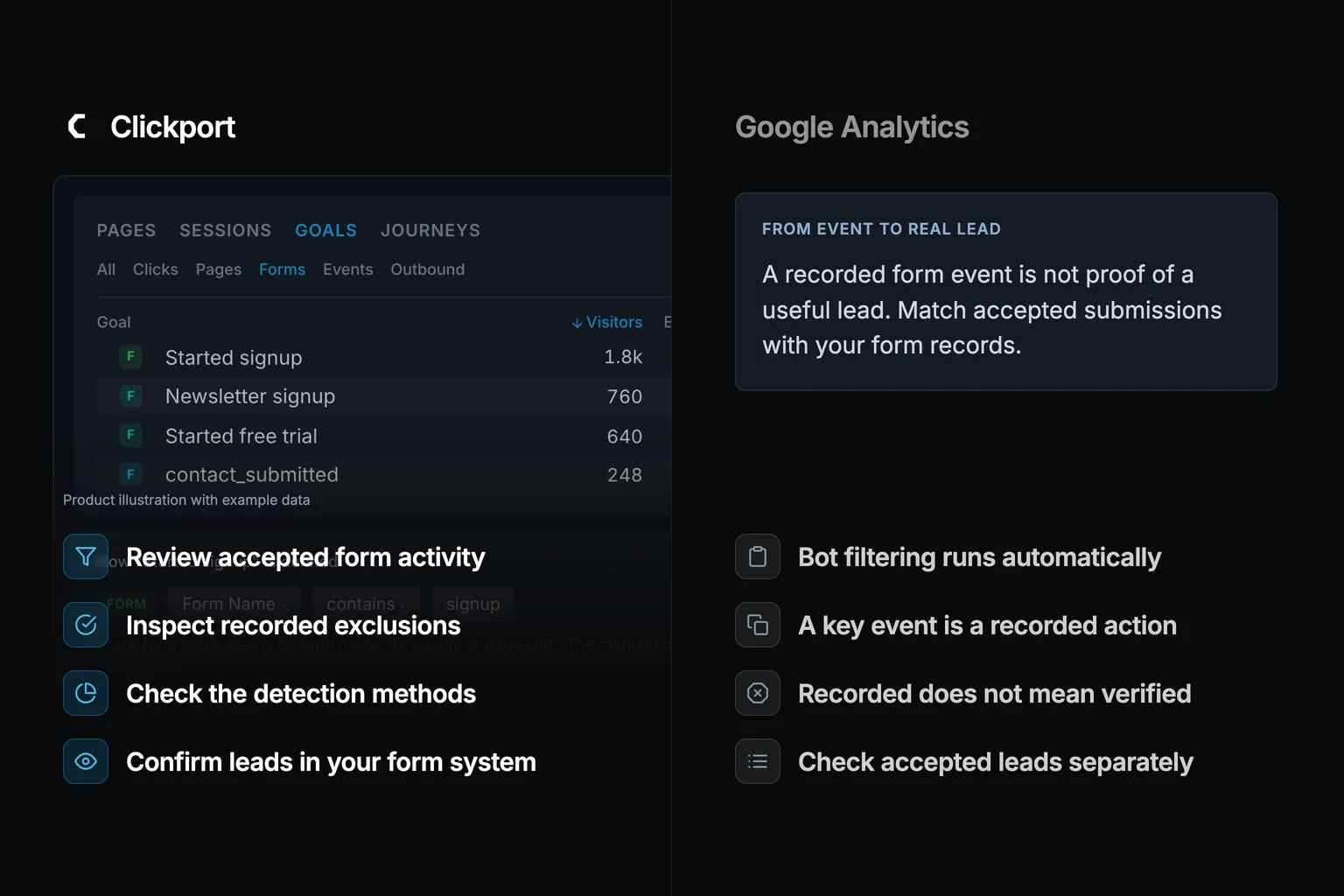
A contact form lead just came in. The name is gibberish. The message is a wall of links to a site you've never heard of. The email bounces on the first reply. Annoying, but harmless. Except it isn't harmless, because that same submission just ticked your conversion count up by one.
You marked form_submit as a Key Event, so GA4 wrote that bot a conversion. And once GA4 counts a conversion, no setting un-counts it. Not a filter, not the referral list, not even a data deletion request. Here's why, and what stops the junk before it counts.
A quick note on who I am and what I'm not selling you. I build Clickport, a privacy-first analytics tool. It helps with this exact problem. It scores the visitor before the event is allowed to count, so obvious automated form spam never becomes a conversion. It's not a CAPTCHA, it's not a firewall, and it can't fix a conversion that's already sitting in GA4. No tool can. I'll be straight about that line the whole way down. Think of this as the companion to a piece I wrote on clicks but no conversions. That piece is about the paid clicks that never convert. This one is about the conversions that were never real. This one is the opposite problem: the fake conversions that do.
- The bot lands in the numerator, not just the traffic. When you mark form_submit as a Key Event, GA4 counts every firing as a conversion, and the default 'once per event' method counts each one separately. A bot that submits your form five times writes five conversions, the same as a human.
- That fake conversion trains your ads. Smart Bidding optimizes for conversions in every auction and learns from your conversion data, so one junk conversion teaches the algorithm to chase more traffic that converts the same cheap, fake way.
- Every GA4 repair fails at the count. reCAPTCHA v3 only scores and never blocks the submit, Google Ads invalid-traffic credits live in billing and never reach GA4, filters and the referral list are forward-only, and data deletion strips the text but the event 'will still be counted in the overall metrics.'
- GA4 excludes known bots automatically but does not show its excluded count. Clickport detector totals cannot establish which form submissions GA4 would count.
- The only durable fix scores the visitor before the event can count. Clickport does that server-side at ingestion, so obvious automated form spam never becomes a counted conversion. It's not a CAPTCHA or a WAF, sophisticated bots still get through, and it can't un-count anything already in GA4.
How a bot form fill becomes a permanent conversion in your count
An automated form event can become a key event if it passes GA4's exclusions and matches an event you marked as important. The recorded event alone does not prove that a real lead exists.
You create the conversion yourself. In GA4 you toggle "Mark as key event" on an event. From that point, GA4 counts every firing of that event as a key event. That is GA4's conversion metric, and it's the action you feed to Google Ads for bidding. The default counting method is "once per event", which counts a key event every time it's triggered. Google's own example: five triggers in a session count as five. So a bot that hammers your form five times doesn't get deduplicated. It writes five conversions.
GA4 does not expose a verified human-versus-bot verdict for each recorded form event. Check the event against your form system before treating it as a useful lead.
This isn't a traffic problem. It's a conversion problem. The junk doesn't just pad a sessions chart. It lands in the top of your conversion-rate fraction and in the exact number your ads optimize against.
Real enquiry (support question)
+ 700 bot form_submits
That gap is real, and I see people hit it constantly. One Contact Form 7 site owner reported Google Ads showing more than 100 conversions a day while genuine enquiries were a couple a week. That means roughly 700 of 702 conversions were bots. The plugin fired form_submit on every submission, real or not.
None of this is about how you set form tracking up. If you want that, I wrote a separate guide to tracking form submissions. This is about what happens after the setup is correct and a bot uses it against you.
Why one fake conversion is worse than one fake visit: it trains your ads
A fake visit pads a chart. A fake conversion changes what your ads do next. Smart Bidding uses Google's AI to optimize for conversions in every single auction, and it requires conversion tracking to work. Your conversion count is the training input. Feed it junk and it learns from the junk.
Google says the bidding models learn from your conversion data and refine as more of it accrues. There's no separate path for fake conversions. The model treats a bot's form_submit the same way it treats a buyer's, because to GA4 they're the same.
Search Engine Journal put the consequence well in a piece on primary versus secondary conversions: every primary conversion teaches the algorithm what an ideal customer looks like. Mix low-intent or junk actions into the primary pool, and it "cannot distinguish a buyer's pattern from a browser's pattern."
Smart Bidding sees a user who converted cheaply. Then it looks for more users who behave like that one. If that user was a bot, it hunts more bots. The spam doesn't just sit in a report. It becomes your targeting.
Now the obvious question. If the bot is in the count, why not just take it back out? Let's walk through every repair you'll reach for, in the order I see people try them.
Repair 1: reCAPTCHA or a honeypot. Why it doesn't clean the count
reCAPTCHA v3 never blocks a submission. Google's own documentation says it "will never interrupt your users." It returns a score from 0.0 to 1.0, and you have to act on that score in your own backend. Which means by the time that score comes back, the form_submit has already fired and the conversion is already counted. The score can't reach back.
Real teams run into this. In an Adobe Marketo community thread, bots that reCAPTCHA scored as suspicious still showed up as successful form fills. The vendor confirmed that v3 is passive scoring, not blocking. A honeypot has the opposite weakness. It's a hidden field that humans can't see, so it adds no friction. But advanced bots detect and skip it, and if the honeypot passes, the conversion fires anyway. These are UI-layer fixes, not count fixes.
There's a nastier failure in the other direction. reCAPTCHA relies on the _grecaptcha cookie. Privacy browsers, ad blockers, and consent tools block it, so real visitors silently fail to submit and their genuine conversion never gets reported. So the CAPTCHA route can both miss bots and suppress humans.
Repair 2: Google Ads invalid-traffic credits. Why the fix never reaches GA4
Google does detect some invalid traffic, and it'll credit you for it. But read the wording carefully: invalid traffic results in credits and adjustments, not a refund. Those credits show up as "Invalid Activity" line items in your Google Ads billing. Every bit of it happens inside Google Ads. The GA4 conversion count is never touched.
So you can be made whole on the wasted spend and still have an inflated analytics number that trains Smart Bidding on the same junk. This is the mirror of the clicks-but-no-conversions problem, where the invalid-click figure is stuck in Ads billing. Here it's the invalid-conversion that Ads credits never remove from GA4.
There's one Ads-side move that gets closer, and I want to be fair about it. You can upload a list of GCLIDs to exclude, which removes the optimization data tied to them and scrubs those conversions from the bidding signal. That genuinely cleans the training pool. But it's reactive and per-lead: you identify each spam GCLID after it converted and after it spent, then upload it, by hand, forever. And even when it works, it only touches Google Ads. The GA4 conversion count that the rest of your reporting and your conversion rate run on never changes.
Repair 3: GA4 filters and the unwanted-referrals list. Why they're forward-only
GA4 data filters only act on data going forward. Google's documentation says filters are evaluated from the point of creation onward and don't affect historical data. It also says that excluded data is never processed and never recoverable. The bot conversion you already have sits there untouched.
The unwanted-referrals list works the same way. Google's own worked example shows a session that happened before you added a domain stays attributed to that domain. Adding to the list only changes the events you haven't collected yet. GTM exception triggers are the same shape: they stop a tag from firing next time, not retroactively.
So every tool in this bucket is a future-tense fix sitting in front of a past-tense problem. And they only help at all if you can match the bot in advance, by its user-agent or its referrer. The disguised ones, the headless browsers wearing a normal Chrome user-agent, give you nothing to match on.
Permanent. Not recoverable.
If you can match them at all.
Repair 4: GA4 data deletion. It strips the text, not the count
A data deletion request is the most aggressive cleanup GA4 offers, and it still can't remove a conversion. The documentation is blunt about it, and I'm going to quote it. When you delete data, "the specific text data will be erased and replaced with (data deleted), but the event will still be counted in the overall metrics in your reports."
GA4's strongest tool removes the gibberish name and email the bot typed, and leaves the conversion. The number is permanent.
This is the same lesson I ran into when I tested GA4 against 1,000 bots: what matters is blocking before storage. Filtering after storage can't reclaim the count. By the time a bot's event is in GA4, the only honest thing left to do is stop the next one.
So that's the whole toolbox. The CAPTCHA fires too late or breaks real conversions. The Ads credit never reaches GA4. The filter is forward-only. The deletion strips the text, not the count. Four tools, and the bot conversion is still sitting in your report.
Why a recorded event is not proof of a real lead
GA4 excludes known bots automatically. A form event that passes those checks can still come from automation. The report does not provide a verified human-versus-bot verdict for each submission.
You need a second check: did the form system accept a useful lead? Compare that record with the analytics event. A gap can come from spam, duplicate tracking, failed submissions, or different counting rules.
For traffic that looks unusual, start with the five checks for real traffic and bots. A detector count alone cannot tell you how many conversions GA4 should remove.
What scoring the visitor before it counts looks like, and what it can't do
The fix has to happen before the event is counted, not after. That means scoring the request when it arrives and dropping the obvious bots before they ever become an event. This is where a cookieless tool like Clickport works differently from GA4.
Clickport checks requests at its own analytics endpoint. When a detection rule rejects an event, Clickport records the exclusion and keeps that event out of its normal analytics. This does not change a separate GA4 count.
The example below shows goals from accepted events. Accepted events are not proof that every submitter was human.
The illustration shows 38 recorded contact-form goals. It is example data, not a measured comparison with the 312 key events shown earlier. You cannot label the difference as 274 bots without matching submission records and evidence of automation.
Bot Center separately shows recorded exclusions and their detection methods. It does not reconstruct which excluded requests would have completed this form.
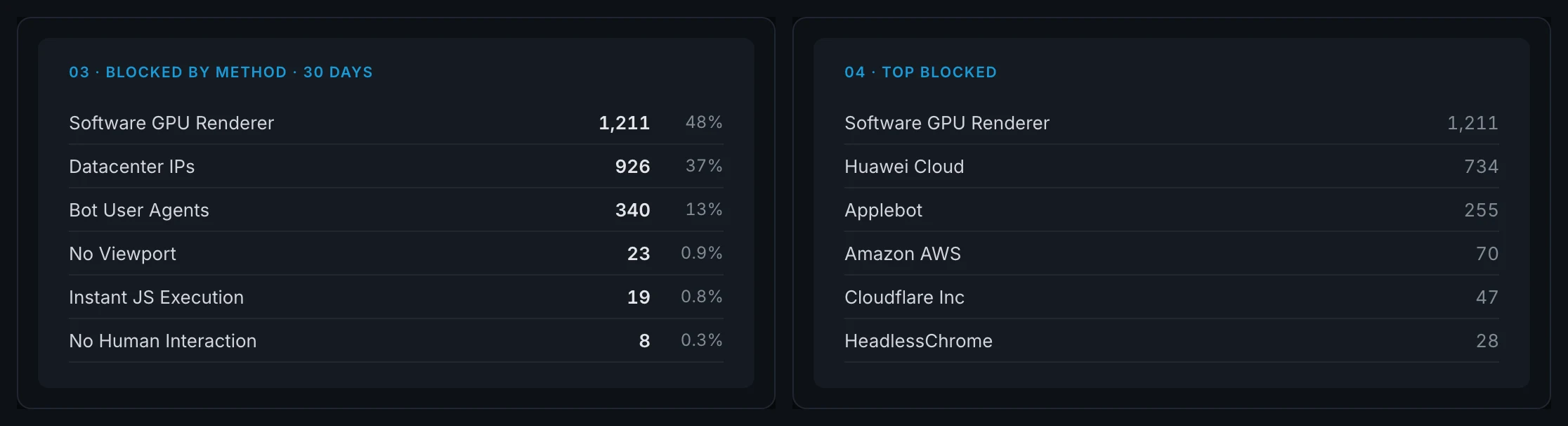
The limit matters: recorded exclusions show Clickport's detection decisions. They do not measure every bot or provide an exact human-versus-bot split for a form. Clickport does not act as a CAPTCHA or firewall, and it does not change data already stored in GA4.
✓ Recorded exclusions by detection method
✓ Detection before accepted events enter reports
✓ Session activity for further investigation
✗ Stop sophisticated residential-proxy form spam
✗ Un-count conversions already in GA4 (no tool can)
✗ Returning-visitor or lifetime-value data (it's cookieless)
What can the detector counts actually tell you?
They show which rule recorded an exclusion in Clickport. They do not show how GA4 classified the same request. An exclusion is also not necessarily a form submission, a distinct bot, or a fraudulent lead.
The earlier percentages in this section did not support a GA4 miss rate. I have removed that comparison. For your own forms, compare recorded goals with accepted submissions in your form system. Then check the affected sessions and detection methods before calling the difference bot traffic.
For scale, the Imperva 2025 Bad Bot Report says automated traffic was 51 percent of all web traffic in 2024, with malicious bots at 37 percent. That is a network-level figure. It doesn't tell you how many of your form submissions are fake.
The practical benefit is a clearer investigation. You can see what Clickport excluded and inspect the activity that it accepted. You still need your form records to confirm which submissions are useful leads.
Common questions
Can you exclude bot form submissions from GA4 conversions after the fact?
No. GA4 data filters and the unwanted-referrals list only act on data going forward. A data deletion request strips the event's text and leaves the event counted in your report metrics. Once a form_submit is marked as a Key Event and fires, that conversion is permanent. You can reduce future spam, but you can't remove a conversion already counted.
Does reCAPTCHA stop GA4 from counting bot conversions?
Not reliably. reCAPTCHA v3 only returns a score and never blocks the submission, so the form_submit and its conversion tag fire before any score-based action runs. It can also block real visitors when privacy tools strip the cookie it depends on, which suppresses genuine conversions. It's a UI-layer deterrent, not a fix for the count.
Why does Google Ads show far more conversions than real leads?
Because a bot that submits your form fires the same form_submit Key Event as a real lead. Smart Bidding counts it, then optimizes to find more traffic like it. Invalid-traffic credits refund some spend inside Google Ads, but they never remove the conversion from GA4, so the inflated count keeps feeding the bidding model.
Can GA4 tell which form submissions are bots?
GA4 does not provide a per-submission human-versus-bot verdict. It does exclude known bots automatically. Check the recorded key events against accepted submissions in your form system to investigate suspicious leads.
The cheap thing to do first
A bot in your traffic is noise. A bot in your conversion count is a decision. It changes which campaigns you scale, which leads your sales team chases, and which audience your bidding goes looking for more of. You can't scrub it out after the fact. You can only keep it from counting in the first place.
Start by matching your recorded form goals to accepted leads in your form system. Then investigate unusual sessions and detection methods. Try Clickport free to review accepted activity and recorded exclusions. The trial lasts 30 days and needs no credit card.

Comments
Loading comments...
Leave a comment